DS212 Oscilloscope Review: Open Source And Great For Hacking

We’ve seen plenty of oscilloscopes that look like repurposed cell phones. Usually, though, they only have one channel. The DS212, has two channels and a signal generator! [Marco] gives his review and a quick tear down in the video below.

The scope isn’t going to replace a big bench instrument, but for a portable scope with a rechargeable battery, it isn’t bad. The 1 MHz analog bandwidth combines with a 10 megasample per second front end and 8K of sample memory. The signal generator can produce basic waveforms up to 1 MHz. We were somewhat surprised the unit didn’t sport a touch screen, which is why you can see [Marco’s] fingers in the screenshot above. He seems to like the dual rotary encoder system the devices uses for navigation.

Where this really stands out is that it is open source for the the firmware running on the STM32 processor inside. We so rarely see this for commercially available bench tools and it makes this a fine hacking platform. It’s easy to imagine adding features like digital signals out and decoding digital data. It would be interesting to marry it with a WiFi chip and use it as a front end for another device over WiFi. Lots of possibilities. [Marco] shows that even though he’s not familiar with the STM32, he was able to add a custom waveform output to the device easily. This has the potential to be a custom troubleshooting platform for your builds. Lining up all of the sensing and signal generation settings for each specific type of test means you don’t need a guru to walk through the common failure modes of a product.

There are many small inexpensive scopes out there that might not match a big bench instrument but can still be plenty useful. [Jenny List] just reviewed one that comes in at around $21. And last year, we saw a sub-$100 scope that would net you just one channel scope. That’s progress!

Drill The Wet Side Wet And The Dry Side Dry

Working mostly in metal as he does, [Tuomas Soikkeli] has invested in some nice tools. So when his sweet magnetic-base drill was in need of a new home, he built this two-in-one drilling station to maximize shop space and add some versatility to boot.

For the non-metalworkers out there, a mag-base drill is basically a portable drill press where the base is replaced with a strong electromagnet like the one shown here. They’re often used in the construction trades to drill holes in steel beams or columns, and often include nice features like a built-in coolant system.

[Tuomas] effectively turned his mag-base drill into a very beefy drill press by mounting it to a disused miter saw stand. A thick piece of plate steel forms the base, and with holes and drain channels machined into it, used coolant can be captured in a drain pan below for reuse. A second base for a benchtop drill press means he’s got a dry drilling station too, and the original support arms on the miter stand are ready for drilling long stock. The drawer below the dry side is a nice touch too.

There’s a lot to learn about fabrication from [Tuomas]’ video and the others on his channel, which is well worth checking out. And if you want to convert your drill press into a mag-base drill, why not check out this microwave oven transformer to electromagnetic crane project for inspiration?

Continue reading “Drill The Wet Side Wet And The Dry Side Dry”

If You Want To Spend On A Microscope

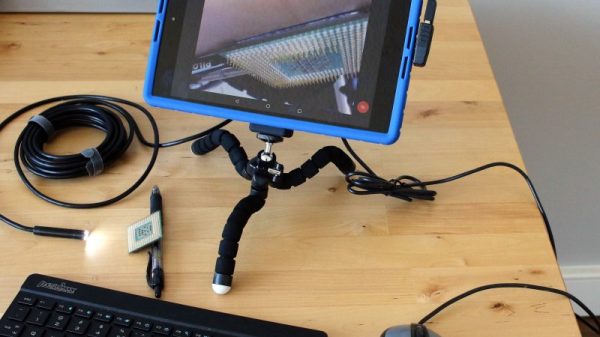
A quick check of the usual Chinese websites will yield USB microscopes for a very low price. However, many of these are little more than webcams with some cheap optics. Not that they can’t be useful, but they probably won’t compete with an expensive instrument like a Dino-Lite. [Shahriar] looks at the latest offerings from Dino-Lite and shows how they can be useful when examining electronics. You can see the video below, but be warned: these little microscopes are not cheap. The entry-level model starts at about $100 and they go up  — way up — from there.

Still, many of us spend as much or more on necessary gear and these days a microscope for inspecting tiny circuits is pretty handy. In addition to the optical instruments, [Shahriar] also looks at a stepper motor-driven microscope stage, which is interesting.

Continue reading “If You Want To Spend On A Microscope”

Lathe Turns The Corner, Makes A Cube

[Tim] was tired of using his lathe to turn round things. He decided to make a gaming die—something that’s iconically square—out of cylindrical scrap. As it turns out, this is possible to do on a lathe with a three jaw chuck. [Tim] discovered that the bevel on the jaws will hold a cylindrical puck of scrap sideways while he squares off the round sides into faces.

Turning a cube on a lathe looks pretty fiddly, so we applaud [Tim]’s lovely handiwork even more. As you’ll see in the video down below, things were going gangbusters until he went to make the last facing cut. Maybe the tool wasn’t lined up just so, or something was off in the chucking, but the first pass made a bit of a gouge in the stock. Looks like it was easy enough to fix, though. After four 90° turns and facing cuts, he had a nice looking rough cube to work with.

This is a regulation-sized die, so the next step was to trim it down to 16mm³. Then it was time to sand, polish, and add the dots. To lay them out, [Tim] sprayed the cube with layout fluid and scribed unique line patterns on each face. Then he drilled the indentations and filled them in with aluminium black.

Most of the dice we see are electronic, like this extremely random pair and these PIC-driven LED dice. We’d like to see [Tim] make a second D6 so he has a pair. And then make a D20. Please?

Continue reading “Lathe Turns The Corner, Makes A Cube”

Smart DC Tester Better Than A Dummy Load

Testing DC supplies can be done in many ways, from connecting an actual load like a motor, to using a dummy load in the manner of a big resistor. [Jasper Sikken] is opening up his smart tester for everyone. He is even putting it on Tindie! Normally a supply like a battery or a generator would be given multiple tests with different loads and periodic readings. Believe us, this can be tedious. [Jasper Sikken]’s simulated load takes away the tedium and guesswork by allowing the test parameters to be adjusted and recorded over a serial interface. Of course, this can be automated.

In the video after the break, you can see an adjustment in the constant-current mode from 0mA to 1000mA. His supply, meter, and serial data all track to within one significant digit. If you are testing any kind of power generator, super-capacitor, or potato battery and want a data log, this might be your ticket.

We love testers, from a feature-rich LED tester to a lead (Pb) tester for potable water.

Continue reading “Smart DC Tester Better Than A Dummy Load”

UV Light Box Cures Both Sides Of A PCB

[GiorgiQ] needed a UV light to cure the etch resist on his printed circuit boards, and what better way to accomplish this than to build the perfect UV light box himself? The box consists of a custom PCB (of course) featuring a pair of 12V relays tripping quad 9×12 matrices of 400nm UV LEDs, with a total of 432 diodes in use — not to mention resistors to protect the LEDs. All of it is run by an Arduino Nano.

The enclosure is made out of 12mm MDF and 3mm cast acrylic, and the circuit board fits into a tray sliding on drawer sliders, allowing a resist-covered board to be placed in a carrier and slid back in.

DIY light boxes mostly don’t look as slick as [GiorgiQ]’s, but they’re a fairly common project. This one also uses 9×12 matrices of UV LEDs, while a distinctly simpler project involves making a UV exposure box out of fluorescent lights.


DIY Injection Mold Design For The Home Shop

3D printing is great for prototyping, and not bad for limited runs of parts. Unfortunately though it really doesn’t scale well beyond a few pieces, so when you’re ready for the mass market you will need to think about injection molding your parts. But something like that has to be farmed out, right? Maybe not, if you know a thing or two about designing your own injection molds.

The video below comes from [Dave Hakkens] by way of his Precious Plastic project, whose mission it is to put the means of plastic recycling into the hands of individuals, rather than relying on municipal programs.  We’ve covered their work before, and it looks like they’ve come quite a way to realizing that dream. This tutorial by [Dave]’s colleague [Jerry] covers the basic elements of injection mold design, starting with 3D modeling in Solidworks. [Jerry] points out the limitations of a DIY injection molding effort, including how the thickness of parts relates to injection pressure. Also important are features like gentle curves to reduce machining effort, leaving proper draft angles on sprues, and designing the part to ease release from the mold. [Jerry] and [Dave] farmed out the machining of this mold, but there’s no reason a fairly complex mold couldn’t be produced by the home gamer.

When you’re done learning about mold design, you’ll be itching to build your own injection mold machine. Precious Plastic’s tutorial looks dead simple, but this machine looks a little more capable. And why CNC your molds when you can just 3D print them?

Continue reading “DIY Injection Mold Design For The Home Shop”