High Speed Photography With Friggin’ Lasers

[Bruce] built his own high-speed photography equipment for a fraction of the price it would have cost him to purchase it. He was inspired by a friend who showed him some example images. He headed into his shop and built an Arduino-based high-speed flash controller.

To capture an image like this one the camera is placed in a dark room and set for a long exposure. At just the right instant the flash is activating, capturing the image. In this case [Bruce] used an infrared laser diode pointed at a phototransistor to trigger the flash. When the droplet breaks the laser beam the Arduino triggers the flash after a calculated delay. It’s not specifically covered in his guide, but [Bruce] also mentions that this can be modified to use sound as a trigger. Here’s another sound-activated flash controller if you need inspiration.

The image at the top was made by dropping dye from a pipette into a pool of water. If you don’t have a pipette on hand you can head over to our LIFE blog to make one out of heat shrink tubing.

Ambilight Clone Has Meaningful Amount Of Resolution

james-bond-ambilight-clone

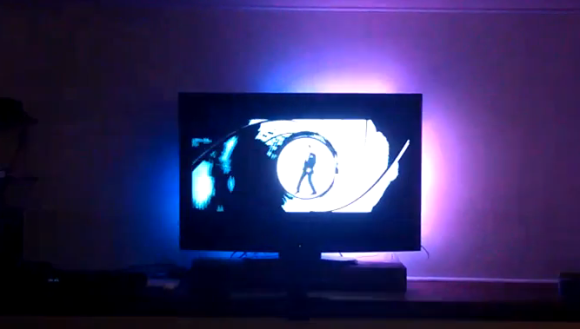
We don’t have an Ambilight clone on our own home theater, but seeing this one in action makes us wonder if we shouldn’t add it to the ever-growing list of projects we need to tackle (right below that POV display we’ve been putting off for years). [Falldeaf] built the colored light augmentation system using a set of WS2801 controlled LED pixels. There are a lot of them, and this results in the ‘meaningful resolution’ we mentioned in the title. The image on the screen is the opening to a James Bond film. You’ll remember that the camera shot down a rifle barrel follows him as he walks across the screen. There’s enough LEDs here to have to the light follow him across the screen as well. This is a nice touch that we don’t see in every Ambilight clone project.

A frame of fake-wood angle bracket holds each LED pixel in place. The entire assembly attaches to the VESA mounting holes on the back of the television. An Arduino addresses the lights while the Boblight package processes the video to acquire the lighting instructions. We think the hue is a bit off, but otherwise it’s a solid offering.

We’re still hoping the Microsoft IllumiRoom becomes a thing.

Continue reading “Ambilight Clone Has Meaningful Amount Of Resolution”

Herd Single Cell Organisms With Your Mind

mind-controlled-paramecium

Most project tips involving brainwaves get passed over because it’s hard to make much out of that type of control. This project doesn’t necessarily make progress on the control side on this, but you have to admit that herding life forms with your thoughts deserves a closer look.

[Geva] set up a rig that allows him to interact with paramecium — tiny single cell organism that are happy to swim around all day long. Just like vertebrates they’re not big fans of electric shocks. Run some current through the fluid and they’ll swim toward the negative electrode.

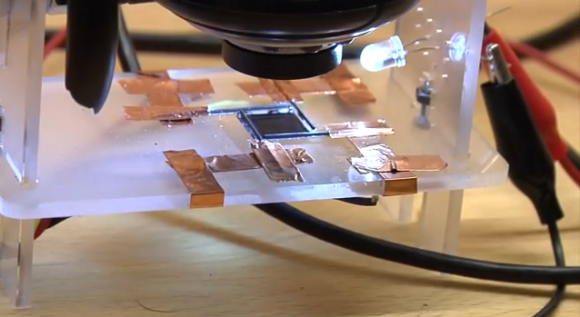
This experiment uses four pencil leads as electrodes. These are driven by an Arduino which reacts to the input from a toy brain wave device. Concentrate in just the right way and they will swim wherever you will them to.

This isn’t quite as involved as cockroach mind control, but it’s every bit as interesting
Continue reading “Herd Single Cell Organisms With Your Mind”

Tracking Cicadas With Radiolab And An Arduino

Cicadia

Once every 17 years, a population of cicadas ranging from Connecticut to the Appalachian highlands of North Carolina emerges to annoy everyone within earshot. The last time east coasters saw this brood was in 1996, making 2013 yet another year of annoying insect pests. The only question is, when will we start to see this year’s cicada brood?

Radiolab, the awesome podcast and public radio show, has put together an awesome project that asks listeners to track when the cicadas in their area will emerge. Cicadas generally enter their loud and obnoxious adult stage when the ground temperature 8 inches below the surface reaches 64º F. Armed with an Arduino, thermistor, and a few wires and resistors, any Radiolab listener can upload soil temperature data to Radiolab servers where all the data will be correlated with documented cicada sightings.

After following the page’s instructions for wiring up a bunch of LEDs and a thermistor to an Arduino, just upload the most well-commented code we’ve ever seen and go outside to take soil temperature measurements. The temperature is displayed in a pseudo-binary format on nine LEDs. To decode the temperature without counting by powers of two, Radiolab has an online decoder that also allows you to upload your data and location.

Vine App Hack On IPhone Makes Time-lapse Movies

time-lapse-with-smashed-iphone

The Vine app is all the rage these days. It lets you shoot six-second videos on your iPhone and easily post them on the Internet. The problem is that [Sean Hodgins] doesn’t find the time limit to be useful for traditional video. But you can cram a lot more info into a half-dozen seconds if you make it a time-lapse video. The rig above is his solution to making the Vine app act as a time-lapse recorder.

The trick is in how the app itself works. It only records video when you’re touching the screen. So you record one second of video, then remove your finger and it ‘pauses’ the recording until you’re ready for the next scene. [Sean] automated this by adding a servo motor and a stylus. An Arduino drives the servo, making quick taps on the screen to get as many different frames into the six seconds as possible. He had a bit of trouble registering quick taps at first. His solution was to inject 3.3V into the stylus he gutted for the project. Click through the link above to see some example videos, or watch this embedded video to see the hardware at work:

Continue reading “Vine App Hack On IPhone Makes Time-lapse Movies”

Scooterputer, The All-in-one Scooter Computer

ScootDisplay-2

We’ve seen a fair share of carputer builds involving a Raspberry Pi in the last few months, but even the power of a Raspi can’t compete with the awesomeness of this Arduino-powered scooterputer.

Like all awesome projects, this build is the product of a massive case of feature creep. Initially, [Kurt] only wanted a voltage monitor for his battery. With an  Arduino Duemilanove, a voltage divider, and an evening of coding, [Kurt] whipped up a simple device with three LEDs to indicate the status of the batter: either low, good, or charging.

The project was complete until he ran across an awesome OLED screen. Using a touch screen display for just battery monitoring is a bit overkill, so [Kurt] made a trip over to Sparkfun and got his hands on a temperature sensor, real-time clock, accelerometer, GPS sensor, and even a cellular shield.

The resulting scooterputer is a masterpiece of in-vehicle displays: there’s a digital speedometer and GPS unit, and the cellular shield works as a tracking device and a way to download real-time maps of the scooter’s current location with itouchmap.

While the majority of the electronics are hidden under the hood of the scooter, the display of course needed to be out in the weather. To do this, [Kurt] found a nice enclosure with a rubber boot that perfectly fit the OLED display. The display is connected to the Arduino with a cat5 cable, and everything should hold up pretty well as long as [Kurt] doesn’t drive through a hurricane.

You can check out a video of the scooterputuer below.

Continue reading “Scooterputer, The All-in-one Scooter Computer”

North Street Labs Try To Spice Up A Game Of Tic-Tac-Toe

tic-tac-toe-stomp-box

The team at North Street Labs really went all out with this Tic-Tack-Toe stomp box. At its most basic it’s a blinky version of the simple two-player game. But there’s always some added appeal when you make large manifestations of normally small items; the 10x Arduino is a good example of this.

The project is NSL’s qualifying entry for this year’s Red Bull Creation Contest (has it already been a year since the last contest?). A special Arduino shield was produced once again, this time it features hardware necessary to control LED strips… a lot of them. That led to the creation of this box, which houses a ton of strip sections inside to light the grid based on tapping one of the red buttons with your foot. We’d image the game would be seldom used at your hackerspace, but they take it to show off at the local children’s museum and it’s a huge hit with the kids!