Arduino Orchestra Plays The Planets Suite

We’ve seen a great many Arduino synthesizer projects over the years. We love to see a single Arduino bleeping out some monophonic notes. From there, many hackers catch the bug and the sky is truly the limit. [Kevin] is one such hacker who now has an Arduino orchestra capable of playing all seven movements of Gustav Holst’s Planets Suite.

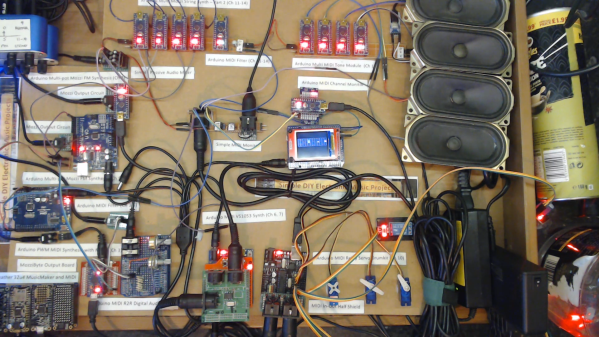
The performers are not human beings with expensive instruments, but simple microcontrollers running code hewn by [Kevin’s] own fingertips. The full orchestra consists of 11 Arduino Nanos, 6 Arduino Unos, 1 Arduino Pro Mini, 1 Adafruit Feather 32u4, and finally, a Raspberry Pi.

Different synths handle different parts of the performance. There are General MIDI synths on harp and bass, an FM synth handling wind and horn sections, and a bunch of relays and servos serving as the percussive section. The whole orchestra comes together to do a remarkable, yet lo-fi, rendition of the whole orchestral work.

While it’s unlikely to win any classical music awards, it’s a charming recreation of a classical piece and it’s all the more interesting coming from so many disparate parts working together. It’s an entirely different experience than simply listening to a MIDI track playing on a set of headphones.

We’d love to see some kind of hacker convention run a contest for the best hardware orchestra. It could become a kind of demoscene contest all its own. In the meantime, scope one of [Kevin’s] earlier projects on the way to this one – 12 Arduinos singing Star Wars tracks all together. Video after the break.

Continue reading “Arduino Orchestra Plays The Planets Suite”

Elderly Remote Keeps Things Simple

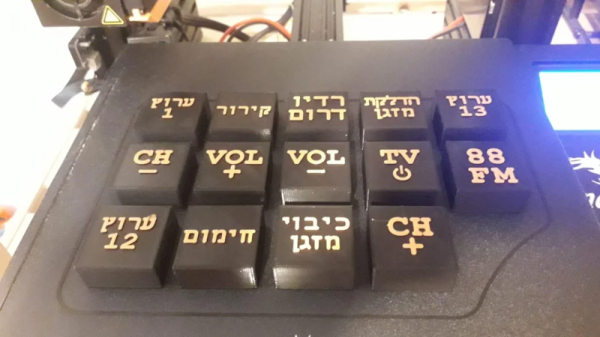
If you are lucky, you’ve never experienced the heartbreak of watching a loved one lose their ability to do simple tasks. However, as hackers, we have the ability to customize solutions to make everyday tasks more accessible. That’s what [omerrv] did by creating a very specific function remote control. The idea is to provide an easy-to-use interface for the most common remote functions.

This is one of those projects where the technology puzzle is now pretty easy to solve: IR remotes are well-understood and there are plenty of libraries for recording and playing back signals. The real work is to understand the user’s challenges and come up with a workable compromise between something useful and something too complex for the user to deal with.

Continue reading “Elderly Remote Keeps Things Simple”

VFD clock with wood case

Captivating Clock Puts Endangered Displays On Display

The DT-1704A VFD is straight from the 1976 Radio Shack Catalog
The DT-1704 VFD as seen the 1976 Radio Shack Catalog. The “A” version has no substrate, making the VFD fully clear for added effect.

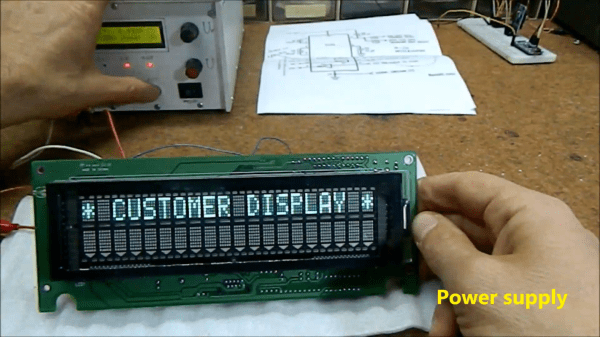
When you have a small stock of vacuum fluorescent displays (VFDs) straight out of the 1976 Radio Shack catalog, you might sit around wondering what to do with them. When [stepawayfromthegirls] found out that his stash of seven DT-1704A tubes may be the last in existence, there was no question. They must be displayed! [stepawayfromthegirls]’ mode of display is this captivating clock build. Four VFDs with their aqua colored elements are set against a black background in a bespoke wooden case. Looking under the hood, the beauty only increases.

VFD Clock Wiring is almost as stunning as the clock itself
VFD Clock Wiring is nearly as stunning as the clock itself.

Keeping the build organized was not an easy task because the tubes are designed in such a way that each segment must be individually controlled. The needed I/O duties are provided by an Arduino Mega 2560 Pro (Embed). 28 2n3904’s each with their two resistors serve as drivers for each VFD segment.

The output of a  24 V AC transformer left over from the 1980s is rectified to 34 V of DC power which is then regulated to 27 V to power the tubes. Switching power supplies provide 6 V to the Arduino and 1.3 V to the filaments. If you look closely, you’ll also see a GPS module so that the clock doesn’t need to be set. To future-proof the clock against daylight savings time adjustments, a potentiometer on the back of the case allows the user to set custom hour offsets without editing any code.

We think the end result is a remarkably clean, simple, and elegant clock that he will be proud of for many years to come!

If VFD clock builds are your thing, then you’ll enjoy this Network Attached VFD Clock and a Mini VFD Clock with floating display.  And while not VFD based, we’d be silly to leave out the Boat Anchor Nixie Clock with enough knobs, switches, and buttons to delight even the fussiest of hacker.


A macro keypad making music.

Meet The Marvelous Macro Music Maker

Do you kind of want a macropad, but aren’t sure that you would use it? Hackaday alum [Jeremy Cook] is now making and selling the JC Pro Macro on Tindie, which is exactly what it sounds like — a Pro Micro-based macro keypad with an OLED screen and a rotary encoder. In the video below, [Jeremy] shows how he made it into a music maker by adding a speaker and a small solenoid that does percussion, all while retaining the original macro pad functionality.

[Jeremy]’s original idea for a drum was to have a servo seesawing a chopstick back and forth on the table as one might nervously twiddle a pencil. That didn’t work out so well, so he switched to the solenoid and printed a thing to hold it upright, and we absolutely love it. The drum is controlled with the rotary encoder: push to turn the beat on or off and crank it to change the BPM.

To make it easier to connect up the solenoid and speaker, [Jeremy] had a little I²C helper board fabricated. There’s one SVG connection and another with power and ground swapped in the event it is needed. If you’re interested in the JC Pro Macro, you can pick it up in various forms over on Tindie. Of course, you might want to wait for version 2, which is coming to Kickstarter in October.

There are many ways to make a macro keyboard. Here’s one that also takes gesture input.

Continue reading “Meet The Marvelous Macro Music Maker”

Mini Wireless Thermal Printers Get Arduino Library (and MacOS App)

[Larry Bank]’s Arduino library to print text and graphics on BLE (Bluetooth Low Energy) thermal printers has some excellent features, and makes sending wireless print jobs to a number of common models about as easy as can be. These printers are small, inexpensive, and wireless. That’s a great mix that makes them attractive for projects that would benefit from printing out a hardcopy.

It’s not limited to simple default text, either. Fancier output can be done using Adafruit_GFX library-style fonts and options, which sends the formatted text as graphics. You can read all about what the library can do in this succinct list of concise functions.

But [Larry] hasn’t stopped there. While experimenting with microcontrollers and BLE thermal printers, he also wanted to explore talking to these printers from his Mac using BLE directly. Print2BLE is a MacOS application that allows dragging image files into the application’s window, and if the preview looks good, the print button makes it come out of the printer as a 1-bpp dithered image.

Small thermal printers make for neat projects, like this retrofitted Polaroid camera, and now that these little printers are both wireless and economical, things can only get easier with the help of a library like this. Of course, if that’s all starting to look a little too easy, one can always put the thermal back in thermal printing by using plasma, instead.

RoboTray Is A Secret Tea Butler

How far would you go for your cup of tea? [samsungite]’s missus doesn’t like clutter on her countertops, so away the one-cup kettle would go back into the cupboard for next time while the tea steeped. As long as there’s room for it in there, why not install it there permanently? That’s the idea behind RoboTray, which would only be cooler if it could be plumbed somehow.

RoboTray went through a few iterations, most importantly the switch from 6mm MDF to 4 mm aluminum plate. A transformer acts as a current sensor, and when the kettle is powered on, the tray first advances forward 7 cm using a 12 VDC motor and an Arduino. Then it pivots 90° on a lazy Susan driven by another 12 VDC motor. The kettle is smart enough to turn itself off when finished, and the Arduino senses this and reverses all the steps after a ten-second warning period. Check it out in action after the break.

If [samsungite] has any more Arduinos lying around, he might appreciate this tea inventory tracker.

Continue reading “RoboTray Is A Secret Tea Butler”

Harp Uses Frikin’ Lasers

We aren’t sure if you really need lasers to build [HoPE’s] laser harp. It is little more than some photocells and has an Arduino generate tones based on the signals. Still, you need to excite the photocells somehow, and lasers are cheap enough these days.

Mechanically, the device is a pretty large wooden structure. There are six lasers aligned to six light sensors. Each sensor is read by an analog input pin on an Arduino armed with a music-generation shield. We’ve seen plenty of these in the past, but the simplicity of this one is engaging.

Continue reading “Harp Uses Frikin’ Lasers”