Hackaday Links Column Banner

Hackaday Links: December 21, 2025

It’s amazing how fragile our digital lives can be, and how quickly they can fall to pieces. Case in point: the digital dilemma that Paris Buttfield-Addison found himself in last week, which denied him access to 20 years of photographs, messages, documents, and general access to the Apple ecosystem. According to Paris, the whole thing started when he tried to redeem a $500 Apple gift card in exchange for 6 TB of iCloud storage. The gift card purchase didn’t go through, and shortly thereafter, the account was locked, effectively bricking his $30,000 collection of iGadgets and rendering his massive trove of iCloud data inaccessible. Decades of loyalty to the Apple ecosystem, gone in a heartbeat.

Continue reading “Hackaday Links: December 21, 2025”

Consider This Pocket Machine For Your IPhone Backups

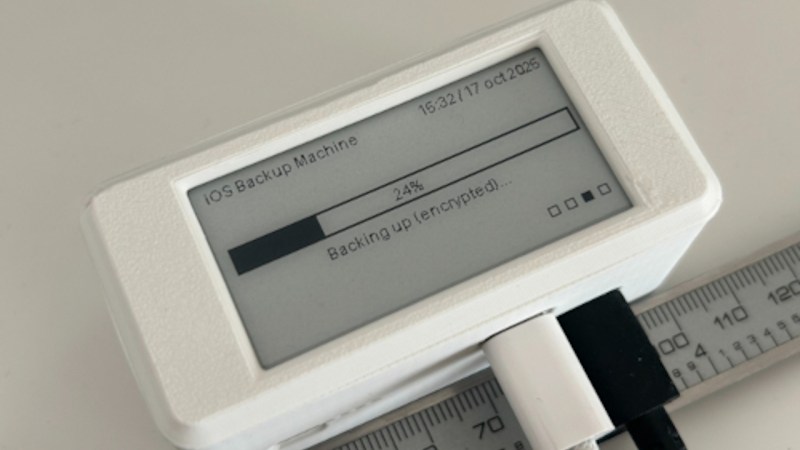
What if you find yourself as an iPhone owner, desiring a local backup solution — no wireless tech involved, no sending off data to someone else’s server, just an automatic device-to-device file sync? Check out [Giovanni]’s ios-backup-machine project, a small Linux-powered device with an e-ink screen that backs up your iPhone whenever you plug the two together with a USB cable.

The system relies on libimobiledevice, and is written to make simple no-interaction automatic backups work seamlessly. The backup status is displayed on the e-ink screen, and at boot, it shows up owner’s information of your choice, say, a phone number — helpful if the device is ever lost. For preventing data loss, [Giovanni] recommends a small uninterruptible power supply, and the GitHub-described system is married to a PiSugar board, though you could go without or add a different one, for sure. Backups are encrypted through iPhone internal mechanisms, so while it appears you might not be able to dig into one, they are perfectly usable for restoring your device should it get corrupted or should you need to provision a new phone to replace the one you just lost.

Easy to set up, fully open, and straightforward to use — what’s not to like? Just put a few off-the-shelf boards together, print the case, and run the setup instructions, you’ll have a pocket backup machine ready to go. Now, if you’re considering this as a way to decrease your iTunes dependency, you might as well check out this nifty tool that helps you get out the metadata for the music you’ve bought on iTunes.

Back Up Your Data On Paper With Lots Of QR Codes

QR codes are used just about everywhere now, for checking into venues, ordering food, or just plain old advertising. But what about data storage? It’s hardly efficient, but if you want to store your files in a ridiculous paper format—there’s a way to do that, too!

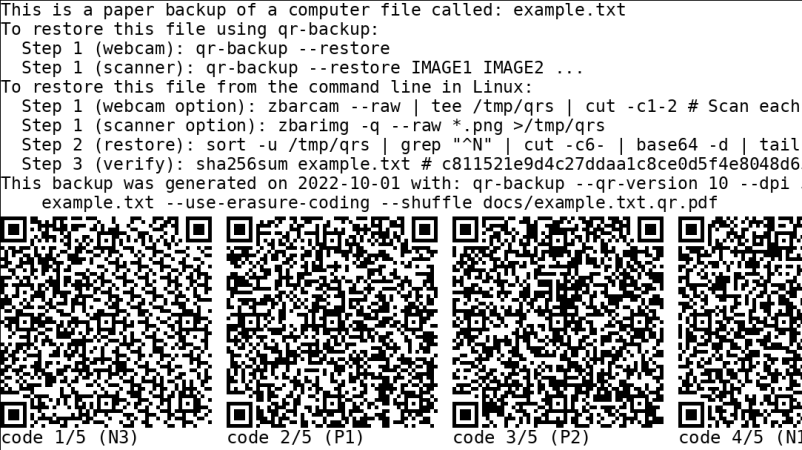
QR-Backup was developed by [za3k], and is currently available as a command-line Linux tool only. It takes a file or files, and turns them into a “paper backup”—a black-and white PDF file full of QR codes that’s ready to print. That’s legitimately the whole deal—you run the code, generate the PDF, then print the file. That piece of paper is now your backup. Naturally, qr-backup works in reverse, too. You can use a scanner or webcam to recover your files from the printed page.

Currently, it achieves a storage density of 3KB/page, and [za3k] says backups of text in the single-digit megabyte range are “practical.” You can alternatively print smaller, denser codes for up to 130 KB/page.

Is it something you’ll ever likely need? No. Is it super neat and kind of funny? Yes, very much so.

We’ve seen some other neat uses for QR codes before, too—like this printer that turns digital menus into paper ones. If you’ve got your own nifty uses for these attractive squares, let us know!

Radio Apocalypse: Hardening AM Radio Against Disasters

If you’ve been car shopping lately, or even if you’ve just been paying attention to the news, you’ll probably be at least somewhat familiar with the kerfuffle over AM radio. The idea is that in these days of podcasts and streaming music, plain-old amplitude modulated radio is becoming increasingly irrelevant as a medium of mass communication, to the point that automakers are dropping support for it from their infotainment systems.

The threat of federal legislation seems to have tapped the brakes on the anti-AM bandwagon, at least for now. One can debate the pros and cons, but the most interesting tidbit to fall out of this whole thing is one of the strongest arguments for keeping the ability to receive AM in cars: emergency communications. It turns out that about 75 stations, most of them in the AM band, cover about 90% of the US population. This makes AM such a vital tool during times of emergency that the federal government has embarked on a serious program to ensure its survivability in the face of disaster.

Continue reading “Radio Apocalypse: Hardening AM Radio Against Disasters”

What Losing Everything Taught Me About Backing Up

Backing up. It’s such a simple thing on paper – making a copy of important files and putting them in a safe place. In reality, for many of us, it’s just another thing on that list of things we really ought to be doing but never quite get around to.

I was firmly in that boat. Then, when disaster struck, I predictably lost greatly. Here’s my story on what I lost, what I managed to hang on to, and how I’d recommend you approach backups starting today.

Continue reading “What Losing Everything Taught Me About Backing Up”

Dumping Game Boy Cartridges Via The Link Cable Port

When it comes to vintage consoles like the Game Boy, it’s often nice to be able to dump cartridge ROMs for posterity, for archival, and for emulation. To that end, [Francis Stokes] of [Low Byte Productions] whipped up a rather unique method of dumping Game Boy carts via the link cable port.

The method starts by running custom code on the Game Boy, delivered by flash cart. That code loads itself into RAM, and then waits for the user to swap in a cart they wish to dump and press a button. The code then reads the cartridge, byte by byte, sending it out over the link port. To capture the data, [Francis] simply uses a Saleae logic analyzer to do the job. Notably, the error rate was initially super high with this method, until [Francis] realised that cutting down the length of the link cable cut down on noise that was interfering with the signal.

The code is available on GitHub for those interested. There are other ways to dump Game Boy cartridges too, of course.

Continue reading “Dumping Game Boy Cartridges Via The Link Cable Port”

Ryobi Battery Hack Keeps CPAP Running Quietly

When it comes to cordless power tools, color is an important brand selection criterion. There’s Milwaukee red, for the rich people, the black and yellow of DeWalt, and Makita has a sort of teal thing going on. But when you see that painful shade of fluorescent green, you know you’ve got one of the wide range of bargain tools and accessories that only Ryobi can offer.

Like many of us, Redditor [Grunthos503] had a few junked Ryobi tools lying about, and managed to cobble together this battery-powered inverter for light-duty applications. The build started with a broken Ryobi charger, whose main feature was a fairly large case once relieved of its defunct guts, plus an existing socket for 18-volt battery packs. Added to that was a small Ryobi inverter, which normally plugs into the Ryobi battery pack and converts the 18 VDC to 120 VAC. Sadly, though, the inverter fan is loud, and the battery socket is sketchy. But with a little case modding and a liberal amount of hot glue, the inverter found a new home inside the charger case, with a new, quieter fan and even an XT60 connector for non-brand batteries.

It’s a simple hack, but one that [Grunthos503] may really need someday, as it’s intended to run a CPAP machine in case of a power outage — hence the need for a fan that’s quiet enough to sleep with. And it’s a pretty good hack — we honestly had to look twice to see what was done here. Maybe it was just the green plastic dazzling us. Although maybe we’re too hard on Ryobi — after all, they are pretty hackable.

Thanks to [Risu no Kairu] for the tip on this one.