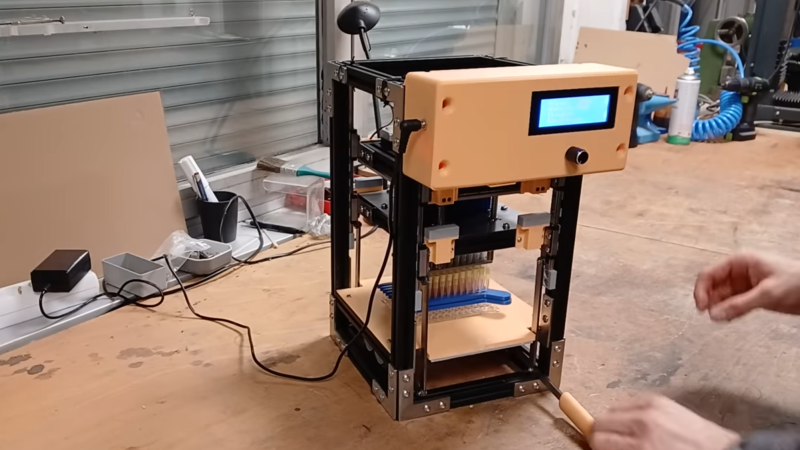
A device within a vertical rectangular frame is shown, with a control box on the front and an LCD display. Within the frame, a grid of syringes is seen held upright beneath two parallel plates.

Building A Multi-Channel Pipette For Parallel Experimentation

One major reason for the high cost of developing new drugs and other chemicals is the sheer number of experiments involved; designing a single new drug can require synthesizing and testing hundreds or thousands of chemicals, and a promising compound will go through many stages of testing. At this scale, simply performing sequential experiments is wasteful, and it’s better to run tens or hundreds of experiments in parallel. A multi-channel pipette makes this significantly simpler by collecting and dispensing liquid into many vessels at once, but they’re, unfortunately, expensive. [Triggy], however, wanted to run his own experiments, so he built his own 96-channel multi-pipette for a fiftieth of the professional price.

The dispensing mechanism is built around an eight-by-twelve grid of syringes, which are held in place by one plate and have their plungers mounted to another plate, which is actuated by four stepper motors. The whole syringe mechanism needed to move vertically to let a multi-well plate be placed under the tips, so the lower plate is mounted to a set of parallel levers and gears. When [Triggy] manually lifts the lever, it raises the syringes and lets him insert or remove the multi-well. An aluminium extrusion frame encloses the entire mechanism, and some heat-shrink tubing lets pipette tips fit on the syringes.

[Triggy] had no particularly good way to test the multi-pipette’s accuracy, but the tests he could run indicated no problems. As a demonstration, he 3D-printed two plates with parallel channels, then filled the channels with different concentrations of watercolors. When the multi-pipette picked up water from each channel plate and combined them in the multi-well, it produced a smooth color gradient between the different wells. Similarly, the multi-pipette could let someone test 96 small variations on a single experiment at once. [Triggy]’s final cost was about $300, compared to $18,000 for a professional machine, though it’s worth considering the other reason medical development is expensive: precision and certifications. This machine was designed for home experiments and would require extensive testing before relying on it for anything critical.

Continue reading “Building A Multi-Channel Pipette For Parallel Experimentation”

Determine Fundamental Constants With LEDs And A Multimeter

There are (probably) less than two dozen fundemental constants that define the physics of our universe. Determining the value of them might seem like the sort of thing for large, well funded University labs, but many can be determined to reasonable accuracy on the benchtop, as [Marb’s Lab] proves with this experiment to find the value of Planck’s Constant.

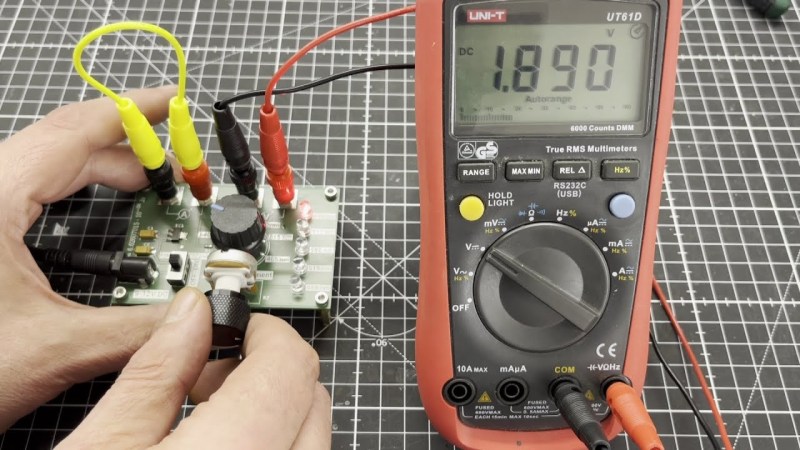
[Marv’s Lab] setup is on a nice PCB that uses a rotary switch to select between 5 LEDs of different wavelengths, with banana plugs for the multi-meter so he can perform a linear regression on the relation between energy and frequency to find the constant. He’s also thoughtfully put connectors in place for current measurement, so the volt-current relationship of the LEDs can be characterized in a second experiment. Overall, this is a piece of kit that would not be out of place in any high school or undergraduate physics lab. Continue reading “Determine Fundamental Constants With LEDs And A Multimeter”

Reconfigurable FPGA For Single Photon Measurements

Detecting single photons can be seen as the backbone of cutting-edge applications like LiDAR, medical imaging, and secure optical communication. Miss one, and critical information could be lost forever. That’s where FPGA-based instrumentation comes in, delivering picosecond-level precision with zero dead time. If you are intrigued, consider sitting in on the 1-hour webinar that [Dr. Jason Ball], engineer at Liquid Instruments, will host on April 15th. You can read the announcement here.

Before you sign up and move on, we’ll peek into a bit of the matter upfront. The power lies in the hardware’s flexibility and speed. It has the ability to timestamp every photon event with a staggering 10 ps resolution. That’s comparable to measuring the time it takes light to travel just a few millimeters. Unlike traditional photon counters that choke on high event rates, this FPGA-based setup is reconfigurable, tracking up to four events in parallel without missing a beat. From Hanbury-Brown-Twiss experiments to decoding pulse-position modulated (PPM) data, it’s an all-in-one toolkit for photon wranglers. [Jason] will go deeper into the subject and do a few live experiments.

Measuring single photons can be achieved with photomultipliers as well. If exploring the possibilities of FPGA’s is more your thing, consider reading this article.

Measuring Local Variances In Earth’s Magnetic Field

Although the Earth’s magnetic field is reliable enough for navigation and is also essential for blocking harmful solar emissions and for improving radio communications, it’s not a uniform strength everywhere on the planet. Much like how inconsistencies in the density of the materials of the planet can impact the local gravitational force ever so slightly, so to can slight changes impact the strength of the magnetic field from place to place. And it doesn’t take too much to measure this impact on your own, as [efeyenice983] demonstrates here.

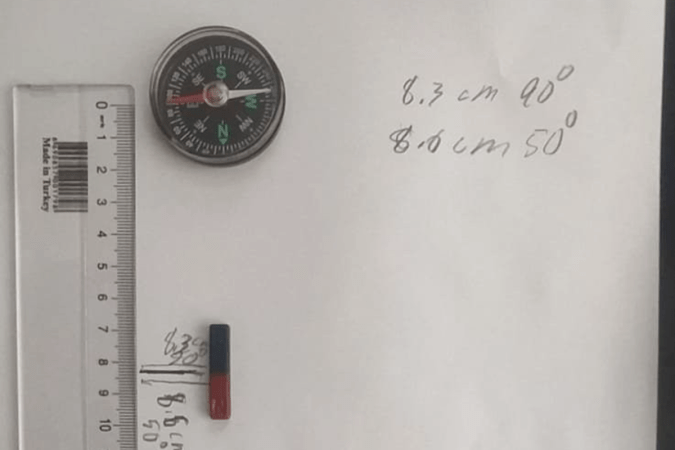
To measure this local field strength, the first item needed is a working compass. With the compass aligned to north, a magnet is placed with its poles aligned at a right angle to the compass. The deflection angle of the needle is noted for varying distances of the magnet, and with some quick math the local field strength of the Earth’s magnetic field can be calculated based on the strength of the magnet and the amount of change of the compass needle when under its influence.

Using this method, [efeyenice983] found that the Earth’s magnetic field strength at their location was about 0.49 Gauss, which is well within 0.25 to 0.65 Gauss that is typically found on the planet’s surface. Not only does the magnetic field strength vary with location, it’s been generally decreasing in strength on average over the past century or so as well, and the poles themselves aren’t stationary either. Check out this article which shows just how much the poles have shifted over the last few decades.

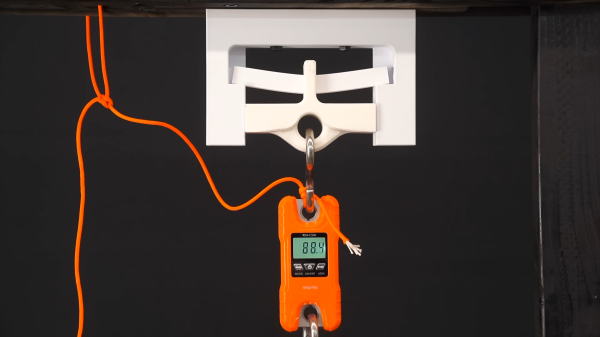
3D printed test jig to determine the yield point of a centrally loaded 3D printed beam.

One Object To Print, But So Many Settings!

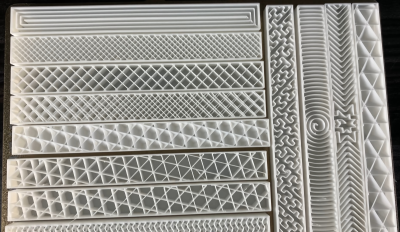
When working with an FDM 3D printer your first prints are likely trinkets where strength is less relevant than surface quality. Later on when attempting more structural prints, the settings become very important, and quite frankly rather bewildering. A few attempts have been made over the years to determine in quantifiable terms, how these settings affect results and here is another such experiment, this time from Youtuber 3DPrinterAcademy looking specifically at the effect of wall count, infill density and the infill pattern upon the strength of a simple beam when subjected to a midpoint load.

A tray of 3D printing infill patterns available in mainstream slicers
Modern slicers can produce many infill patterns, but the effect on real world results are not obvious

When setting up a print, many people will stick to the same few profiles, with a little variety in wall count and infill density, but generally keep things consistent. This works well, up to a point, and that point is when you want to print something significantly different in size, structure or function. The slicer software is usually very helpful in explaining the effect of tweaking the numbers upon how the print is formed, but not too great at explaining the result of this in real life, since it can’t know your application. As far as the slicer is concerned your object is a shape that will be turned into slices, internal spaces, outlines and support structures. It doesn’t know whether you’re making a keyfob or a bearing holder, and cannot help you get the settings right for each application. Perhaps upcoming AI applications will be trained upon all these experimental results and be fed back into the slicing software, but for now, we’ll just have to go with experience and experiment. Continue reading “One Object To Print, But So Many Settings!”

The Freedom To Fail

When you think of NASA, you think of high-stakes, high-cost, high-pressure engineering, and maybe the accompanying red tape. In comparison, the hobby hacker has a tremendous latitude to mess up, dream big, and generally follow one’s bliss. Hopefully you’ll take some notes. And as always with polar extremes, the really fertile ground lies in the middle.

[Dan Maloney] and I were thinking about this yesterday while discussing the 50th flight of Ingenuity, the Mars helicopter. Ingenuity is a tech demo, carrying nothing mission critical, but just trying to figure out if you could fly around on Mars. It was planned to run for five flights, and now it’s done 50.

The last big tech demo was the Sojourner Rover. It was a small robotic vehicle the size of a microwave oven that they hoped would last seven days. It went for 85, and it gave NASA the first taste of success it needed to follow on with 20 years of Martian rovers.

Both of these projects were cheap, by NASA standards, and because they were technical demonstrators, the development teams were allowed significantly more design freedom, again by NASA standards.

None of this compares to the “heck I’ll just hot-air an op-amp off an old project” of weekend hacking around here, but I absolutely believe that a part of the tremendous success of both Sojourner and Ingenuity were due to the risks that the development teams were allowed to take. Creativity and successful design thrives on the right blend of constraint and freedom.

Will Ingenuity give birth to a long series of flying planetary rovers as Sojourner did for her rocker-bogie based descendants? Too early to tell. But I certainly hope that someone within NASA is noticing the high impact that these technical demonstrator projects have, and also noting why. The addition of a little bit of hacker spirit to match NASA’s professionalism probably goes a long way.

Building A Glowing Demon Core Lamp

The so-called Demon Core was a cursed object, a 6.2 kilogram mass of plutonium intended to be installed in a nuclear weapon. Instead, slapdash experimental techniques saw it feature in several tragic nuclear accidents and cause multiple fatalities. Now, you can build yourself a lamp themed after this evil dense sphere.

A later recreation of the infamous “Slotin Accident” that occurred with the Demon Core. Credit: Public Domain, Los Alamos National Laboratory

Creator [skelly] has designed the lamp to replicate the Slotin incident, where the spherical Demon Core was placed inside two half-spheres of beryllium which acted as neutron reflectors to allow it to approach criticality. Thus, the core is printed as a small sphere which is thin enough to let light escape, mimicking the release of radiation that doomed Louis Slotin. The outer spheres are then printed in silvery PLA to replicate the beryllium half-spheres. It’s all assembled atop a stand mimicking those used in the Los Alamos National Laboratory in the 1940s.

To mimic the Core’s deadly blue glow, the build uses cheap LED modules sourced from Dollar Tree lights. With the addition of a current limiting resistor, they can easily be run off USB power in a safe manner.

The Demon Core has become a meme in recent times, perhaps as a new generation believes themselves smart enough not to tinker with 6.2 kilograms of plutonium and a screwdriver. That’s not to say there aren’t still dangerous nuclear experiments going on, even the DIY kind. Be careful out there!