Change Desktop Environments On… IOS?

While Apple’s modern operating systems may seem like they exist independently of the rest of the computing world, they are actually close cousins of modern versions of Linux. The primary link between the two is that Apple’s offerings are Unix-based and even though Linux isn’t Unix in the strict sense, it’s built to be extremely Unix-like. Plenty of Linux software is POSIX-compliant, meaning it is effectively compatible with true Unix. But what can we do with that information? Well, to start, we can run Linux desktop environments on top of an iOS install on your favorite iPhone or iPad.

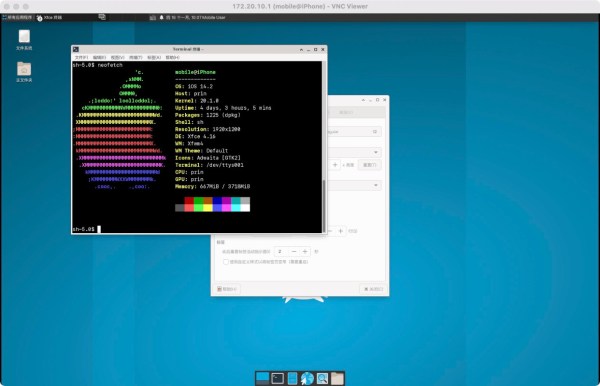
To be sure, we will be filing this hack in the “because you can” category. [Torrekie], the creator of this project, has plenty of builds (Google translate from Chinese) where the boundaries between things like Linux and Unix are either blurred or nonexistant. In this particular project, a jailbroken iOS device is essentially gifted a ported version of XFCE which is able to run fairly well on iOS thanks to its compatibility with Unix environments. Details on how this was accomplished are sparse without a full investigation of the source code right now, but you can head over to the repository if you are curious enough to try this for yourself. [Torrekie] does note that this will only work with iOS devices that have been jailbroken using the “unc0ver” jailbreak only though.

To be sure, the relationship between modern Apple operating systems and Linux is about as close as modern Porsches and the Volkswagen Beetle, but either way the two are close enough to get interesting and impressive mashups like this project. For now only time will tell if using XFCE on iOS will be useful for anyone, but other projects bridging the gap between Linux and Apple are sure to be more immediately fruitful.
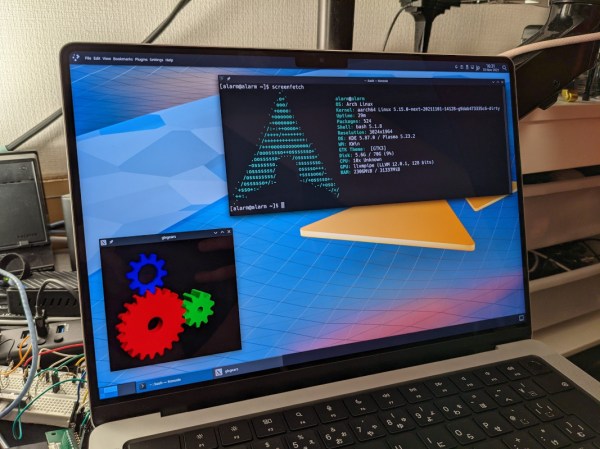

Linux: Coming Soon To M1 Macbooks

Regardless of the chipset or original intended use of any computer system, someone somewhere is going to want to try and run Linux on it. And why not? Linux is versatile and free to use as well as open-source, so it’s quite capable of running on almost anything. Of course, it takes a little while for the Linux folk to port the software to brand new hardware, but it’s virtually guaranteed that it’s only a matter of time before Linux is running on even the most locked-down of hardware, like the M1 MacBooks.

[Hector Martin] aka [marcan] has been hard at work getting Linux up and running on the latest Apple offerings with their ARM-based M1 processors. Since these are completely divorced from their x86 product line the process had to be worked from the ground up which included both booting Linux and modifying the kernel to include support for the hardware. [marcan] has a lot of hardware working such as the USB ports and the SD card slot, and notes that his setup is even compatible with the webcam notch included in the latest batch of MacBooks.

There are a few things still missing. He’s running Arch and doesn’t have the GPU configured yet, so all of the graphics are rendered in software. But he has put the computer through the wringer including running some computationally-intense software for nearly a full day before realizing that the machine wasn’t charging, which did not make much difference in performance. These machines are indeed quite capable with their new ARM chipsets and hopefully his work going forward will bring Linux to the rest of us who still use Macs even if they don’t want to run macOS.

Linux On The Windows 11 Desktop

A month ago Microsoft officially released Windows 11. One of its features is the ability to run Linux GUI applications side by side as peers to normal Windows desktop apps. [Jim Salter] of Ars Technica took a closer look and declared it works as advertised.

This is an evolution of the Windows Subsystem for Linux (WSL), which has existed for a few years but only in command-line form. Linux being Linux, it was certainly possible to put visuals onscreen, but doing so required jumping through some hoops and dealing with limitations. Now “WSLg” gives a smoother and more accessible experience.

While tremendously valuable for those who need it, WSLg is admittedly a niche feature. The circumstances will be different for different needs. Around these parts, one example is letting us work with pieces of proprietary Windows software (such as low level hardware drivers or hardware-specific dev tools) while still retaining Linux tools for the rest of our workflow.

It’s also interesting to take a peek behind the scenes for an instructive look at bridging two operating systems. A Microsoft blog post describes the general architecture, where we were happy to see open-source work leveraged. And by basing this work on Wayland, it is more forward-looking than working with just X11.

The bad news is that WSLg is limited to Windows 11, at least for now. WSL users on Windows 10 will have to continue jumping through hoops (We described one method using X11.) And opening this door unfortunately also opened the door to security issues, so there’s still work ahead for WSL.

The Linux X86 Journey To Main()

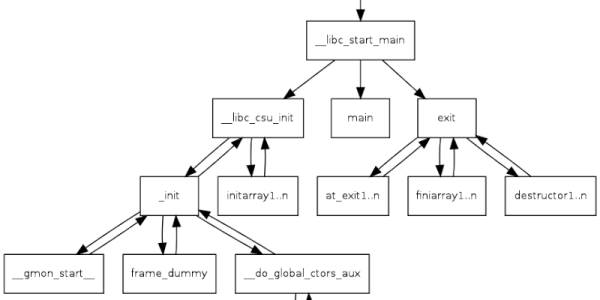
Have you ever had a program crash before your main function executes? it is rare, but it can happen. When it does, you need to understand what happens behind the scenes between the time the operating system starts your program and your first line of code in main executes. Luckily [Patrick Horgan] has a tutorial about the subject that’s very detailed. It doesn’t cover statically linked libraries but, as he points out, if you understand what he does cover, that’s easy to figure out on your own.

The operating system, it turns out, knows nothing about main. It does, however, know about a symbol called _start. Your runtime library provides this. That code contains some stack manipulation and eventually calls __libc_start_main which is also provided by the library. Continue reading “The Linux X86 Journey To Main()”

More Software-Defined Radio Projects Using DragonOS

DragonOS, a Debian-based Linux distribution specifically packaged for software-defined radio functionality, roared onto the wavelengths during the beginnings of the various pandemic lockdowns last year. Since then [Aaron], the creator of the OS, has been busy adding features to the distribution as well as creating plenty of videos which show off its capabilities and also function as how-tos for people who might want to learn about software-defined radio. The latest is a video about using this software to detect radio signals in certain specified spectrums.

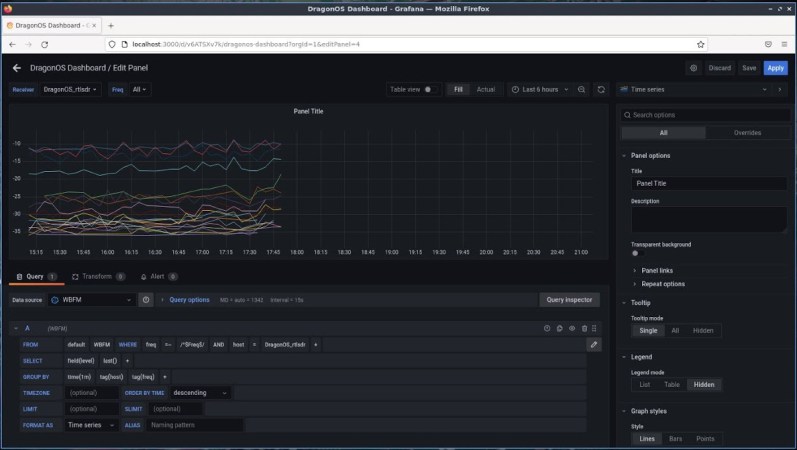
This build uses two  RTL-SDR devices paired with the DragonOS software suite to automatically detect active frequencies within a specified frequency range and that aslo exceed a threshold measured above the average noise floor. The video includes the setup of the software and its use in detecting these signals, but also includes setup of influxdb and Grafana which provide logging capabilities as well. Using this setup, multiple receivers either local or over the internet can then be configured to dump all the identified frequencies, powers, and time stamps into DragonOS.

[Aaron] has also been helping developers to build the SDR4space.lite application which includes GPS support, so he hopes that in a future video a user will be able to easily associate location to identified frequencies. Projects like these also serve as a reminder that getting into software-defined radio is as easy as buying a $10 USB radio receiver and configuring some free software to do anything that you can imagine like tracking ships and airplanes in real time.

Continue reading “More Software-Defined Radio Projects Using DragonOS”

Linux Fu: Globs Vs Regexp

I once asked a software developer at work how many times we called fork() in our code. I’ll admit, it was a very large project, but I expected the answer to be — at most — two digits. The developer came back and read off some number from a piece of paper that was in the millions. I told them there was no way we had millions of calls to fork() and, of course, we didn’t. The problem was the developer wasn’t clear on the difference between a regular expression and a glob.

Tools like grep use regular expressions to create search patterns. I might write [Hh]ack ?a ?[Dd]ay as a regular expression to match things like “HackaDay” and “Hack a day” and, even, “Hackaday” using a tool like grep, awk, or many programming languages.

Continue reading “Linux Fu: Globs Vs Regexp”

Making Linux Offline Voice Recognition Easier

For just about any task you care to name, a Linux-based desktop computer can get the job done using applications that rival or exceed those found on other platforms. However, that doesn’t mean it’s always easy to get it working, and speech recognition is just one of those difficult setups.

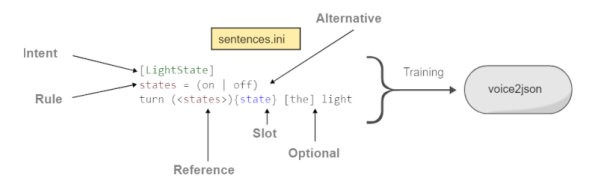
A project called Voice2JSON is trying to simplify the use of voice workflows. While it doesn’t provide the actual voice recognition, it does make it easier to get things going and then use speech in a natural way.

The software can integrate with several backends to do offline speech recognition including CMU’s pocketsphinx, Dan Povey’s Kaldi, Mozilla’s DeepSpeech 0.9, and Kyoto University’s Julius. However, the code is more than just a thin wrapper around these tools. The fast training process produces both a speech recognizer and an intent recognizer. So not only do you know there is a garage door, but you gain an understanding of the opening and closing of the garage door.

Continue reading “Making Linux Offline Voice Recognition Easier”