Vintage Apple Keyboard Revived As Standalone Computer

Many of our readers are familiar with the gold standard of classic PC keyboards – the bunker with switches known as the IBM Model M. The Model M’s Apple contemporary is the Apple Extended Keyboard and they are just as highly sought-after by their respective enthusiasts. Though discontinued almost 25 years ago and incompatible with anything made in the last 15, the codenamed “Saratoga” is widely considered the best keyboard Apple ever made.

[Ezra] has made a hobby of modernizing these vintage heartthrobs and rescuing them from their premature obsolescence. In a superbly documented tutorial he not only shows how to convert them to USB (a popular and trivial hack), but teaches you how and where to smuggle a Raspberry Pi in as well.

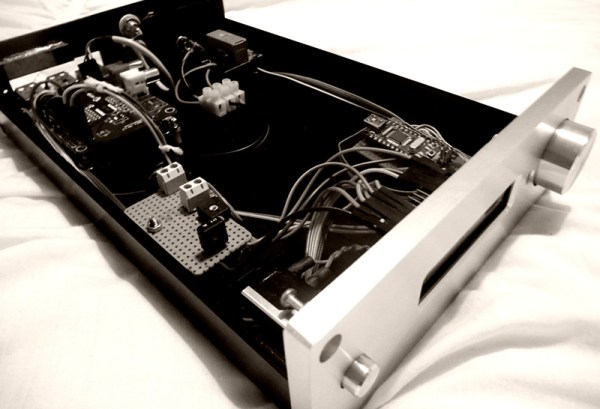
After disassembly, the project requires only a little bit of chisel and Dremel work before the soldering iron comes out. [Ezra] was fairly meticulous in removing or redirecting the Pi’s connectors and hardwiring the internals. Only 3 pins need to be traced from the original keyboard and [Ezra]’s ADB–>USB Rosetta Stone of choice is the Hasu Converter running on a Atmega 32u4 clone. Balancing cost, range, and power draw from the Pi, he settled on the TP-LINK WN722N for his WiFi solution which is also tucked away inside the case. A single pullup resistor to finish it off and [Ezra] was delighted to discover it worked the first time he plugged it in.

Keyboards from this era use actual momentary switches that audibly click twice per keypress. In our world of screens-as-keys celebrating the lack of tactile constraints, using beasts like the Model M or the AEK to force transistors to do your bidding is like racking a shotgun during a game of lasertag – comically obtuse but delightfully mechanical.

If you are looking to expand on [Ezra]’s tinkering, he has already made a wishlist of additions: a toggle switch to lobotomize the Pi back into a plain USB keyboard, an internal USB hub, and a power switch.

Hear the video of an AEK in action after the break (or loop it to sound productive while you nap).

Continue reading “Vintage Apple Keyboard Revived As Standalone Computer”

Build Your Own Raytracing Minion

A canceled project left [Craig] with six Raspberry Pi based devices he calls “Minions”. A minion is a Raspberry Pi model A in a small enclosure with an Adafruit 2.2″ 320×240 SPI LCD. The LCD lives in a lollipop style circular housing above the base. [Craig] has found a use for one of his minions as a desktop raytracer.

The Raspberry Pi is quite capable of running Persistance Of Vision Raytracer, or POV-Ray. POV-Ray started life as an early PC based raytracer. Created as a port of an Amiga program called DKBTrace, which was itself a port of a Unix raytracer, POV-Ray first was released in 1987. For the uninitiated, raytracers like POV-Ray  literally trace rays from a light source to an image plane. As one would imagine, the Raspberry Pi’s little ARM processor would take quite a bit of time to raytrace a high resolution image. However, when targeting a 320×240 LCD, it’s not half bad.

[Craig’s] minion is running his own software which he calls ArtRays. Based upon a setup file, ArtRays can render images from several sources, including the internet via a WiFi dongle, or a local SD card. Rather than walk through the setup and software install, [Craig] has provided a link to download a full SD card image to build your own Minion. It might be worth experimenting on your own first though, rather than killing his server with a 1GB download.

We’re glad [Craig] has found use for one of his minions, now we have to see what he’s done with the other five!

Hacklet 24 – Raspberry Pi Projects

Experimenting with embedded Linux used to mean reformatting an old PC, or buying an expensive dev board. In February of 2012, the Raspberry Pi was released, and it has proven to be a game changing platform. According to the Raspberry Pi Foundation, over 3.8 million boards have been sold. 3.8 million translates into a lot of great projects. This week’s Hacklet focuses on some of the best Raspberry Pi projects on Hackaday.io!

rpfpvWe start with [richardginus] and the RpiFPV (aka Raspberry Pi First Person View) project. [Richardginus]  is trying to build a low latency WiFi streaming camera system for radio-controlled models using a Raspberry Pi and camera. He’s gotten the system down into a respectable 160 milliseconds on the bench, but in the field interference from the 2.4GHz R/C transmitter drives latency way up. To fix this, [Richardginus] is attempting to control the plane over the same WiFi link as the video stream. We’d also recommend checking out some of those “outdated” 72 MHz R/C systems on the used market.

piholgaNext up is [James McDuffie] and his RPi Holga. Inspired by [Peter’s] Holga camera project, [James] has stuffed a Raspberry Pi model A, a camera module, and a WiFi adapter into a Holga camera body. The result looks like a stock Holga.  We saw this camera up close at the Hackaday 10th Anniversary event, and it fooled us – we thought [James] was just a lomography buff. It was only after seeing his pictures that we realized there was a Pi hiding inside that white plastic body! Definitely check out [James’] instructions as he walks through everything from hardware mods to software installation.

cluster2No Raspberry Pi list would be complete without a cluster or two, so we have [Tobias W.] and his 3 Node Raspberry Pi Cluster. The Raspberry Pi makes for a cheap and efficient platform to experiment with cluster computing. [Tobias] did a bit more than just slap a few Pis on a board and call it a day though. He custom machined an aluminum plate to hold his 3 node cluster. This makes wire management a snap. The Pi’s communicate through a four port Ethernet hub and all run from a single power supply. He even added a key switch, just like on the “old iron” mainframes. [Tobias] has been a bit quiet lately, so if you run into him, tell him we’re looking for an update on that cluster!

pivenaFrom [Tim] comes the PIvena, a Raspberry Pi laptop which takes its styling cues from [Bunnie Huang’s] Novena computer.  Pivena is a bit smaller though, with a 7” HDMI LCD connected to the Pi. The case is made from laser cut wood and a few 3D printed parts. Everything else is just standard hardware. [Tim] kept the PIvena’s costs down by using a wooden kickstand to hold up the screen rather than Novena’s pneumatic spring system. The base plate of the PIvena includes a grid of mounting holes just like the Novena. There is also plenty of room for batteries to make this a truly portable machine.  The end result is a slick setup that would look great at any Hackerspace. We hope [Tim] creates an update to support the new Raspberry Pi B+ boards!

Our Raspberry Pi-based alarm clock is chiming the hour, so that’s about it for this episode of the Hacklet! As always, see you next week. Same hack time, same hack channel, bringing you the best of Hackaday.io!

Thermostat

Custom Raspberry Pi Thermostat Controller

Thermostats can be a pain. They often only look at one sensor in a multi-room home and then set the temperature based on that. The result is one room that’s comfortable and other rooms that are not. Plus, you generally have to get up off the couch to change the temperature. In this day and age, who wants to do that? You could buy an off-the-shelf solution, but sometimes hacking up your own custom hardware is just so much more fun.

[redditseph] did exactly that by modifying his home thermostat to be controlled by a Raspberry Pi. The temperature is controlled by a simple web interface that runs on the Pi. This way, [redditseph] can change the temperature from any room in his home using a computer or smart phone. He also built multi-sensor functionality into his design. This means that the Pi can take readings from multiple rooms in the home and use this data to make more intelligent decisions about how to change the temperature.

The Pi needed a way to actually talk to the thermostat. [redditseph] made this work with a relay module. The Pi flips one side of the relays, which then in turn switches the buttons that came built into the thermostat. The Pi is basically just emulating a human pressing buttons. His thermostat had terminal blocks inside, so [redditseph] didn’t have to risk damaging it by soldering anything to it. The end result is a functional design that has a sort of cyberpunk look to it.

[via Reddit]

A Raspberry Pi In A Game Boy Advance SP

It’s not the biggest use of a Raspberry Pi, but running emulators for old game systems is by far the most visible use of the Pi. In fact, putting Pis inside old game systems has led to a resurgence of case modding not seen since the heyday of the Mini-ITX craze of the early ‘aughts.

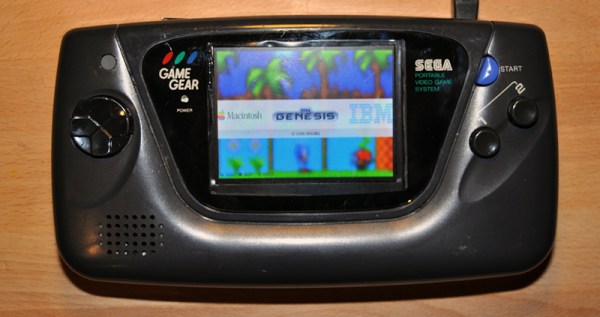
You’d think every possible Pi casemod had been done by now, but [frostedfires] is still raising the bar with a Pi casemod that stuffs a clone of everyone’s favorite credit card sized computer into a Game Boy Advance SP.

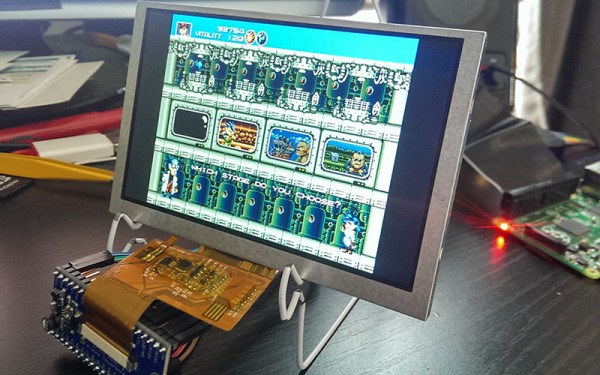
[frostedfires] isn’t using a real Raspi from The Foundataion. Instead, he found the Odroid W, a raspi compatible board that’s about half the size of a model B. It still has everything needed to complete the build – analog video out, a reasonable Linux system, and enough processing power to run Quake III. Right now, [frostedfires] has the screen working – that was taken from a car backup camera. Other than that, the only portion of the build left to go is a few buttons.

This is officially the smallest derivative casemod we’ve ever seen. the previous record holder was the still tiny Game Boy Pocket build from last summer. That build required heavy modifications to the Model B board, though, so if you’re aiming for a smaller build, the Odroid is the way to go.

Thanks to the Bacman forums for yet another great build.

RasPiCommPlus, An Expansion Board For Expansion Boards

The easiest way to connect a GSM module to a Raspberry Pi would be to buy a breakout module, install some software, and connect to a mobile network with a Pi. Need GPS, too? That’s a whole other module, with different software. The guys behind RasPiCommPlus are working on a better solution – a breakout board for breakout boards that takes care of plugging a ton of modules into a Pi and sorts out the kernel drivers to make interfacing with these modules easy.

Right now, the team has a GPS and GSM module, digital in and out modules, an analog input module, and RS-232 and -485 modules. They’re working on some cool additions to the lineup, including a breakout for Sharp memory displays, a 9-axis IMU, a stepper motor driver, and a 1-wire breakout module.

Some of the RasPiCommPlus team showed up to the Hackaday Munich party and were kind enough to sit down for a demo video. You can check that out below.

Continue reading “RasPiCommPlus, An Expansion Board For Expansion Boards”

Hackaday Links Column Banner

Hackaday Links: November 16, 2014

There have been a few people asking us to do our full teardown of a crowdfunding campaign, this time for Bleen. We’ll get to that, but here’s the TL;DR version: 208 people just threw money away, and right now Indiegogo is ~$3000 richer for doing nothing.

Insipired by a Hacklet, [Chris] documented his retro console build. He started out like most people do with a Raspberry Pi, but found emulating newer consoles like the N64 consumed too much processor time. He moved his build over to custom-assembled hardware with an AMD Micro-ATX board, a drive, and a USB gamepad. It’s beautiful, and much, much more powerful than a Raspberry Pi.

SD card in your Pi died? Of course it did. The problem is you’re not shutting down your Pi correctly. [satya] whipped up a quick project to fix that. One button, a bit of Python, and a shell script is all you need for a one-button shutdown for your Raspberry Pi.

A while ago, [Jan] built an ARM-based modeling MIDI synth that sounds a lot like the old Junos of the 80s. It’s build around the one 8-pin DIP ARM that’s being manufactured, placed between a MIDI jack and a 1/4″ jack. That’s pretty much all the components. [Gritty] plugged it into a Teensy that’s connected to a sequencer. It sounds awesome.

Everyone loves the Spark Core – there are a few floating around the office here. Now there’s a new Spark. It’s called the Photon, and they’re packaging it as a module. There’s an STM32F2 microcontroller and a BCM43362 Wi-Fi transceiver packaged in a nice, FCC certified module. Very cool.