Hackaday Links Column Banner

Hackaday Links: June 7, 2020

For many of us who were in college at the time, the 1989 release of Will Wright’s classic SimCity sounded the death knell of our GPAs. Being able to create virtual worlds and then smite them with a tornado or a kaiju attack was the stuff of a procrastinator’s dreams. We always liked the industrial side of the game best, and took great pains in laying out the factory zones, power plants, and seaports. Those of a similar bent will be happy to know that Maxis, the studio behind the game, had a business simulations division, and one of their products was a complete refinery simulator the studio built for Chevron called, unsurprisingly, SimRefinery. The game, which bears a striking resemblance to SimCity, has been recovered and is now available for download, which means endless procrastination by playing virtual petrochemical engineer is only a mouse click away.

Speaking of time wasters, we stumbled upon another simulation this week that sucked away a couple of hours of productivity. As RTL-SDR.com reports, YouTuber called Information Zulu has a 24/7 live stream showing arrivals and departures at Los Angeles International Airport. That may sound boring, but the cameras used to watch the runways are virtual, and the planes are animated based on ADS-B data being scooped up by an RTL-SDR dongle. We pinged Information Zulu and asked for a rundown of the gear behind the system, but never heard back. If we do, we’ll post a full article on what we learned, because the level of detail is amazing. The arriving and departing planes sport the correct livery for the airline, the current weather conditions are shown, taxiing is shown in real time, and there’s even an audio feed from air traffic control.

If you’re looking to gain back a little of the productivity lost to the last two items, Digi-Key might be able to help with their new PCB Builder service. All you have to do is upload your gerbers and select your materials, and they’ll give you options for a bunch of different quick-turn fabrication houses. Looks mighty convenient.

Steve Mould dropped a video this week about vibration analysis. That might not sound very exciting, but the fascinating bit is how companies are now using motion amplification video techniques to show how and where industrial equipment is moving, even if those motions are too subtle to be seen by the naked eye. It’s frankly terrifying to see how pipes flex and tanks expand and contract, and how pumps and motors move relative to each other. The technique used is similar to the way a person’s pulse can be detected on a video by the subtle color change as blood rushes into capillaries. We’d love to see someone tackle a homebrew version of this so we can all see what’s going on around us.

And finally, we want to remind everyone that the Hackaday Prize is back, and that you should get your entries going. What’s new this year is the Dream Team challenges, where four worthy non-profits organizations will each assemble a three-person team to work on a specific pain-point in their process. The application deadline has been extended to June 9, and there are two $3,000 microgrants, one in June and one in July, for each team member. So look through the design briefs and see if your skills match their needs.

A Basketball Hoop That Never Lets You Brick

With none of the major leagues in any team sport currently meeting, sports fans have a huge void that has to be filled with something. For [Shane Wighton], the machine shop is the place to go when sports let you down, and the result is this basketball backboard that lets you sink every shot every time.

When we first saw this, we thought for sure it would be some overly complicated motorized affair that would move the hoop to catch the basketball, sort of like the dart-catching dartboard we featured some time ago. And while that would be awesome and somebody should totally build that so we can write it up, [Shane]’s hoop dream is a lot simpler mechanically, even if the math needed to determine the proper shape for the backboard was complex. He wrote software to simulate throws from hundreds of positions to determine the shape for the board, which ends up looking like a shallow elliptic paraboloid. The software created a mesh that was translated into CNC tool paths in Fusion 360, and the backboard was carved from blocks of softwood.

The first tests were disappointing; instead of landing every shot, the board seemed to be actively denying them. [Shane] had to puzzle over that for a while before realizing that he didn’t account for the radius of the ball, which means the centroid never actually contacts the backboard. Rather than recalculate and create a new backboard, he just shifted the hoop out from the backboard by a ball radius. With that expedient in place, the setup performed exactly as calculated.

[Shane] may have taken the long road to hoops glory, but we appreciate the effort and the math lesson. And the fact that this ends up being the same shape as some antennas is a plus.

Continue reading “A Basketball Hoop That Never Lets You Brick”

NeoPixel Matrix Simulation Lets You Virtually Groove To The Lights

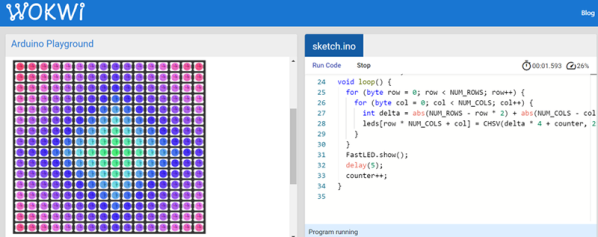
You are stuck at home quarantined and you want to do some Arduino projects. The problem is you don’t have all the cool devices you want to use. Sure, you can order them, but the stores are slow shipping things that aren’t essential these days. If you want to get a headstart while you are waiting for the postman, check out Wokwi’s Playground. For example, you can write code to drive a virtual NeoPixel 16×16 matrix. There’s even example code to get you started.

There are quite a few other choices in the playground including Charlieplexed LEDs, a keypad, and an LCD. There are also challenges. For example, in the traffic light challenge, you are given code that uses a task scheduler library to implement a traffic light. You have to add a turn signal to the code.

In addition to LEDs in various configurations, the site has some serial bus components, an LCD, a keypad, and a NeoPixel strip. There are also a few tools including an EasyEDA to KiCad converter and a way to share sourcecode similar to Pastebin.

Of course, simulations only get you so far, but the site is a fun way to play with some different I/O devices. It would be very nice if you could compose for the different components together, but you could work your code in sections, if necessary. You can do similar things with TinkerCad circuits. If you want to install software, there’s a simulator for you, too.

Commercial Circuit Simulator Goes Free

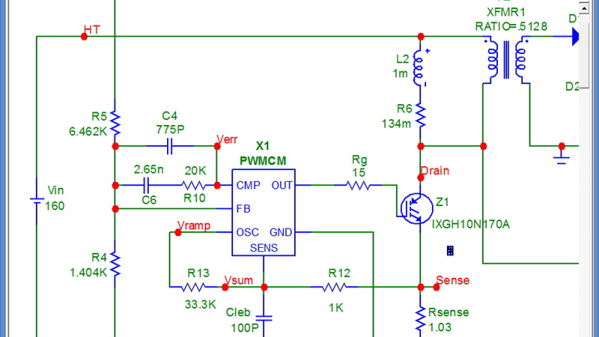
If you are looking for simulation software, you are probably thinking LTSpice or one of the open-source simulators like Ngspice (which drives Oregano and QUCs-S), or GNUCap. However, there is a new free option after the closing of Spectrum Software last year: Micro-Cap 12. You may be thinking: why use another closed-source simulator? Well, all the simulators have particular strengths, but Micro-Cap does have very nice features and used to retail for about $4,500.

The simulator boasts a multipage schematic editor, native robust digital simulation, Monte Carlo analysis, 33,000 parts in its library, worst-case and smoke analysis, Smith charts, and it can even incorporate spreadsheets. There’s a built-in designer for active and passive filters. Have a look at the brochure and you will see this is a pretty serious piece of software. And now it’s at least free as in beer.

Continue reading “Commercial Circuit Simulator Goes Free”

Circuit Simulation In Python

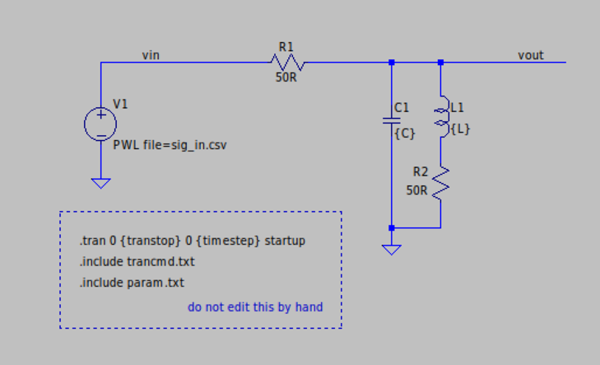
Using SPICE to simulate an electrical circuit is a common enough practice in engineering that “SPICEing a circuit” is a perfectly valid phrase in the lexicon. SPICE as a software tool has been around since the 70s, and its open source nature means there are more SPICE tools around now to count. It also means it is straightforward enough to use with other software as well, like integrating LTspice with Python for some interesting signal processing circuit simulation.

[Michael]’s latest project involves simulating filters in LTspice (a SPICE derivative) and then using Python/NumPy to both provide the input signal for the filter and process the output data from it. Basically, it allows you to “plug in” a graphical analog circuit of any design into a Python script and manipulate it easily, in any way needed. SPICE programs aren’t without their clumsiness, and being able to write your own tools for manipulating circuits is a powerful tool.

This project is definitely worth a look if you have any interest in signal processing (digital or analog) or even if you have never heard of SPICE before and want an easier way of simulating a circuit before prototyping one on a breadboard.

Darwin Approves: Berkeley Evolves Analog Design

Digital design is hard. But in the right environment, digital circuits are more forgiving than analog. That 3.3V signal coming out of the chip has to drop a lot along the way to not be a logic level at the destination. If you are trying to push the boundary then digital design has much of analog design, but mostly you get a bit of a pass on many things that plague analog designers. Berkeley’s AI research group has been experimenting with using deep learning to evolve analog IC design.

Analog ICs are plagued with noise sources and often don’t have the margins that digital circuit designers enjoy. According to the post by [Kourosh Hakhamaneshi], designers often build a few blocks and attempt to lay them out in a way that should work and meet other requirements. Then they employ simulation, make changes as required, and simulate again. Accurate simulations can be very time intensive. You can read the actual paper, too, should you want to dig into the details.

Continue reading “Darwin Approves: Berkeley Evolves Analog Design”

Circuit VR: Advanced Falstad Logic With Geniac

I find that if I’m trying to make a point with a student or a colleague about a circuit, sometimes the Falstad online simulator is worth a few thousand words. You can draw the circuit, play with the values, and even see the current flow in an intuitive way as well as make traditional measurements. The simulator not only handles analog but also digital circuits. At first glance, though, the digital functions appear limited, but if you dig deeper, there is a custom logic block that can really help. I dug into this — and into how switches work in the simulator — the other day in response to a Hackaday post. If you use Falstad, read on!

Continue reading “Circuit VR: Advanced Falstad Logic With Geniac”