Precision Frequency Measurement Library For 8-bit Microcontrollers

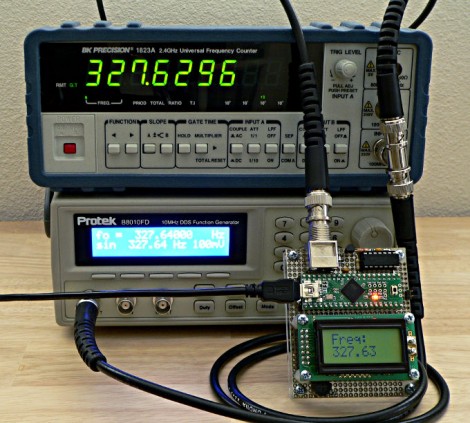
[Paul] has been working on porting over Arduino libraries for use with the Teensy microcontroller platform. This tends to be pretty simple since they both use the same Atmel chip architecture. But once in a while he finds the Arduino libraries are not what they’re cracked up to be. When looking to port over a frequency measurement library he ended up writing his own that works better and is much more portable.

He had two big beefs with the Arduino Frequency Counter Library. The first is that it required the compensation factor the be calibrated using an accurate frequency counter. That’s a chick-and-egg problem since many people who build a frequency counter with an Arduino are doing so because they don’t already have a standalone tool. The second problem is that the Arduino library was hardcoded for ATmega168 or ATmega328 chips.

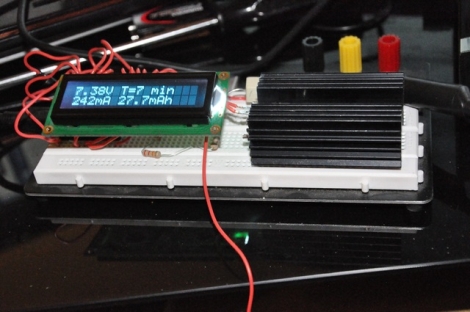
This new library fixes both issues with just one trade-off. Your hardware setup must be using a crystal oscillator. You can see above in the image above that the frequency measurement is quite accurate with this method. The package also uses a thin abstraction layer which will make it easy to port to any 8-bit microcontroller which is programmed in C.

Fixing Arduino’s Serial Latency Issues

arduino_latency

[Paul] wrote in to tell us about some interesting Arduino latency issues he helped nail down and fix on the Arduino.

It seems that [Michu] was having some problems with controlling his Rainbowduino project we featured earlier this year, and he couldn’t quite figure out why he was experiencing such huge delays when sending and receiving data.

Searching online for answers turned up very little, and since [Michu] was using Processing, the pair designed a set of tests to see what kind of latency was being introduced by Java. Pitting an Arduino Uno and an Arduino from 2009 against a Teensy 2.0, the tests gauged the latency of native data transfers versus transfers facilitated by Java via the rxtx library it uses for serial communications.

The results were pretty stunning. While both of the Arduinos lagged behind the Teensy by a long shot, their latency values under Java were always 20ms at a minimum – something didn’t add up. [Michu] poked around in the rxtx code and found a mystery 20ms delay programmed into the serial library. It made no sense to him, so he changed the delay to 2ms and saw a drastic increase in performance when transferring less than 128 bytes of data.

The pair’s fix doesn’t seem to affect latency when larger amounts of data (>1kB) are being transferred, but it makes a world of difference when manipulating smaller chunks of data.

For the sake of disclosure, it should be noted that [Paul’s] company produces the Teensy mcu.

Tricycle Robot Using Omni-wheels

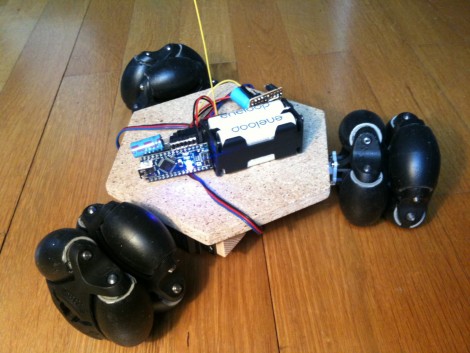
[Markus Gritsch] built this six-wheeled robot using omni-wheels. Two wheels are used on each axis in order to ensure perpendicular rotation is possible no matter where the axis rotation stops. The wheels have also been improved by dipping the elliptical components to give them a rubbery coating.

The robot gets its commands wirelessly from a separate controller unit. That controller, as well as the bot seen above, uses a Teensy microcontroller board. Two analog sticks take input from the operator and transmit commands using an inexpensive RF pair. The wheel movement is facilitated by three servo motors which may seem like an odd choice. But we think that it simplifies the electronic side of the build because you do not need an H-bridge to control a servo motors. It’s a bit loud, as you can hear in the video after the break, but it certainly works quite well.

One of the commenters on the thread above asks why [Markus] didn’t use mechanum wheels. These would have allowed him to use just one wheel on each axis but the omni-wheels were so inexpensive that he went this route instead.

Continue reading “Tricycle Robot Using Omni-wheels”

Battery Capacity Tester Lifts The Veil On Manufacturer Capacity Claims

battery_cap_tester

[Nick] was tasked with building a battery capacity tester by one of his teachers in order to test some aftermarket batteries that were purchased for their Vex robotics lab. The batteries were cheaper than the official version, but boasted more than twice the capacity. Fairly skeptical of the rating, he got to work designing his circuit.

He originally planned on discharging the battery through a resistor and measuring the voltage with a PIC microcontroller. After prototyping the circuit, he found that the PIC did not have enough storage space for the data he was collecting, and that there were issues with fluctuating current as the voltage decreased.

Undeterred, he built a new tester using a Teensy microcontroller and a different discharging circuit using a LM317T. This second version not only included an LCD screen to track the discharging process in real-time, but it also dumps all of the data and calculations to a spreadsheet on the computer connected to the Teensy.

The capacity tester works pretty well, according to [Nick]. He says that most batteries overestimate their capacity, and that his meter is getting readings within an acceptable variance when testing known good batteries. What about those knock-off batteries from China?  He discovered that they can hold about half the charge that they claim – it’s a good thing he decided to test them out!

While he provides the software he used for the tester, there are no schematics to be found. Check out some of the other battery capacity testers we have featured in the past for tips on building one yourself.

IR-controlled Musical Alarm Clock

Music-Playing-Alarm-Clock

Forum user [Frank] shared with us his recent project, a musical alarm clock. More than just a simple alarm clock, his creation allows the user to load music onto a micro SD card, has alarm settings for each day of the week, and best of all, can be controlled using an IR remote. He uses a Teensy++ to control most of the clock’s functions including the display, delegating the time keeping to a DS1307 real-time clock. All of the audio playback is handled by a separate music decoder mounted on a breakout board.

His Instructables writeup is extremely detailed, with tons of annotations, pictures, diagrams, and source code available. He walks through each step in detail, making this a great learning guide for others looking to start in on AVR programming.

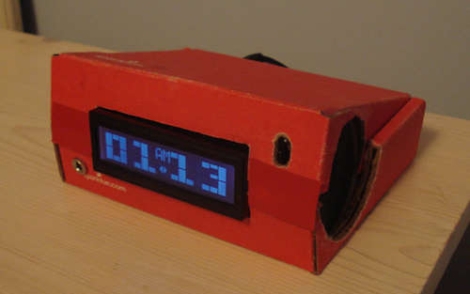
His final presentation is a great lesson in recycling, though unfortunately a bit lackluster, as the clock is packaged in an old SparkFun cardboard box. He does mention that there were some time constraints towards the end, which may explain this choice – it would be nice to see a revised version of this clock packaged in a nice plexi case.


What Development Board To Use? (Part Two)

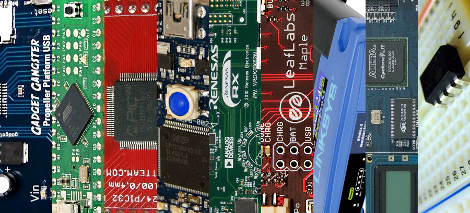
We asked for responses to our last Development Board post, and you all followed through. We got comments, forum posts, and emails filled with your opinions. Like last time, there is no way we could cover every board, so here are a few more that seemed to be popular crowd choices. Feel free to keep sending us your favorite boards, we may end up featuring them at a later date!

Continue reading “What Development Board To Use? (Part Two)”

Teensy Can School You At Guitar Hero

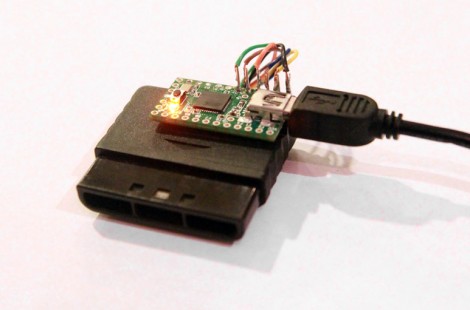
[Johnny Chung Lee] put together a system that is perfect at playing Guitar Hero. He’s using the PlayStation 2 version and, as you can see above he’s combined a controller connector and a Teensy microcontroller board to communicate with the console using its native SPI protocol. This custom guitar controller receives its signals via USB from a computer that is monitoring the video from the console and calculating the controller signals necessary for perfect gameplay. [Johnny] wrote an OpenCV program that monitors the video, removes the perspective from the virtual fretboard, and analyzes color and speed of the notes coming down the screen.

As you can see after the break it works like a charm. It’s fun from a programming standpoint, but if you want a hack you can actually play maybe you should build your own Banjo Hero.

Continue reading “Teensy Can School You At Guitar Hero”