Ever wanted to be able to launch a balloon into space, track its location via GPS, take some photographs of the curvature of the earth, and recover the balloon, all for the low low cost of $150? [Oliver Yeh] sent in his teams project, Icarus, which does just that. The group of MIT students found that they could use a weather balloon filled with helium to reach heights of around 20 miles above the earth; their particular balloon achieved 93,000 feet (17.5 miles). Then, utilizing only off the shelf components with no soldering, conjured up a GPS tracker using a Motorola i290 Prepaid Cellphone. They then used a Canon A470 loaded with the chdk open source firmware to take pictures. After seeing the results of their launch, the team hopes that this could rejuvenate interests in science and the arts.
[Gary Honis] has been modifying his Canon Digital Rebel XSi in order to do astrophotography. He previously removed the IR filter and replaced it with a Baader UV-IR cut filter that lets most infrared light through. However, in order to reduce noise in the pictures, he had to cool the camera down. He based the project on a peltier cooler that he salvaged from a powered beverage cooler. He made a small aluminum box and insulated it with styrofoam to hold the camera body. The peltier cooler was then attached on the side. It takes just over an hour to cool the camera down to 40 degrees, but the shots come out a lot clearer.
has released a new firmware for the Canon 5D Mark II DSLR geared toward film makers. The stock firmware was very limited on the audio side. This firmware adds features such as live VU meters, reduced audio noise, and crop marks for filming in different formats. The firmware is written in a manner that it can be extended fairly easily. Hopefully this will turn out to be as helpful as CHDK has been for point and shoot cameras.
Cockeyed.com is a peculiar site. It is spattered with links in an almost unintelligible manner, but if you dig hard enough, or just click randomly, you can find some pretty fun stuff. One nice writeup they’ve done is how to replace the lens in their point and shoot camera. This one happens to be a Canon Powershot sd750, but it will give you an idea about how difficult it can be for any point and shoot. The lens assembly couldn’t be replaced until almost every single piece had been disassembled. There are tons of pictures showing the process and the final result. Though the install was a success, his replacement lens was already beat up pretty bad. Looks like he’ll have to go through it all again.
[Chris] wanted to do some macro photography, but found the price tag off putting. He was looking at roughly $800 for a decent macro lens. Instead, he decided to build his own. He wanted to build a lens that could be removed and used just like his normal lenses. He picked up a standard Canon AF lens for $10 to start with. He has posted detailed steps on how he modded it to work, and you can see the results are quite stunning. Great job [Chris]. If you want to try your hand at macro photography but don’t think you can pull of a job like this, you might want to check out the pringles can macro lens.
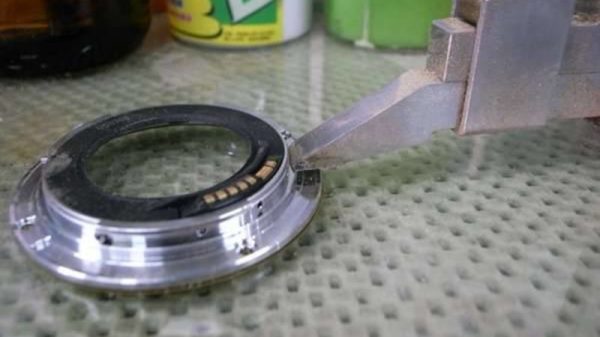
[Peter] sent in this really slick project where he ads an FD lens mount to a cannon EOS D60. He already had a collection of nice lenses and didn’t want to waste them. After finding some a donor camera for the FD mount, he purchased a cheap D60 to graft it onto. While his first impulse was to simply glue the new mount onto the front of the camera, it was evident that this would hold the lenses too far from the sensor. The camera went under a bit for a while and luckily, no real damage was done to the mirror housing. The final result seems to work very well, there are example galleries available on his site.
We covered [Steve Chapman]’s Nintendo DS control for his Canon DSLR in September. He’s since improved the software so that it has a timer for sunset/sunrise amongst other things. He also shot about 30GB worth of timelapse images while in Vancouver and assembled a couple test videos. He’s still working out the processing to take full advantage of the 15megapixel images. We look forward to future results since YouTube is now using a much larger player for high def content.
Both Canon and Nikon recently released DSLR cameras that now include a feature that most consumer level digital cameras have had for sometime: the ability to record movies. What makes movie recording especially appealing on a DSLR is the wide selection of lenses available to get the look you’re after. If you’re an owner of Canon’s 40D you may want to follow [DataGhost]’s progress on the CHDK forum as he is currently working on bringing this function to the 40D.
While [DataGhost] has a working proof of concept he notes that there are still some issues pertaining to the camera powering down while recording a video, autofocusing, and writing to the memory card. Aside from this, [DataGhost] has made considerable progress and is considering adding custom user settings via the mode dial to really give some creative control. We’re excited about this hack and can’t wait for its release to the general public.
Currently the software supports bracket shooting as well as bulb mode. [Steve] points out that he is currently testing an audio based trigger system using the mic built into the DS and the software is still a work in progress.
While the weight saving benefits of using a DS instead of a notebook are obvious, there are things you do give up going this route. Traditionally, when you tether a camera to a computer the photos are saved directly to the computer where you can view the image on a much larger monitor. With the DS, it seems all you can do is remotely trigger the camera. Given the size and resolution of the screens maybe that’s all it can do.
So you got CHDK working on your camera, and the histograms, raw image files, variable shutter speeds and other added functions are amazing, but stereo imaging is what you really want. If you have two or more CHDK-ready cameras, it’s cheap and easy to run StereoData Maker, a system that synchronizes the shutter and flash of multiple cameras.
The first step in getting SDM to work is installing the software on your SD card. You’ll need to find the correct version for you camera; a list is available on the main SDM page. If you are running Windows XP or Vista, run the installer in the zip file. Otherwise, load the files on the SD card and run the installer directly from the camera. Then decide whether this will be the right or left camera and repeat the steps for your second camera.
Next, you’ll need to prepare a switch unit, essentially a set of synchronized USB remotes. There are many ready made commercial units available, but building one on your own shouldn’t be much trouble, and a few ideas are provided on the SDM instruction page.
You’re basically ready to start shooting stereo images, just take a few test shots to get used to it and to customize the configuration on the cameras.