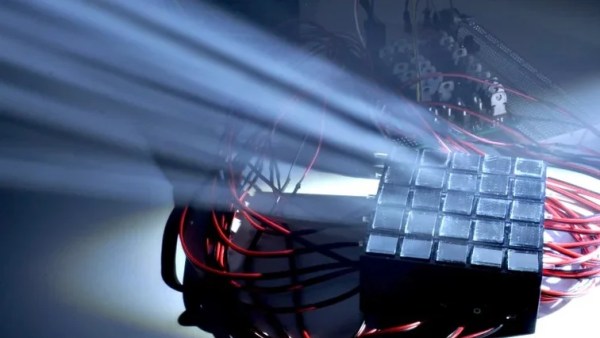
[Ben] told us about his POV globe yesterday. We took a look and saw just one photo and the code with no real explanation of his project. He certainly set to work over night and now we see all the goodies we look for in a great build log. He even threw the Hackaday logo up for our enjoyment. His build is well executed and he found some creative ways around the common problems in these projects. We take a closer look after the break. Read the rest of this entry »
Everyone loves a good LED matrix hack, and we’ve seen our fair share, but never a 16 by 24 hand soldered SMD one. [bear24rw] and his team needed a project reflecting the interests of one of his classes, being an EE major, an LED matrix was just the ticket. Based on this instructable, he was able to cobble together a driver board; the code however was unacceptable, and he came up with a double buffer array solution. You can grab the eagle file and source code here, while you’re at it check out a quick video after the break.
Circuit Ideas Design has posted a digital picture frame project based on their 240×320 16-bit color QVGA display. We made our own digital frame from a smaller screen a while back and this is pretty much the same implementation except with a larger screen and built around the AVR family of microcontrollers rather than PIC controllers.
The thing that piqued our curiosity was the five icons silk screened on one end of the display. That’s right, this is a touch screen. The board also has a built in SD slot and a bit of flexibility for connecting to a microcontroller. It can be controlled from a 40-pin header, or from headers that are designed to work as an Arduino shield. We’d love to get our hands on one but we were unable to figure out what currency the list price was in. Has anyone used this board yet?
[Dave Vondle] from IDEO Labs sent in the large LED pixel wall he built using BlinkM modules, an Arduino, and Flash to control it. The overall result is a blindingly bright, large, public display for people to interact with. The best part about the project is that [Dave Vondle] documents everything; from hardware to schematics to source code. Unfortunately, he was forced to remove the wall due to construction, but since every part of the project is open source, it lends itself to be easily recreated. I’m sure we’d all like to see a wireless controller hookup to play pong on the streets of Chicago.
This is an interesting little toy. A tiny board that can display text on an oscilloscope. The components, or rather just component, is a PIC16F628A. Aside from a power supply, that’s it. It can display 10 characters at a time and, as you can see above, scroll them as well. We don’t really know of a practical use for this, but it would make a nice practical joke tool. If you want some more complicated oscilloscope effects, check out Tennis for Two.
[Spikenzie] has created an 8×8 LED array that fits inside an ikea frame. He multiplexed the 64 red LEDs on a PCB with connections on the back. He then used a MAX7129, an LED multiplexer and driver, driven by a PIC over SPI to do animations and play pong. He then encased the array in laser-cut cardboard and white acrylic to get large dots. This entire assembly was then placed inside an Ikea RIBBA picture frame. The result is an aesthetic homebrew display that is easy to control.
This digital thermometer won’t win any awards for being something innovative and new, but we really like how it looks. The bar graph style display adds something to the project that a normal character display just wouldn’t. You can download source code and schematics on the site.
[fibra] has been slowly building a custom controller for his motorcycle. It’s an automated chain oiling system that varies application based on RPM. The LCD can show wheel RPM, voltage, time, date, air, and engine temperature. A separate driver board has a MOSFET for controlling the oiling valve. The real gold here is the attention to detail. He built a one off circuit board. The case is laser cut acrylic that he then shaped. The box is molded smoothly into the original instrument cluster using epoxy. It’s excellent work that could be mistaken for a commercial product.
Remember the 2 meter POV display? Well, that same group of students are at it again. This is the display they built for parties. It is 5 meters wide and 2.5 meters tall, 240 LEDs, controlled by 40 AVR ATmega48s. This is pretty nice. We think next time they should go for RGB.
[Aaron] a google employee came up with an idea that would be good for the environment, as well as fun. The Radish is a solar powered display, updated from a google calendar, with extremely low power consumption. They are building this to be an indicator of the conference room schedule. When we first read this, we wondered just how much greener it could possibly be than printing a few sheets of paper. Then we read that they were going through six reams per day. wow. The Radish gets its power through a solar panel, and preserves it through some creative power saving modes and the fact that it has an LCD that only requires power to update. Would this be a good place for some E paper? Data is transferred using IEEE 802.15.4, which is slow, but also more efficient in terms of power than normal WiFi. The system is so efficient, it can run for 3-4 days in low light conditions after a charge . Another cool fact is that [Aaron] got to design and build this on company time. Google allows people to spend 20% of their time on innovative new projects of their choice.
correction: the LCD goes into an extremely low power “sleep mode” when not being updated, and retains the last image loaded.