Count Your Zombies! A Left4Dead 2 Stat Tracker

Sure, you’re getting further and further into the game and finishing missions, but the true progress for a zombie shooter is how many zombies you’ve killed, right? [Evan Juras] agreed, so he set off to build a hardware stat tracker for Left4Dead 2!

Left4Dead 2 tracks a bunch of stats and at the end of each level, those stats are updated on your Steam page. [Evan] used a Python script running on a Raspberry Pi to connect to the internet and grab four different stats from your Steam profile. Those stats are displayed on an RGB 16×2 display. To house the project, a case for it was designed and [Evan] had it 3D printed. There are two buttons on the case: one to update the stats and another to cycle through them. If no buttons are pressed then the display cycles through the stats every minute and updates the stats every 24 hours.

The video below shows a summary of the build process and describes the hardware and software used. [Evan] has plans for tracking stats from other games through Steam and his python code is available on Github. Python is becoming the go-to tool for interacting with video game bots and now, stats — see this list of Pokemon Go bots. Also, check out this feature about running MicroPython on an ESP8266 if you wanted to build something similar to this without the Raspberry Pi.

Continue reading “Count Your Zombies! A Left4Dead 2 Stat Tracker”

How To Use A Photo Tachometer

If you’re into anything even vaguely mechanical on the broad hacking spectrum, you’ve come into contact with things that spin. Sometimes, it’s important to know precisely how fast they are spinning! When you’ve got the need to know angular speed, you need a device to measure it. That device is a tachometer. And the most useful tachometer is the non-contact photo-tachometer.

Continue reading “How To Use A Photo Tachometer”

The Custom Clicky Shortcut Keypad

You’re not cool unless you have a mechanical keyboard. Case in point: if you were to somehow acquire an identical keyboard to the one I used to type this, it would set you back at least seven hundred dollars. Yes, it’s mechanical (Topre), and yes, I’m cooler than you. Of course, you can’t be as cool as me, but you can build your own mechanical keyboard. [Robin] is, I presume, a pretty cool dude so he built his own keyboard. It’s the amazing shortcut keyboard, and it can be programmed graphically.

The idea for this keyboard came when [Robin] was studying as an engineer. We assume this is code for wearing out the Escape key on AutoCAD, but many other software packages have the same problem. The solution to [Robin]’s problem was a shortcut keypad, a 3 by 4 matrix of Cherry switches that could be programmed for any task.

The design of this keyboard started out as an Adafruit Trellis matrix keypad. This was combined with some software written in Processing that assigned macros to each button. This was a sufficient solution, but the switches in the Adafruit trellis look squishy. These are not the right switches for someone who craves a soft snap under every fingertip. It’s not the keyboard of someone who desires the subtle thickness of laser etched PBT keycaps. The Adafruit keypad doesn’t have the graceful lines of a fully sculpted set of keycaps. Oh my god, it’s doubleshot.

[Robin]’s completed keyboard has gone through a few revisions, but in the end, he settled on PCB-mounted switches and a very clever 3D printed standoff system to hold an Arduino Pro Micro in place. The enclosure, too, is 3D printed, and the end result is a completely custom keyboard that’s perfect for mashing key combos.

You can check out a video of this keyboard in action below.

Continue reading “The Custom Clicky Shortcut Keypad”

Are You Down With MPPT? (Yeah, You Know Me.)

Solar cells have gotten cheaper and cheaper, and are becoming an economically viable source of renewable energy in many parts of the world. Capturing the optimal amount of energy from a solar panel is a tricky business, however. First there are a raft of physical prerequisites to operating efficiently: the panel needs to be kept clean so the sun can reach the cells, the panel needs to point at the sun, and it’s best if they’re kept from getting too hot.

Along with these physical demands, solar panels are electrically finicky as well. In particular, the amount of power they produce is strongly dependent on the electrical load that they’re presented, and this optimal load varies depending on how much illumination the panel receives. Maximum power-point trackers (MPPT) ideally keep the panel electrically in the zone even as little fluffy clouds roam the skies or the sun sinks in the west. Using MPPT can pull 20-30% more power out of a given cell, and the techniques are eminently hacker-friendly. If you’ve never played around with solar panels before, you should. Read on to see how!

Continue reading “Are You Down With MPPT? (Yeah, You Know Me.)”

Neural Network Composes Music; Says “I’ll Be Bach”

[carykh] took a dive into neural networks, training a computer to replicate Baroque music. The results are as interesting as the process he used. Instead of feeding Shakespeare (for example) to a neural network and marveling at how Shakespeare-y the text output looks, the process converts Bach’s music into a text format and feeds that to the neural network. There is one character for each key on the piano, making for an 88 character alphabet used during the training. The neural net then runs wild and the results are turned back to audio to see (or hear as it were) how much the output sounds like Bach.

The video embedded below starts with a bit of a skit but hang in there because once you hit the 90 second mark things get interesting. Those lacking patience can just skip to the demo; hear original Bach followed by early results (4:14) and compare to the results of a full day of training (11:36) on Bach with some Mozart mixed in for variety. For a system completely ignorant of any bigger-picture concepts such as melody, the results are not only recognizable as music but can even be pleasant to listen to.

Continue reading “Neural Network Composes Music; Says “I’ll Be Bach””

Can You Bull’s-Eye A Womprat With A Bean Bag?

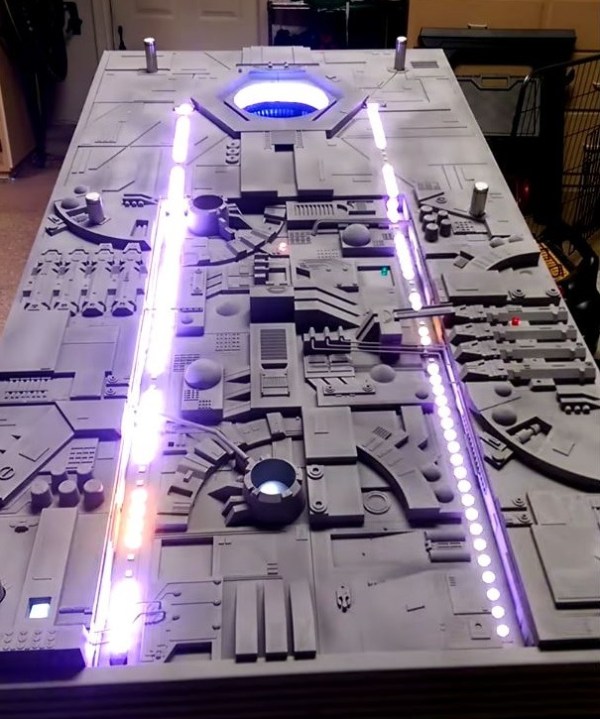
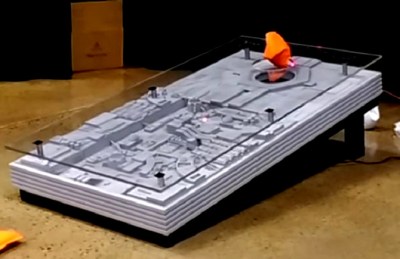
As it turns out, a simple game of cornhole — aka, bean bag toss — can have some pretty high stakes. If you lose a round playing on this Death Star trench run cornhole table, the Rebel Alliance may pay the price.

Designed and built by [Hyperdynelabs], the table is set up to play a number of audio clips from the movie with accompanying light effects. Details on how it was made are scant, but there are at least three strips of RGBW LEDs — two that run the length of the board and one inside the exhaust port — an Arduino(presumably), and some sort of wireless connectivity to receive commands.

But it’s not just the electronic effects that make this one great. The physical build itself really nails the Death Star trench run look. This is thanks to artful use of greebles — it’s the same technique which can turn a Nissan into a Z-Wing.

When you make a shot worthy of Luke Skywalker, you’re treated to an impressive lightshow and the sound of the Death Star exploding. For a particularly bad turn, you can have the table charge up and make a show of firing back, or taunt the player if their shot goes wide.

Continue reading “Can You Bull’s-Eye A Womprat With A Bean Bag?”

PiSound, The Audio Card For The Raspberry Pi

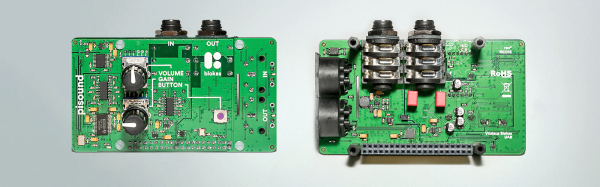
Kids today are being loud with their ‘drum machines’ and ‘EDM’. Throw some Raspberry Pis at them, and there’s a need for a low-latency sound card with MIDI and all the other accouterments of the modern, Skrillex-haired rocker. That’s where PiSound comes in.

Of course, the Pi already comes with audio out, but that’s not enough if you want to do some real audio processing. You need audio in as well, and while you’re messing around with that, adding some high-quality opamps, ADCs, DACs, and some MIDI would be a good idea. This is what the PiSound is all about.

[Pranciskus], the guy who has been working on the PiSound for a while now, developed this multitool for audio on a tiny Linux system. One of the killer features on the PiSound is ‘The Button’, a simple tact switch that runs a script if the button is pressed, another script if the button is held down, and two more if the button is pressed two or three times. This is actually a pretty nifty UI, and we wouldn’t mind seeing this on a few more Pi accessories.

If you’d like to see some example projects using the PiSound, there example MIDI controllers, networked audio players, and some goofing around with LV2 plugins over here.