A Single Pixel, Color Digital Camera

[Ben] has written all sorts of code and algorithms to filter, sort, and convolute images, and also a few gadgets that were meant to be photographed. One project that hasn’t added a notch to his soldering iron was a camera. The easiest way to go about resolving this problem would be to find some cardboard and duct tape and built a pinhole camera. [Ben] wanted a digital camera. Not any digital camera, but a color digital camera, and didn’t want to deal with pixel arrays or lenses. Impossible, you say? Not when you have a bunch of integral transforms in your tool belt.

[Ben] is only using a single light sensor that outputs RGB values for his camera – no lenses are found anywhere. If, however, you scan a scene multiple times with this sensor, each time blocking a portion of the sensor’s field of view, you could reconstruct a rudimentary, low-resolution image from just a single light sensor. If you scan and rotate this ‘blocking arm’ across the sensor’s field of view, reconstructing the image is called a Radon transform, something [Ben] has used a few times in his studies.
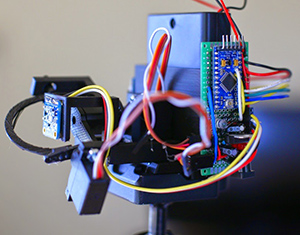
camera [Ben]’s camera consists of the Adafruit RGB light sensor, an Arduino, a microSD card, a few servos, and a bunch of printed parts. The servos are used to scan and rotate the ‘blocking arm’ across the sensor for each image. The output of the sensor is saved to the SD card and moved over to the computer for post-processing.

After getting all the pixel data to his laptop, [Ben] plotted the raw data. The first few pictures were of a point source of light – a lamp in his workspace. This resulted in exactly what he expected, a wave-like line on an otherwise blank field. The resulting transformation kinda looked like the reference picture, but for better results, [Ben] turned his camera to more natural scenes. Pointing his single pixel camera out the window resulted in an image that looked like it was taken underwater, through a piece of glass smeared with Vaseline. Still, it worked remarkably well for a single pixel camera. Taking his camera to the great outdoors provided an even better reconstructed scene, due in no small part to the great landscapes [Ben] has access to.


High Altitude Balloon Keeps Going

Here’s a post from the AMSAT-UK high altitude balloon blog. It’s a great story about a balloon cruising at about 12km above the Earth completing its sixth circumnavigation of the planet. That post is from October 4th, and two weeks later the balloon is still going strong. Right now it’s over the Baltic heading into Russia with no sign of stopping or popping any time soon.

globeThe balloon was launched July 12, 2014 from Silverstone, UK. In the 100 days since then, this balloon has covered 144168 kilometers and has crossed its launching longitude six times. Even if this balloon weren’t trapped at high latitudes (including coming within 9 km of the pole), this balloon has still travelled more than three times the equatorial circumference of the Earth.



The balloon was built by [Leo Bodnar] a.k.a. [M0XER] with a self-made plastic foil envelope. The solar-powered payload weighs only 11 grams. It’s an exceptional accomplishment and one that has smashed all the amateur high altitude balloon distance records we can find.

Hackaday Links Column Banner

Hackaday Links: October 19, 2014

Introducing the Hayes Smartmodem 1200. The era of the single station microcomputer…. is over. The Hayes Smartmodem offers advanced features like auto answer and auto dial. Now if we could only find an ‘RS-232 Computer.’

Have a 3D printer and an old router? How about controlling your printer with Octoprint? For some cases, it might be better than using a Raspberry Pi and OctoPi, but you won’t get a camera for streaming pics of your builds to the web.

Last year, [CNLohr] built a microscope slide Minecraft thing and in the process created the smallest Minecraft server ever. The record has now been bested with the Intel Edison. There’s a bit of work to install Java, but the performance is pretty good for one player. Bonus: Minecraft is a single threaded app, so you have another core for garbage collection.

Remember the Scribble pen, that showed just how gullible people are and how crappy tech journalism is? They’re back with a beta program. A mere $15 guarantees you a scribble pen for their beta program. I wouldn’t give these guys $15 of someone else’s money, but lucky for us [ch00f] bit the bullet. He’ll be updating everyone on the status of his fifteen dollars, I’m sure.

Hey, guess what will eventually be in the Hackaday store? Keycaps for your mechanical keyboard. Yes, we actually figured out a way to do this that makes sense and won’t lose money. Pick your favorite, or suggest new ones in the comments:
keycaps

BSAPEDWLOVKTUB.YBKAB

Playing Doom (Poorly) On A VoCore

Last May brought the unastonishing news that companies were taking the Systems on Chip found in $20 wireless routers and making dev boards out of them. The first of these is the VoCore, an Indiegogo campaign for a 360MHz CPU with 8MB of Flash and 32MB or RAM packaged in a square inch PCB for the Internet of Things. Now that the Indiegogo rewards are heading out to workbenches the world over, it was only a matter of time before someone got Doom to run on one of them.

After fixing some design flaws in the first run of VoCores, [Pyrofer] did the usual things you would do with a tiny system running Linux – webcams for streaming video, USB sound cards to play internet radio, and the normal stuff OpenWrt does.

His curiosity satiated, [Pyrofer] turned to more esoteric builds. WIth a color LCD from Sparkfun, he got an NES emulator running. This is all through hardware SPI, mind you. Simple 2D graphics are cool enough, but the standard graphical test for all low powered computers is, of course, Doom.

The game runs, but just barely. Still, [Pyrofer] is happy with the VoCore and with a little more work with the SPI and bringing a framebuffer to his tiny system, he might have a neat portable Doom machine on his hands.

Replacing The Lead In A Motorcycle Battery With Supercaps

[Raphael] has a motorcycle he’s constantly working on, and for him that means replacing the battery occasionally. Tired of the lead-acid batteries that have been used for 100 years now, he took a look at some of the alternatives, namely lithium and the much cooler supercapacitor option. A trip to the local electronics distributor, and [Raphael] had a new supercapacitor battery for his bike, and hopefully he’ll never need to buy another chunk of lead again.

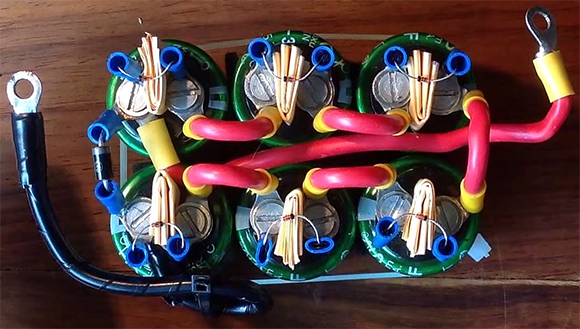
The battery pack is built from six 2.7V, 350F caps, a few connectors, and a handful of diodes. These are lashed together with rubber bands to form a 16V, 58F capacitor that makes for a great stand-in for a chunk of lead or a potentially puffy lithium battery.

[Raphael] put up a walkthrough video of his battery pack where he shows off the enclosure – an old, empty lead acid cell. He also goes through the back current protection and his method of balancing the supercaps with a few diodes.

The Network Of 1-Wire Devices

teensynet

[jimmayhugh] is a homebrewer and has multiple fermentation chambers and storage coolers scattered around his home. Lucky him. Nevertheless, multiple ways of making and storing beer requires some way to tell the temperature of his coolers and fermenters. There aren’t many temperature controllers that will monitor more than two digital thermometers or thermocouples, so he came up with his own. It’s called TeensyNet, and it’s able to monitor and control up to 36 1-wire devices and ties everything into his home network.

Everything in this system uses the 1-Wire protocol, a bus designed by Dallas Semiconductor that can connect devices with only two wires; data and ground. (To be a fly on the wall during that marketing meeting…) [jimmay] is using temperature sensors, digital switches, thermocouples, and even a graphic LCD with his 1-wire system, with everything controlled by a Teensy 3.1 and Ethernet module to push everything up to his network.

With everything connected to the network, [jimmay] can get on his personal TeensyNet webpage and check out the status of all the devices connected to any of his network controllers. This is something the engineers at Dallas probably never dreamed of, and it’s an interesting look at what the future of Home Automation will be, if not for a network connected relay.

The Economics Of Fuzz Testing With The Intel Edison

The Intel Edison is an incredibly small and cheap x86 computing platform, and with that comes the obvious applications for robotics and wearable computing. [mz] had another idea: what if the Edison could do work that is usually done by workstations? Would it make economic sense to buy a handful of Edisons over a single quad-core Xeon system?

[mz] thought the Edison would be an ideal platform for fuzz testing, or sending random, automated data at a program or system to figure out if they’ll misbehave in interesting ways. After figuring out where to solder power and ground wires to boot an Edison without a breakout board, [mz] got to work benchmarking his fuzz testing setup.

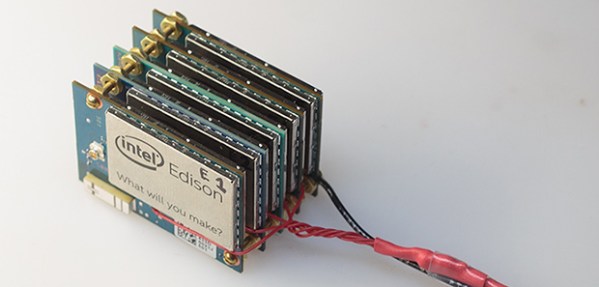
Comparing the benchmarks of a fuzzing job running on the Edison and a few servers and workstations, calculations of cost-efficiency worked out well for this tiny x86 system on module. For parallelizable tasks, the Edison is about 8x less powerful than a reasonably modern server, but it’s also about 5-8x cheaper than a comparable desktop machine. Although renting a server is by far the more economic solution for getting a lot of computing power easily, there are a few use cases where a cluster of Edisons in your pocket would make sense.