Stacking GPS, GSM, And An SD Card Into An Arduino Shield

A few years ago, [Phang Moh] and his compatriots were asked by a client if they could make a vehicle tracking device for oil tankers all around Indonesia. The request of putting thousands of trackers on tanks of explosives was a little beyond [Phang Moh]’s capability, but he did start tinkering around with GPS and GSM on an Arduino.

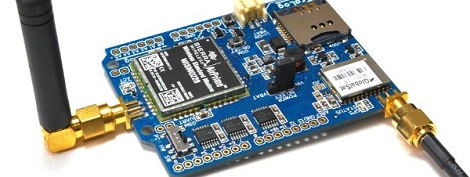
Now that tinkering has finally come to fruition with [Phang]’s TraLog shield, a single Arduino shield that combines GPS tracking with a GSM and GPRS transceiver. There’s also an SD card thrown in for good measure, making this one of the best tracking and data logging shields for the Arduino.

The shield can be configured to send GPS and sensor data from devices attached to an I2C bus to remote servers, or a really cool COSM server. [Phang] is selling his TraLog for $150, a fairly good deal if you consider what this thing can do.

Seems like the perfect piece of kit for just about any tracking project, whether you want to know the location of thousands of oil tankers or just a single high altitude balloon.

Tip ‘o the hat to [Brett] for finding this one.
Hackaday Retro Edition Roundup

It’s time for another update chronicling the adventures and misadventures of getting really old computers to load our retro edition!

First up is [Andrew Hull] and his brilliant use of a Raspberry Pi to get an old Psion 5mx PDA on the Internet. The Raspi served as a wireless bridge, taking in Internet from a WiFi dongle and sending it back out via a serial port. Here’s a great guide for enabling PPPD on the Raspi, and giving just about anything with a serial port an Internet connection.

It may push the limits of being a retro submission, but [Glen]’s use of a modem to get on the Internet calls to us like a siren song.

Did you know Corel made computers? Well, [Victor] has one, and it’s actually a pretty interesting machine. ARM processor, an actual hard drive, and dual Ethernet ports. It was built in the late 90s and the hard drive has since died, but [Victor] booted it into Red Hat over his network and loaded up our retro site.

Finally, we come to [Greg]’s submission. He could have sent in a Mac SE/30 submission, but figured that was old hat (do you see one on there, [Greg]. No. And it’s the best computer Apple will ever make). Instead, he had an old Powerbook Duo 2300c with a Duo 230 screen lying around.

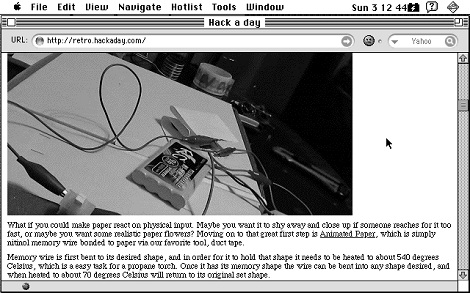
Powerbook Duos are pretty weird; they only had two ports – a single DIN-8 serial port and a dock connector. [Greg] had a Powerbook Duo dock that surprisingly had an Ethernet port. Third-party peripherals to the rescue, it seems. After plugging his Duo to his network and launching iCab, [Greg] was able to browse both the retro and main Hackaday editions. Picture Not bad for the smallest laptop Apple made before the Air.

Oh, [Greg] was also cool enough to write a tutorial for getting just about every Macintosh on the Internet. We’ve put that up on the retrocomputing guide portion of our retro site, and we’re always looking for new submissions.

You can check out the pics from all these submissions in a Web 2.0 WordPress gallery after the break, or head on over to the retro site and view them the way the gods of HTML intended.

Continue reading “Hackaday Retro Edition Roundup”

Creating A MIDI Synth From A Commodore SID

The Commodore SID was the audio chip in the venerable Commodore 64 and in the 30 years since release has attained classic status and become one of the best ways to get your chiptune on. Designed by famous synthesizer designer [Bob Yannes], it was only a matter of time before we saw a real, homebrew MIDI synth based on the Commodore SID.

Because real SID chips are rare as hen’s teeth nowadays, [Jeff Ledger] built his SID synth around an emulated system running on a Pocket Mini Computer. This very cool microcontroller platform runs on the Parallax Propeller. An emulated SID runs in one of the Propeller’s 8 cores, with the remaining cores kept open for reading MIDI notes and displaying info on a display.

The hardware portion of this build is amazingly simple; just an optoisolater, a few resistors, and a diode connect a MIDI keyboard to the Pocket Mini Computer. The buttons and dials on [Jeff]’s MIDI keyboard control the waveforms, filters, and envelope controls. A very neat setup if we do say so ourselves, and just perfect if you’re needing more chiptunes in your life.

You can check out [Jeff]’s video after the break.

Continue reading “Creating A MIDI Synth From A Commodore SID”

Android Debug Bridge Released For The Raspi

Over on the XDA developers forums, something really cool is happening. Android hacker extraordinaire [AdamOutler] has managed to port the Android Debug Bridge to the Raspberry Pi.

The Android Debug bridge allows hardware tinkerers full access to their Android device. This feature has been used to build everything from telepresence robots to connecting a MIDI keyboard to a phone. With this port of the Android Debug Bridge, anyone can take advantage of the existing hacks and hardware written around the ADB to build something completely new.

Of course, the port of the Android Debug Bridge is only useful if your Raspi is running Android. Current Android builds for the Raspberry Pi are janky at best, but the current rate of progress does look encouraging. Hopefully with the most useful Android tool ported to everyone’s favorite credit-card sized computer, the progress of the Raspi/Android builds will pick up their pace.

Reading An N64 Controller With A Microcontroller

We’ve seen NES, SNES, Sega, and just about every weird controller Atari put out connected to microcontrollers, but connecting the N64 controller to a project has remained one of those seldom-seen, rarely copied endeavors, not often tackled by makers around the globe. [Pieter-Jan] decided to throw his hat in the ring and give reading an N64 controller with a PIC a try, and we’re pleased to report he’s been completely successful.

One of the difficulties of reading an N64 controller is simply the speeds involved; with only three pins on the controller port, the N64 controller uses a serial protocol to send 32 bits of controller data at a fairly fast rate. Armed with a PIC18F ‘micro, [Pieter] realized that programming in C would be too slow, he needed to go all the way down to the bare metal and program his micro in assembly.

Every time the N64 controller data needs to be read, the console sends out a 9-bit polling request. The controller responds in turn with a 32-bit sequence informing the console of the status of all the buttons and joysticks. Once [Pieter] got his micro sending the correct polling response, it was only an issue of parsing the data returned from the controller.

Right now, [Pieter] has a small demo board rigged up that flashes a LED whenever the A, B, or Z buttons are pressed. This can be expanded to the remaining buttons and joystick, but for now we’ll just enjoy [Pieter]’s demo after the break.

Continue reading “Reading An N64 Controller With A Microcontroller”

Tiny OLED Oscilloscope Gets A Fancy Case

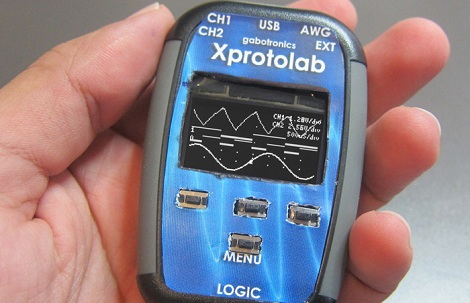
[Gabriel Anzziani] has just unleashed a newer, more convenient version of his Xprotolab portable oscilloscope, logic analyzer, and function generator. It’s up on Kickstarter, and the price is actually very nice for a tool of this caliber.

We first saw the Xprotolab early last year and ran into [Gabriel] at this year’s World Maker Faire in New York. On both occasions we were impressed with the size and capability of this very, very small OLED-display oscilloscope and general breadboarding Swiss army knife.

The Xprotolab features a two-channel, 200 kHz oscilloscope, 8-input logic analyzer, and an arbitrary waveform generator that should be good enough for all your breadboarding adventures. On top of that, the Xprotolab can sniff SPI, I2C, and UART protocols, and even has a small spectrum analyzer tucked away in a device small enough to lose in your pocket.

The updated-for-Kickstarter Xprotolab features an enclosure with a LiPo battery good for 12 hours of use per charge. Sure, it’s not a bench full of old HP and Tektronix gear, but for the budding maker, this seems like a very useful tool indeed.

Directing An Alarm System Straight To The Internet

[Scott] has a pretty nice alarm system at his house – it will give the operator at his alarm company enough information to determine if it’s a fire alarm, burglary, or just a cat walking in front of a sensor. [Scott] wanted to cut out the middle man and receive notifications from his alarm system on his phone. He did just that, with the help of a trusty Arduino and the very cool Electric Imp.

[Scott]’s build began with an Arduino attach to a Raspi to monitor state changes in the alarm system. Because the designers of the alarm system included a very helpful four-wire bus between the alarm panels and the part connected to the phone line, [Scott] found it fairly easy to tap into these lines and read the current alarm status.

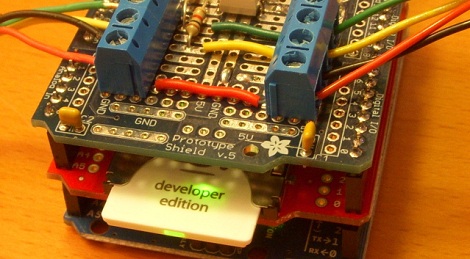
Dedicating a Raspberry Pi to the simple task of polling a few pins and sending data out over WiFi is a bit overkill, so [Scott] picked up an Electric Imp Arduino shield to transmit data over WiFi. We’ve played around with the Imp before, and [Scott] would be hard pressed to come up with a cleaner solution to putting his alarm monitor on the Internet.

Now [Scott] has a very tidy alarm monitor that sends updates straight to his cell phone, no middle man required. A very neat build, and an excellent use of a very cool WiFi device.