Spit Out VGA With Non-Programmable Logic Chips

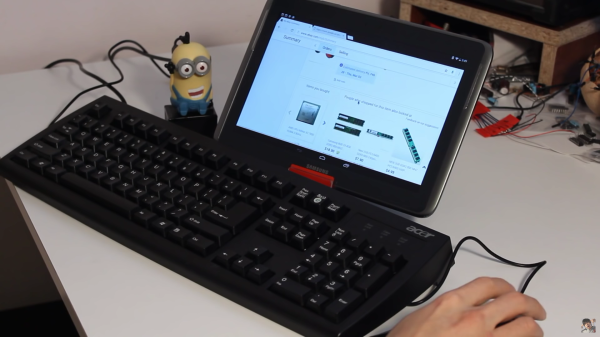
It’s not uncommon to bitbang a protocol with a microcontroller in a pinch. I2C is frequently crunched from scratch, same with simple serial protocols, occasionally complex systems like Ethernet, and a whole host of other communication standards. But VGA gets pretty tricky because of the timing requirements, so it’s less common to bitbang. [Sven] completely threw caution to the wind. He didn’t just bitbang VGA on an Arduino, but he went one step further and configured an array of 7400 logic chips to output a VGA signal.

[Sven]’s project is in two parts. In part one, he discusses choosing a resolution and setting up the timing signal. He proceeds to output a simple(-ish) VGA signal that can be displayed on a monitor using a single gate. At that point only a red image was displayed, but getting signal lock from the monitor is a great proof of concept and [Sven] moved on to more intricate display tricks.

With the next iteration of the project [Sven] talks about adding in more circuitry to handle things like frame counting, geometry, and color. The graphics that are displayed were planned out in a simulator first, then used to design the 7400 chip configuration for that particular graphic display. It made us chuckle that [Sven] reports his monitor managed to survive this latest project!

We don’t remember seeing non-programmable integrated circuits used for VGA generation before. But bitbanging the signal on an Arduino or from an SD card slot is a great test of your ability to calculate and implement precise timings with an embedded system. Give it a try!

Continue reading “Spit Out VGA With Non-Programmable Logic Chips”

Macintosh Hard Drive Repair

The Macintosh II was a popular computer in the era before Apple dominated the coffee shop user market, but for those of us still using our Mac II’s you may find that your SCSI hard drive isn’t performing the way that it should. Since this computer is somewhat of a relic and information on them is scarce, [TheKhakinator] posted his own hard drive repair procedure for these classic computers.

The root of the problem is that the Quantum SCSI hard drives that came with these computers use a rubber-style bump stop for the head, which becomes “gloopy” after some time. These computers are in the range of 28 years old, so “some time” is relative. The fix involves removing the magnets in the hard drive, which in [TheKhakinator]’s case was difficult because of an uncooperative screw, and removing the rubber bump stops. In this video, they were replaced with PVC, but [TheKhakinator] is open to suggestions if anyone knows of a better material choice.

This video is very informative and, if you’ve never seen the inside of a hard drive, is a pretty good instructional video about the internals. If you own one of these machines and are having the same problems, hopefully you can get your System 6 computer up and running now! Once you do, be sure to head over to the retro page and let us know how you did!

Continue reading “Macintosh Hard Drive Repair”

Tiny PIC Clock Is Not A Tiny Bomb

It’s been a few weeks since the incident where Ahmed Mohamed, a student, had one of his inventions mistaken for a bomb by his school and the police, despite the device clearly being a clock. We asked for submissions of all of your clock builds to show our support for Ahmed, and the latest one is the tiniest yet but still has all of the features of a full-sized clock (none of which is explosions).

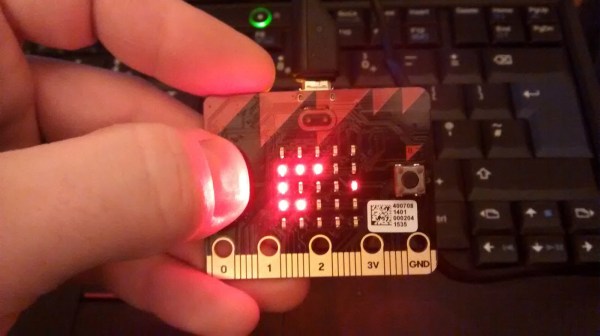
[Markus]’s tiny clock uses a PIC24 which is a small yet powerful chip. The timekeeping is done on an RTCC peripheral, and the clock’s seven segment displays are temporarily lit when the user presses a button. Since the LEDs aren’t on all the time, and the PIC only consumes a few microamps on standby, the clock can go for years on a single charge of the small lithium-ion battery in the back. There’s also a phototransistor which dims the display in the dark, and a white LED which could be used as a small flashlight in a pinch. If these features and the build technique look familiar it’s because of [Markus’] tiny MSP430 clock which he was showing around last year.

Both of his tiny clocks are quite impressive for their size, features, and power consumption. Some of the other clocks we’ve featured recently include robot clocks, clocks for social good, and clocks that are not just clocks (but still won’t explode). We’re suckers for a good clock project here, so keep sending them in!

Continue reading “Tiny PIC Clock Is Not A Tiny Bomb”

Tape Loop Echo Made With An Actual Tape Loop

A lot of digital processes are named after an old analog device that they’ve since replaced. It’s not uncommon to “tape” a show nowadays, for example, even though the recording work is actually done by a digital video recorder. Sometimes, though, the old analog devices have a certain je ne sais quoi that is desirable even in today’s digital world. This is certainly the case with [Dima]’s tape loop echo which is actually made with a physical tape loop.

The process of building the tape loop hardware is surprisingly non-technical. By positioning a recording head and a playback head right next to one another, a delay is introduced. An echo is created by mixing the original live sound signal with this delayed signal coming from the tape By varying the speed of the tape or altering several other variables, many different-sounding effects can be achieved.

Although in practice it’s not as simple as it sounds (the device required a lot of trial-and-error), the resulting effect is one that Pink Floyd or Beck would surely be proud of. Analog isn’t the only way to go though, there are plenty of digital effects that are easily created, and some with interesting mounting options as well.

Continue reading “Tape Loop Echo Made With An Actual Tape Loop”

3D Popup Cards From 3D Photos

The world of 3D printing is growing rapidly. Some might say it’s growing layer by layer. But there was one aspect that [Ken] wanted to improve upon, and that was in the area of 3D photos. Specifically, printing a 3D pop-up-style photograph that collapses to save space so you can easily carry it around.

It’s been possible to take 3D scans of objects and render a 3D print for a while now, but [Ken] wanted something a little more portable. His 3D pop-up photographs are similar to pop-up books for children, in that when the page is unfolded a three-dimensional shape distances itself from the background.

The process works by taking a normal 3D photo. With the help of some software, sets of points that are equidistant from the camera are grouped into layers. From there, they can be printed in the old 2-dimensional fashion and then connected to achieve the 3D effect. Using a Kinect or similar device would allow for any number of layers and ways of using this method. So we’re throwing down the gauntlet — we want to see an arms-race of pop-up photographs. Who will be the one to have the most layers, and who will find a photograph subject that makes the most sense in this medium? Remember how cool those vector-cut topographical maps were? There must be a similarly impressive application for this!

[Ken] isn’t a stranger around these parts. He was previously featured for his unique weather display and his semi-real-life Mario Kart, so be sure to check those out as well.

Nixie Tube Clock Isn’t Just A Clock

With everything that’s been happening in the news lately, [Jarek] decided it was finally time to finish up his latest project. The Internet of Things has been exploding with projects lately, and this clock that also alerts him of the weather is the latest addition. Plus it has the added bonus of using everybody’s favorite display: nixie tubes!

Of course, using high voltage for the nixies can be terror-inducing, but [Jarek] found a power supply on eBay that was able to power the tubes for not too much money. The controller is an HV5622 which can control up to 32 nixies while only using up three pins on a microcontroller which is pretty handy if you have a limited number of output pins.

The clock also has another device hidden behind all of the wires for the tubes: an ESP8266 to give it network connectivity. The clock connects to the Internet and searches for the nine-hour weather forecast. There are a few nixie lights behind the display which illuminate cutouts in the case to indicate a few different weather statuses. It’s a very polished project, and since it’s enclosed in a nice case it’s not likely to be mistaken for any movie props. Of course, other nixie projects don’t have the same comforting look.

Continue reading “Nixie Tube Clock Isn’t Just A Clock”

Head Gesture Tracking Helps Limited Mobility Students

There is a lot of helpful technology for people with mobility issues. Even something that can help people do something most of us wouldn’t think twice about, like turn on a lamp or control a computer, can make a world of difference to someone who can’t move around as easily. Luckily, [Matt] has been working on using webcams and depth cameras to allow someone to do just that.

[Matt] found that using webcams instead of depth cameras (like the Kinect) tends to be less obtrusive but are limited in their ability to distinguish individual users and, of course, don’t have the same 3D capability. With either technology, though, the software implementation is similar. The camera can detect head motion and control software accordingly by emulating keystrokes. The depth cameras are a little more user-friendly, though, and allow users to move in whichever way feels comfortable for them.

This isn’t the first time something like a Kinect has been used to track motion, but for [Matt] and his work at Beaumont College it has been an important area of ongoing research. It’s especially helpful since the campus has many things on network switches (like lamps) so this software can be used to help people interact much more easily with the physical world. This project could be very useful to anyone curious about tracking motion, even if they’re not using it for mobility reasonsContinue reading “Head Gesture Tracking Helps Limited Mobility Students”