Inputs Of Interest: The Differently Dexterous DataHand Directionalizes Digits

If you had debilitating pain from repetitive stress injury in the 1990s, there were a lot of alternative keyboard options out there. One of the more eye-catching offerings was the DataHand keyboard made by DataHand Systems out of Phoenix, AZ. The DataHand debuted in 1993 with a price tag around $2,000. While this is admittedly pretty steep for the average consumer, it was well within the IT budgets of companies that wanted to avoid workman’s comp claims and keep their employees typing away.

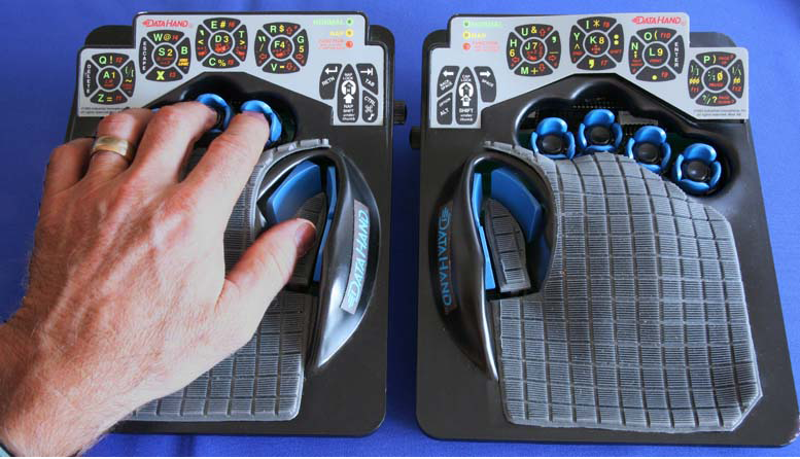
In theory, this is holy grail territory for anti-RSI keyboards. The DataHand was designed to eliminate wrist motion altogether by essentially assigning a d-pad plus a regular push-down button to each finger. The layout resembles QWERTY as closely as possible and uses layers to access numbers, symbols, and other functions, like a rudimentary mouse.

Although if you put them this close together, you’re kind of missing the point. Image via Bill Buxton

Ergonomic to the Max

Typing on the DataHand is supposed to be next to effortless. The directional switches are all optical, which probably has a lot to do with the eye-popping price point. But instead of being spring-loaded, these switches use magnets to return to the neutral position.

Continue reading “Inputs Of Interest: The Differently Dexterous DataHand Directionalizes Digits”

Model Rocket Launcher Is So Serious, It Has A Briefcase

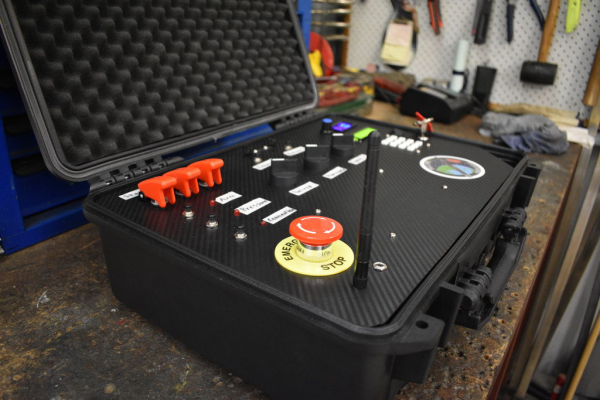
What could be more thrilling than launching a complex rocket that you built yourself? For starters, launching it with literally anything better than the stock ignition system would be a step in the right direction. How about a briefcase full of fantastically fun overkill?

[FastEddy59] is in the middle of building a model rocket complete with a Thrust Vector Control (TVC) system to help with stabilization. Much to our delight, he’s designed an equally ambitious controller to spice up the launch sequence with security codes and a physical key. And what’s a launch controller without a giant emergency stop button to shut down everything? Incomplete, if you ask us.

Under the carbon fiber-wrapped acrylic hood, there’s an Arduino MEGA engine and an NRF24 LoRa module for transmission to the rocket. There’s even a DHT11 temperature sensor to verify that launch conditions are ideal. It’s still a work in progress with plenty of features to come, like fancier labels and plenty of launch-appropriate sound files for the hidden speaker. There’s a lot to this case, and [FastEddy59]’s video brief is ready and waiting on the pad after the break.

[FastEddy59] plans to hold the first launch in a few months, and we sincerely hope he outfits the rocket with a camera.

Continue reading “Model Rocket Launcher Is So Serious, It Has A Briefcase”

RGB Kitchen Uses Pots To Stir Up Color

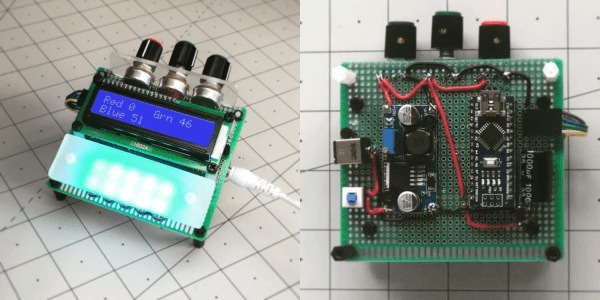
Anyone who has done anything with RGB LEDs knows that their ability to display pretty much any color is somehow both the best and worst thing about them. How do you get it right? How do you make your results repeatable? [Thomas] has the answer. He dug around in the ol’ parts cupboard, found a few pots, and got to work making this stay-home stew of a project — an on-demand RGB LED color mixer.

Three cleverly color-coded potentiometers and an Arduino let [Thomas] step through 0-255 to mix various values of red, blue, and green. The shade that gets made is displayed live on a set of 10 individual NeoPixels that are laid out under a frosty diffusing panel. Each of the RGB values are also shown on an 16×2 LCD.

This is one of those projects that hits a sweet spot of being simple, useful, and fun. It’s even nice-looking and compact. What more could you want from a project cobbled together from ingredients on hand? [Thomas] is even giving away the code recipe.

Once you dial in your ideal colors, why not make a gesture-controlled lamp?

Puttering Around In A Converted Golf Cart

Technically speaking, golf carts are already sports cars, they’re just not very sporty in themselves. When [rtkerth] went to trade in his old golf cart for a new one, he found that it would be more valuable to hang on to the old one and have a bit of fun with it. The result is retro-styled kart that would not look out of place at a micro car show.

Before getting to the really fun bits, he had to do a bit of prep work, such as relocating the six large batteries so that super cool stock seat can sit lower. Now the batteries are distributed throughout the vehicle, including one that’s been cleverly disguised as center console. Since the cart won’t be hitting the links anymore, there’s no need for a place to put clubs. Two of the batteries are now in the back, supported by a platform made from old bed frames.

We love the fiberglass fab work [rtkerth] did to the front and rear — it looks great, especially considering he’d never done it before. The rear is done more traditionally with a foam mold, but the front is fiberglassed directly over expanding foam insulation framed with cardboard. The local body shops refused to paint this baby roadster, so [rtkerth] did it himself before adding the killer touches — 1930s Brooklands-style windscreens and 1950s bullet mirrors that look great together.

Believe it or not, this isn’t the first amazing golf cart mod we’ve seen. Go see this baby DeLorean before you’re outta time.

Software Shortcut Keyboard Registers Many Macros

[FabroLabs Technologies] is an industrial designer who uses several creative-type software programs in a given day. Unfortunately, they all have slightly different shortcut schemes, and trying to remember all the different modifiers is a waste of time better spent elsewhere.

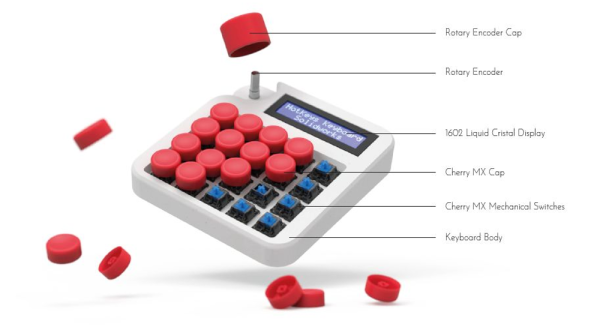
This lovely little macro keyboard is every bit as useful as it is cool looking. Spinning the rotary encoder cycles through a menu of programs on the 16×2 LCD, and the key map just updates automatically for the chosen program. At the heart of this build is an Arduino Pro Micro and 20 of the loudest key switches ever made — Cherry MX blues. We like that it manages to look like toy cash register and a serious peripheral all at once — it probably has something to do with those way-cool circular keycaps that were made on a resin printer.

We’re glad that [FabroLabs] laid down such a comprehensive and open build guide during the process of making this macro keyboard. The average hacker can learn a lot from industrial designers who show their work. Remember the time [Eric Strebel] showed us all how to improve our foam board design game?

LED Clock Strips Time Down To Pulses Of Light

Nietzsche said (essentially) that time is a flat circle — we are doomed to repeat history whether we remember it or not. This is a stark and sobering thought for sure, but it’s bound to dissipate the longer you look at [andrei.erdei]’s literal realization of time as a flat circle.

A clock that uses nothing but RGB LEDs to give the time sounds confusing and potentially cluttered, but the result here is quite pleasing and serene. We figure it must be the combination of brighter LEDs to represent 12, 3, 6, and 9, and dimmer LEDs for the rest of the numbers, plus the diffusion scheme. The front plate is smoky acrylic topped with two layers of frosted black window foil.

Inside the printed plastic ring are two adhesive RGB LED strips running on an ESP8266 that ultimately connects to an NTP time server. The strips are two halves of an adhesive 60 LED/meter run that have been stuck together back to back so that the lights are staggered for seamless coverage. This sets up the coolest thing about this clock — the second hand, which is represented by a single pink LED zig-zagging back and forth around the ring. Confused? Watch the short demo after the break and you’ll figure it out in no time.

Now that times are strange, you might be more interested in a straightforward approach to finding out what day it is. The wait is over.

Continue reading “LED Clock Strips Time Down To Pulses Of Light”

Pulse Visualizer Is A Real Work Of Heart

Some projects are all-around simple, such as the lemon battery or the potato clock. Other projects are rooted in simple ideas, but their design and execution elevates them to another level. [Sharathnaik]’s heart visualizer may not be all that electronically complex, but the execution is pulse-pounding.

The closest that most of us will get to seeing our own heartbeat is watching the skin twitch in our neck or wrist. You know that your heart doing the work of keeping you alive, but it’s hard to appreciate how it exerts itself. With just a few components and printed parts, the heart’s pumping action comes to life as your pulse drives single-x scissor mechanisms to push and pull the plastic plates.

This heart visualizer isn’t nearly as complex as the organ it models, and it’s an easy build for anyone just starting out in electronics. Put your finger on the heart rate sensor in the base, and an Arduino Nano actuates a single servo to your own personal beat. We’d love to see it work overtime while someone gets worked up. For now, there’s an even-tempered demo after the break, followed by an assembly video.

Heartbeat sensing can be romantic, too. Here’s a lovely circuit sculpture that runs at the rate of the receiver.

Continue reading “Pulse Visualizer Is A Real Work Of Heart”