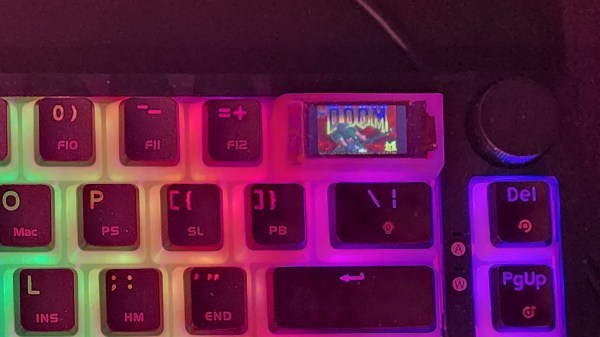
Pi Zero Runs DOOM Via Wireless Power

What’s better than a Raspberry Pi Zero running DOOM on a 3.5″ touchscreen? Running it over wireless power, of course!

[atomic14] has been interested in wireless power for a while, and while most of the hardware he’s tested over the years has been less than impressive, he demonstrates one that’s able to reliably deliver 5 V at about 1 A which is more than enough to boot a Raspberry Pi W2 into X and launch DOOM. But while that’s neat, he explains that wireless power isn’t quite yet an effortless solution.

The hardware can deliver 5 V at about 1 A wirelessly, which is plenty, but coil alignment is critical to efficiency.

For one thing, the hardware he’s using — similar to those used for mobile phone charging — need the receiver to be very close to the transmitter. In addition, they need to be aligned well or efficiency drops off sharply. For mobile phones this isn’t much of a problem, but it’s difficult to position a Raspberry Pi and display just so when one can’t see the coils. Misalignment means brownouts and other unreliable operation.

So while the wireless power is capable of running the Pi directly, [atomic14] attempts to put a small battery and charger circuit into the mix in order to make the whole thing both portable and more reliable. But because nothing is easy, he discovers that his charging board — which should be able to output as low as 4.5 V — isn’t able to be adjusted down any lower than 5.66 V. It turns out that a resistor marked 104 (which should be 100 kΩ) is actually measuring 57 kΩ, and the trim pot doesn’t go lower than 10 kΩ. The solution is a bit of component swapping, but we suppose it’s a reminder that sometimes with cheap parts, one pays in other ways.

You can see [atomic14]’s wireless power Raspberry Pi running the classic shooter in the video below. Wireless power may have its issues, but it’s certainly a lot less messy than running DOOM with a gigantic potato battery.

Continue reading “Pi Zero Runs DOOM Via Wireless Power”

SSH Can Handle Spaces In Command-line Arguments Strangely

One of the things ssh can do is execute a command on a remote server. Most of us expect it to work transparently when doing so, simply passing the command and its arguments on without any surprises in the process. But after 23 years of using OpenSSH on a nearly daily basis, [Martin Kjellstrand] got surprised.

It turns out that the usual rules around how things are parsed can have some troublesome edge cases when spaces are involved. [Martin] kicks off an example in the following way:

One would reasonably expect the commands figlet foobar bar\ baz and ssh localhost figlet foobar bar\ baz to be functionally equivalent, right? The former ultimately runs the command “figlet” with arguments “foobar” and “bar baz” on the local machine. The second does the same, except with ssh being involved in the middle. As mentioned, one would expect both commands to be functionally identical, but that’s not what happens. What happens is that ssh turns bar\ baz into two distinctly separate command-line arguments in the process of sending it for remote execution: “bar” and “baz”. The result is mystification as the command fails to run the way the user expects, if it runs at all.

What exactly is going on, here? [Martin] goes into considerable detail tracking down this odd behavior and how it happens, but he’s unable to ultimately explain why ssh does things this way. He suspects that it is the result of some design decision taken long ago. Or perhaps a bug that has, over time, been promoted to entrenched quirk.

Do you have any insights or knowledge about this behavior? If so, [Martin] wants to hear about it and so do we, so don’t keep it to yourself! Let us know in the comments, below.

These Fake Nixie Tubes Have A Bootup Screen

[IMSAI Guy] bought a fake Nixie clock, and luckily for all of us has filmed a very close look and demonstration. Using OLED displays as the fake Nixie elements might seem like cheating to some, the effect is really very well done.

Clock digits with bootup screens is something we didn’t know we liked until we saw it.

When it comes to Nixie elements, it’s hard to say which gets more attention and project time from hardware folks: original Nixie tube technology, or fake Nixie elements. Either way, their appeal is certainly undeniable.

Original Nixie tubes have shown up in modern remakes of alarm clocks, and modern semiconductors make satisfying a Nixie tube’s power requirements much easier with clever and compact Nixie drivers costing under $3 USD. This is also a good time to remind people that Nixie tubes don’t have to be digits. This audio spectrum visualizer, for example, uses IN-13 tubes which serve as elements of a bar graph.

Authentic Nixie elements require high voltages and are labor-intensive to manufacture to say the least, and as far as fake Nixie elements go, this one looks pretty good once it lights up. You can see it in action in the video, embedded below.

Continue reading “These Fake Nixie Tubes Have A Bootup Screen”

Behold A DIY VR Headset Its Creator Will “Never” Build Again

Unsatisfied with commercial VR headset options, [dragonskyrunner] did what any enterprising hacker would: gathered parts over time and ultimately made their own. Behold the Hades Widebody (HWD), a DIY PC VR headset that aims for a wide field of view and even manages to integrate some face and eye tracking. (Editor’s note: link went dead in 2025. You’ll find the Hades Widebody here. Thanks [DragonSkyRunner] for keeping us in the loop!)

The Fresnel elements hugging the primary lenses provide a way of extending the display into the wearer’s peripheral vision.

[dragonskyrunner] is — and we quote — “NEVER building one of these again.” The reason is easily relatable to anyone who has spent a lot of time and effort creating something special: it does the job it was created for, but it also has limitations and is a lot of work. If one were to do it all over again, there would be a host of improvements and changes to consider. But one won’t be doing it all over again any time soon because it’s done now.

The good news is that [dragonskyrunner] made an effort to document things, so there is at least a parts list and enough details for any suitably motivated hacker to replicate the work and perhaps even put their own spin on it.

The Hades Widebody has a dual-lens arrangement and wide displays that aim to provide a wider field of view than most setups allow. There’s a main lens in front of the user’s eyes and a cut Fresnel lens providing a sort of extension to the side. [dragonskyrunner] claims that while there is certainly not a seamless transition between the lens elements, it does a better job than an Ambilight at providing a sense of visuals extending into the wearer’s peripheral vision.

The DIY spirit of making a piece of hardware to suit one’s own needs is exactly the sort of thing that would fit into our 2023 Cyberdeck content, and while a headset by itself isn’t quite enough to qualify (devices must have some form of usable input and output), it just might get those creative juices flowing.

Enhance VR Immersion By Shoehorning An Ambilight Into A Headset

Everyone wants a wider field of view in their VR headsets, but that’s not an easy nut to crack. [Statonwest] shows there’s a way to get at least some of the immersion benefits with a bit of simple hardware thanks to the VR Ambilight.

Continue reading “Enhance VR Immersion By Shoehorning An Ambilight Into A Headset”

2023 Cyberdeck Challenge: YAHRC Takes Its Power Seriously

Cyberdecks are all about custom builds, and [f4drj]’s YAHRC (Yet Another Ham Radio Cyberdeck) takes its ruggedization and power seriously. There are some great power management features, and the enclosure even has a layer of RF shielding.

YAHRC is a Raspberry Pi-based build with a generously-sized screen that tucks a small Bluetooth keyboard into a storage area for input in a pinch. Everything is secured behind custom panels, and behind those panels are some really great build details. There’s active cooling via fans, an SSD for data, and [f4drj] even made a custom riser for the GPIO header by soldering together a couple of headers to act as an extender. This exposes the GPIO header right beside a clear area for prototyping, with easy access to USB ports next to the screen in the top panel. Continue reading “2023 Cyberdeck Challenge: YAHRC Takes Its Power Seriously”

Hackaday Prize 2023: Wear-a-Chorder Lets Discreet Chording Keyboards Do The Talking

Being mute or speech-challenged can be a barrier, and [Raymond Li] has an interesting project to contribute to the 2023 Hackaday Prize: a pair of discreet chording keyboards that allow the user to emit live text-to-speech as quickly as one can manipulate them.

Rapid generation of input to high-quality speech helps normalize interactions.

The project leverages recent developments to deliver high-quality speech via an open-source web app called VoiceBox, while making sure the input devices themselves don’t get in the way of personal interaction. Keeping the chorders at waist level and ensuring high-quality speech is generated and delivered quickly goes a long way towards making interaction and communication flow more naturally.

The VoiceBox software is doing the heavy lifting, and there’s not yet much detail about the rest of the hardware used in the prototype. It’s currently up to the user to figure out a solution for a wearable computer or a suitable chording keyboard. Still, the prototype looks like the Charachorder with a 3D-printed mounting solution to locate them at one’s beltline. Of course, the beauty of the underlying system being so standard is that one can use whatever is most comfortable.