Lithium: What Is It And Do We Have Enough?

Lithium (from Greek lithos or stone) is a silvery-white alkali metal that is the lightest solid element. Just one atomic step up from Helium, this magic metal seems to be in everything these days. In addition to forming the backbone of many kinds of batteries, it also is used in lubricants, mood-stabilizing drugs, and serves as an important additive in iron, steel, and aluminum production. Increasingly, the world is looking to store more and more power as phones, solar grids, and electric cars continue to rise in popularity, each equipped with lithium-based batteries. This translates to an ever-growing need for more lithium. So far production has struggled to keep pace with demand. This leads to the question, do we have enough lithium for everyone?

It takes around 138 lbs (63 kg) of 99.5% pure lithium to make a 70 kWh Tesla Model S battery pack. In 2016, OICA estimated that the world had 1.3 billion cars in use. If we replace every car with an electric version, we would need 179 billion pounds or 89.5 million tons (81 million tonnes) of lithium. That’s just the cars. That doesn’t include smartphones, laptops, home power systems, massive grid storage projects, and thousands of other products that use lithium batteries.

In 2019 the US Geological Survey estimated the world reserves of identified lithium was 17 million tonnes. Including the unidentified, the estimated total worldwide lithium was 62 million tonnes. While neither of these estimates is at that 89 million ton mark, why is there such a large gap between the identified and estimated total? And given the general rule of thumb that the lighter a nucleus is, the more abundant the element is, shouldn’t there be more lithium reserves? After all, the US Geological Survey estimates there are around 2.1 billion tonnes of identified copper and an additional 3.5 billion tonnes that have yet to be discovered. Why is there a factor of 100x separating these two elements?

Continue reading “Lithium: What Is It And Do We Have Enough?”
Pushing The FPGA Video Player Further

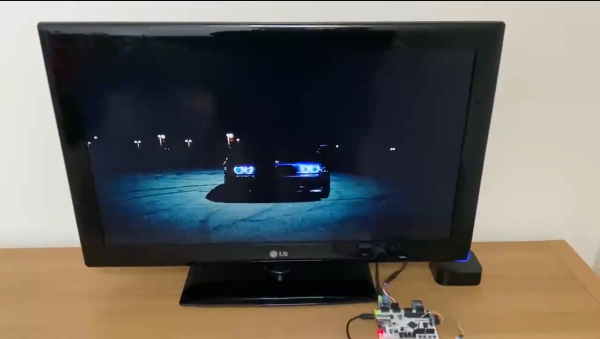
A fact universally known among the Hackaday community is that projects are never truly done. You can always spin another board release to fix a silkscreen mistake, get that extra little boost of performance, or finally spend the time to track down that weird transient bug. Or in [ultraembedded’s] case, take a custom FPGA player from 800 x 600 to 1280 x 720. The hardware used is a Digilent Arty A7 and PMOD boards for I2S2, VGA, and MicroSD. We previously covered this project back when it was first getting started.

Getting from 800 x 600 to 1280 x 720 — 31% more pixels — required implementing a higher performance JPEG decoder that can read in the MPJEG frames, pushing out a pixel every 2.1 clock cycles. The improvements also include a few convenience features such as an IR remote. The number of submodules inside the system is just incredible, with most of them being implemented or tweaked by [ultraembedded] himself.

For the FPGA Verilog, there’s the SD/MMC interface, the JPEG decoder, the audio controller, the DVI framebuffer, a peripheral core, and a custom RISC-V CPU. For the firmware loaded off the SD card, it uses a custom RTOS running an MP3 decoder, a FAT32 interface, an IR decoder, and a UI based on LVGL.

We think this project represents a wonderful culmination of all the different IP cores that [ultraembedded] has produced over the years. All the code for the FPGA media player is available on GitHub.

Continue reading “Pushing The FPGA Video Player Further”

An IMac All-In-One’s New Life

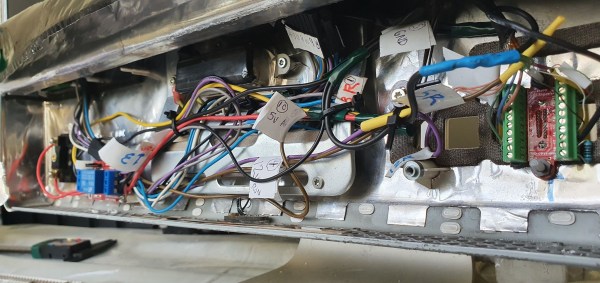
There’s a sleek form factor for desktop computers known as an “all-in-one” that enrobes a computer in a monitor. While the convenience of having all your computing in a neat package has some nice benefits, it comes with an unfortunate downside. Someday the computer inside is going to be old and outdated in comparison to newer machines. While a new OS goes a long way towards breathing life into an old machine, [Thomas] has decided to take the path less travelled and converted an old iMac all-in-one into a discrete monitor.

The iMac in question is the 20″ iMac G5 iSight (A1145) with an LG-Philips LM201W01-STB2 LCD panel. Looking back, [Thomas] would recommend just ordering an LCD driver controller kit from your favourite auction house. But for this particular modification, he decided to do things a little bit more manually and we’re quite glad he did.

Luckily for [Thomas], the panel supports TMDS (which both DVI and HDMI are compatible with). So the next step was to figure out the signalling wires and proper voltages. After some trouble caused by a mislabeled power line on the iMac PCB silk-screen (12v instead of 3.3v), he had all the wires identified and a plan starting to form. The first step was a circuit to trick the inverter into turning on with the help of a relay. The female HDMI plug with a breakout board was added and sticks out through the old firewire port. The minuscule wires in the display ribbon cable to the monitor were separated and soldered onto with the help of [Thomas’] daughter’s microscope. Resistances were checked as HDMI relies on impedance matched pairs. To finish it off, an old tactile toggle switch offers a way to turn the monitor on and off with a solid thunk.

We love seeing old hardware being repurposed for new things. This project nicely complements the iMac G4 Reborn With Intel NUC Transplant we saw earlier this year, as they both try to preserve the form factor while allowing a new computer to drive the display.

A Computer In The Game Of Life

We often hear the term “Turing-complete” without giving much thought as to what the implications might be. Technically Microsoft PowerPoint, Portal 2, and Magic: the Gathering all are Turing-complete, what of it? Yet, each time someone embarks on an incredible quest of perseverance and creates a computer in one of these mediums, we stand back in awe.

[Nicolas Loizeau] is one such individual who has created a computer in Conway’s Game of Life. Unlike electricity, the Game of Life uses gliders as signals. Because two orthogonal gliders can cancel each other out or form a glider eater if they intersect with a good phase shift, the basic logic gates can be formed from these interactions. This means the space between gates is crucial as signals need to be in phase alignment. The basic building blocks are a period-60 gun, a 90-degree glider reflector, a glider duplicator, and a glider eater.

All the Python code that generates these structures is on GitHub as the sheer size of the machine couldn’t possibly be placed by hand. The Python includes scripts to assemble the basic programs as a bank of selectable glider generators. It’s all based on Golly, which is an excellent program for simulating Conway’s Game of Life, among other things. While this isn’t the first computer in the Game of Life as [Paul Rendell] published a design in 2000 and [Adam Goucher] published a Spartan universal computer constructor in 2009, we think this is a particularly beautiful one.

The actual architecture has an 8-bit data bus, a 64-byte memory with two read ports, a ROM with 21 bits per line, and a one-hot encoded ALU supporting 8 different operations. Instructions have a 4-bit opcode which is decoding in a few different instructions. The clock is four loops, formed by the glider reflectors as the glider beams rotate. This gives the computer four stages: execution, writing, increment PC, and write PC to memory.

The Game of Life is an excellent example of Cellular Automaton (CA). There are several other types of CA’s and the history behind them is fascinating. We’ve covered this field before and delved into this beautiful fringe of computer science. Check out the video below to truly get a sense of the scale of the machine that [Nicolas] has devised.

Continue reading “A Computer In The Game Of Life”

Reverse Engineering A PokeWalker

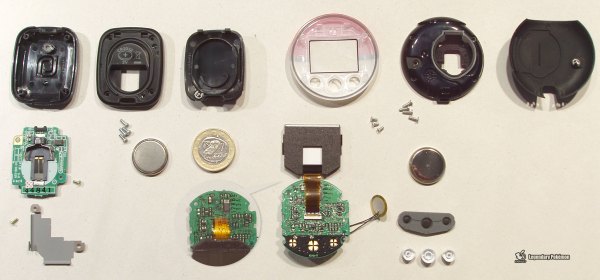
The PokeWalker is part of Nintendo’s long quest to get children (and likely some adults) walking and exercising. There’s the PokeWalker, Pokemon Pikachu, PokeBall Plus, Pokemon Pikachu 2, Pokemon mini, and of course Pokemon Go. Despite being out a decade, there wasn’t a ROM dump for the device and there was minimal documentation on the communication protocol. [Dmitry Grinberg] took it upon himself to change all that and crack the PokeWalker open.

At its heart, the PokeWalker is just a pedometer with an IR port and a 96×64 grayscale screen. It came out in 2009 to accompany the new Pokemon release for the Nintendo DS. Cracking open the device revealed a 64KB EEPROM, a Renesas H8/38606R CPU, a Bosch BMA150 accelerometer, and a generic IR transceiver. The CPU is particularly interesting as in addition to being quite rare, it has a mix of 8, 16, and 32 bits with 24-bit pointers. This gives it a 64K address space. While the CPU is programmable, any attempt to do so erases the onboard flash. The communication protocol packets have an 8-bit header that precedes each packet. The header has a checksum, a command byte, and four bytes of session id, and an unused byte. Curiously enough, every byte is XOR’d with 0xAA before being broadcast.

One command is an EEPROM write, which uses back-referencing compression. Each chunk of data to be written is packaged into 128-byte chunks, though 128 bytes likely won’t be sent thanks to the compression. The command can theoretically reference 4k bytes back, but in practice, it can only reference 256 bytes back. It was this command that laid the foundation for the exploit. By carefully crafting the command to send, the command can overflow the decompression buffer and into executable code. Only a few bytes can be overflowed so the payload needs to be carefully crafted. This allowed for an exploit that reads the system ROM and broadcasts it out the IR port. Only 22k bytes can be dumped before the watchdog reboots the device. By changing the starting address, it was easy to do multiple passes.

After the ROM was stitched together from the different passes, the different IR commands were analyzed. In particular, a command was found that allows direct writes into RAM. This makes for a much easier exploit as you can write your exploit, then override a pointer in the event table, then have the exploit revert the event table once the system naturally jumps to your exploit.

[Dmitry] finishes off this amazing exploit by writing a PalmOS app to dump the ROM from a PokeWalker as well as modify the system state. PalmOS was chosen as it is an easy and cheap way to have a programmable IR transciever. All in all, a gorgeous hack with a meticulous writeup. This isn’t the first video game accessory that’s been reverse engineered with a scrupulous writeup, and we’re sure it won’t be the last.

Continue reading “Reverse Engineering A PokeWalker”

Procedurally Generated Trees

As the leaves fall from the trees here in the Northern Hemisphere, we are greeted with a clear view of the branches and limbs that make up the skeleton of the tree. [Nicolas McDonald] made a simple observation while looking at trees, that the sum of the cross-sectional area is conserved when a branch splits. This observation was also made by Leonardo Da Vinci (according to Pamela Taylor’s Da Vinci’s Notebooks). Inspired by the observation, [Nicolas] decided to model a tree growing for his own curiosity.

The simulation tries to approximate how trees spread nutrients. The nutrients travel from the roots to the limbs, splitting proportionally to the area. [Nicolas’] model only allows for binary splits but some plants split three ways rather than just two ways. The decision on where to split is somewhat arbitrary as [Nicolas] hasn’t found any sort of rule or method that nature uses. It ended up just being a hardcoded value that’s multiplied by an exponential decay based on the depth of the branch. The direction of the split is determined by the density of the leaves, the size of the branch, and the direction of the parent branch. To top it off, a particle cloud was attached at the end of each branch past a certain depth.

By tweaking different parameters, the model can generate different species like evergreens and bonsai-like trees. The code is hosted on GitHub and we’re impressed by how small the actual tree model code is (about 250 lines of C++). The power of making an observation and incorporating it into a project is clear here and the results are just beautiful. If you’re looking for a bit more procedurally generation in your life, check out this medieval city generator.

E-Ink Calendar Paves A Path For All

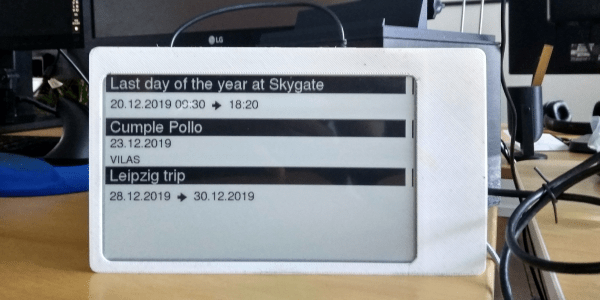
[Martin Fasani] has set out to build a beautiful low power E-Ink Calendar he can hang on his wall. But perhaps more importantly, the work he has done makes it easier for everyone in the future to have a e-ink display. Many battery-powered e-ink projects connect to some server, download a bitmap image, display the new image, and then go into a deep sleep power mode. [Martin’s] project is no different, but it uses a handy microservice that does the conversion and rendering for you.

The firmware for this ESP32/ESP32S2 based calendar is open sourced on GitHub, with a version based on the Arduino framework as well as the native ESP-IDF framework. One particularly fantastic part of the firmware is a C++ component called CalEPD that drives e-paper displays. CalEPD extends the Adafruit_GFX class and is broken out in a separate repo, making it easy to consume on other projects. Since this supports dozens of different e-paper displays, this simplifies the process of building a calendar with different screens. The firmware includes a Bluetooth setup flow from a smartphone or tablet. This means you can quickly configure how often it wakes up, what it queries, and other important features.

The hardware shown in the demo video has a 7.5″ Waveshare screen with 800 x 400 resolution nestled inside a 3D-printed shell. There is also a 5,000 mAh battery with an ESP32 TinyPICO powering the whole system. The TinyPICO was picked for its incredible deep sleep power consumption. All this fits into a frame just 11 mm thick, for which STL files are available. [Martin] continues to work on this calendar display and has recently added support for FocalTech touch panel controllers. We’re excited to see where he takes it next!

This isn’t the first e-ink display project we’ve seen but this is a great reference to build your own. If you need another good starting point, this weather display might give you that little bit of inspiration you need.

Continue reading “E-Ink Calendar Paves A Path For All”