How To Build Your Own 16-Bit System-on-Spreadsheet

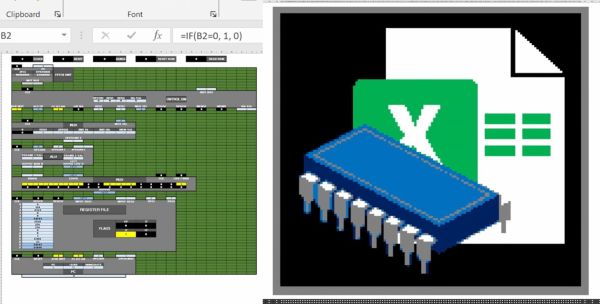
Back in the hazy days of the  early home computers, many of us would rejoice at running our first BASIC applications, some of us even built our own 8-bit system from a handful of ICs and felt elated the moment the connected LEDs, screen or other output device would show signs of life. It is this kind of excitement that [Inkbox] has managed to bring to the bane of every office worker: spreadsheet programs like Excel. How, you may ask? Why, by implementing a completely functional 16-bit system with 16 general purpose registers, 128 kB of RAM and a 128×128 pixel color display, all inside an Excel spreadsheet, making it conceivably the world’s first System-on-Spreadsheet (SoS).

Perhaps the most tantalizing aspect of this approach is that it provides a very good visual way to indicate what is happening inside the system using color codes and clearly segregated and marked functional elements. Not only can it be programmed manually, but [Inkbox] also created an assembler for the CPU’s ISA – called Excel-ASM16 – all of which is available from the ExcelCPU GitHub project page. The ASM is assembled into a ROM.xlsx file that can then be run by the CPU.xlsx file by triggering the Read ROM button. After this you are confronted with the realization that although it all works, it’s also incredibly slow, at about 2-3 Hz.

Still, with all the elegance of an IMSAI 8080 front panel, we cannot help but give full points for this achievement. Plus it gives many of us something to do during those exceedingly dull meetings where only serious applications like office suites are allowed.

Continue reading “How To Build Your Own 16-Bit System-on-Spreadsheet”
The World’s First Microprocessor: F-14 Central Air Data Computer

When the Grumman F-14 Tomcat first flew in 1970, it was a marvel. With its variable-sweep wing, twin tail, and sleek lines, it quickly became one of the most iconic jet fighters of the era — and that was before a little movie called Top Gun hit theaters.

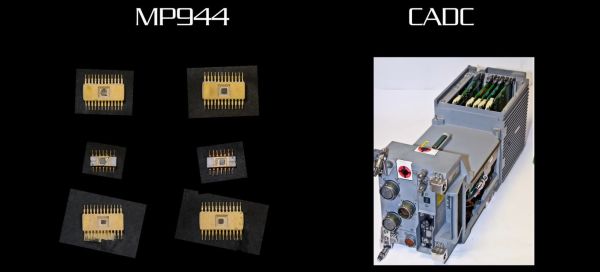
A recent video by [Alexander the ok] details something that was far less well-documented about the plane, namely its avionics. The Tomcat was the first aircraft to use a microprocessor-driven flight system, as well as the first microprocessor unit (MPU) ever demonstrated, beating the Intel 4004 by a year. In 1971, one of the designers of the F-14’s Central Air Data Computer (CADC) – [Ray Holt] – wrote an article for Computer Design magazine that was naturally immediately classified by the Navy until released to the public in 1998.

The MPU in the CADC is called the Garrett AiResearch MP944, and consists of a number of ICs that together form a full computer. These were combined in the CADC with additional electronics to control many elements of the airplane automatically, including the weapons system and the variable-sweep wing configuration. This was considered to be essential based on experiences with the F-111 and its very complex electromechanical flight computer, which was an evolution of the 1950s-era Bendix CADC.

The video goes through the differences between the 4-bit Intel 4004 and the 20-bit MP944, questioning whether the 4004 is even really an MPU, the capabilities of the MP944 and its system architecture. Ultimately the question of ‘first’ and that of ‘what is an MPU’ will always be somewhat fuzzy depending on your definitions, but there is no denying that the MP944 was a marvel of large-scale integration.

Continue reading “The World’s First Microprocessor: F-14 Central Air Data Computer”

New Robots To Explore New Areas Of Japan’s Fukushima Daiichi Nuclear Plant

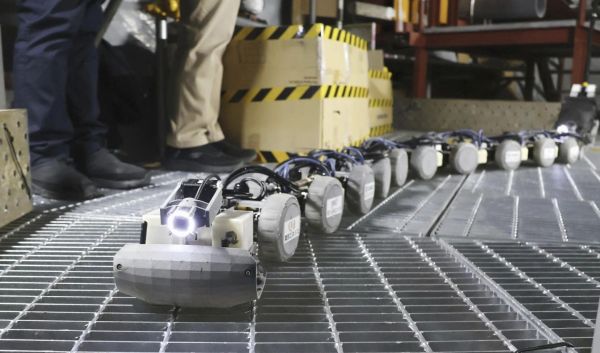
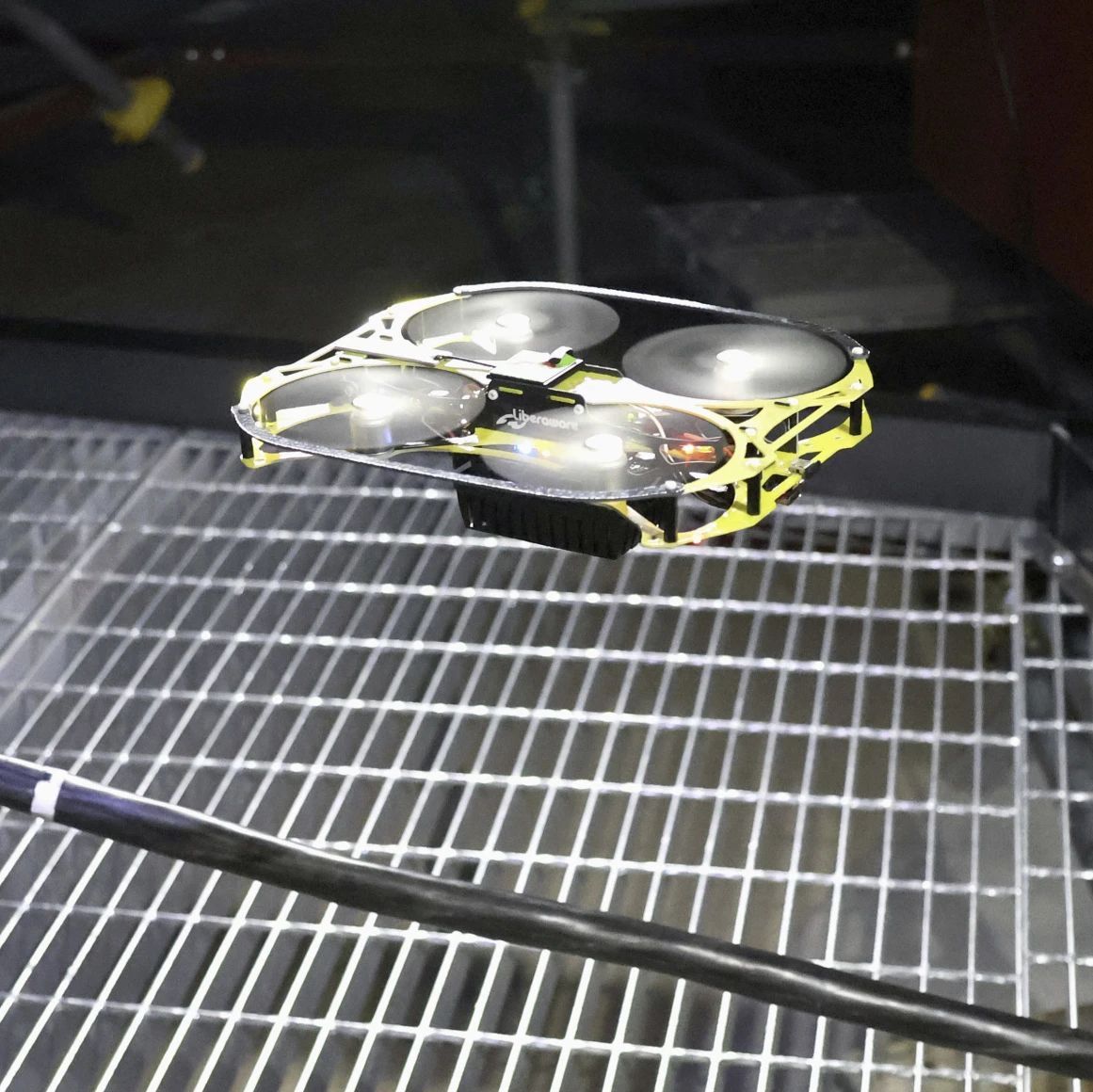
During a press event on January 23rd, Tokyo Electric Power Company (TEPCO) demonstrated two new robots at the mock-up facility at Japan Atomic Energy Agency’s Naraha Center for Remote Control Technology Development (NARREC). As pictured by AP, one is a snake-like robot that should be able to reach very inaccessible areas, while four flying drones will be the first to enter the containment vessel of the Unit 1 reactor for inspection.

The flying drone to be used at Fukushima Daiichi's Unit 1 building. (Credit: Daisuke Kojima/Kyodo News via AP)
The flying drone to be used at Fukushima Daiichi’s Unit 1 building. (Credit: Daisuke Kojima/Kyodo News via AP)

These flying drones are 20 cm across, weigh 185 grams each, and were adapted from an existing model that’s used for boiler inspections. At the Naraha Town facility, operators were able to practice flying it into a copy of the Unit 1’s containment vessel via the piping. As the most heavily damaged unit at the Fukushima Daiichi plant, engineers are interested to learn the details of the fuel and debris that has fallen to the bottom of the vessel so that the clean-up and decontamination steps can be planned.

Most of the current work inside the Fukushimi Daiichi reactor buildings is performed by robots, with the TEPCO gallery providing an overview of the wide range of the types used so far.

One of the first was the PackBot, from US-based iRobot, with many more following for a variety of tasks, from inspection to debris clearing and even dry ice-based decontamination.

Roman Dodecahedrons: A Mystifying Archaeological Find

Much about archaeology can be described as trying to figure out the context in which objects and constructions should be interpreted. A good example of this are the metal dodecahedrons (twelve-sided shape) which have been found during archaeological excavations at former Roman sites. Since 1739 over 115 of them have been recorded, most recently a fully intact copper specimen found near the Lincolnshire village of Norton Disney during the Summer of 2023 by a local group of archaeologists.

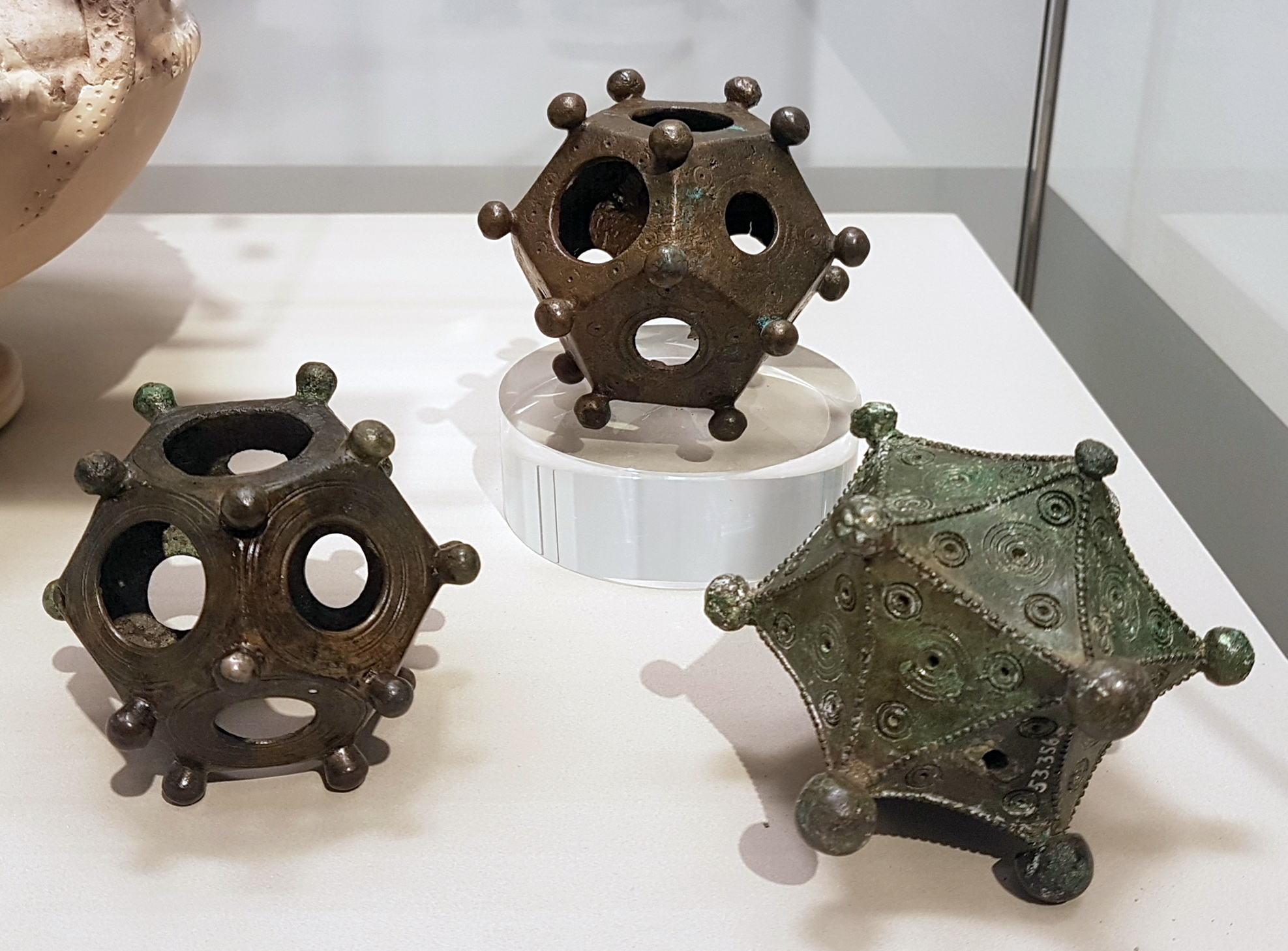
Two ancient Roman bronze dodecahedrons and an icosahedron (3rd c. AD) in the Rheinisches Landesmuseum in Bonn, Germany. (Credit: Kleon3, Wikimedia)

As the Norton Disney History and Archaeology Group notes on their page, this is the 33rd example of one of these items found in what was once Roman Britain, lending credence to the idea that such dodecahedrons originated within the Gallo-Roman culture.

As for the objects themselves, the ones so far found were dated to between the 2nd and 4th century CE, are all made out of some kind of metal alloy (e.g. bronze), are usually a dodecahedron but sometimes different (e.g. an icosahedron with 20 faces), yet all are hollow and usually with a single large hole in each face. The dodecahedron found at Norton Disney was analyzed to consist out of 75% copper, 7% tin and 18% lead, with a width of 8.6 cm and weighing in at 254 grams.

Continue reading “Roman Dodecahedrons: A Mystifying Archaeological Find”

Getting Started With USB-C And Common Pitfalls With Charging And Data Transfer

USB-C is one of those things that generally everyone seems to agree on that it is a ‘good thing’, but is it really? In this first part of a series on USB-C, [Andreas Spiess] takes us through the theory of USB-C and USB Power Delivery (PD), as well as data transfer with USB-C cables. Even ignoring the obvious conclusion that with USB-C USB should now actually be called the ‘Universal Parallel Bus’ on account of its two pairs of differential data lines, there’s quite a bit of theory and associated implementation details involved.

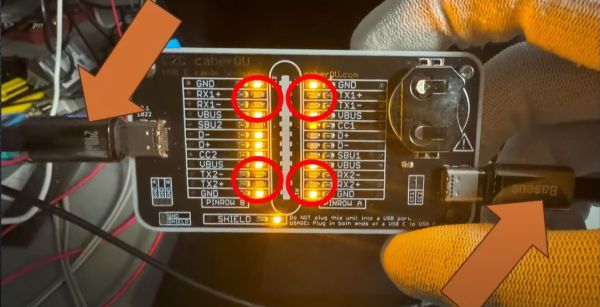
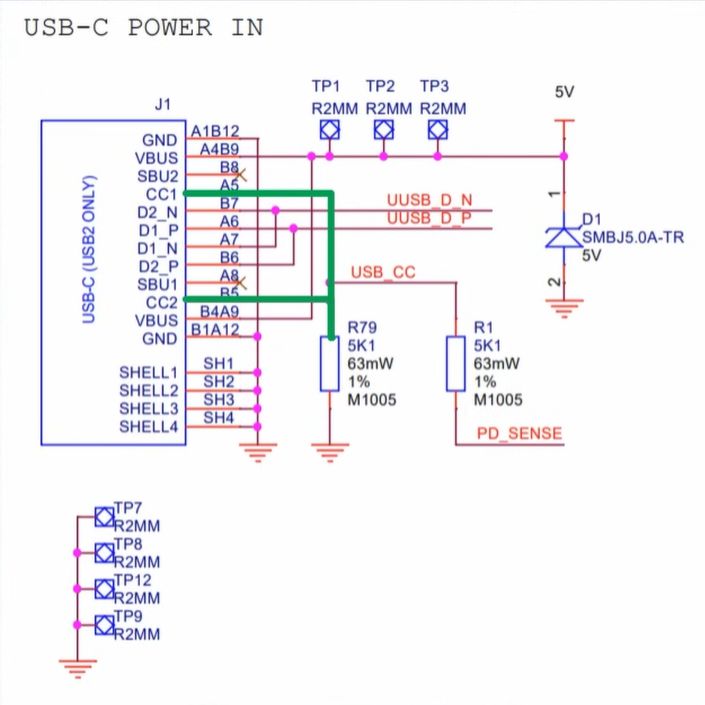
The Raspberry Pi 4B's wrong USB-C CC-pin configuration is a good teaching example.
The Raspberry Pi 4B’s wrong USB-C CC-pin configuration is a good teaching example.

Starting with the USB 2.0 ‘legacy mode’ and the very boring and predictable 5 V power delivery in this mode, [Andreas] shows why you may not get any power delivered to a device with USB-C connector. Most likely the Downstream Facing Peripheral (DFP, AKA not the host) lacks the required resistors on the CC (Configuration Channel) pins, which are both what the other USB-C end uses to determine the connector orientation, as well as what type of device is connected.

This is where early Raspberry Pi 4B users for example saw themselves caught by surprise when their boards didn’t power up except with some USB cables.

The saga continues through [Andreas]’s collection of USB-C cables, as he shows that many of them lack the TX/RX pairs, and that’s before trying to figure out which cables have the e-marker chip to allow for higher voltages and currents.

On the whole we’re still excited about what USB-C brings to the table, but the sheer complexity and number of variables make that there are a myriad of ways in which something cannot work as expected. Ergo Caveat Emptor.

Continue reading “Getting Started With USB-C And Common Pitfalls With Charging And Data Transfer”

Harvesting Electricity From High-Voltage Transmission Lines Using Fences

When you have a bunch of 230 kV transmission lines running over your property, why not use them for some scientific experiments? This is where the [Double M Innovations] YouTube channel comes into play, including a recent video where the idea of harvesting electricity from HV transmission lines using regular fences is put to an initial test.

The nearly final measurement by [Double M Innovations].
The nearly final voltage measurement by [Double M Innovations].
A rather hefty 88 µF, 1200 V capacitor, a full bridge rectifier, and 73 meters (240 feet) of coax cable to a spot underneath the aforementioned HV transmission lines. The cable was then put up at a height consistent with that of fencing at about 1.2 m (4 ft), making sure that no contact with the ground occurred anywhere. One end of the copper shield of the coax was connected to the full bridge rectifier, with the opposite AC side connected to a metal stake driven into the ground. From this the capacitor was being charged.

As for the results, they were rather concerning and flashy, with the 1000 VAC-rated multimeter going out of range on the AC side of the bridge rectifier, and the capacitor slowly charging up to 1000 V before the experiment was stopped.

Based on the capacity of the capacitor and the final measured voltage of 907 VDC, roughly 36.2 Joule would have been collected, giving some idea of the power one could collect from a few kilometers of fencing wire underneath such HV lines, and why you probably want to ground them if energy collecting is not your focus.

As for whether storing the power inductively coupled on fence wire can be legally used is probably something best discussed with your local energy company.

Continue reading “Harvesting Electricity From High-Voltage Transmission Lines Using Fences”

Hacking A Xiaomi Air Purifier’s Filter DRM To Extend Its Lifespan

When [Unethical Info] was looking at air purifiers a while back, their eye fell on a Xiaomi 4 Pro, with a purchase quickly made. Fast-forward a while and suddenly the LCD on top of the device was showing a threatening ‘0% filter life remaining’ error message. This was traced back to an NFC (NTAG213) tag stuck to the filter inside the air purifier that had been keeping track of usage and was now apparently the reason why a still rather clean filter was forcibly being rejected. Rather than give into this demand, instead the NFC tag and its contents were explored for a way to convince it otherwise, inkjet cartridge DRM-style.

While in the process of reverse-engineering the system and doing some online research, a lucky break was caught in the form of earlier research by [Flamingo Tech] on the Xiaomi Air Purifier 3, who had obtained the password-generating algorithm used with the (password-locked) NFC tag, along with the target area of the filter’s NFC tag to change. Using the UID of the NFC tag, the password to unlock the NFC tag for writing was generated, which requires nothing more than installing e.g. ‘NFC Tools’ on an NFC-capable Android/iOS smartphone to obtain the tag’s UID and reset the usage count on the filter.

A password generating tool is provided with the [Unethical Info] article, and this approach works across a range of Xiaomi air purifiers, making it an easy fix for anyone who owns such a device but isn’t quite ready yet to shell out the big bucks for a fresh DRM-ed filter. This approach also saves one from buying more NFC tags, which was the case with the previous solution.