Arduino Watchdog Sniffs Out Hot 3D Printers

We know we’ve told you this already, but you should really keep a close eye on your 3D printer. The cheaper import machines are starting to display a worrying tendency to go up in flames, either due to cheap components or design flaws. The fact that it happens is, sadly, no longer up for debate. The best thing we can do now is figure out ways to mitigate the risk for all the printers that are already deployed in the field.
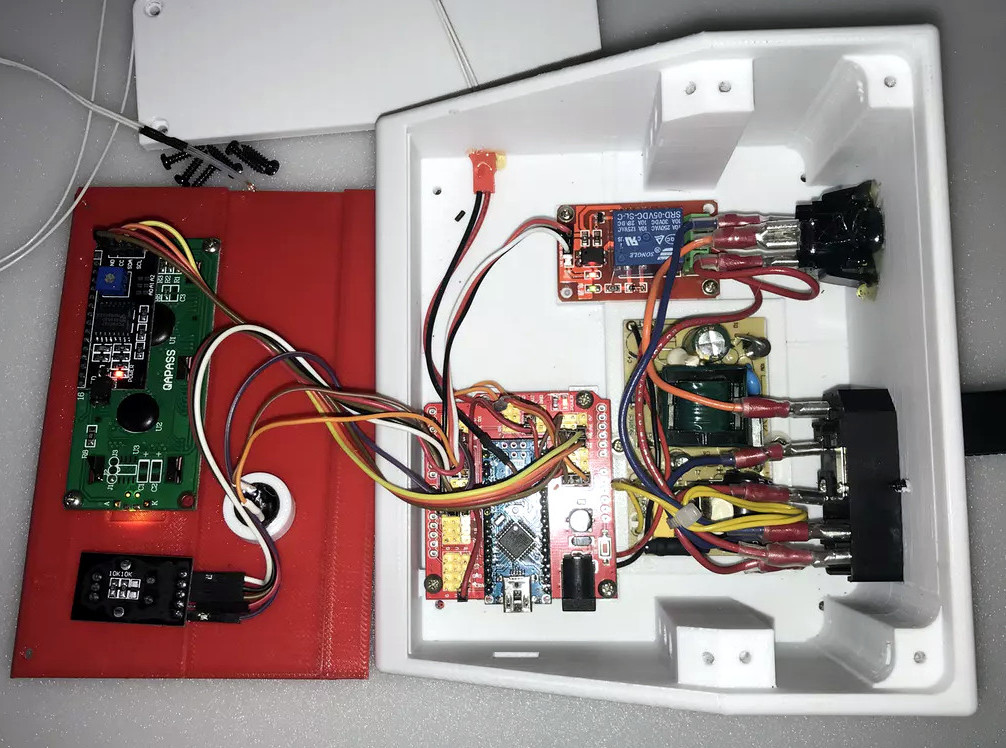
At the risk of making a generalization, most 3D printer fires seem to be due to overheating components. Not a huge surprise, of course, as parts of a 3D printer heat up to hundreds of degrees and must remain there for hours and hours on end. Accordingly, [Bin Sun] has created a very slick device that keeps a close eye on the printer’s temperature at various locations, and cuts power if anything goes out of acceptable range.

The device is powered by an Arduino Nano and uses a 1602 serial LCD and KY040 rotary encoder to provide the user interface. The user can set the shutdown temperature with the encoder knob, and the 16×2 character LCD will give a real-time display of current temperature and power status.

Once the user-defined temperature is met or exceeded, the device cuts power to the printer with an optocoupler relay. It will also sound an alarm for one minute so anyone in the area will know the printer needs some immediate attention.

We’ve recently covered a similar device that minimizes the amount of time the printer is powered on, but checking temperature and acting on it in real-time seems a better bet. No matter what, we’d still suggest adding a smoke detector and fire extinguisher to your list of essential 3D printer accessories.

Continue reading “Arduino Watchdog Sniffs Out Hot 3D Printers”

Dissecting The Elusive Wax Motor

We’d wager most readers aren’t intimately acquainted with wax motors. In fact, a good deal of you have probably never heard of them, let alone used one in a project. Which isn’t exactly surprising, as they’re very niche and rarely used outside of HVAC systems and some appliances. But they’re fascinating devices, and once you’ve seen how they work, you might just figure out an application for one.

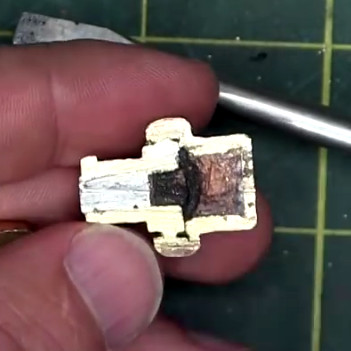
[AvE] recently did a complete teardown on a typical wax motor, going as far as cutting the thing in half to show the inner workings. Now we’ve seen some readers commenting that everyone’s favorite foul-mouthed destroyer of consumer goods has lost his edge, that his newer videos are more about goofing off than anything. Well we can’t necessarily defend his signature linguistic repertoire, but we can confidently say this video does an excellent job of explaining these little-known gadgets.

The short version is that a wax motor, which is really a linear actuator, operates on the principle that wax expands when it melts. If a solid block of wax is placed in a cylinder, it can push on a piston during the phase change from solid to liquid. As the liquid wax resists compression, the wax motor has an exceptionally high output force for such a small device. The downside is, the stroke length is usually rather short: for the one [AvE] demonstrates, it’s on the order of 2 mm.

By turning heat directly into mechanical energy, wax motors are often used to open valves and vents when they’ve reached a specific temperature. The common automotive engine thermostat is a classic example of a wax motor, and they’re commonly found inside of dishwashers as a way to open the soap dispenser at the proper time during the cycle.

This actually isn’t the first time we’ve featured an in-depth look at wax motors, but [AvE] actually cutting this one in half combined with the fact that the video doesn’t look like it was filmed on a 1980’s camera makes it worth revisiting the subject. Who is going to build a wax motor power device for the Power Harvesting Challenge in the 2018 Hackaday Prize?

Continue reading “Dissecting The Elusive Wax Motor”

Cheap Front Panels With Dibond Aluminium

The production capability available to the individual hacker today is really quite incredible. Even a low-end laser engraver can etch your PCBs, and it doesn’t take a top of the line 3D printer to knock out a nice looking enclosure. With the wide availability of these (relatively) cheap machines, the home builder can churn out a very impressive one-off device on a fairly meager budget. Even low volume production isn’t entirely out of the question. But there’s still one element to a professional looking device that remains frustratingly difficult: a good looking front panel.

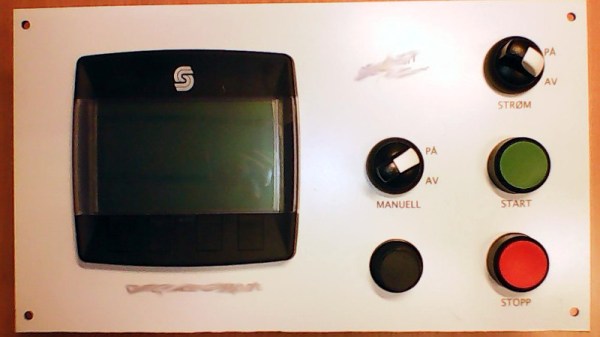
Now if your laser is strong enough to engrave (and ideally cut) aluminum sheets, then you’ve largely solved this problem. But for those of us who are plodding along with a cheap imported diode laser, getting text and images onto a piece of metal can be rather tricky. On Hackaday.io, [oaox] has demonstrated a cost effective way to create metal front panels for your devices using a print service that offers Dibond aluminum. Consisting of two thin layers of aluminum with a solid polyethylene core, this composite material was designed specifically for signage. Through various online services, you can have whatever you wish printed on a sheet of pre-cut Dibond without spending a lot of money.

As explained by [oaox], the first step is putting together the image you’ll send off to the printer using a software package like Inkscape. The key is to properly define the size of the Dibond plate in your software and work within those confines, otherwise the layout might not look how you expected once the finish piece gets back to you. It’s also important to avoid lossy compression formats like JPEG when sending the file out for production, as it can turn text into a mushy mess.

When you get the sheet back, all you need to do is put your holes in it. Thanks to the plastic core, Dibond is fairly easy to cut and drill as long as you take your time. [oaox] used a step drill for the holes, and a small coping saw for the larger openings. The final result looks great, and required very little effort in the grand scheme of things.

But how much does it cost? Looking around online, we were quoted prices as low as $7 USD to do a full-color 4×4 inch Dibond panel, and one site offered a 12×12 panel for $20. For a small production run, you could fit several copies of the graphics onto one larger panel and cut them out with a bandsaw; that could drop the per-unit price to only a couple bucks.

We’ve seen some clever attempts at professional looking front panels, from inkjet printing on transparencies to taking the nuclear option and laser cutting thin plywood. This is one of those issues the community has been struggling with for years, but at least it looks like we’re finally getting some decent options.

A Crash Course In Reliable Communication

It’s probably fair to say that anyone reading these words understands conceptually how physically connected devices communicate with each other. In the most basic configuration, one wire establishes a common ground as a shared reference point and then the “signal” is sent over a second wire. But what actually is a signal, how do the devices stay synchronized, and what happens when a dodgy link causes some data to go missing?

All of these questions, and more, are addressed by [Ben Eater] in his fascinating series on data transmission. He takes a very low-level approach to explaining the basics of communication, starting with the concept of non-return-to-zero encoding and working his way to a shared clock signal to make sure all of the devices in the network are in step. Most of us are familiar with the data and clock wires used in serial communications protocols like I2C, but rarely do you get to see such a clear and detailed explanation of how it all works.

He demonstrates the challenge of getting two independent devices to communicate, trying in vain to adjust the delays on the receiving and transmitting Arduinos to try to establish a reliable link at a leisurely five bits per second. But even at this digital snail’s pace, errors pop up within a few seconds. [Ben] goes on to show that the oscillators used in consumer electronics simply aren’t consistent enough between devices to stay synchronized for more than a few hundred bits. Until atomic clocks come standard on the Arduino, it’s just not an option.

[Ben] then explains the concept of a dedicated clock signal, and how it can be used to make sure the devices are in sync even if their local clocks drift around. As he shows, as long as the data signal and the clock signal are hitting at the same time, the actual timing doesn’t matter much. Even within the confines of this basic demo, some drift in the clock signal is observed, but it has no detrimental effect on communication.

In the next part of the series, [Ben] will tackle error correction techniques. Until then, you might want to check out the fantastic piece [Elliot Williams] put together on I2C.

[Thanks to George Graves for the tip.]

Continue reading “A Crash Course In Reliable Communication”

Poetry Is The Fruit Of This Loom

We’d wager that most people reading these words have never used a loom before. Nor have most of you churned butter, or ridden in a horse-drawn wagon. Despite these things being state of the art technology at one point, today the average person is only dimly aware of their existence. In the developed world, life has moved on. We don’t make our own clothes or grow our own crops. We consume, but the where and how of production has become nebulous to us.

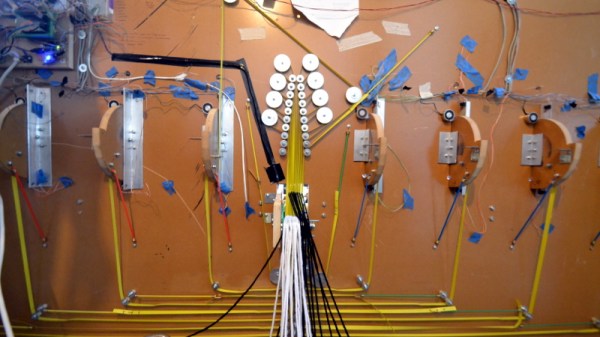
[David Heisserer] and his wife [Danielle Everine], believe this modern separation between consumption and production is a mistake. How can we appreciate where our clothing comes from, much less the people who make it, without understanding the domestic labor that was once required to produce even a simple garment? In an effort to educate the public on textile production in a fun and meaningful way, they’ve created a poetry printing loom called Meme Weaver.

The Meme Weaver will be cranking out words of woolen wisdom at the Northern Spark Festival taking place June 15th and 16th in downtown Minneapolis. If any Hackaday readers in the area get a chance to check out the machine, we’d love to hear about it in the comments. Take photos! Just don’t blame us if you have a sudden urge to make all of your clothing afterwards.
Continue reading “Poetry Is The Fruit Of This Loom”

VCF East 2018: Cactus, Retro Because It Wants To Be

Among the rows of digital dinosaurs, one blinking front panel stood out. It certainly looked the part of a retro computer; with banks of blinking LEDs and multicolored paddle switches. But upon closer inspection, the laser cut wooden front panel betrays the fact that this machine is an impostor. It may have the appearance of a machine from the heady days where home computers looked like they could have doubled as a prop on the bridge of Kirk’s Enterprise, but it’s actually a product of much more modern provenance.

It’s called the Cactus, a love letter to the homebrew microcomputers of the 1970’s, designed and built by somebody at least 20 years too young to have experienced them the first time around. Alexander Pierson created the Cactus not because he had fond memories of putting together an Altair 8800 in 1975, but because he’s fascinated with the retro computer experience: the look of the front panel, the satisfying clunk of era-appropriate switches, and the idea that the computer’s inner workings aren’t an abstract black box but rather something you can interact with and study. Judging by all the attention the Cactus got at VCF East XIII, he’s not the only one.

Let’s take a look at everything Alexander poured into this retrocomputer build.

Continue reading “VCF East 2018: Cactus, Retro Because It Wants To Be”

Unlocking Animal Crossing’s Debug Mode

Originally released on the Nintendo 64 in 2001, Animal Crossing was the first entry into what has become a massively successful franchise. But while the game has appeared on more modern Nintendo consoles, most recently Android and iOS, the version released on the GameCube holds a special place in many fan’s hearts. The GameCube version was the first time those outside of Japan got a taste of the unique community simulation offered by Animal Crossing, and maintains a following nearly 20 years after its release.

[James Chambers] has recently been investigating creating mods for the GameCube version of Animal Crossing, and in the process uncovered some interesting references to a debug mode. That launched a deep dive into the game’s assembly code in an attempt to find what the debug functions did and if they could be enabled without having to patch the game ROM. In the end, he was able to find a push button code that enables debug mode on the retail copy of the game.

[James] starts by using the debugger provided by the Dolphin GameCube emulator to poke around and figure out exactly what flags need to be modified to activate the debug mode. This leads to a few interesting finds, such as being able to pop up a performance monitor graph and some build info. Eventually he finds the proper incantation to bring up a functional debug display in the game, but there was still the mystery of how you do it on the real hardware with a retail copy of the game.

It wouldn’t be unreasonable to think that some special dongle or development version of the GameCube would be required to kick the game into debug mode. But through careful examination of the code path, [James] was able to figure out that hitting a specific combination of buttons on the controller was all that was required to use the debug mode on the stock game. Once the debug mode is started, a controller plugged into the second port allows the user to navigate through options and perform tasks. Not everything is currently understood, but some progress has been made, such as figuring out how to add items to your inventory.

It’s hardly Nintendo’s most popular console, but there’s still a healthy interest in GameCube hacking as the machine approaches its 20th anniversary. We recently saw some impressive work being done to reverse engineer the system’s wireless controllers, though some people are more interested in just cutting the thing in half.

[Thanks to Tim Trzepacz for the tip.]