Clean Enclosures, No Printing Necessary

Unless you’re into circuit sculptures, generally speaking, a working circuit isn’t the end-point of a lot of electronics projects. To protect your new creation from grabby hands, curious paws, and the ravages of nature, you’ll probably want some kind of enclosure. These days a lot of us would probably run it off on the 3D printer, but some people would rather stay electronics hobbiests without getting into the 3D printing hobby. For those people, [mircemk] shares how he creates professonal-looking enclosures with handtools.

The name [mircemk] will seem familiar to longtime readers– we’ve featured many of his projects, and they’ve always stood out for the simple but elegant enclosures he uses. The secret, it turns out, is thin PVC sheeting from a sign shop. At thicknesses up to and including 5 mm, the material can be bent by hand and cut with hobby knives. It’s obviously also amenable to drilling and cutting with woodworking tools as well. Drilling is especially useful to make holes for indicator LEDs. [mircemk] recommends cyanoacrylate universal glue to hold pieces together. For holding down the PCB, the suggestion of double-sided tape will work for components that won’t get too hot.

Rather than paint, the bold contrasting colours we’ve become used to are applied using peel-and-stick wallpaper, which is a great idea. It’s quick, zero mess, and the colour is guaranteed to be evenly applied. It might even help hold the PVC enclosure together ever so slightly. You can watch him do it in the video embedded below.

We hate to say it, but for a one-off project, this technique probably does beat a 3D printed box for professional looks, assuming you have [mircemk]’s motorskills. If you don’t have said motor skills, check out this parametric project box generator. If you’d rather avoid PVC while making a square box to hold a PCB, have you considered using PCBs?

Thanks to [mircemk] for the tip! If you have a tip or technique you want to share, please box it up and send it to the tipsline

Continue reading “Clean Enclosures, No Printing Necessary”

Magic-less 8 Ball Finds New Life With Pi Pico Inside

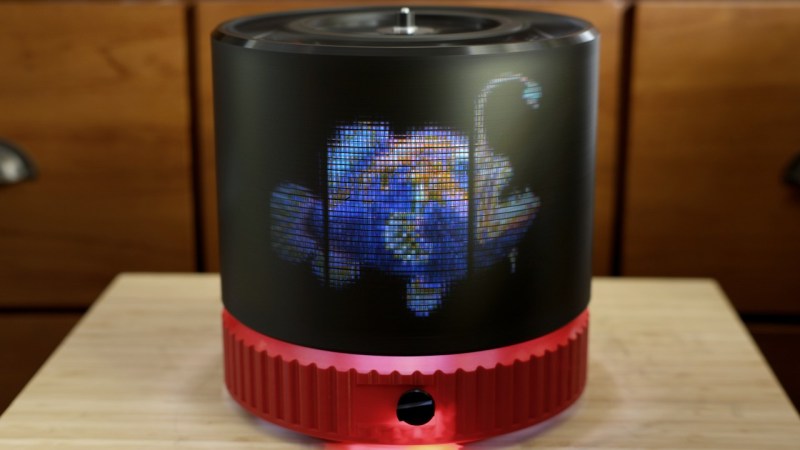
There’s an old saying that goes: when life gives you lemons, make lemonade. [lds133] must have heard that saying, because when life took the magic liquid out of his Magic 8 Ball, [lds133] made not eight-ball-aide, but an electronic replacement with a Raspberry Pi Pico and a round TFT display.

In case the Magic 8 Ball is unknown in some corners of the globe, it is a toy that consists of a twenty-sided die with a set of oracular messages engraved on it, enclosed in a magical blue liquid — and by magical, we mean isopropyl alcohol and dye. The traditional use is to ask a question, shake the eight-ball, and then ignore its advice and do whatever you wanted to do anyway.

Continue reading “Magic-less 8 Ball Finds New Life With Pi Pico Inside”

SEGA Music To MODfile, (Semi)Automatically

One thing SEGA’s MegaDrive/Genesis and the Commodore Amiga had in common was–aside from the Motorola 68000 processor– being known for excellent music in games. As [reassembler] continues his quest to de-assemble Sonic: The Hedgehog and re-assemble the code to run on Amiga, getting the music right is a key challenge. Rather than pull MIDI info or recreate the sound by ear, [reassembler] has written a program called Sonic2MOD to automatically take the assembly file music from the MegaDrive cartridge and turn it into an Amiga-style MODfile. He’s also made a video about it that you’ll find embedded below.

Of course how music gets made differs widly on the two systems. Amiga, famously has Paula, a custom ASIC designed for sampling, allowing you to play four eight-bit voices. The Sega, of course, has that glorious FM-synthesis chip from Yamaha synthesizing five channels of CD-quality sound and one channel of sample. It’s not as well known, but the Sega also has a bonus TI-compatible programmable sound chip (PSG) that can handle 3 square-wave tone channels and one noise channel. That’s ten total channels to the Amiga’s four, and CD-quality to 8-bit voices. Knowing all that, we were very curious how close to SEGA’s original music [reassembler] could get on the Amiga.

Before he could show us, [reassembler] needed to decode the SMPS files used on Sonic: The Hedgehog and many other MegaDrive games. Presumably he could have gotten a MIDI file online somewhere– there are oodles– but the goal was to reverse engineer Sonic from its cartridge for the Amiga, not download a lot of resources from the web. SMPS is a sort of programing language for sound, telling the Yamaha and PSG chips what to do.

In some ways, it’s not unlike the Amiga’s MOD format, which programmatically specifies how to play the sampled voices also stored in the file. Translating from one to another is a matter of reading the SMPS files, extracting the timing, volume, vibrato, et cetera, and translate that into a form the MOD file can use. Then [reassembler] needed to generate samples, which was an added hiccup because the Amiga can only handle 3 octaves vs the seven of the SEGA’s FM synthesizer. He’s able to solve this simply by generating multiple samples to span the Yamaha chip’s range, though, again, at only 8-bit fidelity. It doesn’t sound half bad.

What about the four-channel limit? That’s where a bit of artistry comes in; the automated tool produces MOD files with more voices, which MOD trackers can handle at increased computational load. Computational load you don’t need when trying to play a game. Scaling down the soundtrack to the Amiga’s limits is something [reassembler] already has practice with from his famous OutRun port, though, so we’re sure he’ll get it done.

All of this effort just to match the Mega Drive makes us appreciate what a capable little computer the Sega console was; why, you can even check your stocks with it! We’ve already featured [reassembler]’s Sonic port once before, but this music tool was interesting enough we couldn’t help ourselves coming back to it. The ability to play MOD files were pretty impressive when the Amiga came out, but nowadays all you need is a ten-cent microcontroller.

Continue reading “SEGA Music To MODfile, (Semi)Automatically”

Laser Welding Helps YouTuber Get Ahead With Aluminum Sheet

Laser Welding is apparently the new hotness, in part because these sci-fi rayguns masquerading as tools are really cool. They cut! They weld! They Julienne Fry! Well, maybe not that last one. In any case, perhaps feeling the need to cancel out that coolness as quickly as he possibly could, YouTuber [Wesley Treat] decided to make a giant version of his own head.

[Wesely] had previously been 3D scanned as part of the maker scans project, which you can find over on Printables. Those of you who really hate YouTubers, take note: finally you have something  to take your frustrations out on. [Wesely] takes that model into Blender to decimate and decapitate– fans of the band Tyr may wonder if the model questioned his sword–before feeding that head through an online papercraft tool called PaperMaker to generate cut files for his CNC. There are also a lot of welding montages interspersed there as he practices with the new tool. [Wesely] did first try out his new raygun on steel in a previous video, but even knowing that, he makes the learning curve on these lasers look quite scalable.

While we’re not likely to follow in [Wesely]’s footsteps and create our own low-poly Zardoz– Zardozes? Zardii?– using a papercraft toolchain and CNC equipment with sheet aluminum is absolutely a great idea worth stealing. It’s very similar to what another hacker did with PCBs— though that project was perhaps more reasonable in scale and ego.

We are no strangers to papercrafts that use actual paper here, either, having featured everything from model retrocomputers to fully-mobile strandbeasts. 

Continue reading “Laser Welding Helps YouTuber Get Ahead With Aluminum Sheet”

A screenshot of the inkjet simulator project

Understand Your Printer Better With The Interactive Inkjet Simulator

Love them or hate them, inkjets are still a very popular technology for putting text and images on paper, and with good reason. They work and are inexpensive, or would be, if not for the cartridge racket. There’s a bit of mystery about exactly what’s going on inside the humble inkjet that can be difficult to describe in words, though, which is why [Dennis Kuppens] recently released his Interactive Printing Simulator.

[Dennis] would likely object to that introduction, however, as the simulator targets functional inkjet printing, not graphical. Think traces of conductive ink, or light masks where even a single droplet out-of-place can lead to a non-functional result. If you’re just playing with this simulator to get an idea of what the different parameters are, and the effects of changing them, you might not care. There are some things you can get away with in graphics printing you really cannot with functional printing, however, so this simulator may seem a bit limited in its options to those coming from the artistic side of things.

You can edit parameters of the nozzle head manually, or select a number of industrial printers that come pre-configured. Likewise there are pre-prepared patterns, or you can try and draw the Jolly Wrencher as the author clearly failed to do. Then hit ‘start printing’ and watch the dots get laid down.

[Dennis] has released it under an AGPL-3.0 license, but notes that he doesn’t plan on developing the project further. If anyone else wants to run with this, they are apparently more than welcome to, and the license enables that.

Did you know that there’s an inkjet in space? Hopefully NASA got a deal on cartridges. If not, maybe they could try hacking the printer for continuous ink flow. Of course that’s all graphics stuff; functional printing is more like this inkjet 3D printer.

Electric Motorcycles Don’t Have To Be Security Nightmares, But This One Was

Once upon a time, they told us we wouldn’t download a car, and they were wrong. Later, Zero Motorcycles stated in their FAQ that you cannot hack an electric motorcycle, a statement which [Persephone Karnstein] and collaborator [Mitchell Marasch] evidently took issue with. Not only can you hack an electric motorcycle, it is — in [Persephone]’s words — a security nightmare.

You should absolutely go over to [Persephone]’s website and check out the whole write-up, which is adapted from a talk given at BSides Seattle 2026. There’s simply way more detail than we can get into here. Everything from “what horridly toxic solvents would I need to unpot this PCB?” to the scripts used in de-compiling and understanding code, it’s all there, and in a lively and readable style to boot. Even if you have no interest in security, or electric motorcycles, you should check it out.

The upshot is that not only were Zero Motorcycles wrong when they said their electric motorcycles could not be hacked, they were hilariously wrong. The problem isn’t the motorcycle alone: it has an app that talks to the electronics on the bike, which take over-the-air (OTA) updates. What about the code linked to the VIN alluded to in that screenshot? Well, it turns out you just need a code structured like a VIN, not an actual number. Oops. By the end of it, [Persephone] and [Mitchell] have taken absolute control of the bike’s firmware, an so have them full control over all its systems.

Why cut the brake lines when you can perform an OTA update that will do the same thing invisibly? And don’t think you can just reset the bike to factory settings to fix it: they thought of this, and the purely-conceptual, never-deployed malware has enough access to prevent that. Or they could just set the battery on fire. That was an option, too, because the battery management system gets OTA updates as well.

To be clear, we don’t have any problem with a motorcycle that’s dependent on electronics to operate. After all, we’ve seen many projects that would meet that definition over the years. But the difference is none of those projects fumbled the execution this badly. Even this 3 kW unicycle, which has a computer for balance control, doesn’t see the need to expose itself. It’s horribly unsafe in very different ways.

A hotend equipped with the bd_pressure sensor. The nozzle is facing upwards.

Direct Pressure Advance Measurement For Fast Calibration

Some people love fiddling with their 3D printers, others love printing. Some fiddle so they can spend more time printing, which is probably where this latest project comes in: an automated pressure advance calibration tool by [markniu].

Most of us don’t take enough care with pressure advance (PA). But if you want absolutely perfect prints, its something you should be calibrating for every type filament in your collection. Some would argue, ideally every individual spool. While that sort of dialing in can be fun, it takes away from actually running off prints. Bambu printers automate PA by scanning the usual sort of calibration print, but that’s still a very indirect measurement. Why not, just advance the filament, and measure the pressure at the nozzle directly? That is what PA is meant to account for, after all: the pressure of the plastic in the hotend causing oozing and blobbing at corners.

Did we mention it connects via USB-C? That’s helpfully broken out well away from the heat with a ribbon cable.

[mark]’s solution comes very close to a direct measurement. It uses a strain gauge that sits directly on top of the heatbreak, with the sound logic that the strain there experienced will be directly proportional to the pressure inside, at least along the axis of flow. Instead of filling half the bed with lines, the calibration process instead is a ‘printer poop’ style extrusion that doesn’t take nearly as long, and seems to save plastic, too. Since this puts a strain gauge in your hotend, you also get the bonus of being able to use it for bed leveling if you should so desire.

[mark] is claiming sub-90 second calibration — as you can see in the demo video embedded below — versus over seven minutes for the indirect calibration print. The value is plugged directly into Klipper, assuming you configured everything correctly, which should be easy enough looking at the instructions on the GitHub. Continue reading “Direct Pressure Advance Measurement For Fast Calibration”