Paper Keyboard Is Self-Powered

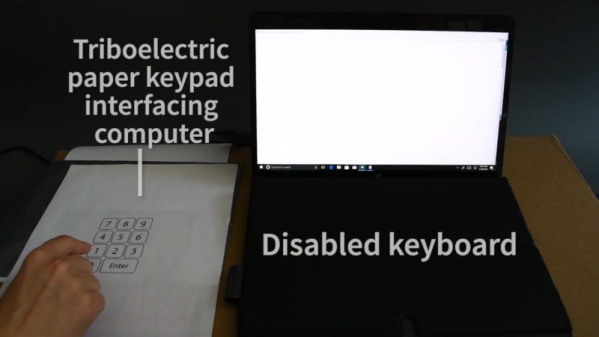
Building a keyboard isn’t a big project these days. Controller chips and boards are readily available, switches are easy to find, and a 3D printer can do a lot of what used to be the hard parts. But engineers at Purdue have printed a self-powered Bluetooth keyboard on an ordinary sheet of paper. You can see videos of the keyboards at work below.

The keyboards work by coating paper with a highly fluorinated coating that repels water, oil, and dust. Special inks print triboelectric circuits so that pressing your finger on a particular part of the paper generates electricity. We were skeptical that the Bluetooth part is self-powered, although maybe it is possible if you have some very low-power electronics or you manage the power generated very carefully.

Continue reading “Paper Keyboard Is Self-Powered”

Tutorial For Setting Up Raspberry Pi For Ham Radio Use

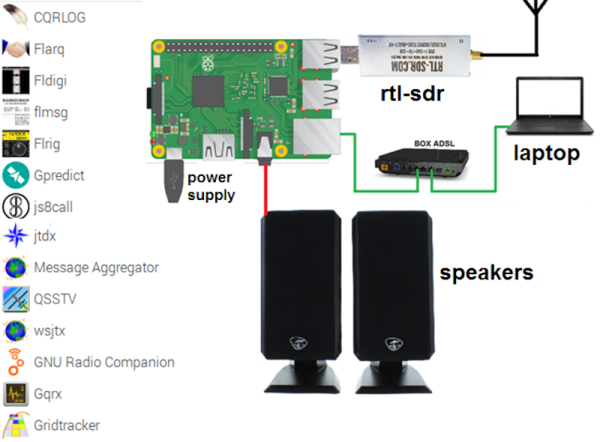
There was a time when a ham radio set up sported many dials and switches and probably quite a few boxes as well. Computers have changed all that. Some transceivers now have just a few buttons or are even totally computer-controlled. Where a ham, at one time, might have a TeleType machine, a slow-scan TV monitor, and a fax printer for receiving satellite images, now that can all be on a single computer which can even be a Raspberry Pi. [F4GOH] has a post that takes you from the fundamentals to installing everything from an SDR to many common ham programs for digital modes, APRS, SSTV, and more. You can download the seven-part tutorial as separate PDF files, too.

Even if you aren’t a ham, you might find some of the software interesting. OpenWebRX lets you listen to your software defined radio on the road. You can use other software to pick up weather satellite data.

Continue reading “Tutorial For Setting Up Raspberry Pi For Ham Radio Use”

You Don’t Need A Weatherman To Know Which Way The Drone Blows

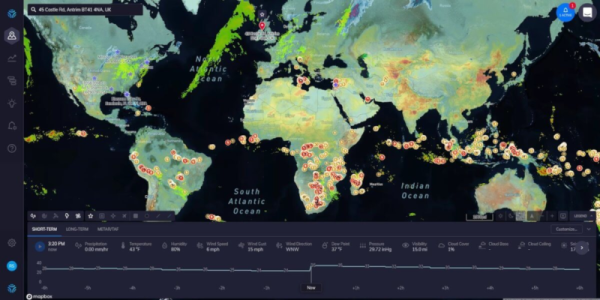
“How’s the weather?” is a common enough question down here on the ground, but it’s even more important to pilots. Even if they might not physically be in the cockpit of the craft they are flying. [Justin Parsons] explains how weather affects drone flights and how having API access to micro weather data can help ensure safe operations.

As drone capability and flight time increase, the missions they will fly are getting more and more complex. [Justin] uses a service called ClimaCell which has real-time, forecast, and historical weather data available across the globe. The service isn’t totally free, but if you make fewer than 1,000 calls a day you might be able to use a developer account which doesn’t cost anything.

According to [Justin], weather data can help with pre-flight planning, in-flight operations, and post-flight analysis. The value of accurate forecasting is indisputable. However, a drone or its ground controller could certainly understand real-time weather in a variety of ways and record it for later use, so the other two use cases maybe a little less valuable.

While on the subject, it seems to us that accurate forecasting could be important for other kinds of projects. Will you have enough sun to catch a charge on your robot lawnmower tomorrow? If your beach kiosk is expecting rain, it could deploy an umbrella or close some doors and shutdown for a bit.

If you insist on using a free service, the ClimaCell blog actually lists their top 8 APIs. Naturally, their service is number one, but they do have an assessment of others that seems fair enough. Nearly all of these will have some cost if you use it enough, but many of them are pretty reasonable unless you’re making a huge number of calls.

How would you use accurate micro weather data? Let us know in the comments. Then again, sometimes you want to know the weather right from your couch. Or maybe you’d like your umbrella to tell you how long the storm is going to last.

Codespaces For Embedded Development

We can sympathize with [Benjamin Cabé]. He has a lot of development boards and it has become painful to maintain the many toolchains for each board. We’ve also suffered from upgrading one tool breaks another tool in some obscure way. His solution? Use Github Codespaces which you can get early access for beta testers.

The idea is that you can spin off a container-specific to a GitHub repository that has all the proper versions and dependencies required to work with a project.

If you sign up for the beta, you’ll be on a waitlist, but it is interesting to see [Benjamin] go through the steps. The service is free during the beta and you get two codespaces. Presumably, you’ll eventually be able to pay for more capability.

The idea is good, but we’ll have to see about the implementation. A preconfigured container might move from machine to machine or even to deep storage for later reconstitution. Flashing the binary image to the device looked painful from the browser. We’ve seen it done nicely with, for example, the online Arduino IDE but it did take some installable software helpers to do that.

We’ll be curious about how many different platforms this will support. However, you can roll your own version of this and avoid the cloud using Docker or even a full-blown VM like VirtualBox. Sure, it is more work, but you control your destiny. Add something like Platform.IO and your choice of development tools and you can avoid having so many competing development tools all in your main computer.

Continue reading “Codespaces For Embedded Development”

Intuition About Signals And Systems

Signals and systems theory is a tough topic. Terms like convolution and impulse response can be hard to understand on a visceral level and most books that talk about these things emphasize math over intuition. [Discretised] has a YouTube channel that already has several videos that promise to tackle these topics with “minimum maths, maximum intuition.” We particularly noticed the talks on convolution and impulse response.

We think that often math and intuition don’t always come together. It is one thing, for example, to know that E=I times R, and power is I times E, but it is another to realize that a half-watt transmitter delivers 5V into a 50Ω load and that one watt will take just over 7V into that same load.

The example used is computing how much smoke you can expect to create by setting off fireworks. We presume the math models are notional since we imagine a real model would be pretty complex and involve things like wind data. But it still makes a nice example.

If you don’t know anything about the topic, these might not be the right ones to try to learn the basics. But we do applaud people sharing their intuition on these complex subjects.

Continue reading “Intuition About Signals And Systems”

I’m Sorry Dave, You Shouldn’t Write Verilog

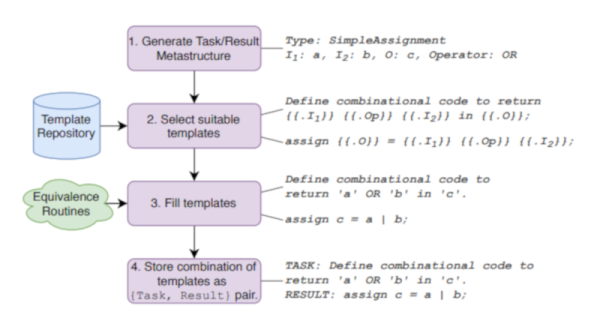
We were always envious of Star Trek, for its computers. No programming needed. Just tell the computer what you want and it does it. Of course, HAL-9000 had the same interface and that didn’t work out so well. Some researchers at NYU have taken a natural language machine learning system — GPT-2 — and taught it to generate Verilog code for use in FPGA systems. Ironically, they called it DAVE (Deriving Automatically Verilog from English). Sounds great, but we have to wonder if it is more than a parlor trick. You can try it yourself if you like.

For example, DAVE can take input like “Given inputs a and b, take the nor of these and return the result in c.” Fine. A more complex example from the paper isn’t quite so easy to puzzle out:

Write a 6-bit register ‘ar’ with input
defined as ‘gv’ modulo ‘lj’, enable ‘q’, synchronous
reset ‘r’ defined as ‘yxo’ greater than or equal to ‘m’,
and clock ‘p’. A vault door has three active-low secret
switch pressed sensors ‘et’, ‘lz’, ‘l’. Write combinatorial
logic for a active-high lock ‘s’ which opens when all of
the switches are pressed. Write a 6-bit register ‘w’ with
input ‘se’ and ‘md’, enable ‘mmx’, synchronous reset
‘nc’ defined as ‘tfs’ greater than ‘w’, and clock ‘xx’.

Continue reading “I’m Sorry Dave, You Shouldn’t Write Verilog”

Linux Fu: Moving /usr

Linux has changed. Originally inspired by Unix, there were certain well understood but not well enforced rules that everyone understood. Programs did small things and used pipes to communicate. X Windows servers didn’t always run on your local machine. Nothing in /usr contributed to booting up the system.

These days, we have systemd controlling everything. If you run Chrome on one display, it is locked to that display and it really wants that to be the local video card. And moving /usr to another partition will easily prevent you from booting up, unless you take precautions. I moved /usr and I lived to tell about it. If you ever need to do it, you’ll want to hear my story.

A lot of people are critical of systemd — including me — but really it isn’t systemd’s fault. It is the loss of these principles as we get more programmers and many of them are influenced by other systems where things work differently. I’m not just ranting, though. I recently had an experience that brought all this to mind and, along the way, I learned a few things about the modern state of the boot process. The story starts with a friend giving me an Intel Compute Stick. But the problems I had were not specific to that hardware, but rather how modern Linux distributions manage their start-up process.

Continue reading “Linux Fu: Moving /usr”