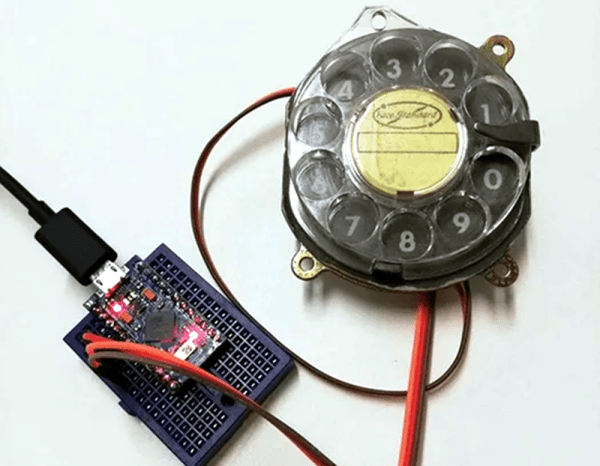
Rotary Dial Becomes USB Keyboard

[Max] had a rotary dial from an old telephone and — unsurprisingly — had nothing in particular to do with it. The simple answer? Use an Arduino Leonardo to turn it into a USB keyboard device.

Of course, the Leonardo can easily impersonate a USB keyboard, so that’s the easy part of the project. Interfacing to the dial requires an understanding of how the phone system works.

While today, TouchTone phones are most common, they were quite uncommon for many years. Early phones required you to have an operator connect your circuit to another person’s circuit. Unfortunately for the operators, the system was inherently unscalable and also cost prohibitive.

There were a variety of schemes tried and — supposedly — an undertaker who was angry that the operator was connecting his customers to her husband’s competing mortuary invented the dial telephone.

The details are pretty simple. A typical dial has two contacts. There’s a normally open contact that closes when you spin the dial to any position. It says closed until the spring returns the dial to the home position.

The other contact is normally closed and makes or breaks the phone line. Each time the dial rewinds past a position, the contact opens briefly. Of course, this is a mechanical system, so the software has to debounce the inputs, but that’s easy enough.

If you don’t have access to a dial, you could always print one. Sort of.

Arduino Does Multitouch

A lot of consumer gadgets use touch sensors now. It is a cheap and reliable way to replace a variety of knobs and switches on everything from headphones to automobiles. However, creating a custom touch controller for a one-off project can be daunting. A recent ACM paper shows how just about any capacitive sensor can work as a multitouch sensor with nothing more than an Arduino although a PC running processing interprets the data for higher-level functions.

The key is that the Arduino excites the grid using PWM and then examines the signal coming out of the grid. Finger poking changes the response quite a bit and the Arduino can sense it using the analog to digital converters onboard. You can find the actual software kit online. The tutorial document is probably more interesting than the ACM paper if you only want to use the kit.

The optimum drive frequency is 10 MHz. The examples rely on harmonics of a lower frequency PWM signal to get there. The analog conversion, of course, isn’t that fast but since your finger touch rate is relatively slow, they treat the signal as an amplitude-modulated input which is very easy to decode.

The sensors can be conductive ink, thread, or copper strips. There are several example applications, including a 3D printed bunny you can pet, a control panel on a sleeve, and an interactive greeting card.

The sensor forms an image and OpenCV detects the actual touch configuration. It appears you can use the raw data from the Arduino, too, but it might be a little harder.

We imagine aluminum foil would work with this technique. If you get to the point of laying out a PCB, this might come in handy.

DSP Spreadsheet: IQ Diagrams

In previous installments of DSP Spreadsheet, we’ve looked at generating signals, mixing them, and filtering them. If you start trying to work with DSP, though, you’ll find a topic that always rears its head: IQ signals. It turns out, these aren’t as hard as they appear at first and, as usual, we’ll tackle them in a spreadsheet.

What does IQ stand for? The I stands for “in phase” and the Q stands for quadrature. By convention, the I signal is a cosine wave and the Q signal is a sine wave. Another way to say that is that the I and Q signals are 90 degrees out of phase. By manipulating the amplitude of I and Q, you can create complex modulation or, conversely, demodulate signals. We’ll see a spreadsheet that shows that completely next time.

Continue reading “DSP Spreadsheet: IQ Diagrams”

Audio Processing In Rust

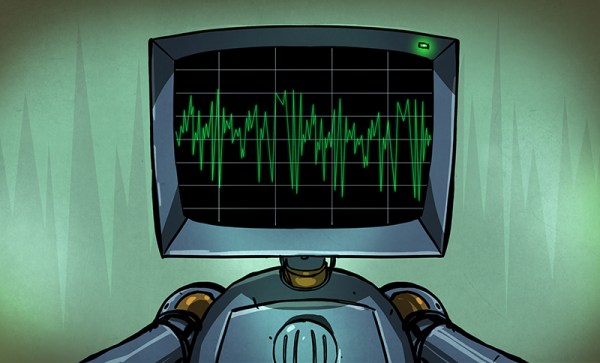
[Michael] volunteers with emergency services, and sometimes has to monitor radio traffic. Sometimes there’s a lot to review, and to make it easier he wrote a noise gate — think of it as a squelch — to break apart recorded audio into parts. Rust has been gaining popularity for writing low level software, and that’s the language he uses. However, you’ll see even if you don’t know Rust, it is pretty easy to figure out.

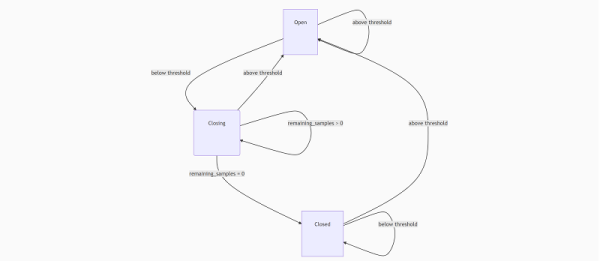
For test data, [Michael] took some publicly-available recordings of air traffic control. Using some ready-made audio processing functions and a simple state machine makes the code easy to write.

Continue reading “Audio Processing In Rust”

Best Buy’s IoT Goes Dark, Leaving Some “Smart” Products Dumbfounded

Bad news if you bought several Insignia-branded smart devices from Best Buy. The company has decided to shut down the back end systems that make them work — or at least work as a smart device. On the chopping block are smart outlets, switches, a security camera, and an upright freezer. If you bought, say, the freezer, it will still keep things cold. But the security camera will apparently be of no use at all now that the backend systems have gone dark. The company is offering an unspecified partial refund to users of the affected devices.

Best Buy announced this in September, and the shutdown date was last week on November 6th. Not all Insignia products are impacted, just the ones that rely on their app.

Anytime we talk about cloud-based technology, there are always a few people who say something like, “I’ll never rely on anything in the cloud!” Perhaps they have a point — certainly in this case they were right. There are really two things to consider: hardware devices that rely on the cloud, and data that resides in the cloud. In some cases, one product — like a camera — might have both.

Continue reading “Best Buy’s IoT Goes Dark, Leaving Some “Smart” Products Dumbfounded”

Peltier Device Experiments

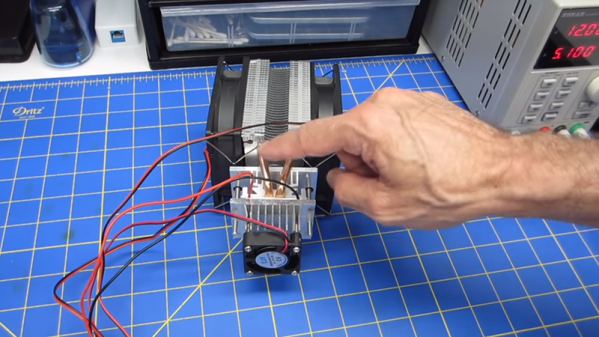
Once an exotic component, solid state heat pumps or Peltier devices are now pretty mainstream. The idea is simple: put electricity through a Peltier device and one side gets hot while the other side gets cold. [DroneBot] recently posted a video showing how these cool — really cool — devices work. You can see the video, below.

Many things in physics are reversible, and the Peltier is no exception. The device is actually a form of thermocouple, and in a thermocouple a temperature difference causes a voltage difference. This is known as the Seebeck effect as opposed to the Peltier effect in which current flowing between voltage differences causes a temperature difference. It was known for many years, but wasn’t very practical until modern semiconductor materials arrived.

Continue reading “Peltier Device Experiments”

This Arduino Keeps Its Eyes On You

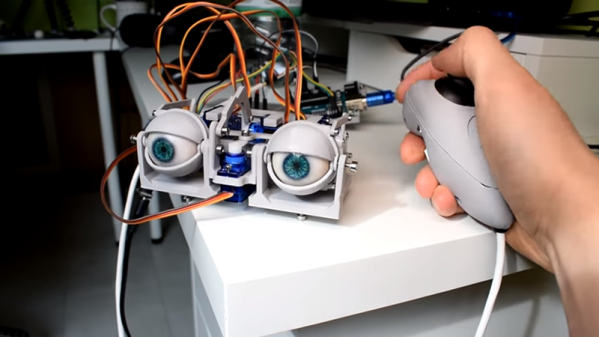
[Will] wanted to build some animatronic eyes that didn’t require high-precision 3D printing. He wound up with a forgiving design that uses an Arduino and six servo motors. You can see the video of the eyes moving around in the video below.

The bill of materials is pretty simple and features an Arduino, a driver board, and a joystick. The 3D printing parts are easy to print with no supports, and will work with PLA. Other than opening up holes there wasn’t much post-processing required, though he did sand the actual eyeballs which sounds painful.

Continue reading “This Arduino Keeps Its Eyes On You”