Talking With Bubbles

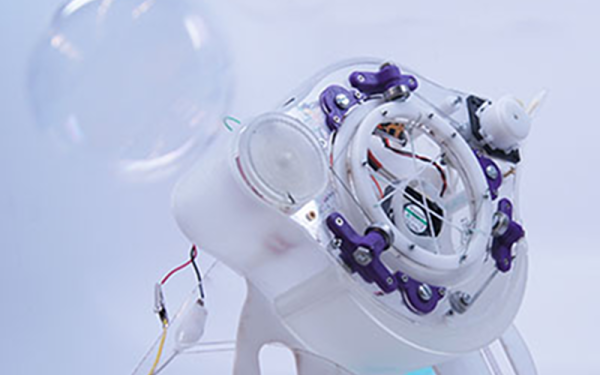
Despite the title, this isn’t a tale of conversing with Michael Jackson’s chimp. Rather, it is about [KyungYun]’s machine that transforms speech into whimsical bubbles. While the speech control is novel, we were more fascinated with how the mechanism uses a system of strings to blow bubbles, along with the workmanship to make the device portable.

The rate of fire isn’t that great, so the bubbles appear to simply get larger the longer you talk. Essentially, the device increases the size of the iris — the part that blows the bubble — until you pause speaking. Then it burps out a bubble.

Continue reading “Talking With Bubbles”

DIY Clapper Is 1980s Style With Raspberry Pi Twist

Home automation isn’t all that new. It is just more evolved. Many years ago, a TV product appeared called the Clapper. If you haven’t heard of it, it was basically a sound-operated AC switch. You plug, say, a lamp into the device and the clapper into the wall and you can then turn the lamp on or off by clapping. If you somehow missed these — and you can still get them, apparently — have a look at the 1984 commercial in the video below. [Ash] decided to forego ordering one on Amazon and instead built her own using a Raspberry Pi.

[Ash’s] prototype uses an LED and could — in theory — drive anything. If you wanted to make a real Clapper replacement you’d need a relay or some other kind of AC switch suitable for the load. The actual clap detection software is from [nikhiljohn10] and simply waits for two loud noises. No fancy machine learning to differentiate between a clap and a cat knocking over a vase. Just a threshold and some timing.

Continue reading “DIY Clapper Is 1980s Style With Raspberry Pi Twist”

Hack Your Gmail: A Quick Start For Google App Scripting

For many people, Gmail is synonymous with e-mail. Some people like having cloud access to everything and some people hate having any personal data in the cloud. However you feel about it, one thing that was nice about having desktop software is that you could hack it relatively easily. If you didn’t like how your desktop mail client worked, you had a lot of options: use a different program, write your own, hack the executable of your current program, or in the case of open source just fork it and make any changes you are smart enough to make.

Google provides a lot of features with all of its products, but however you slice it, all the code runs on their servers out of your reach. Sort of. If you know JavaScript, you can use Google Apps Script to add features to many Google products including Gmail. If you’ve used Office scripting, the idea is the same, although obviously the implementation is very different.

With scripting you can make sophisticated filters that would be very hard to do otherwise. For example,  monitor for suspicious messages like those with more than 4 attachments, or that appear to come from a contact between the hours of 2AM and 5AM.

For our example today, I’m going to show you something that is easy but also highly useful.

Continue reading “Hack Your Gmail: A Quick Start For Google App Scripting”

RSA Encryption Cracked Easily (Sometimes)

A large chunk of the global economy now rests on public key cryptography. We generally agree that with long enough keys, it is infeasible to crack things encoded that way. Until such time as it isn’t, that is. Researchers published a paper a few years ago where they cracked a large number of keys in a very short amount of time. It doesn’t work on any key, as you’ll see in a bit, but here’s the interesting part: they used an undescribed algorithm to crack the codes in a very short amount of time on a single-core computer. This piqued [William Kuszmaul’s] interest and he found some follow up papers that revealed the algorithms in question. You can read his analysis, and decide for yourself how badly this compromises common algorithms.

The basis for public key cryptography is that you multiply two large prime numbers to form a product and post it publicly. Because it is computationally difficult to find prime factors of large numbers, this is reasonably secure because it is difficult to find those prime numbers that are selected randomly.

However, the random selection leads to an unusual attack. Public keys, by their very nature, are available all over the Internet. Most of them were generated with the same algorithm and random number generation isn’t actually totally random. That means some keys share prime factors and finding a common factor between two numbers isn’t nearly as difficult.

Continue reading “RSA Encryption Cracked Easily (Sometimes)”

No Moving Parts: Phased Array Antennas Move While Standing Still

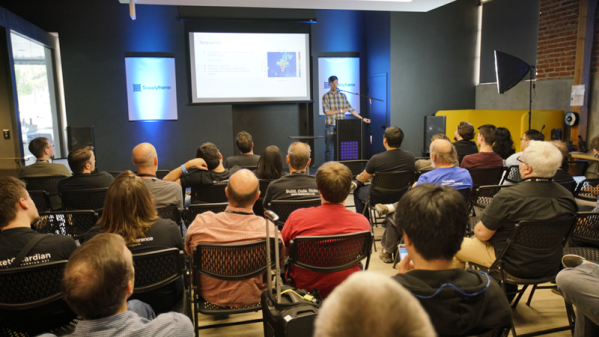
If you watch old science fiction or military movies — or if you were alive back in the 1960s — you probably know the cliche for a radar antenna is a spinning dish. Although the very first radar antennas were made from wire, as radar sets moved higher in frequency, antennas got smaller and rotating them meant you could “look” in different directions. When most people got their TV with an antenna, rotating those were pretty common, too. But these days you don’t see many moving antennas. Why? Because antennas these days move electrically rather than physically using multiple antennas in a phased array. These electronically scanned phased array antennas are the subject of Hunter Scott’s talk at 2018’s Supercon. Didn’t make it? No problem,  you can watch the video below.

While this seems like new technology, it actually dates back to 1905. Karl Braun fed the output of a transmitter to three monopoles set up as a triangle. One antenna had a 90 degree phase shift. The two in-phase antennas caused a stronger signal in one direction, while the out-of-phase antenna canceled most of the signal and the resulting aggregate was a unidirectional beam. By changing the antenna fed with the delay, the beam could rotate in three 120 degree steps.

Today phased arrays are in all sorts of radio equipment from broadcast radio transmitters to WiFi routers and 5G phones. The technique even has uses in optics and acoustics.

Continue reading “No Moving Parts: Phased Array Antennas Move While Standing Still”

Low Tech High Safety And The NYC Subway System

The year is 1894. You are designing a train system for a large city. Your boss informs you that the mayor’s office wants assurances that trains can’t have wrecks. The system will start small, but it is going to get big and complex over time with tracks crossing and switching. Remember, it is 1894, so computing and wireless tech are barely science fiction at this point. The answer — at least for the New York City subway system — is a clever system of signals and interlocks that make great use of the technology of the day. Bernard S. Greenberg does a great job of describing the system in great detail.

The subway began operation in 1904, well over 30 years since the above-ground trains began running. A clever system of signals and the tracks themselves worked together with some mechanical devices to make the subway very safe. Even if you tried to run two trains together, the safety systems would prevent it.

On the face of it, the system is very simple. There are lights that show red, yellow, and green. If you drive, you know what these mean. But what’s really interesting is the scheme used at the time to make them light.

Continue reading “Low Tech High Safety And The NYC Subway System”

Linux Fu: The Kitchen Sync

One of the great things about Linux and similar operating systems is they are configurable. If you don’t like something, there’s a great chance you can change it easily with a few entries in a file somewhere. For example, take bash — a very popular shell by any measure. If you want a different style of command line editing, there’s an option. You want the tab key to match files regardless of case? Another option. Usually, these are set in one of your so-called profile files like .bashrc in your home directory.

As long as you are sitting in front of your single computer working, this is great. You customize your .bashrc and other files to your heart’s content and then you work in an environment that acts the way you want it to. The problem is when you have a lot of computers. Maybe you have a web server, a desktop, a firewall machine, and a few dozen Raspberry Pi computers. How do you keep all the configurations the same? Then once they are the same, how do you keep them up to date?

Continue reading “Linux Fu: The Kitchen Sync”