The Cheapest Meter On Banggood

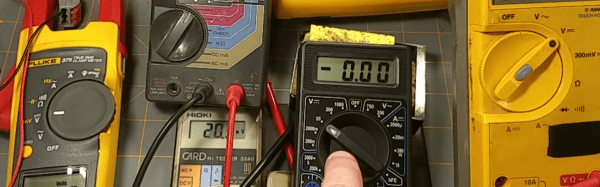
According to [pileofstuff], he didn’t really need another digital multimeter. However, when he saw a DT-832 meter on Banggood for the princely sum for $4.99 he wondered just what kind of meter you’d get for that price. You can see his conclusions in his recent video (below). He does make it clear, by the way, that he wasn’t paid for the review or given the meter. He just decided to see what $5 would buy in a meter.

Depending on your predisposition to cheap Asian electronics, you may or may not be surprised. After all, for $5 you can’t expect a top-of-the-line lab instrument. The device measures AC and DC voltage, DC amperage, ohms, transistor beta, and has a diode tester and continuity buzzer. It also has some frequency measurement capability. You can’t be too surprised it doesn’t auto range, though. To be fair, although he mentions Banggood as the source of the meter, a quick Google search shows you can get them from all the usual sources, and the price is down to $3.73 as long as you let them ship it from Canada.
Continue reading “The Cheapest Meter On Banggood”

Radiohead’s Greatest Hits For The ZX Spectrum

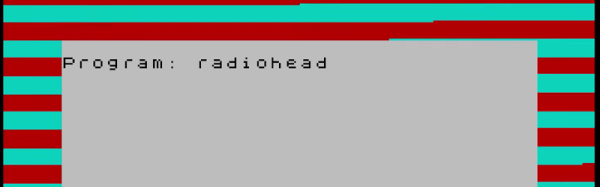
We’ll admit that only a few of us here at Hackaday are Radiohead fans. However, we all couldn’t help but appreciate their new remastered release of OK Computer. The new release contains some bonus material. At the end of the bonus material is a strange noise that turns out to be a ZX Spectrum Basic program.[OooSLAJEREKooO] managed to find it, play it, and record it for all of us (see video below).

The two minutes of tones might sound unfamiliar to a modern computer user, but back in the day, audio tones were used to communicate over phone lines and to load and save programs via cassette tape recorders. You might be asking yourself: why the ZX Spectrum? Radiohead is from the UK, but that’s not the complete picture. Of all home computers, the ZX Spectrum had a higher effective bit rate when storing data on tape. Basically, it takes less time (and less tape) to put it on a Speccy than a C64 or Apple.

Continue reading “Radiohead’s Greatest Hits For The ZX Spectrum”

The Sound Of (Synthesized) Music

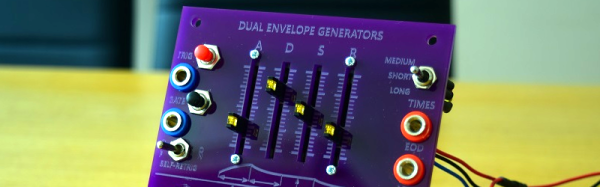
What’s an ADSR envelope generator? If you are a big music hacker, you probably know. If you are like the rest of us, you might need to read [Mich’s] post to find out that it is an attack-decay-sustain-release (ADSR) envelope generator. Still confused? It is a circuit used in music synthesis. You can see a demo of the device in the video below.

Before the Altair–which was sort of the first hobbyist computer you could actually buy–electronics magazines were full of music synthesizer projects that had a lot in common with the analog computers of old. A lot of people took that very seriously and then computers took over the collective consciousness and we found musical hackers started working with (digital) computer-based synthesizers. But the old analog synth designs just won’t die. [Mich’s] ADSR is based on an ancient design, and the amount of information and additions he provides makes it worth a read, even if you don’t fancy building one.

Continue reading “The Sound Of (Synthesized) Music”

Game Like It Is 1983

The first computer I ever physically saw — I think — was an IBM System/3. You might not remember them. They were business computers for businesses that couldn’t justify a big mainframe. They were “midrange.” Nevermind that the thing probably had the memory and processing speed of the CPU inside my mouse. Time progressed and IBM moved on to the System/3x (for example, the System/32). Next up was the AS/400 and finally the IBM i, which is still in production. Here’s a secret, though, most of the code I’ve seen running on an IBM i dates back to at least the System/3 days and maybe even before that.

If you are interested in history, or midrange computers (which are mainframe-like in their operation), you might want to actually play with a real machine. A quick glance at eBay tells me that you might be able to get something workable for about $1000. Maybe. That’s a bit much. What if you could get time on one for free? Turns out, you can.

The Cloud Option

Head over to PUB400.com and register for an account. This won’t be instant — mine took a day or two. The system is for educational purposes, so be nice and don’t use it for commercial purposes. You get 150MB of storage (actually, some of the documentation says 250MB, and I have not tested it). While you are waiting for your account, you’ll need to grab a 5250 terminal emulator and adjust your thinking, unless you are a dyed-in-the-wool IBM guy.

Even though the IBM i looks like an old 1970’s midrange, the hardware is quite modern with a 64-bit CPU (and the architecture can handle 128 bits) and well-known stability. However, the interface is, well, nostalgic.

Ready…

Depending on your host computer, there are several IBM 5250 terminal programs available. They recommend tn5250 or tn5250j which use Java. However, I installed Mochasoft’s emulator into my Chrome browser. It is a 30-day free trial, but I figure in 30 days I’ll be over it, anyway.

Continue reading “Game Like It Is 1983”

JPEG Decoding, Arduino Style

When you think of image processing, you probably don’t think of the Arduino. [Jan Gromes] did, though. Using a camera and an Arduino Mega, [Jan] was able to decode input from an Arduino-connected camera into raw image data. We aren’t sure about [Jan’s] use case, but we can think of lots of reasons you might want to know what is hiding inside a compressed JPEG from the camera.

The Mega is key, because–as you might expect–you need plenty of memory to deal with photos. There is also an SD card for auxiliary storage. The camera code is straightforward and saves the image to the SD card. The interesting part is the decoding.

Continue reading “JPEG Decoding, Arduino Style”

Tinkercad Does Arduino

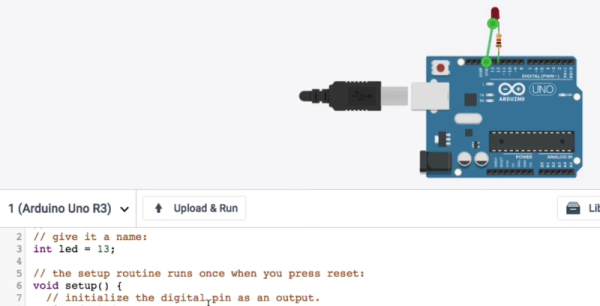
If you’ve done 3D printing, you’ve probably at least heard of Tinkercad. This popular CAD package runs in your browser and was rescued from oblivion by Autodesk a few years ago. [Chuck] recently did a video about a new Tinkercad feature: building and simulating virtual Arduino circuits. You can watch it below.

There are a variety of components you can add to your design. You’ll find an integrated code editor and a debugger. You can even get to the serial monitor, all in your browser with no actual Arduino hardware. You can also build simple circuits that don’t use an Arduino, although the component selection is somewhat limited.

Continue reading “Tinkercad Does Arduino”

Digitool Helps Debugging

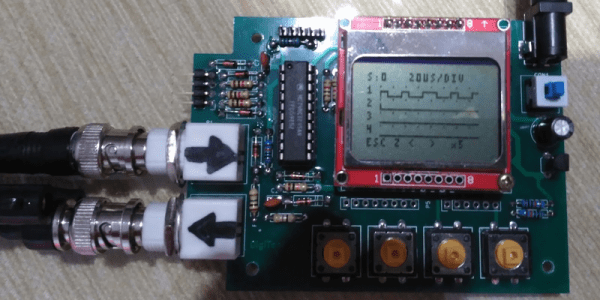
Logic analyzers used to be large boxes full of high-speed logic and a display monitor. Today, they are more likely to be a small box with a USB port that feeds data to a PC application. [Juan Antonio Rubia Mena] wanted something more self-contained, so he built Digitool. Built around a PIC18F2525, the device can measure frequency up to 10 MHz and inject square waves up to 1 MHz into the circuit under test. Oh yeah. It also has a simple four-channel logic analyzer that displays on a tiny LCD.

The 500,000 sample per second rate and the 1024 sample buffer isn’t going to put any logic analyzer vendors out of business, but it is still enough to help you figure out why that SPI or I2C logic is messed up. It looks like a fun project that could have some usefulness.

Continue reading “Digitool Helps Debugging”