PIC32 DMA SPI

[Mike] wanted to drive several SPI peripheral from a PIC32. He shows how much latency his conventional interrupt handlers were taking away from his main task. He needed something more efficient. So he created the SPI channels using DMA. He also made a video (see below) with a very clear explanation about why he did it and shows oscilloscope traces about how it all works.

Although the project is specific to the PIC32, the discussion about DMA applies to any computer with direct memory access. The only thing missing is the code. However, there are plenty of examples on the web you can look at, including a Microchip webinar.

Continue reading “PIC32 DMA SPI” →

The Arduino Sleeps With The Fishes

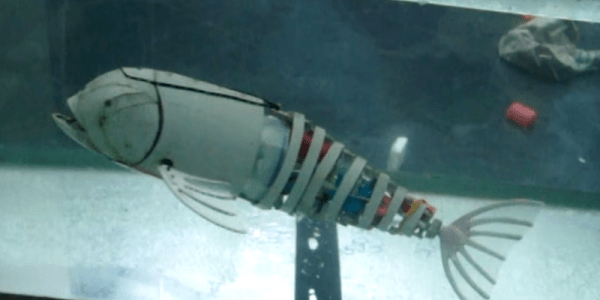
[Eric Dirgahayu] wanted to explore underwater with some sensors and cameras. First, he needed a platform to carry them. That led to his Arduino-controlled swimming fish. The fish is made from PVC and some waterproof servos. From the video (see below) it isn’t clear how much control the fish has, but it does swim with an undulating motion like a real fish.

Continue reading “The Arduino Sleeps With The Fishes” →

Electric Train Demonstrator

If you ever want to pique a kid’s interest in technology, it is best to bring out something simple, yet cool. There was a time that showing a kid how a crystal radio could pull in a radio station from all the way across town fit the bill. Now, that’s a yawner as the kid probably carries a high-tech cell phone with a formidable radio already. Your latest FPGA project is probably too complicated to grasp, and your Arduino capacitance meter is–no offense–too boring to meet the cool factor criterion.

There’s an old school project usually called an “electromagnetic train” that works well (Ohio State has a good write up about it as a PDF file). You coil some bare copper wire around a tubular form to make a tunnel. Then a AAA battery with some magnets make the train. When you put the train in the tunnel, the magnetic forces propel the train through the tunnel. Well, either that or it shoots it out. If that happens, turn the train around and try again. There’s a few of these in Internet videos and you can see one of them (from [BeardedScienceGuy]) below.

Continue reading “Electric Train Demonstrator” →

Arduino Sketch: The Next Generation

What was your first Arduino program? Probably an LED blinker — that seems to be the “hello world” of microcontrolllers. You probably moved on to things a little more complicated pretty quickly. At some point, things get harder because the Arduino lacks an operating system.

There are operating systems that will run on the Arduino. They aren’t full-featured like Windows or Linux, but they allow you to run multiple tasks that are both isolated from each other (to some degree) and have a way to cooperate (that is, synchronize, share data and resources, and so on). One such operating system is ChibiOS. It will run on AVR- and ARM-based devices. You can find documentation about the entire project on the home page along with other ports.

The problem with adopting a new operating system is always getting started. [ItKindaWorks] has started a video series on using ChibiOS and has posted three installments so far (see below; one is about getting started, the other two cover messaging, mutexes, and priorities).

Continue reading “Arduino Sketch: The Next Generation” →

How To Run A Pagekite Server To Expose Your Raspberry Pi

Last time I showed you how to expose a web service on a Raspberry Pi (or, actually, any kind of device) by using a reverse proxy from Pagekite. On your Pi, you just need a simple Python script. However, it also depends on the Pagekite server, which isn’t always convenient. There are limits to the free service, and you don’t control the entire thing. The good news is twofold: the same Python script you use to set up the client-side can also set up a server. The other good news is the entire thing is open source.

In practical terms, then, if you have a computer that is always on and has an IP address that can be found on the public internet, you can run your own Pagekite server (they call it a front end) and service your own backends.

Continue reading “How To Run A Pagekite Server To Expose Your Raspberry Pi” →

Arduino Detects Pants On Fire

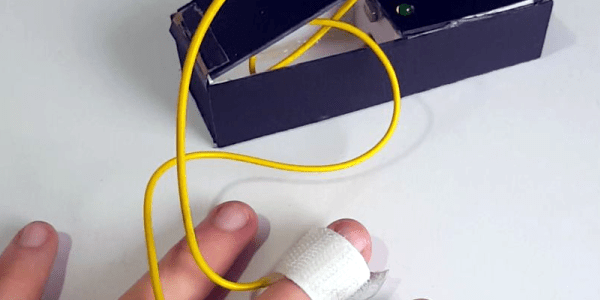
Hard as it is to imagine, lie detectors have been sold as children’s toys for a number of years. A simple battery-operated device clipped to your fingers and would show the conductivity of your skin. The concept — which is probably not very reliable — observers that lying causes you to imperceptibly sweat which causes a sudden increase in your skin’s conductivity. These cheap toys would have a meter and you’d note the meter deflection to determine if the subject was lying.

You can debate the amusement value of interrogating your friends, perhaps, but they were pretty common and still exist (including some that shock you if they detect you are lying). Seventeen-year-old [BuildIt] has his own modern take on this classic device using — what else? — an Arduino. You can see a video of the device below.

Continue reading “Arduino Detects Pants On Fire” →

Expose Your Raspberry Pi On Any Network

Everyone’s talking about the Internet of Things (IoT) these days. If you are a long-time Hackaday reader, I’d imagine you are like me and thinking: “so what?” We’ve been building network-connected embedded systems for years. Back in 2003, I wrote a book called Embedded Internet Design — save your money, it is way out of date now and the hardware it describes is all obsolete. But my point is, the Internet of Things isn’t a child of this decade. Only the name is.

The big news — if you can call it that — is that the network is virtually everywhere. That means you can connect things you never would have before. It also means you get a lot of data you have to find a reason to use. Back in 2003, it wasn’t always easy to get a board on the Internet. The TINI boards I used (later named MxTNI) had an Ethernet port. But your toaster or washing machine probably didn’t have a cable next to it in those days.

Today boards like the Raspberry Pi, the Beagle Bone, and their many imitators make it easy to get a small functioning computer on the network — wired or wireless. And wireless is everywhere. If it isn’t, you can do 3G or 4G. If you are out in the sticks, you can consider satellite. All of these options are cheaper than ever before.

The Problem

There’s still one problem. Sure, the network is everywhere. But that network is decidedly slanted at letting you get to the outside world. Want to read CNN or watch Netflix? Sure. But turning your computer into a server is a little different. Most low-cost network options are asymmetrical. They download faster than they upload. You can’t do much about that except throw more money at your network provider. But also, most inexpensive options expose one IP address to the world and then do Network Address Translation (NAT) to distribute service to local devices like PCs, phones, and tablets. What’s worse is, you share that public address with others, so your IP address is subject to change on a whim.

What do you do if you want to put a Raspberry Pi, for example, on a network and expose it? If you control the whole network, it isn’t that hard. You usually use some kind of dynamic DNS service that lets the Pi (or any computer) tell a well-known server its current IP address (see figure below).

Continue reading “Expose Your Raspberry Pi On Any Network” →