In the early days of C, you’d occasionally see someone — probably a former Pascal programmer — write something like this:
#define BEGIN {
#define END }
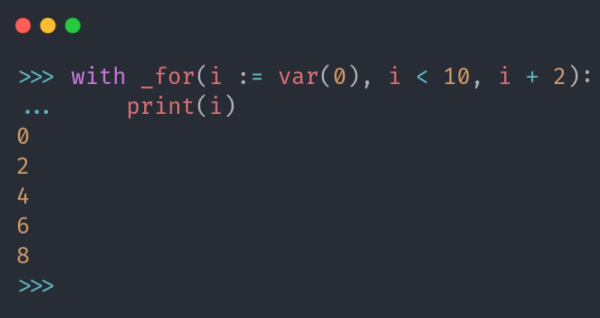
This would usually initiate complaints about abusing the preprocessor and generally being anti-C. Surely no modern language would permit such things, right? Perhaps not. Consider [Tushar Sadhwani] who wanted to create a classic C-style for loop inside of Python. He did it, and the journey is perhaps more interesting than the result.
First, you can’t just transport straight C for loops into Python. There has to be some concession to Python syntax. The initial attempt was clever but not clever enough. However, the disassembly of the Python code was telling. The second attempt, however, was particularly interesting.
That attempt used an odd feature to examine the interpreter’s tree structure for the code and then modify it. This is sort of like a very painful C preprocessor but more powerful. That version works although it is pretty convoluted.
Ironically, [Tushar] then set up a third attempt after seeing code that tries to replace Python indentation with braces using a codec. In Python-speak, a codec lets you convert different text encodings. However, you can do other things than text encoding conversion. This is closest in spirit to the C preprocessor method. You can wade through the source code ahead of processing and make whichever changes you see fit.
Is any of this really useful? Probably not as it is. But you never know when you might need to do something exotic and one of these techniques could save the day. You probably couldn’t get away with some of this on MicroPython, of course. Your mileage may vary depending on where you find your Python running — like the Web.