Impossibilities And 3D Printing

This week our own [Donald Papp] wrote a thought-provoking piece on buying and selling 3D-printer models. His basic point: if you don’t know what you’re getting until you’ve purchased it, and there’s no refund policy, how can you tell if your money is being well spent? It’s a serious problem for these nascent markets, because when customers aren’t satisfied they won’t come back.

It got me thinking about my own experience, albeit with all of the free 3D models out there. They are a supremely mixed bag, and even though you’re not paying for the model, you’re paying in printing time, filament, and effort. It pays to be choosy, and all of [Donald]’s suggestions hold in the “free” market as well.
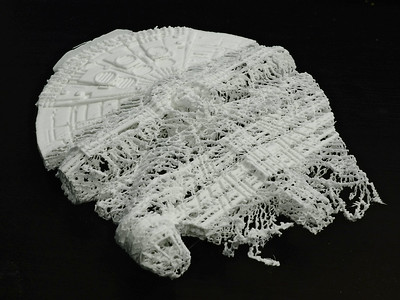
Failenium Falcon. Image by Johannes

Only download models that have been printed at least once, have decent documentation about things like layer height, filament type, and support, and to the best of your abilities, be critical about the ability to fabricate the part at all. Fused-deposition printers can only print on top of previous layers, and have a distinct grain, so you need to watch out for overhangs and print orientation. With resin printers, you need to be careful about trapped volumes of uncured resin. You want to be sure that the modeler at least took these considerations into account.

But when your parts have strength requirements, fits, and tolerances, it gets even worse. There’s almost no way a designer can know if you’re overextruding on your first layers or not. Different slicers handle corners differently, making inner surfaces shrink to varying degrees. How can the designer work around your particular situation?

My personal answer is open-source. Whenever possible, I prefer models in OpenSCAD. If you download an STL with ten M8 bolt holes, you could widen them all in a modeling program, but if you’ve got the source code, it’s as easy as changing a single variable. Using the source plays to the customizability of 3D printing, which is perhaps its strongest suit, in my mind. Nobody knows exactly how thick your desk is but you, after all. Making a headphone hook that’s customizable is key.

So even if the markets for 3D prints can solve the reliability problems, through customer reviews or requirements of extensive documentation, they’ll never be able to solve the one-size-fits-nobody issue. Open source fixes this easily. Sell me the source, not the STL!


Two Days Left To Enter The Hackaday Prize!

Your entry for the 2020 Hackaday Prize needs to be in by Monday morning, August 31st!

This is the deadline for initial entries, if you’re one of the one hundred lucky projects that advance to the finals you’ll still have another month to polish up your project. Why not make this weekend your own personal hackathon?

Entries focus on four challenges outlined by our non-profit partners this year. From improving modular dome housing and developing manufacturing techniques in disaster zones, to designing interfaces for people with physical challenges and protecting natural ocean landscapes, there’s plenty of room to be creative here. In addition to the $50,000 grand prize there are still nine other top prizes up for grabs.

You can do this. Tell your story, show a proof of concept, and document it to convince the judges your project is viable. It’ll be tight, but hackers work best when deadlines are looming. We can’t wait to see what you come up with between now and Monday!

Automation With A New Twist

Turning on a lightbulb has never been easier. You can do it from your mobile. Voice activation through home assistants is robust. Wall switches even play nicely with the above methods. It was only a matter of time before someone decided to make it fun, if you consider a Rubik’s cube enjoyable. [Alastair Aitchison] at Playful Technology demonstrated that it is possible to trigger a relay when you match all the colors. Video also after the break.

The cube does little to obfuscate game data, so in this scope, it sends unencrypted transmissions. An ESP32 with [Alastair]’s Arduino code, can track each movement, and recognize a solved state. In the video, he solves the puzzle, and an actuator releases a balloon. He talks about some other cool things this could do, like home automation or a puzzle room, which is in his wheelhouse judging by the rest of his YouTube channel.

We would love to see different actions perform remote tasks. Twisting the top could set a timer for 1-2-3-4-5 minutes, while the bottom would change the bedroom lights from red-orange-yellow-green-blue-violet. Solving the puzzle should result in a barrage of NERF darts or maybe keep housemates from cranking the A/C on a whim.

Continue reading “Automation With A New Twist”

Auxiliary Display Makes Ham Radio Field Operations Easier

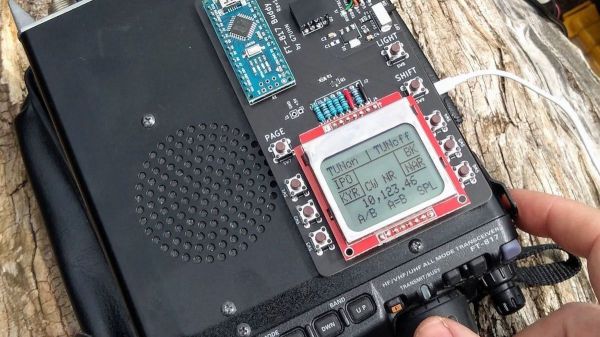
As popular as the venerable Yaesu FT-817 transceiver might be with amateur radio operators, it’s not without its flaws, particularly in the user interface department. [Andy (G7UHN)] is painfully familiar with these flaws, so he designed this auxiliary display and control panel for the FT-817 to make operating it a little easier.

There are a ton of ways to enjoy ham radio, but one of the more popular ways is to bust out of the shack and operate in the great outdoors. From the seashore to mountain peaks, hams love giving their rigs some fresh air and sunshine. The battery-powered, multimode, all-band FT-817 is great for these jaunts, but to fit as much radio into a small package as they did, Yaesu engineers had to compromise on the controls. Rather than bristling with buttons, many of the most-used features of the radio are buried within menus that require multiple clicks and twists to access.

[Andy]’s solution is a PCB bearing an Arduino Nano, an LCD screen, and a whole bunch of actual buttons. The board sits on top of the case and talks to the radio over a 8-pin mini-DIN cable using both documented and undocumented  CAT, or Computer Aided Transceiver commands. The LCD displays the current status of various features and the buttons provide easy access to changing them, essentially by sending keystrokes to the radio.

Hats off to [Andy] for tackling this project. The only other FT-817 hack we’ve seen before was useful but far simpler, and didn’t require KiCad, which [Andy] had to teach himself for this one.

Robotic Mouse Toy Built For Cats

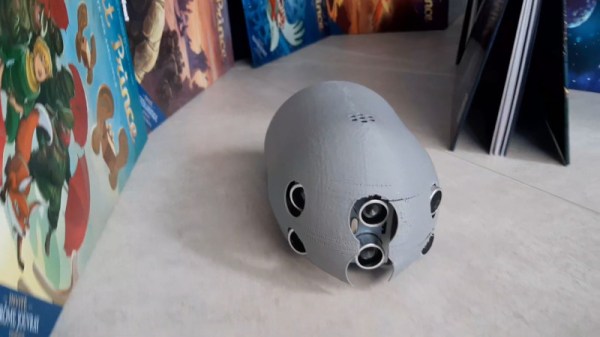
Cats are nature’s born hunters. Whether its rodents, insects, or lasers, they’ll pounce and attack with ruthless efficiency. Built to challenge a cat, or perhaps merely to tease it, Sourino is a robotic mouse built with common off-the-shelf parts.

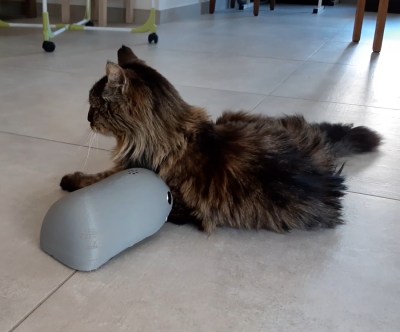
A test subject appears unamused.

So named for the combination of Souris (French for “mouse”) and Arduino, the project is driven by an Arduino Nano. Hooked up to three sets of ultrasonic transducers, this gives the robot mouse much improved obstacle avoidance abilities compared to using just a single transducer front-and-centre. The ‘bot can navigate basic mazes or household floors with ease. A pair of geared motors are used for drive, using simple skid-steering to turn corners. It’s all packed in a 3D printed enclosure, which mounts the various components and exposes the ultrasonic sensors. There’s even an IR remote enabling mode selection or full manual control.

While the ‘bot lacks the speed and agility of common house mice, it’s nevertheless a project that teaches plenty of valuable lessons. We’re sure [Electrocat01] picked up plenty of skills in robotic navigation, mechanical design and 3D printing along the way. Creating robot mice is actually a competitive field, as we’ve seen before. Video after the break.

Continue reading “Robotic Mouse Toy Built For Cats”

Video Compression Explainer — Like We’re Five-Year-Olds

[Ottverse] has an interesting series in progress to demystify video compression. The latest installment promises to explain discrete cosine transforms as though you were five years old.

We’ll be honest. At five, we probably didn’t know how to interpret this sentence:

…the Discrete Cosine Transform takes a set of N correlated (similar) data-points and returns N de-correlated (dis-similar) data-points (coefficients) in such a way that the energy is compacted in only a few of the coefficients M where M << N.

Still, the explanation is pretty clear and we really liked the analogy with the spheres and the stars in a constellation.

Continue reading “Video Compression Explainer — Like We’re Five-Year-Olds”

A New Spin On A Medical Test

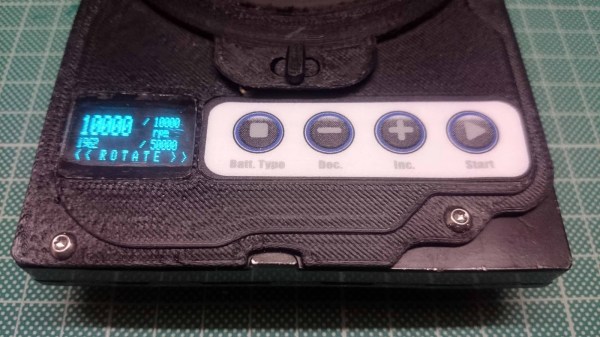
Most of us can say that we have taken an obsolete hard drive out of a computer and felt it was a waste to toss it in the e-waste pile. Some of us have children’s drawings hung on the fridge with actuator magnets, or maybe a vast spreadsheet suspended on a steel filing cabinet. Let us not forget that there is also a high-speed, low-noise motor in there. On some models it is separate from the PCB, so grab an Electronic Speed Controller (ESC), your microcontroller of choice, and make yourself a salvaged HDD centrifuge like [Cave Man] has. His build uses the tray as a chassis, but he modeled and printed a new face in the same style as the original.

On top, he has an OLED screen for displaying the requested speed, measured speed, and runtime. Next to the display is a four-button pad with a customized legend for setting parameters. The video after the break shows the machine running through its paces. This version accommodates the tiny capillary tubes, microhematocrit tubes, for processing raw blood. This test can calculate the packed cell volume, which professionals use to determine things from dehydration to anemia.

There are other builds out there where people have modified an old drive into the kind of centrifuge that accepts larger diameter tubes, but this was a shining example of what is possible. One good turn deserves another, so we recommend a desktop bio-lab companion, or enlist some LEGO Mindstorms to help out.

Continue reading “A New Spin On A Medical Test”