Linux Fu: Interactive SSH Applications

[Drew DeVault] recently wrote up some interesting instructions on how to package up interactive text-based Linux commands for users to access via ssh. At first, this seems simple, but there are quite a few nuances to it and [Drew] does a good job of covering them.

One easy way — but not very versatile — is to create a user and make the program you want to run the default shell. The example used is to make /usr/bin/nethack the shell and now people can log in as that user and play nethack. Simple, right? However, there are better ways to get there.

Continue reading “Linux Fu: Interactive SSH Applications”

Who Needs Four Wheels When You’ve Got A Gyro?

Your garden variety car generally comes with four wheels, plus a spare in the boot. It’s a number landed upon after much consideration, with few vehicles deviating from the norm. That doesn’t mean there aren’t other possibilities however, and [RCLifeOn] decided to experiment in just such a manner.

The result is a gyro-stabilized two-wheeled RC car, or as we might have put it, a motorcycle of sorts. A brushless motor drives the rear wheel, while steering up front is handled by a servo controlling the front wheel. A large spinning disc acts as a gyro in the center of the vehicle, and it’s all packaged in a simple 3D printed frame.

Results are impressive, with the gyro making a demonstrable difference to the vehicle’s performance. While it can be driven without the gyro enabled, it requires continual steering corrections to stay upright. With the gyro spun up, it rides much more like a bicycle, with few stability issues.

It’s a fun project, and a great way to learn about gyroscopic stability. Of course, there are great primers on the topic, too. Video after the break. Continue reading “Who Needs Four Wheels When You’ve Got A Gyro?”

Reading The Water Meter In A Literal Sense With An ESP8266

In our info-obsessed culture, hackers are increasingly interested in ways to quantify the world around them. One popular project is to collect data about their home energy or water consumption to try and identify any trends or potential inefficiencies. For safety and potentially legal reasons, this usually has to be done in a minimally invasive way that doesn’t compromise the metering done by the utility provider. As you might expect, that often leads to some creative methods of data collection.

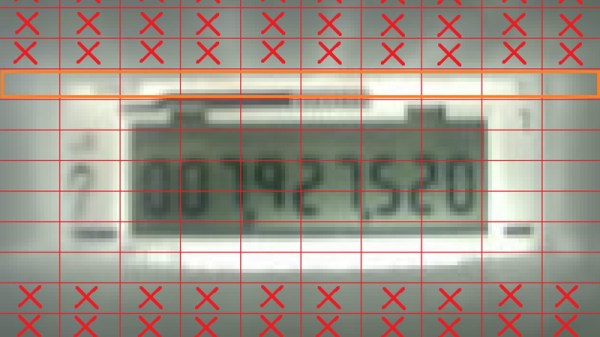
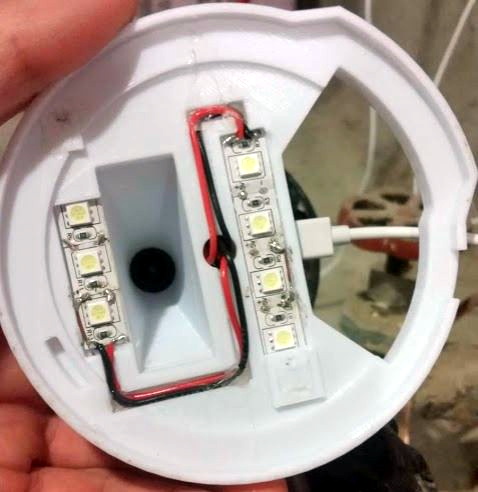
The latest solution comes courtesy of [Keilin Bickar], who’s using the ESP8266 and a serial TTL camera module to read the characters from the LCD of his water meter. With a 3D printed enclosure that doubles as a light source for the camera, the finished device perches on top of the water meter and sends the current reading to HomeAssistant via MQTT without any permanent wiring or mounting.

Of course, the ESP8266 is not a platform we generally see performing optical character recognition. Some clever programming was required to get the Wemos D1 Mini Lite to reliably read the numbers from the meter without having to push the task to a more computationally powerful device such as a Raspberry Pi. The process starts with a 160×120 JPEG image provided by a VC0706 camera module, which is then processed with the JPEGDecoder library. The top and bottom of the image are discarded, and the center band is isolated into blocks that correspond with the position of each digit on the display.

Within each block, the code checks an array of predetermined points to see if the corresponding pixel is black or not. In theory this allows detecting all the digits between 0 and 9, though [Keilin] says there were still the occasional false readings due to inherent instabilities in the camera and mounting. But with a few iterations to the code and the aid of a Python testing program that allowed him to validate the impact of changes to the algorithm, he was able to greatly improve the detection accuracy. He says it also helps that the nature of the data allows for some basic sanity checks;  for example the number only ever goes up, and only by a relatively small amount each time.

This method might not allow the per-second sampling required to pull off the impressive (if slightly creepy) water usage data mining we saw recently, but as long as you’re not after very high resolution data this is an elegant and creative way to pull useful data from your existing utility meter.

Building A GPS With Bug Eyes And Ancient Wisdom

The Global Positioning System (GPS) is so ingrained into our modern life that it’s easy to forget the system was created for, and is still operated by, the United States military. While there are competing technologies, such as GLONASS and Galileo, they are still operated by the governments of their respective countries. So what do you do if you want to know your position on the globe without relying on any government-operated infrastructure?

According to the team behind [Aweigh], all you have to do is take a cue from ancient mariners and insects and look up. Using two light polarization sensors, a compass, and a bit of math, their device can calculate your latitude and longitude by looking at the daytime sky. With their custom Raspberry Pi shield and open source Python 3 software, the team envisions a future where fully-independent global positioning can be tacked onto all sorts of projects.

The concept relies on the Rayleigh model, which is essentially a polarization map of the sky. As light from the sun is scattered in the Earth’s atmosphere, it creates bands of polarization which can be identified from the ground. Essentially it’s the same principle that makes the sky appear blue when viewed with human eyes, but if you have two light sensors looking at the proper wavelengths, you can use the effect to figure out where the sun is; which the team says is precisely how some insects navigate. Once the position of the sun is known, [Aweigh] operates like a modernized, automatic, sextant.

Naturally, this is not an ideal solution in all possible situations. In an urban environment, a clear view of the sky isn’t always possible, and of course the system won’t work at all once the sun goes down. In theory you could switch over to navigating by stars at night, but then you run into the same problems in urban areas. Still, it’s a fascinating project and one that we’re eager to see develop further.

Incidentally, we’ve seen automated sextants before, if you’re looking for a similar solution that still retains that Horatio Hornblower vibe.


Sensor Filters For Coders

Anybody interested in building their own robot, sending spacecraft to the moon, or launching inter-continental ballistic missiles should have at least some basic filter options in their toolkit, otherwise the robot will likely wobble about erratically and the missile will miss it’s target.

What is a filter anyway? In practical terms, the filter should smooth out erratic sensor data with as little time lag, or ‘error lag’ as possible. In the case of the missile, it could travel nice and smoothly through the air, but miss it’s target because the positional data is getting processed ‘too late’. The simplest filter, that many of us will have already used, is to pause our code, take about 10 quick readings from our sensor and then calculate the mean by dividing by 10. Incredibly simple and effective as long as our machine or process is not time sensitive – perfect for a weather station temperature sensor, although wind direction is slightly more complicated. A wind vane is actually an example of a good sensor giving ‘noisy’ readings: not that the sensor itself is noisy, but that wind is inherently gusty and is constantly changing direction.

It’s a really good idea to try and model our data on some kind of computer running software that will print out graphs – I chose the Raspberry Pi and installed Jupyter Notebook running Python 3.

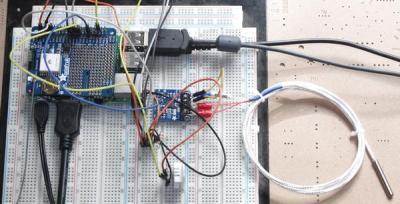
The photo on the left shows my test rig. There’s a PT100 probe with it’s MAX31865 break-out board, a Dallas DS18B20 and a DHT22. The shield on the Pi is a GPS shield which is currently not used. If you don’t want the hassle of setting up these probes there’s a Jupyter Notebook file that can also use the internal temp sensor in the Raspberry Pi. It’s incredibly quick and easy to get up and running.

It’s quite interesting to see the performance of the different sensors, but I quickly ended up completely mangling the data from the DS18B20 by artificially adding randomly generated noise and some very nasty data spikes to really punish the filters as much as possible. Getting the temperature data to change rapidly was effected by putting a small piece of frozen Bockwurst on top of the DS18B20 and then removing it again.

Continue reading “Sensor Filters For Coders”

Hackaday Podcast 034: 15 Years Of Hackaday, ESP8266 Hacked, Hydrogen Seeps Into Cars, Giant Scara Drawbot, Really Remote RC Car Racing

Elliot Williams and Mike Szczys wish Hackaday a happy fifteenth birthday! We also jump into a few vulns found (and fixed… ish) in the WiFi stack of ESP32/ESP8266 chips, try to get to the bottom of improved search for 3D printable CAD models, and drool over some really cool RC cars that add realism to head-to-head online racing. We look at the machining masterpiece that is a really huge SCARA arm drawbot, ask why Hydrogen cars haven’t been seeing the kind of sunlight that fully electric vehicles do, and give a big nod of approval to a guide on building your own custom USB cables.

Take a look at the links below if you want to follow along, and as always tell us what you think about this episode in the comments!

Take a look at the links below if you want to follow along, and as always, tell us what you think about this episode in the comments!

Direct download (60 MB or so.)

Continue reading “Hackaday Podcast 034: 15 Years Of Hackaday, ESP8266 Hacked, Hydrogen Seeps Into Cars, Giant Scara Drawbot, Really Remote RC Car Racing”

Big And Glowy Tetris Via Arduino

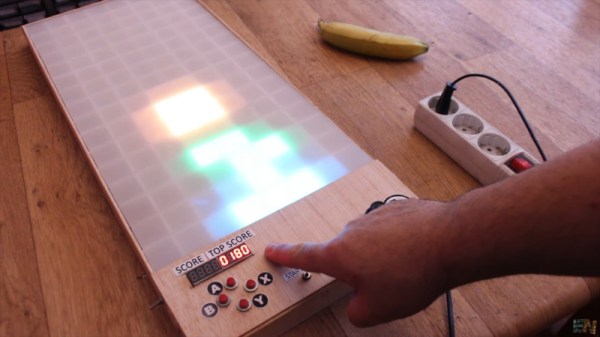
Tetris was a breakout hit when it was released for the Nintendo Game Boy in 1989, in much the same way that Breakout was a breakout hit in arcades in 1976. Despite this, gamers of today expect a little more than a tiny monochrome LCD with severe motion blur problems. Enter the LED Tetris build from [Electronoobs].

The build relies on a hacker favourite, the WS2812B LED string. The LEDs are set up in a 8×16 matrix to create the familiar Tetris playfield. Buttons and a joystick are then installed on the front panel to allow the player to control the action. An Arduino Mega runs the show, with a DFPlayer used to play the famous theme music as the cherry on top.

It’s a fun build that would be an awesome addition to any hacker’s coffee table. Big glowing LEDs make everything better, after all – this ping-pong ball display is a great example of the form. Video after the break.

Continue reading “Big And Glowy Tetris Via Arduino”