Arduino Detects Pants On Fire

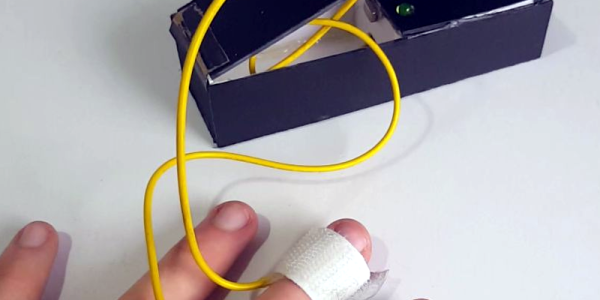
Hard as it is to imagine, lie detectors have been sold as children’s toys for a number of years. A simple battery-operated device clipped to your fingers and would show the conductivity of your skin. The concept — which is probably not very reliable — observers that lying causes you to imperceptibly sweat which causes a sudden increase in your skin’s conductivity. These cheap toys would have a meter and you’d note the meter deflection to determine if the subject was lying.

You can debate the amusement value of interrogating your friends, perhaps, but they were pretty common and still exist (including some that shock you if they detect you are lying). Seventeen-year-old [BuildIt] has his own modern take on this classic device using — what else? — an Arduino. You can see a video of the device below.

Continue reading “Arduino Detects Pants On Fire”

Here’s The Turbocharged BBQ Grill You’ve Been Waiting For

We’re not actually sure that it’s a good idea at all, but it’s got a heck of a lot of style; [Morgan]’s barbecue grill is turbocharged. Literally.

Keeping with the automotive theme, a serve-motor-driven throttle from a Ford Mustang serves as a (naturally-aspirated) air intake, and a Honda Civic manifold delivers it to the grill. But when he really needs to turn up the heat, a 360 watt fan can force-feed the fire.

Continue reading “Here’s The Turbocharged BBQ Grill You’ve Been Waiting For”

Hackaday Prize Entry: The Internet Of Meat

We’ve only just begun to see the proliferation of smart kitchen gadgets. Dumb crock pots with the intelligence of a bimetallic strip, are being replaced by smart sous vide controllers. The next obvious step is barbecue. For his Hackaday Prize entry, [armin] is building a smart, eight-channel BBQ controller for real barbecue, with smoke and fans, vents and metal boxes.

This BBQ controller has been in the works for years now, starting with a thread in a German barbeque forum. The original build featured an original Raspberry Pi, and could relay temperatures from inside a slab of meat to anywhere with range of a WiFi network.

For his Hackaday Prize entry, [armin] is working on a vastly improved version. The new version supports eight temperature probes, temperature logging and plotting, a webcam, setting alarms, a web interface, 433MHz radio, and PWM and fan control. Yes, if you’re very, very clever you can use this project to build a barbeque that will cycle a fan, and open and close a damper while monitoring the temperature of a brisket and email you when it’s done. It’s the Internet of Meat, and it’s the most glorious thing we’ve seen yet.

Arcade Button Pressing Game

When every month brings out a fresh console blockbuster game that breaks new boundaries of cinematic immersion in its gameplay, it’s easy to forget that sometimes the simplest of game interfaces can be rewarding.

Hele Norges Knapp” (“All of Norway’s Button”), is a good example. As you might expect, it’s a button, a large arcade-style one, and the gameplay is simple. Press the button as many times as you can in 30 seconds. It’s a project from Norwegian Creations, and it was produced as a promotion that toured the country for one of Norway’s debit card payment systems.

The blog post and video is frustratingly light on hardware or software details, and their is nothing about it in their GitHub presence. But they tell us that at its heart is a Teensy 3.2 with an audio board, driving the big 7-segment displays for the scoreboard and the WS2801 LED lighting.

The button itself is Adafruit’s 100mm Massive Arcade Button, and given that it was pressed over a million times by eager Norwegians it would seem this project has proved its robustness.

The video below the break has details of construction and of the game in action, and there is another far more corporate promotional video on Facebook featuring a host of Bright Young People honing their button action in a sun-kissed Norway that looks almost tropical. The game itself does look as though it could be an amusing diversion in the same vein as those fairground strength tests.

Continue reading “Arcade Button Pressing Game”

Classing Up A RetroPie Arcade With A Wine Barrel

Arcade cabinets are a lot of fun, and something most of us would probably like in our homes. Unfortunately, space and decor constraints often make them impractical. Or, at least, that’s what our significant others tell us. Surely there must be a workaround, right?

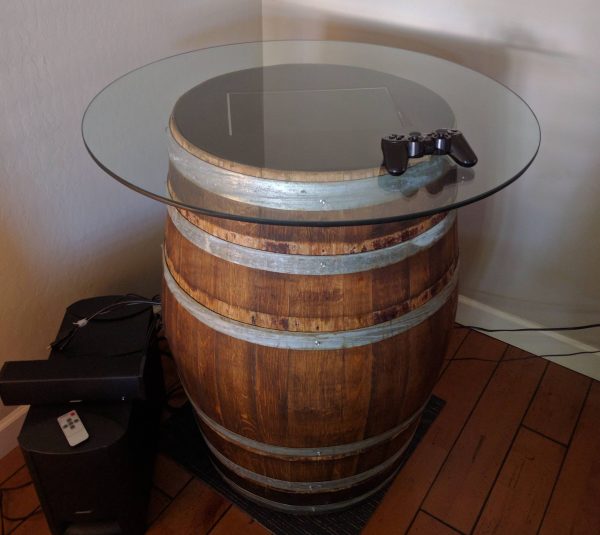
Right! In this case, the workaround [sid981] came up with was to build a RetroPie arcade into a fancy looking wine barrel. The electronics are pretty much what you’d expect for a RetroPie system, and the screen is set into the top of the barrel. Control is handled by a wireless controller that can be tucked away when it’s not in use, and a glass top simultaneously protects the screen and lets guests use the barrel as a bar table.

Continue reading “Classing Up A RetroPie Arcade With A Wine Barrel”

LEGO Looper Makes Modular Music

This LEGO synth made by [Rare Beasts] had us grinning from ear to ear.

It combines elements from LEGO Mindstorms with regular blocks in order to make music with color. A different music sample is assigned to each of five colors: red, blue, green, yellow, and white. The blocks are attached to spokes coming off of a wheel made with NXT an EV3. As the wheel turns, the blocks pass in front of a fixed color sensor that reads the color and plays the corresponding sample. The samples are different lengths, so changing the speed of the wheel makes for some interesting musical effects.

As you’ll see in the short video after the break, [Rare Beasts] starts the wheel moving slowly to demonstrate the system. Since the whole thing is made of LEGO, the blocks are totally modular. Removing a few of them here and there inserts rests into the music, which makes the result that much more complex.

LEGO is quite versatile, and that extends beyond playtime. It can be used to automate laboratory tasks, braid rope, or even simulate a nuclear reactor. What amazing creations have you made with it? Let us know in the comments.

Continue reading “LEGO Looper Makes Modular Music”

MakerBot Releases Their 6th Generation Of 3D Printers

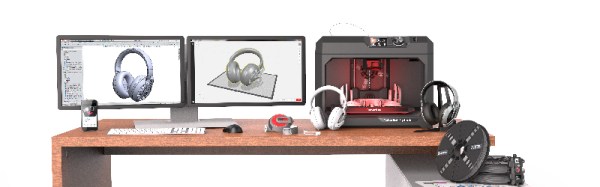
Just in time for the back to school and holiday season, Makerbot has released their latest line of printers. The latest additions to the lineup include the new Makerbot Replicator+ and the Makerbot Replicator Mini+.

The release of these new printers marks MakerBot’s first major product release since the disastrous introduction of the 5th generation of MakerBots in early 2014. The 5th generation of MakerBots included the Replicator Mini, priced at $1300, the Replicator, priced at $2500, and the Replicator Z18, priced at $6500. Comparing the build volume of these printers with the rest of the 3D printer market, these printers were overpriced. The capabilities of these printers didn’t move many units, either (for instance, the printers could only print in PLA). Makerbot was at least wise enough to continue building the 4th generation Replicator 2X, a printer that was capable of dual extrusion and printing more demanding filaments.

The release of the Makerbot Replicator+ and the Makerbot Replicator Mini+ is the sixth generation of MakerBot printers and the first generation of MakerBot’s manufactured overseas. This new generation is a hardware improvement on several fronts and included a complete redesign of the Makerbot Replicator and the Replicator Mini. The Replicator Mini+ features a 28% larger build volume than the original MakerBot Replicator Mini and an easily removable Grip Build Surface that can be flexed to remove a printed part. The Replicator+ features a 22% larger build volume than the MakerBot Replicator and a new Grip Build Surface. The Replicator Mini+ is $1000 ($300 cheaper than its predecessor), and the Replicator+ is $2000 ($500 less expensive). Both new printers, and the old Replicator Z18, now ship with the improved Smart Extruder+.

While the release of two new MakerBots does mean new hardware will make it into the wild, this is not the largest part of MakerBot’s latest press release. The big news is improved software. Makerbot Print is a slicer that allows Windows users to directly import 3D design files from SolidWorks, IGES, and STEP file formats. Only .STL files may be imported into the OS X version of the Makerbot Print software. MakerBot Mobile, an app available through the Apple Store and Google Play, allows users to monitor their printer from a smartphone.

Earlier this year, we wrote the Makerbot Obituary. From the heady days of The Colbert Report and an era where 3D printing would solve everything, MakerBot has fallen a long way. In the first four months of 2016, MakerBot only sold an average of about fifteen per day, well below the production estimated from the serial numbers of the first and second generation Makerbots, the Cupcake and Thing-O-Matic.

While this latest hardware release is improving the MakerBot brand by making the machines more affordable and giving the software some features which aren’t in the usual Open Source slicers, it remains to be seen if these efforts are enough. Time, or more specifically, the Stratasys financial reports, will tell.