AI Bot Plays Castlevania So You Don’t Have To

We’re not allowed to have TV here in the Hackaday Wonder Bunker, but occasionally we’ll pool together the bandwidth credits they pay us in and gather ’round the old 3.5 inch TFT LCD to watch whatever Netflix assures us is 93% to our liking. That’s how we found out they’ve made a show based on, of all things, one of the Castlevania games for the NES. We wanted to play the game to understand the backstory, but since it hails from the era of gaming where primitive graphics had to be supplemented with soul-crushing difficulty, we didn’t get very far.

But thanks to a very impressive project developed by [Michael Birken] maybe we’ll have it all figured out by the time we’ve saved enough credits to watch Season 2 (no spoilers, please). The software, which he’s quick to point out is not an example of machine learning, is an attempt to condense his personal knowledge of how to play Castlevania into a plugin for the Nintaco NES emulator. The end result is CastlevaniaBot, which is capable of playing through the original Castlevania from start to finish without human intervention. You can even stop and start it at will, so it can play through the parts you don’t want to do yourself.

[Michael] started this project with a simple premise: if he could make a bot successfully navigate the many levels of Dracula’s castle, then getting it to kill a few monsters along the way should be easy enough. Accordingly, he spent a lot of time perfecting the path-finding for CastlevaniaBot, which included manually playing through the entire game in order to get an accurate map of the background images. These images were then analyzed to identify things like walls and stairs, so the bot would know where it could and couldn’t move protagonist Simon Belmont. No matter what the bot is doing during the game it always considers where it is and where it needs to be going, as there’s a time limit for each stage to contend with. Continue reading “AI Bot Plays Castlevania So You Don’t Have To”
Bust A Move Doesn’t Have To Be Such A Grind

PC gamers have the benefit of the mouse and keyboard, which are highly flexible when it comes to input devices for gaming. What’s more, the freedom of the platform means that it’s easy to whip up whatever mad controller you can dream of to best suit the games you’re playing. Enter [Tom Tilley] with the aptly-named Hipster Game Controller.

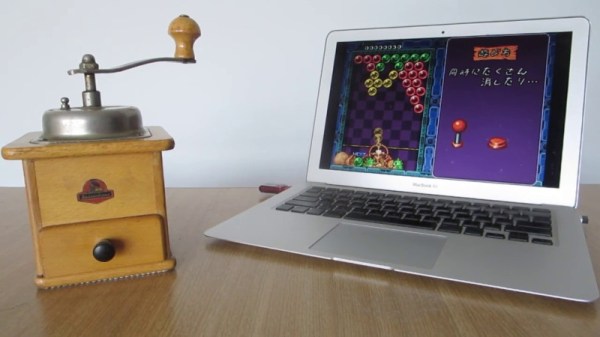
Yes, this is a controller made out of a coffee grinder. The hand-crank setup makes it perfect for imitating the game board in that puzzle classic, Bust-A-Move. [Tom] interfaces the controller in a perfectly hacky way – the scroll wheel from a mouse is removed from the case and zip tied to the shaft of the grinder, allowing the rotation of the grinder to turn the wheel. The mouse wheel is then mapped as the aim control in the game – it really is that simple. An arcade button is also fitted into a mug and wired into the left mouse button to act as the trigger.

[Tom] notes that while you can fill the grinder up while you play, it makes playing the game very hard work. It’s a hacky build to show that sometimes, you don’t need a microcontroller and lines of code – just a mouse, some wire, and a healthy dose of ingenuity.

And, as it turns out, [Tom]’s been quite the Bust-a-Move fan for a few years now. Video after the break.

Continue reading “Bust A Move Doesn’t Have To Be Such A Grind”

A Portal Port Programmed For Platforms Of The Past

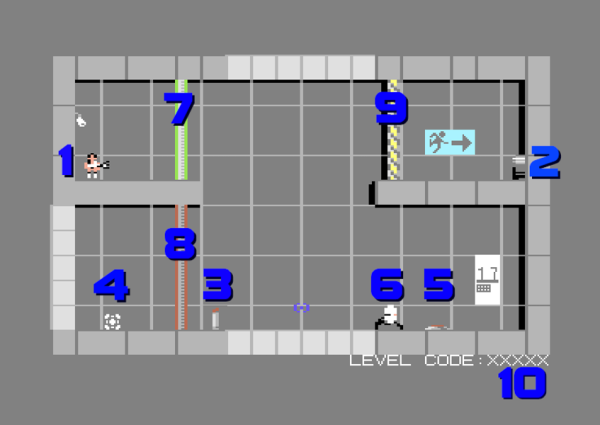
If you still have a Commodore 64 and it’s gathering dust, don’t sell it to a collector on eBay just yet. There’s still some homebrew game development happening from a small group of programmers dedicated to this classic system. The latest is a Portal-like game from [Jamie Fuller] which looks like a blast.

The Commodore doesn’t have quite the same specs of a Playstation, but that’s no reason to skip playing this version. It has the same style of puzzles where the player will need to shoot portals and manipulate objects in order to get to the goals. GLaDOS even makes appearances. The graphics by [Del Seymour] and music by [Roy Widding] push the hardware to its limits as well.

If you don’t have a C64 laying around, there are some emulators available such as VICE that can let you play this game without having to find a working computer from the 80s. You can also build your own emulator if you’re really dedicated, or restore one that had been gathering dust. And finally, we know it’s not, strictly speaking, a port of Portal, but some artistic license in headlines can be taken on occasion.

Continue reading “A Portal Port Programmed For Platforms Of The Past”

Xbox One X Gets Aluminum Laptop Makeover

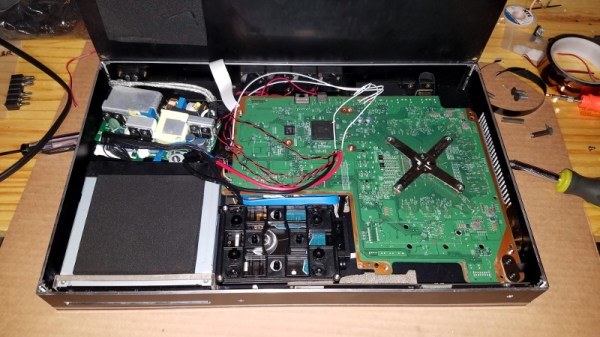
While many a gamer was willing to brave hand-to-hand combat this Black Friday just to get a few bucks off of Microsoft’s premium-tier game console, [jomega] was already cutting his to pieces from the comfort of his own home. Not dissuaded by the system’s fairly high sticker price or relatively limited modding scene, he decided to transplant his Xbox One X into an incredibly slick laptop-style aluminum enclosure.

Turning a game console into a “laptop” is hardly new, Ben Heck has been doing it for over a decade now, but in general they tend to look pretty clunky. With a few exceptions, the builder’s goal is not so much to make the final result look sleek and professional, but simply to take their favorite games on the go. But from the start [jomega] wanted something that would not only allow him to take long walks in the park with Master Chief, but look gorgeous doing it.

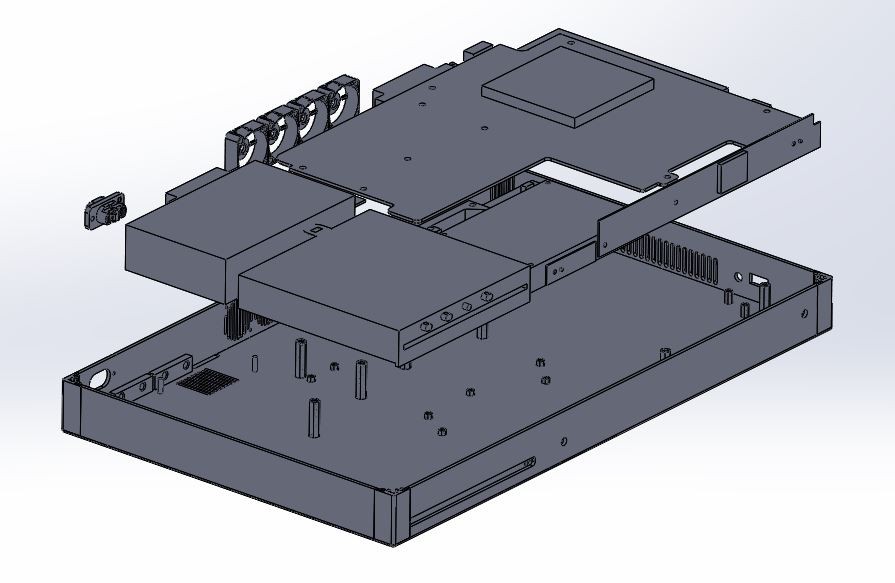
One of his goals was to make the final device thinner than the original system, so the first step was to assemble virtual representations of the Xbox’s principal components in CAD to find the most efficient placement for everything. Long before the first pieces of aluminum were cut, [jomega] already knew where each part and screw was going to end up. The time he invested in planning out the build in CAD more than made up for itself when it came time to assemble the final product, and also means this design is highly reproducible should he decide to build another one on commission.

Even though the final system seems impossibly thin, no hardware or functionality had to be left out. Even the optical drive, which on the stock console is something of an afterthought to begin with in an era of digital downloads (rumor has it the next Xbox will drop optical discs entirely), has been retained. Special consideration did need to be given to cooling the 4K powerhouse though, and [jomega] warns that running the system with the case open or the fans off can have dangerous consequences.

Thanks to the Xbox One’s wireless capabilities (for both Internet connection and controllers), there’s a notable lack of ports on the case. This made the design a bit easier, as [jomega] really only needed to have a connector for the AC power cord in the back and a couple of holes for the system’s power, eject, and controller sync buttons. He did add in a USB port for convenience, but even that could be skipped to make things easier.

In the past we’ve seen some rather husky Xbox 360 laptop builds, and at least one attempt to build a more slimline version, but this latest entry in the long line of portable-ized Xboxen has set the bar very high.

Continue reading “Xbox One X Gets Aluminum Laptop Makeover”

Xbox One Adaptive Controller Mod

Dad’s Custom Xbox Adaptive Controller Build For His Child

When Microsoft announced the Xbox adaptive controller earlier this year, many were pleasantly surprised at how adaptive it truly was. The controller features 3.5mm jacks for easily connecting any external input device and sports an impressive build quality given its price tag, but the most impressive part was the fact that the design was so open in nature. Rather than seeking to create a specific design solution tailored to a subset of users the adaptive controller acts more as a hub for the community’s designs. One of those brilliant designs comes from [Colton] who posted a five-part series on his custom controller build for his daughter.

Xbox One Adaptive Controller Build Push Button Switches

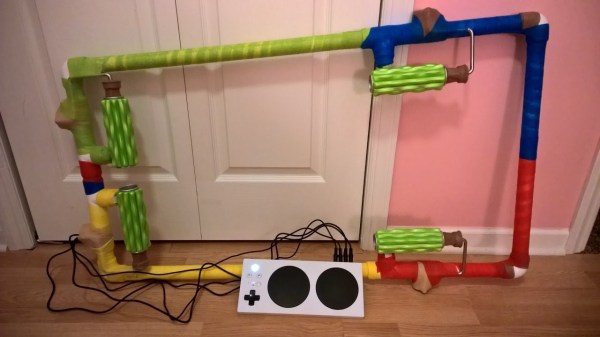
His daughter, Ellie, has Cornelia de Lange syndrome which prevents her from being able to use more conventional pressure sensitive input devices. So [Colton] devised a way for buttons to be pressed using an alternate range of motion. By attaching foam massage inserts to standard paint rollers, the buttons could be triggered by allowing the peaks and valleys of the foam to roll over the top of each button. He could achieve even better accuracy by attaching braided ribbon over the buttons in order to prevent binding.

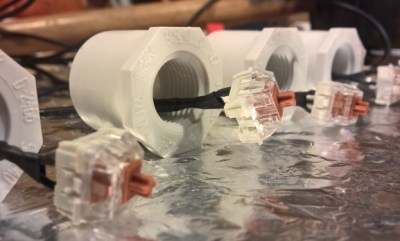
After finding that setup to be successful, [Colton] went about designing a frame. He arrived at using PVC pipe and utilizing tees as anchor points for the rollers. A couple of steel hose clamps are enough to hold each of the foam rollers in place, and the contact distance can be dialed in with buttons housed in threaded PVC adapters (shown right). After the addition of a little colored wrap here and there the build has a decidedly cheery exterior.

However, the build was not complete without a custom piece of software to match. [Colton] reached out for help from his nephew to program a “RGB Etch-a-Sketch” they called Sundoodler. The game runs on a small form factor PC hooked up to a projector so Ellie can play lying down. [Colton] has some future plans for his daughter’s custom Xbox adaptive controller build, but for now you can see the results in the video below.

Continue reading “Dad’s Custom Xbox Adaptive Controller Build For His Child”

Neo Geo Mini Gets The Ben Heck Portable Treatment

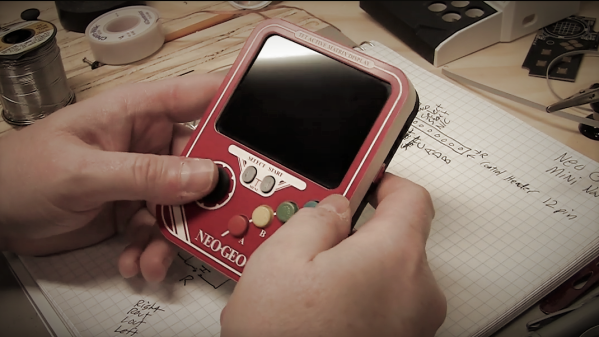
It feels like that Neo Geo Mini kinda came and went. All the hype surrounding the idea of having a tiny usable arcade machine melted away when the original system’s fans first touched the “non-clicky” joystick. While it was encouraging to see the inclusion USB-C power, there was no internal battery to allow players to use the system untethered. Not satisfied with the product in its current state [Ben Heck] shot a video detailing his latest portable creation using the Neo Geo Mini internals.

The design of the portable focuses around incorporating aspects of the Neo Geo MVS arcade system that the Neo Geo Mini lacks. The D-pad includes tiny micro-switches, or as [Ben Heck] calls them nano-switches, for a decidedly more tactile feel. He was able to re-purpose the speakers and headphone jack from the original PCB along with the 4:3 aspect ratio LCD. The custom faceplate wraps everything in the familiar red and white insignia while the 3D printed face buttons come in the classic red, yellow, green, and blue. Don’t worry, they are finally in the right button configuration here.

It’s great to see [Ben Heck] still making portable magic since his YouTube show ended earlier this year. He has contributed a lot to the modding community over the years, and there are plenty of helpful tips scattered throughout this Neo Geo Mini portable video as well. Note that the build is split into two separate videos (part two is below). We look forward to many more projects like this from [Ben Heck] in the future.

Continue reading “Neo Geo Mini Gets The Ben Heck Portable Treatment”

Gorgeous Bartop Arcade Build Is A Cut Above

At this point we’ve seen a good number of desktop-sized arcade cabinets, and while they’ve naturally all been impressive in their own ways, they do tend to follow a pretty familiar formula. Cut the side panels out of MDF (or just buy a frame kit), stick a Raspberry Pi and an old LCD monitor in there, and then figure out how to control the thing. Maybe a couple strategically placed stickers and blinking LEDs to add a few extra horsepower, but nothing too surprising.

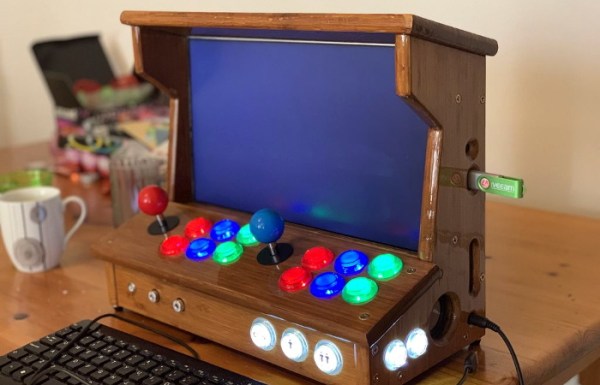
[Andy Riley] had seen plenty of builds like that, and he wasn’t having any of it. With the heart of an old laptop and bones made of IKEA cutting boards, his build is proof positive that there’s always more than one way to approach a problem that most would consider “solved” already. From the start, he set out to design and build a miniature arcade cabinet that didn’t look and feel like all the other ones he’d seen floating around online, and we think you’ll agree he delivered in a big way.

Powering the arcade with an old laptop is really a brilliant idea, especially since you can pick up older models for a song now that they’re considered nearly disposable by many users. As long as it doesn’t have a cracked display, you’ll get a nice sized LCD panel and potentially a rather powerful computer to drive it. Certainly the graphical capabilities of even the crustiest of used laptops will run circles around the Raspberry Pi, and of course it opens the possibility of playing contemporary PC games. As [Andy] shows in his detailed write-up, using a laptop does take more custom work than settling for the Pi, but we think the advantages make a compelling case for putting in the effort.

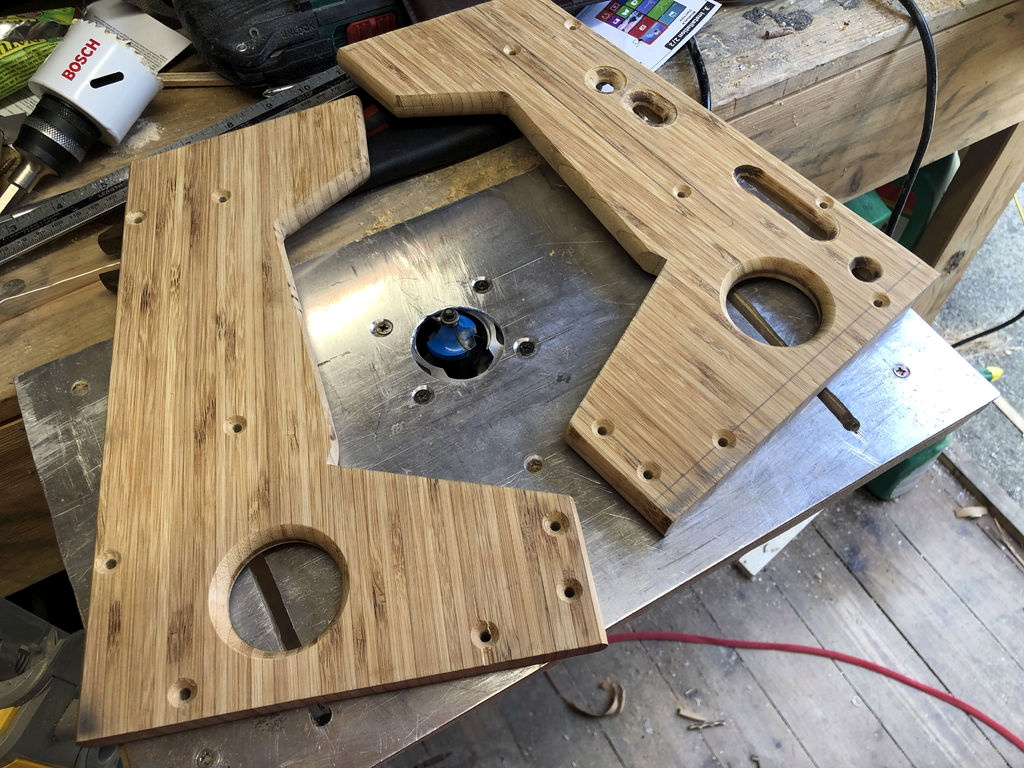
Of course, that’s only half the equation. Arguably the most impressive aspect of this build is the cabinet itself, which is made out of a couple IKEA bamboo cutting boards. [Andy] used his not inconsiderable woodworking skills, in addition to some pretty serious power tools, to turn the affordable kitchen accessories into a furniture-grade piece that really stands out from the norm. Even if you aren’t normally too keen on working with dead trees, his step-by-step explanations and pictures are a fascinating look at true craftsman at work.

If you’re more concerned with playing Galaga than the finer points of varnish application, you can always just turbocharge the old iCade and be done with it. But we think there’s something to be said for an arcade cabinet that could legitimately pass as a family heirloom.