Re-enacting TRON On The Apple IIgs

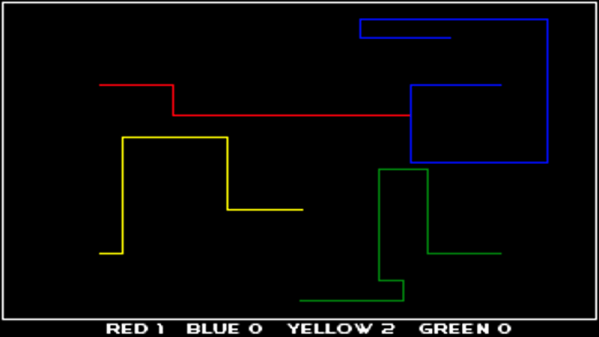
TRON is a science fiction classic, hitting cinemas in the midst of the burgeoning home computer era. It’s the film that created the famous light cycle, which spawned many video game recreations in the following years. Many years ago now, [Daniel] decided to flex his programming muscles by coding a version of the game for the Apple IIgs, with accidentally excellent results.

In the film, the characters find an escape from the light cycle game by forcing another player to crash into the walls of the play area. The resulting explosion left a hole, allowing the players to exit the light cycle game and explore the rest of the computer. Amusingly, due to a coding oversight, [Daniel] had created exactly this same flaw in his own code.

[Daniel]’s game differed from the original in that players were provided with missiles to destroy enemy trails. However, these missiles did not discriminate, and due to the simplicity of the code, were able to destroy the boundary on the play area. This was discovered when the computer player tried to escape an otherwise impossible situation. Upon blowing a hole in the arena wall, the computer player proceeded to drive off the screen – into invalid memory. This led to the computer crashing in short order, due to the unprotected memory space of the Apple II platform.

It’s a case of code imitating art – and completely by accident. The game managed to replicate the light cycle escape from the film entirely due to the unexpected behaviour of the simple missile code. [Daniel] steps through the code and how the bug happened, and covers the underlying principle behind the resulting crashes. It’s an entertaining tale of the risks of coding at low level; something we don’t always run into with today’s modern interpreted languages.

Thirsty for more tales of hacking the Apple II? How about going back in time to fix a 37 year old bug?

Memory Mapping Methods In The Super Nintendo

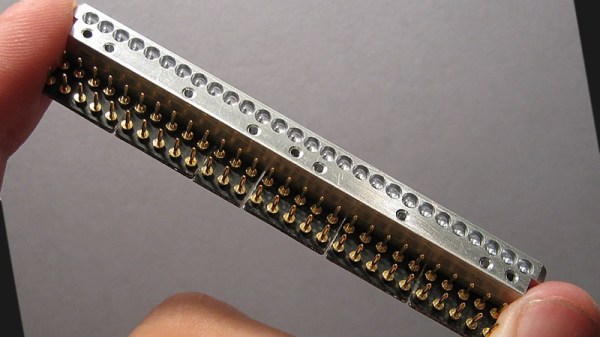
Not only is the Super Nintendo an all-around great platform, both during its prime in the 90s and now during the nostalgia craze, but its relative simplicity compared to modern systems makes it a lot more accessible from a computer science point-of-view. That means that we can get some in-depth discussion on how the Super Nintendo actually does what it does, and understand most of it, like this video from [Retro Game Mechanics Explained] which goes into an incredible amount of detail on the mechanics of the SNES’s memory system.

Two of the interesting memory systems the SNES uses are called DMA and HDMA. DMA stands for direct memory access, and is a way for the Super Nintendo to access memory independently of the CPU. The advantages to this are that it’s incredibly fast compared to more typical methods of accessing memory. This isn’t particulalry unique, but the HDMA system is. It allows the SNES to do all kinds of interesting tricks with its video output display like changing color gradients and doing all kinds of masking effects.

If you’re interested in the inner workings of classic consoles like the SNES, this video gets way down in the weeds in the system itself. It’s interesting to see how programmers were able to squeeze more capability from these limited (by modern standards) systems by manipulating memory like the DMA and HDMA systems do.  [Retro Game Mechanics Explained] is a great resource for exploring in-depth aspects of lots of classic games, like how speedrunners can execute arbitrary code in old Mario games.

Continue reading “Memory Mapping Methods In The Super Nintendo”

A Daylight-Readable Bar Graph Display In The 70s Wasn’t Cheap

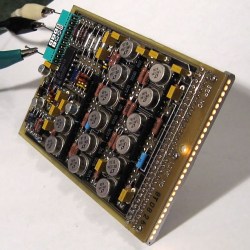
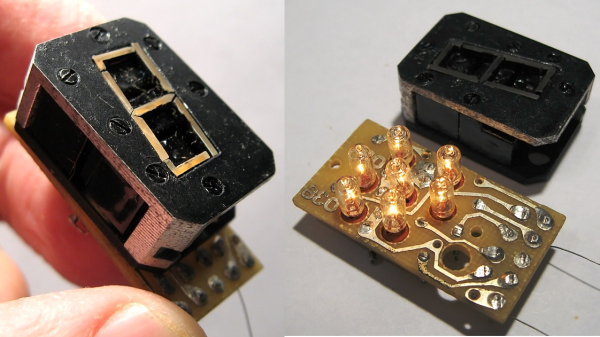
The driver board with display attached; the row of lamps is visible on the right hand side.

LEDs weren’t always an easy solution to displays and indicators. The fine folks at [Industrial Alchemy] shared pictures of a device that shows what kind of effort and cost went into making a high brightness bar graph display in the 70s, back when LEDs were both expensive and not particularly bright. There are no strange materials or methods involved in making the display daylight-readable, but it’s a peek at how solving problems we take for granted today sometimes took a lot of expense and effort.

The display is a row of 28 small incandescent bulbs, mounted in a PCB and housed in a machined aluminum frame. Holes through which to view the bulbs are on both the top and front of the metal housing, which allows the unit to be mounted in different orientations. It was made as a swappable module, its 56 machined gold pins mate to sockets on the driver board. The driver board itself consists of 14 LM119 dual comparators, each of which controls two bulbs on the display.

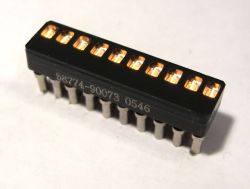
An example of a Wamco minitron bar graph display. Each window contains an incandescent filament. [Source: industrialalchemy.org]
[Industrial Alchemy] believes that the display unit itself may have been a bit of a hack in its own way. Based on the pin spacing and dimensions of the driver board, they feel that it was probably designed to host a row of modular units known as the Wamco minitron bar graph display. An example is pictured here; they resembled DIP chips and could be stacked side-by-side to make a display of any length. Each window contained an incandescent filament in a reflective well, and each light could be individually controlled.

These minitron bar graph units could only be viewed from the top, and were apparently high in cost and low in availability. Getting around these limitations may have been worth creating this compatible unit despite the work involved.

Display technology has taken many different turns over the years, and you can see examples of many of them in one place in the Circus Clock, which tells the time with a different technology for each digit: a nixie, a numitron, a 7-segment thyratron tube, a VFD, an LED dot display, and a rear projection display.

Put An ItsyBitsy Zork In Your Pocket

Before computer games had all these fancy graphics, text based games were a very popular genre. Rather than move a character on the screen, you’d type out commands for your player in sentence form which the game would interpret; decades before the “cloud” language processing technology that the likes of Amazon and Google currently use to power their virtual assistants. In some ways the genre was ahead of its time, but it didn’t survive the graphical revolution for home computers. Of course, these games still have some diehard fans out there.

[Dan The Geek] is one such fan. He loves text based adventure games like Zork so much that he wanted to create his own implementation of the core technology that made these games possible all those years ago. But he didn’t want to just do it on this desktop computer, there’s already projects that let you run these classic games on modern hardware. He wanted to see if he could run these classic games on a modern microcontroller, and create a authentic retro experience on a handy portable device.

[Dan] starts by explaining the technology used to make titles like these possible in the days when the wide array of home computer types required a nuanced approach. By separating the story files from the actual interpreter, developers could more easily port the games to various computers. In theory these interpreters, known as “Z-machines”, could be written for any computer that could compile C code, had enough RAM to hold the story, and had a terminal and keyboard. Not exactly the kind of system requirements we’re used to seeing for modern PC games, but it was the 1980’s.

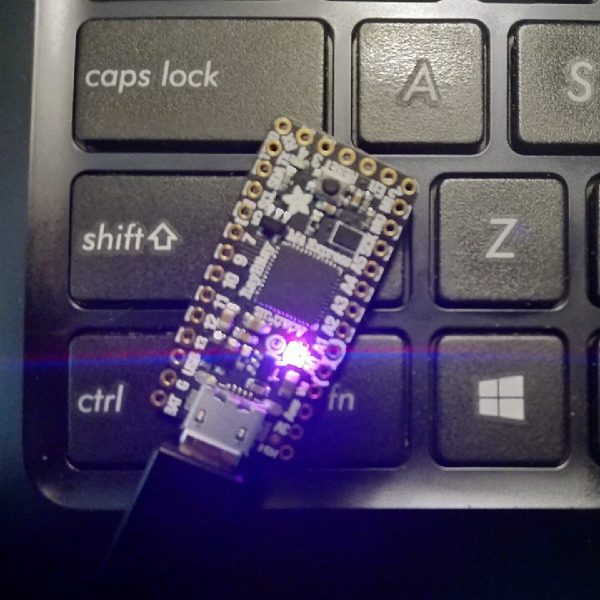
In theory a modern microcontroller will meet these requirements, so [Dan] wanted to create his own Z-machine for one. But rather than “cheat” by using an SD card like previous Arduino Z-machines have, he wanted to see if there was a development board out there that could do it all internally. The answer came in the form of the  Adafruit ItsyBitsy M4 Express, with its 192 kB of RAM and 2 MB of SPI flash.

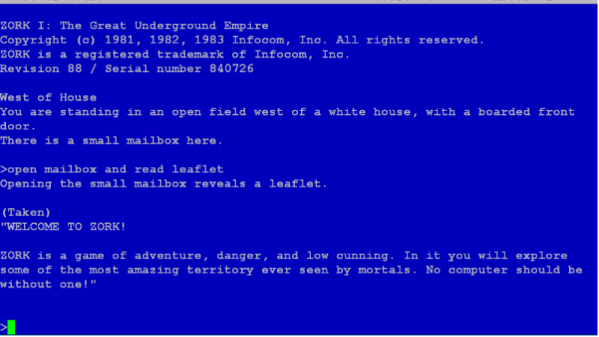
The Z-machine created by [Dan], which he’s calling A2Z, allows users to run Zork and other compatible interactive text games on the ItsyBitsy without any additional hardware. Just plug the board into your computer and you’ll be able to play the games over the the serial connection. He’s even implemented some retro color schemes to make the experience more authentic, like the blue of the Amiga or Compaq green.

We’ve covered previous projects that brought Zork and friends to the Arduino, your web browser via a virtual Altair 8800, and even some more exotic targets like custom FPGAs. You can play cave adventure, the game that inspired Zork, on the Supercon Badge.

Soviet-Era 7-Segment Display, Built Like A Tank

In a way, all 7-segment displays are alike; at least from the outside looking in. On the inside it can be quite another story, and that’s certainly the case with the construction of this Soviet-era 7-segment numerical display. From the outside it may look a bit sturdier than usual, but it’s still instantly recognizable for what it is. On the inside is an unusual mixture of incandescent bulbs and plastic light guides.

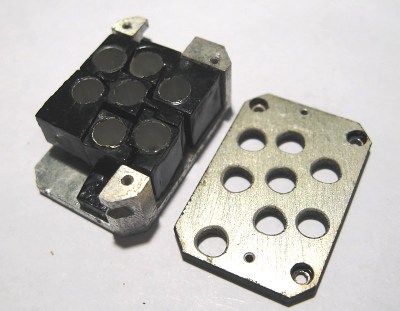
The black-coated blocks of plastic on the left (shown from the rear) act as light guides. The holes are for nesting the incandescent bulbs. Note the puzzle-like arrangement of the uniquely shaped pieces.

The rear of the display is a PCB with a vaguely hexagonal pattern of low-voltage incandescent bulbs, and each bulb mates to one segment of the display. The display segments themselves are solid blocks of plastic, one for each bulb, and each a separate piece. These are painted black, with the only paint-free areas being a thin segment at the top for the display, and a hole in the back for the mating bulb.

The result is that each plastic piece acts as a light guide, ensuring that a lit bulb on the PCB results in one of the seven thin segments on the face being lit as well. An interesting thing is that the black paint is the only thing preventing unwanted light from showing out the front, or leaking from one segment to another; usually some kind of baffle is used for this purpose in displays from this era.

More curiously, each plastic segment is a unique shape apparently unrelated to its function. We think this was probably done to ensure foolproof assembly; it forms a puzzle that can only fit together one way. The result is a compact and remarkably sturdy unit that shows how older and rugged tech isn’t necessarily bulky. Another example of small display tech from the Soviet era is this tiny 7-segment display of a completely different manufacture, which was usually used with an integrated bubble lens to magnify the minuscule display.

Rebuilding An Amiga 500 PSU

One of the challenges of keeping a vintage computer up and running is the limited availability of spare parts. While not everything has hit dire levels of availability (not yet, anyway), it goes without saying that getting a replacement part for a 30+ year old computer is a bit harder than hitting up the local electronics store. So the ability to rebuild original hardware with modern components is an excellent skill to cultivate for anyone looking to keep these pieces of computing history alive in the 21st century.

This is in ample evidence over at [Inkoo Vintage Computing], where repairs and upgrades to vintage computers are performed with a nearly religious veneration. Case in point: this detailed blog post about rebuilding a dead Amiga 500 power supply. After receiving the machine as a donation, it was decided to attempt to diagnose and repair the PSU rather than replace it with a newly manufactured one; as much for the challenge as keeping the contemporary hardware in working order.

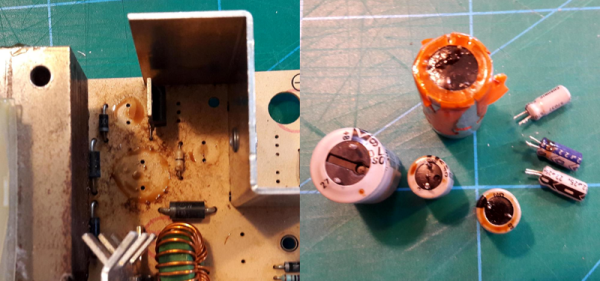
What was found upon opening the PSU probably won’t come as a huge surprise to the average Hackaday reader: bad electrolytic capacitors. But these things weren’t just bulged, a few had blown and splattered electrolyte all over the PCB. After removing the bad caps, the board was thoroughly inspected and cleaned with isopropyl alcohol.

[Inkoo Vintage Computing] explains that there’s some variations in capacitor values between different revisions of the Amiga PSU, so it’s best to match what your own hardware had rather than just trying to look it up online. These capacitors in particular were so old and badly damaged that even reading the values off of them was tricky, but in the end, matching parts were ordered and installed. A new fuse was put in, and upon powering up the recapped PSU, the voltages at the connector were checked to be within spec before being plugged into the Amiga itself.

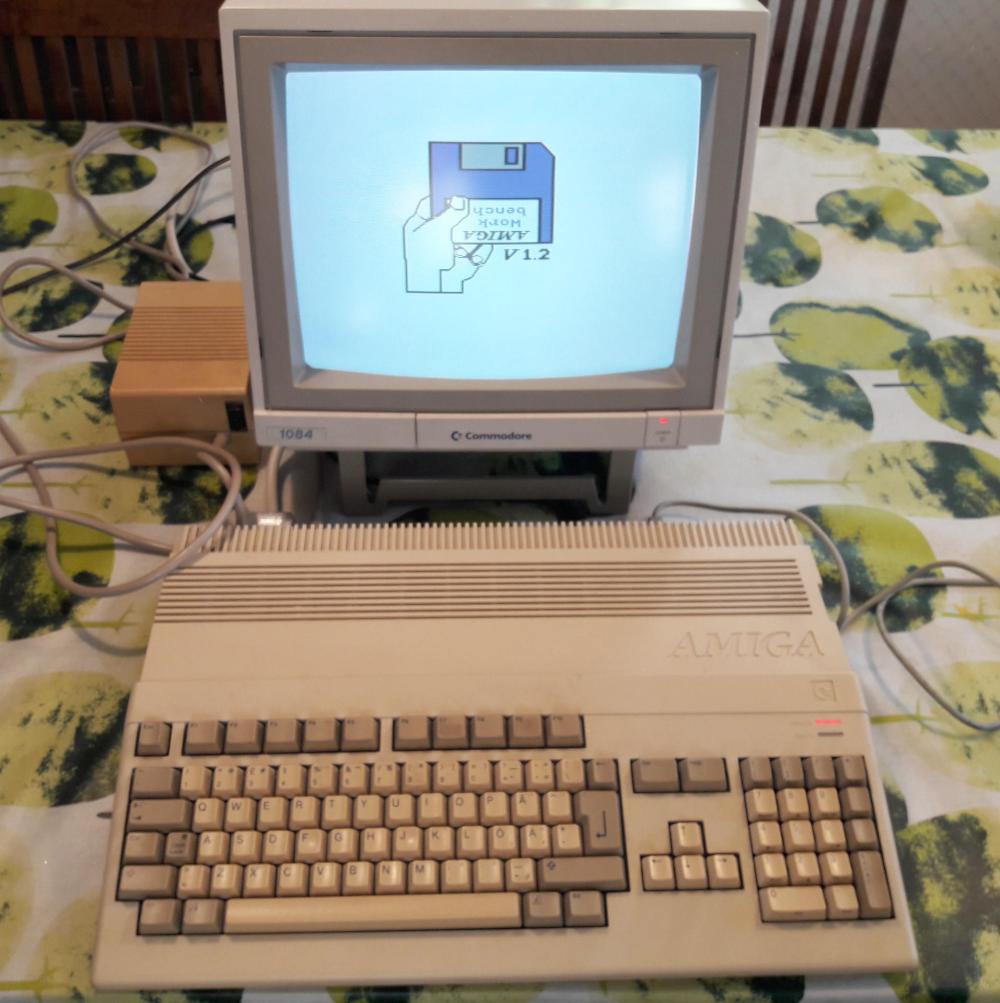
As a test, the Amiga 500 was loaded up with some demos to really get the system load up. After an hour, the PSU’s transformer was up to 78°C and the capacitors topped out at 60°C. As these parts are rated for 100°C (up from 85°C for the original parts), everything seemed to be within tolerances and the PSU was deemed safe for extended use.

This sort of repair isn’t exactly rare with hardware this old, and we’ve seen similar work done on a vintage Apple power supply in the past. If you’re less concerned with historical accuracy, [Inkoo Vintage Computing] has also shown off adapting an ATX PSU for use with the Amiga.

The Math That Makes Computers Go, Built On A Tiny PCB

A computer is, at its core, just a bunch of transistors wired together. Once you have enough transistors on a board, though, one of the first layers of abstraction that arises is the Arithmetic Logic Unit. The ALU takes in two sets of data, performs a chosen math function, and outputs one data set as the result. It really is the core of what makes computers compute.

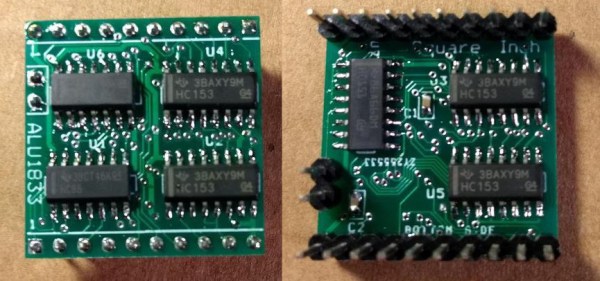
An ALU is built into modern processors, but that wasn’t always how it was done. If you’re looking to build a recreation of an early computer you may need a standalone, and that’s why [roelh] designed an ALU that fits in a square inch piece of circuit board using five multiplexer chips and two XOR chips.

One of the commonly used components for this purpose, the 74LS181 ALU, is not in production anymore. [roelh’s] ALU is intended to be a small footprint replacement of sorts, and can perform seven functions: ADD, SUB, XOR, XNOR, AND, OR, A, B, and NOT A. The small footprint for the design is a constraint of our recent contest: Return of the Square Inch Project. Of course, this meant extra design challenges, such as needing to move the carry in and carry out lines to a separate header because there wasn’t enough space on one edge.

Exploring the theory behind an ALU isn’t just for people building retrocomputers. It is integral to gaining an intuitive understanding of how all computers work. Everyone should consider looking under the hood by walking through the nand2tetris course which uses simulation to build from a NAND gate all the way up to a functioning computer based on The Elements of Computing Science textbook.

If you’re a homebrew computer builder, it might be worthwhile to use one of these ALUs rather than designing your own. Of course, if building components from scratch is your thing we definitely understand that motivation as well.