Speedrunning Windows 95

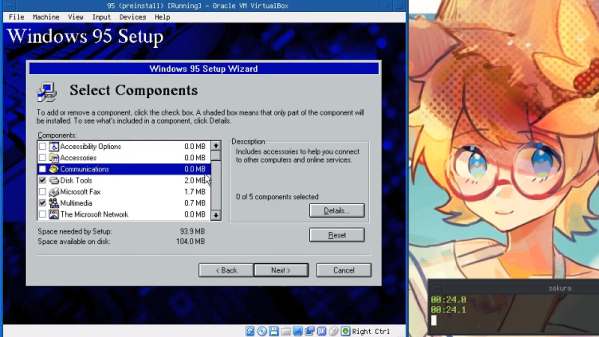
Speedrunning is the practice of attempting to beat a videogame in as short a time as possible. There are a huge variety of methods and styles. There are 100% completion speedruns, tool-assisted speedruns, and speedruns that just focus on getting to the game over screen as quickly as possible by hook or by crook. Now, there’s a world record speedrun, installing Windows 95B in just 1 minute 10.9 seconds.

The current best attempts are collected in a Google Sheets document. So far, there have been few competitors but we expect to see more activity in future. The current rules for world record competition require original floppy and CD-ROM images to be used, but there are no limits on hardware, so records should tumble as time goes on. All the top times have been completed in virtual machines, but we’d love to see an attempt made on raw hardware.

It all kicked off when [oscareczek] grew tired of trying to compete in traditional gaming speedruns, so invented a new category instead. Competition has already come a long way from that original 4 minute time, and competitors are now considering advanced techniques such as RAM disks to speed their runs. All keystrokes are by hand at the moment, but we could see a tool-assisted competition starting up in future.

We’ve seen speedrunning techniques pushed to impressive limits before – like running Pong within Super Mario World, just for fun. Video after the break.

Continue reading “Speedrunning Windows 95”

SVG Rendering Comes To 8-bit Atari Computers

Bringing modern protocols and techniques to vintage computers is a favorite pastime for hackers, and over the years we’ve seen some absolutely incredible hardware and software projects designed specifically to do what most people would consider impossible. They’re very rarely practical projects, of course. But that’s never really the point.

The product of 45 minutes of work.

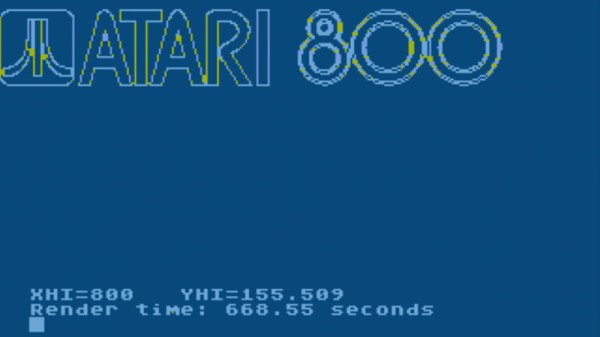
Today we present another excellent entry into this niche avenue of hacking: Renderific, a tool to render SVGs on 8-bit Atari computers by [Kevin Savetz]. The MIT licensed program is written in Turbo-BASIC XL and allows computers such the 1200XL and 800XL to not only render the image on screen but output it to an attached plotter. There are a few niggling issues with some files, and apparently the plotter draws the image upside-down for some reason, but on the whole we can now add “SVG Rendering” to the list of things you can do with a nearly 40-year-old computer.

Of course, those who are familiar with these 1980’s machines might wonder how their limited CPUs can possibly cope with such a task. Well, that’s where the impracticality comes in. According to [Kevin], you can be in for quite a wait depending on the complexity of the image. In his tests, some SVGs took up to 45 minutes to fully render on the screen, so you might want to have a snack handy.

If you’re interested in lending a hand with the project, it sounds as though [Kevin] could use some assistance in figuring out why the Atari 1020 plotter doesn’t like the output of his program. There’s also a few SVG functions and forms of Bézier curves that need some work if you’ve got your Turbo-BASIC XL programming books handy.

Will you ever have a need to view SVG files on an Atari 1200XL? No, probably not. You might not have a desire to play Spotify on the Macintosh SE/30 either, but that hasn’t stopped hackers from figuring out how you can do it. As long as these old machines are still up and running, we’re confident that the community will continue to teach them new tricks.

Ludwig Promises Easy Machine Learning From Uber

Machine learning has brought an old idea — neural networks — to bear on a range of previously difficult problems such as handwriting and speech recognition. Better software and hardware has made it feasible to apply sophisticated machine learning algorithms that would have previously been only possible on giant supercomputers. However, there’s still a learning curve for developing both models and software to use these trained models. Uber — you know, the guys that drive you home when you’ve had a bit too much — have what they are calling a “code-free deep learning toolbox” named Ludwig. The promise is you can create, train, and use models to extract features from data without writing any code. You can find the project itself on GitHub.io.

The toolbox is built over TensorFlow and they claim:

Ludwig is unique in its ability to help make deep learning easier to understand for non-experts and enable faster model improvement iteration cycles for experienced machine learning developers and researchers alike. By using Ludwig, experts and researchers can simplify the prototyping process and streamline data processing so that they can focus on developing deep learning architectures rather than data wrangling.

Continue reading “Ludwig Promises Easy Machine Learning From Uber”

Foundations For Machine Learning In English (Or Russian)

We are big fans of posts and videos that try to give you a gut-level intuition on technical topics. While [vas3k’s] post “Machine Learning for Everyone” fits the bill, we knew we’d like it from the opening sentences:

Machine Learning is like sex in high school. Everyone is talking about it, a few know what to do, and only your teacher is doing it.”

That sets the tone. What follows is a very comprehensive exposition of machine learning fundamentals. There is no focus on a particular tool, instead this is all the underpinnings. The original post was in Russian, but the English version is easy to read and doesn’t come off as a poor machine translation.

Continue reading “Foundations For Machine Learning In English (Or Russian)”

Relive The Dot Matrix Glory Days With Your 3D Printer

With the cost of 3D printers dropping rapidly, we’ve started to see a trend of hackers re-purposing them for various tasks. It makes perfect sense; with the hotend and extruder turned off (or removed entirely), you’ve got a machine that can move a tool around in two or three dimensions with exceptional accuracy. Printers modified to carry lasers, markers, and even the occasional rotary tool, are becoming a common sight in our tip line.

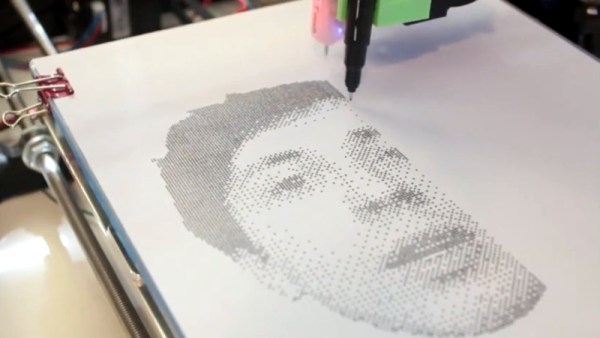
Last year [Matthew Rayfield] attached a marker to his 3D printer and had it sketch out some pictures, but recently he decided to revisit the idea and try to put a unique spin on it. The end result is a throwback to the classic dot matrix printers of yore utilizing decidedly modern hardware and software. There’s something undeniably appealing about the low-fi nature of dot matrix printing, and when fed the appropriate images this setup is capable of producing something which we’ve got to admit is dangerously close to being art.

To create these images, [Matthew] has created “Pixels-to-Gcode”, an online service that anyone can use to turn an arbitrary image into GCode they can feed their 3D printer. There’s a number of options available for you to play with so you can dial in the specific effect you’re looking for. Pointillist images can be created using a tight spacing of dots, but widen them up, and your final image becomes increasingly abstract.

The hardware side of this project is left largely as an exercise for the reader. [Matthew] has attached a fine-point pen to his printer’s head using a rubber band, but admits that it’s far from ideal. A more robust approach would be some kind of 3D printed device that allows you to quickly attach your pen or marker so the printer can be easily switched between 2D and 3D modes. We’d also be interested in seeing what this would look like if you used a laser mounted on the printer to burn the dots.

Back in the ancient days of 2012, we saw somebody put together a very similar project using parts from floppy and optical drives. The differences between these two projects, not only in relative difficulty level but end result, is an excellent example of how the hacker community is benefiting from the widespread availability of cheap 3D motion platforms.

Continue reading “Relive The Dot Matrix Glory Days With Your 3D Printer”

Talking Telegram With The ESP8266

At this point it’s something of a given that a member of the ESP8266 family is likely your best bet if you want to cobble together a small Internet-connected gadget. Costing as little as $3 USD, this well documented all-in-one solution really can’t be beat. But of course, the hardware is only one half of the equation. Deciding how to handle the software side of your homebrew Internet of Things device is another story entirely.

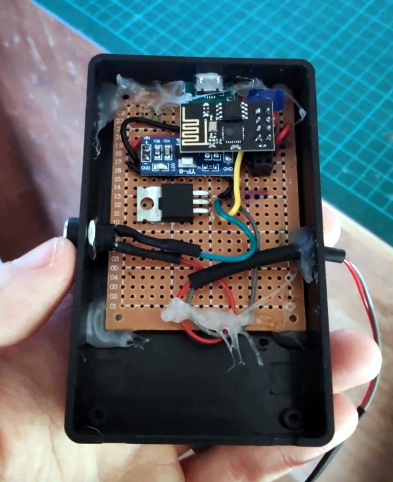
A simple Telegram ESP8266 switch

It would be fair to say that there’s no clear-cut “right” way to approach the software, and it really depends on the needs or limitations of your particular project. For example [Brian Lough] finds that building Telegram support into his ESP8266 allows him to accomplish his goals with the minimum amount of fuss while at the same time using an environment he’s already comfortable with. He recently wrote in to share one of his Telegram projects with us, and in the video after the break, takes the time to explain some of the things he likes best about controlling his hardware through the encrypted chat platform.

But you don’t have to take his word for it, you can try it yourself. Thanks to the software library that [Brian] has developed to connect his projects to Telegram, the aptly named “Universal Telegram Bot Library”, anyone can easily follow in his footsteps. Adding his Telegram library to your next ESP8266 project is as easy as selecting it in the Arduino IDE. From there the video explains the process for getting a bot ID from Telegram, and ultimately how you use it to receive messages from the service. What you do with those messages is entirely up to you.

According to [Brian], the main downside is that you are beholden to a web service to control your local devices; not ideal if the Internet goes down or you would rather your little hacker projects not talk to the big scary Internet in the first place. If you’d rather keep all your smart things talking within the confines of your own network, perhaps your next project could be setting up a private MQTT server.

Continue reading “Talking Telegram With The ESP8266”

Calling World Cup Goals Before They Happen, By Polling A Betting Site

[Ben] made an interesting discovery during the FIFA World Cup in 2018, and used it to grant himself the power to call goals before they happened. Well, before they happened on live TV or live streaming, anyway. It was possible because of the broadcast delay on “live” broadcasts, combined with the sports betting industry’s need for timely and detailed game state tracking.

He discovered that a company named Running Ball provides fairly detailed game statistics in digital form, which are generated from inside the stadium as events occur. An obvious consumer of this data are sports betting services, and [Ben] found a UK betting site that exposed that information in full inside their web app. By polling this data, he measured a minimum of 4 seconds between an event (such as a goal) being reported in the data and the event occurring on live TV. The delay was much higher — up to minutes — for live streaming. [Ben] found it quite interesting to measure how the broadcast delay on otherwise “live” events could sometimes be quite significant.

Knowing broadcast delays exist is one thing, but it’s a neat trick to use it to predict goals before they occur on “live” television. This isn’t the first time we’ve seen evidence of [Ben]’s special interest in data and using it in unusual ways; he once set up a program to play Battleship over the Border Gateway Protocol (BGP), making it very probably the first board game played over BGP.