Smartphone App Uses AR To Visualize The RF Spectrum

Have you ever wished you could see in the RF part of the radio spectrum? While such a skill would probably make it hard to get a good night’s rest, it would at least allow you to instantly see dead spots in your WiFi coverage. Not a bad tradeoff.

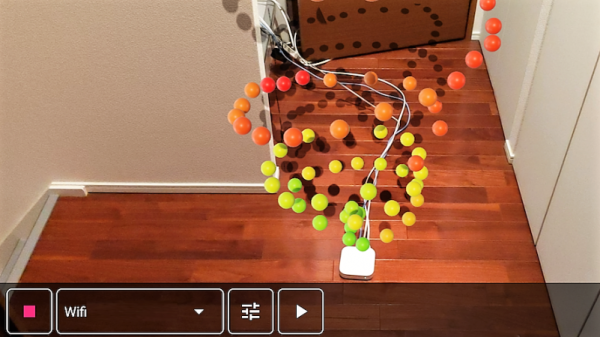
Unwilling to go full [Geordi La Forge] to be able to visualize RF, [Ken Kawamoto] built the next best thing – an augmented-reality RF signal strength app for his smartphone. Built to aid in the repositioning of his router in the post-holiday cleanup, the app uses the Android ARCore framework to figure out where in the house the phone is and overlays a color-coded sphere representing sensor data onto the current camera image. The spheres persist in 3D space, leaving a trail of virtual breadcrumbs that map out the sensor data as you warwalk the house. The app also lets you map Bluetooth and LTE coverage, but RF isn’t its only input: if your phone is properly equipped, magnetic fields and barometric pressure can also be AR mapped. We found the Bluetooth demo in the video below particularly interesting; it’s amazing how much the signal is attenuated by a double layer of aluminum foil. [Ken] even came up with an Arduino with a gas sensor that talks to the phone and maps the atmosphere around the kitchen stove.

The app is called AR Sensor and is available on the Play Store, but you’ll need at least Android 8.0 to play. If your phone is behind the times like ours, you might have to settle for mapping your RF world the hard way.

Continue reading “Smartphone App Uses AR To Visualize The RF Spectrum”

Finding The Goldilocks Cell Module

If adding a cell modem is dealing with a drama queen of a hardware component, then choosing from among the many types of modules available turns the designer into an electronics Goldilocks. There are endless options for packaging and features all designed to make your life easier (or not!) so you-the-designer needs to have a clear understanding of the forces at work to come to a reasonable decision. How else will Widget D’lux® finally ship? You are still working on Widget D’lux®, aren’t you?

OK, quick recap from last time. Cell modems can be used to add that great feature known as The Internet to your product, which is a necessary part of the Internet of Things, and thus Good. So you’re adding a cell modem! But “adding a cell modem” can mean almost anything. Are you aiming to be Qualcomm and sue Apple build modems from scratch? Probably not. What about sticking a Particle Electron inside to bolt something together quickly? Or talk to Telit and put a bare modem on a board? Unless you’re expecting to need extremely high volume and have a healthy appetite for certification glee, I bet you’ve chosen to get a modem with as many existing certifications as possible, which takes us to where we are today. Go read the previous post if you want a much more elaborate discussion of your modem-packaging options and some of the trade offs involved. Continue reading “Finding The Goldilocks Cell Module”

Choosing Cell Modems: The Drama Queen Of Hardware Design

So you went to a tradeshow and heard about this cool new idea called the Internet Of Things; now it’s time to build an IoT product of your own. You know that to be IoT, your Widget D’lux® has to have a network connection but which to choose?

You could use WiFi or Bluetooth but that would be gauche. Maybe LoRaWAN? All the cool kids are using LoRa for medium or long range wireless these days, but that still requires a base station and Widget D’lux® will be a worldwide phenomenon. Or at least a phenomenon past your bedroom walls. And you know how much user’s hate setting things up. So a cell modem it is! But what do you have to do to legally include one in your product? Well that’s a little complicated.

Continue reading “Choosing Cell Modems: The Drama Queen Of Hardware Design”

Revive That Old Analog Cell Phone With SDR

With the latest and greatest 5G cellular networks right around the corner, it can be difficult to believe that it wasn’t so long ago that cell phones relied on analog networks. They aren’t used anymore, but it might only take a visit to a swap meet or flea market to get your hands on some of this vintage hardware. Of course these phones of a bygone era aren’t just impractical due to their monstrous size compared to modern gear, but because analog cell networks have long since gone the way of the floppy disk.

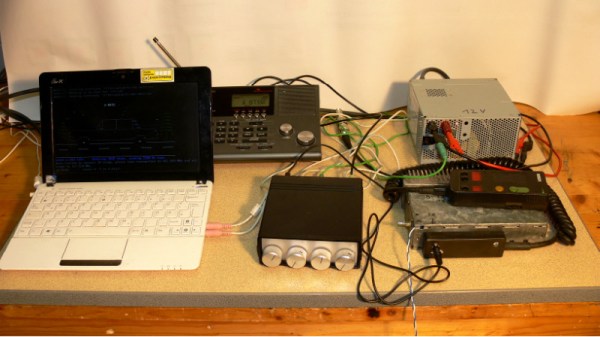
But thanks to the efforts of [Andreas Eversberg] those antique cell phones may live again, even if it’s only within the radius of your local hackerspace. His software allows the user to create a functioning analog base station for several retro phone networks used in Europe and the United States, such as AMPS, TACS, NMT, Radiocom, and C450. You can go the old school route and do it with sound cards and physical radios, or you can fully embrace the 21st century and do it all through a Software Defined Radio (SDR); in either event, calls to the base station and even between multiple mobile devices is possible with relatively inexpensive hardware.

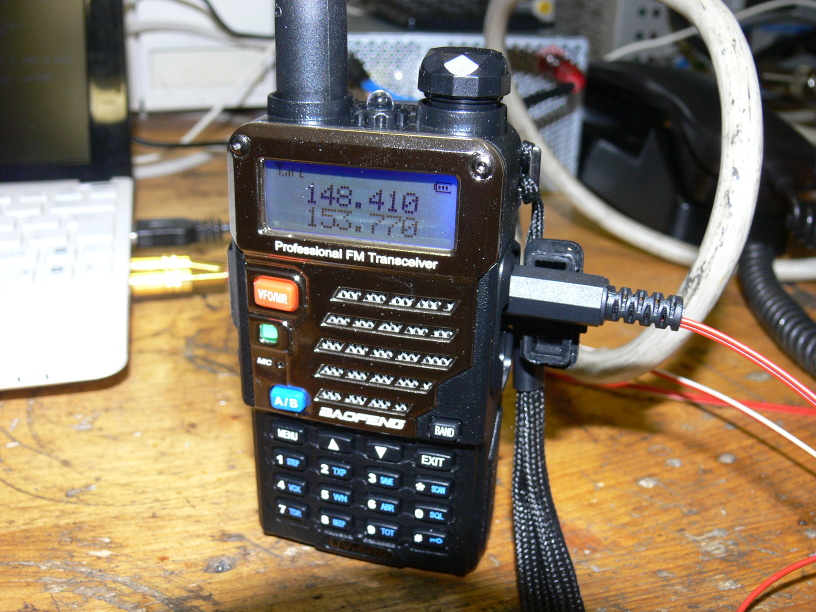
[Andreas] has put together exceptional documentation for this project, which starts with a walk through on how you can setup your DIY cell “tower” with traditional radios. He explains that amateur radios are a viable option for most of the frequencies used, and that he had early success with modifying second-hand taxi radios. He even mentions that the popular BaoFeng handheld radios can be used in a pinch, though not all the protocols will work due to distortion in the radio.

If you want to take the easy way out, [Andreas] also explains how to replace the radios with a single SDR device. This greatly simplifies the installation, and turns a whole bench full of radios and wires into something you can carry around in your pack if you were so inclined. His software has specific options to use the LimeSDR and LimeSDR-Mini, but you should be able to use other devices with a bit of experimentation.

We’ve previously reviewed the LimeSDR-Mini hardware, as well as covered its use in setting up DIY GSM networks.

Creating A 3G Raspberry Pi Smartphone

It’s hard to believe, but the Raspberry Pi has now been around long enough that some of the earliest Pi projects could nearly be considered bonafide vintage hacks at this point. A perfect example are some of the DIY Raspberry Pi smartphone projects that sprung up a few years back. Few of them were terribly practical to begin with, but even if you ignore the performance issues and bulkiness, the bigger problem is they relied on software and cellular hardware that simply isn’t going to cut it today.

Which was exactly the problem [Dylan Radcliffe] ran into when he wanted to create his own Pi smartphone. There was prior art to use as a guide, but the ones he found were limited to 2G cellular networks which no longer exist in his corner of the globe. He’s now taken on the quest to develop his own 3G-capable Pi smartphone, and his early results are looking very promising.

Inside the phone, which he calls the rCrumbl, [Dylan] has crammed a considerable amount of hardware. A Raspberry Pi 3B+ with attached Adafruit touchscreen LCD is the star of the show, but there’s also a Pi camera module, battery charging circuit, and Adafruit FONA 3G modem (which also provides GPS). Powering the device is a 2500 mAh 3.7V battery, which reportedly delivers a respectable 8 to 12 hour runtime.

The case is 3D printed, and [Dylan] says it took a long time to nail down a design that would fit all of his hardware, keep things from shifting around, and still be reasonably slim. Obviously DIY phones like this are never going to be as slim as even the chunkiest of modern smartphones, but the rCrumbl looks fairly reasonable for a portable device. We especially like the row of physical buttons he’s included along the bottom of the screen, which should help with the device’s usability.

Speaking of usability, that’s where [Dylan] still has his work cut out for him. The existing software he’s found won’t work on 3G, so he’s going to have to come up with his own software stack to provide a proper phone interface. As it stands he’s made a call on the rCrumbl using command line tools, but while that might score you some extra geek points at the next hacker meetup, it’s not exactly going to fly for daily use. He mentions he would love to talk to any developers out there that would like to team up on the software side of the project.

We’ve covered one of the 2G Pi smartphones in the past, and of course the ZeroPhone is a very interesting project if you don’t mind the “dumb phone” interface. But if you’re looking for something that’s fairly close to commercial devices in terms of usability, you might just want to roll your own Android phone.

EMMC Data Recovery From A Bricked Phone

We’ve probably all got at least one old cell phone lurking somewhere around our bench. In most cases they’ll still work, but their  batteries may be exhausted and their OS could be an ancient version. But sometimes there will be a phone that just died. One minute the flagship model, the next a useless slab of plastic and glass with the added annoyance of those priceless photos of Aunty May’s 80th forever locked in its memory.

[Andras Kabai] had just such a device land on his desk, a high-end Sony whose screen had gone blank. Others had tried, he was the last hope for the data it contained. He zoomed in on the eMMC chip on its motherboard, desoldered it and hooked it up via a specialist eMMC reader to recover those files. That was a very simple description of a far more involved process that he sets out in his post about it, a post that is fascinating reading and serves as a handy primer for any reader who might like to try it for themselves. We learn about the MMC interface and how simple it can be in its serial form, how with some fine soldering you can use a cheap USB reader, and that eMMC chips have a pinout conforming to a JEDEC standard.

Finally we see the software side as he takes the various SQLite databases and extracts the data for the user. It shows, all is not necessarily lost, however dead a phone may be.

We’ve seen [Andras] before, using an old scanner in his PCB fab.

Ask Hackaday: Why Aren’t We Hacking Cellphones?

When a project has outgrown using a small microcontroller, almost everyone reaches for a single-board computer — with the Raspberry Pi being the poster child. But doing so leaves you stuck with essentially a headless Linux server: a brain in a jar when what you want is a Swiss Army knife.

It would be a lot more fun if it had a screen attached, and of course the market is filled with options on that front. Then there’s the issue of designing a human interface: touch screens are all the rage these days, so why not buy a screen with a touch interface too? Audio in and out would be great, as would other random peripherals like accelerometers, WiFi, and maybe even a cellular radio when out of WiFi range. Maybe Bluetooth? Oh heck, let’s throw in a video camera and high-powered LED just for fun. Sounds like a Raspberry Pi killer!

And this development platform should be cheap, or better yet, free. Free like any one of the old cell phones that sit piled up in my “hack me” box in the closet, instead of getting put to work in projects. While I cobble together projects out of Pi Zeros and lame TFT LCD screens, the advanced functionality of these phones sits gathering dust. And I’m not alone.

Why is this? Why don’t we see a lot more projects based around the use of old cellphones? They’re abundant, cheap, feature-rich, and powerful. For me, there’s two giant hurdles to overcome: the hardware and the software. I’m going to run down what I see as the problems with using cell phones as hacker tools, but I’d love to be proven wrong. Hence the “Ask Hackaday”: why don’t we see more projects that re-use smartphones?

Continue reading “Ask Hackaday: Why Aren’t We Hacking Cellphones?”