Old-School Video Switching Levels Up With Modern USB Control

Video effects and mixing are done digitally today, but it wasn’t always so. When analog ruled the video world, a big switch panel was key to effective results.

VIdeo like this was the result of combining different analog feeds with different effects. The better the hardware, the more was possible.

Devices like [Glen]’s Grass Valley Series 300 Crosspoint Switch Panel were an important part of that world. With tools like that, a human operator could set up a composited preview feed in true WYSIWYG style, and switch to live on cue. All done with relatively simple CMOS ICs and buttons. Lots and lots of buttons.

[Glen] reverse engineers the panel to show how it works, and most of the heavy lifting is done by the MC14051B analog multiplexer/demultiplexer, and the MC14532B 8-bit priority encoder. Once that’s figured out, the door is open to modernizing things a little by using a microcontroller to drive the device, turning it into a USB peripheral.

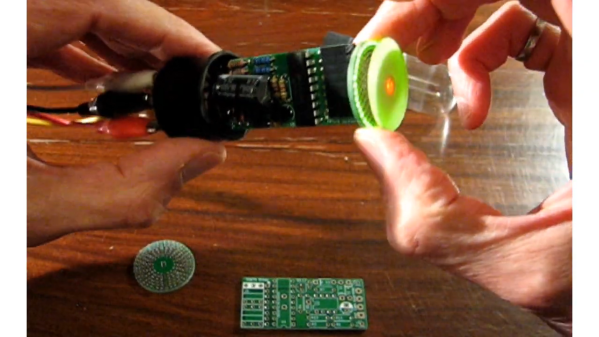
With a little design work, [Glen] builds a PCB around the EFM8UB2 8-bit microcontroller to act as a USB peripheral and control the switch panel, taking care of things like key scanning and lamp control. The last step: a GUI application for monitoring and controlling the panel over USB.

This isn’t [Glen]’s first time interfacing to vintage video mixing and switching, and as many of us know it’s sometimes tricky work to interface to existing hardware. We covered his earlier video switcher project using hardware that was not nearly as easy to work with as this one.

Printed Propeller Blades Repair Indoor Flyer

Fair warning for readers with a weak stomach, the video below graphically depicts an innocent rubber band airplane being obliterated in mid-air by a smug high-tech RC helicopter. It’s a shocking display of airborne class warfare, but the story does have a happy ending, as [Concrete Dog] was able to repair his old school flyer with some very modern technology: a set of 3D printed propeller blades.

Now under normal circumstances, 3D printed propellers are a dicey prospect. To avoid being torn apart by the incredible rotational forces they will be subjected to, they generally need to be bulked up to the point that they become too heavy, and performance suffers. The stepped outer surface of the printed blade doesn’t help, either.

But in a lightweight aircraft powered by a rubber band, obviously things are a bit more relaxed. The thin blades [Concrete Dog] produced on his Prusa Mini appear to be just a layer or two thick, and were printed flat on the bed. He then attached them to the side of a jar using Kapton tape, and put them in the oven to anneal for about 10 minutes. This not only strengthened the printed blades, but put a permanent curve into them.

The results demonstrated at the end of the video are quite impressive. [Concrete Dog] says the new blades actually outperform the originals aluminum blades, so he’s has to trim the plane out again for the increased thrust. Hopefully the extra performance will help his spindly bird avoid future aerial altercations.

On the electrically powered side of things, folks have been trying to 3D print airplane and quadcopter propellers for almost as long as desktop 3D printers have been on the market. With modern materials and high-resolution printers the idea is more practical than ever, though it’s noted they don’t suffer crashes very well.

Continue reading “Printed Propeller Blades Repair Indoor Flyer”

Audio Amp Puts VFDs To Work In An Unusual Way

It’s safe to say that most projects that feature a VFD emphasize the “D” aspect more than anything. Vacuum fluorescent displays are solid performers, after all, with their cool blue-green glow that’s just the right look for lots of retro and not-so-retro builds. But that doesn’t mean there aren’t applications that leverage the “V” aspect, such as this nifty audio preamp using VFDs as active components.

The inspiration behind [JGJMatt]’s build came from the Korg Nutube line of VFD-based low-voltage dual-triode vacuum tubes. Finding these particular components a little on the expensive side, [JGJMatt] turned to the old standby DM160 VFD indicator tube, which is basically just a triode, to see how it would fare as an amp. The circuit takes advantage of the low current and voltage requirements of the VFDs — the whole thing runs from a USB boost converter — by wedging them between a 2N3904 input stage and a 2N2007 MOSFET output. There’s a mix of SMD and through-hole components on the custom-etched PCB, with a separate riser card to show off the VFDs a little bit through the front panel of the 3D printed case.

All in all, we find this little amp pretty cool, and we love the way it puts a twist on the venerable VFD. We’ve seen similar VFD amps before, but this one’s fit and finish really pays off.

A Wheatstone Bridge Matches Your Pots

Sometimes the simplest hacks can be the most useful or ingenious, and such is the case with [Keri Szafir]’s method of ensuring that potentiometers used in audio devices are matched. If you consider a typical stereo amplifier for a moment, you’ll see two amplifiers in one box with a single volume control. Two channels, one knob? Volume knobs are ganged stereo potentiometers.

All potentiometers are not created equal, and particularly in the cheaper devices they may not have a consistently matched resistance across both pots and across their travel. This messes up the stereo balance, so naturally it’s worth selecting a part with good matching. [Keri] selects them not with his golden ears, but by wiring both pots together as a Wheatstone bridge. A meter between the two wipers would detect any current due to a mismatch.

A Wheatstone bridge is one of those handy circuits that has plenty of uses in both AC and DC measurements. We probably see them most often in a strain gauge.

A dekatron-based clock with a GPS receiver and a plastic dinosaur on top

Dekatron Clock Tells The Time, Sans Semiconductors

Over the years, there have been several memory and display technologies that served a particular niche for a while, only to be replaced and forgotten when a more suitable technology came along. One of those was the dekatron: a combination memory and display tube that saw some use in the 1950s and ’60s but became obsolete soon after. Their retro design and combined memory/display functionality make them excellent components for today’s clock hackers however, as [grobinson6000] demonstrates in his Dekaclock project.

A dekatron tube is basically a neon tube with ten cathodes arranged in a circle. Only one of them is illuminated at any time, and you can make the tube jump to the next cathode by applying pulses to its pins. The Dekaclock uses the 50 Hz mains frequency to generate 20 ms pulses in one tube; when it reaches 100 ms, it triggers the next tube that counts hundreds of ms, which triggers another one that counts seconds, and so on with minutes and hours.

The Dekaclock uses no semiconductors at all: the entire system is built from glass tubes and passive components. However, [grobinson6000] also built an auxiliary system, full of semiconductors, that makes the clock a bit easier to use. It sits on top of the Dekaclock and automatically sets the correct time using a GPS receiver. It also keeps track of the time displayed by the dekatrons, and tells you how far they have drifted from their initial setting.

Both systems are housed in sleek wooden cases that perfectly fit the tubes’ retro aesthetic. [grobinson6000] was inspired to make the Dekaclock after watching another dekatron clock we featured earlier, and designed the GPS receiver to work alongside it. Dekatrons are surprisingly versatile devices: you can use them to make anything from internet speed gauges to kitchen timers.

Continue reading “Dekatron Clock Tells The Time, Sans Semiconductors”

Nixie Display Module Is Addressable Via SPI

There are plenty of SPI interface screens on the market, but few of them have the charm of the good old Nixie tube. [Tony] decided to whip up a simple three-Nixie module that could be addressed via SPI. 

The stacked construction keeps things compact.

The module relies on a PIC16F15344 microcontroller to run the show, using its built-in SPI interface. It’s built with four stacked-up PCBs for ease of assembly and testing. It uses an internal buck converter to create the 170 volts required for the Nixie tubes from a 6 to 12 volt input. The high-voltage lines are routed towards the inside of the stack to minimize any nasty shocks when handling, though caution would still be advisable.

Driving the display is as simple as sending 16-bit words over the SPI interface, with the device operating in SPI client mode 1. If you’re looking for a simple way to have projects write output to a nice Nixie display, this module could be just what you’re looking for. Alternatively, if you can’t lay your hands on the tubes, there are other pretty solutions out there, too. Video after the break.

Continue reading “Nixie Display Module Is Addressable Via SPI”

Is That A Typewriter In Your Pocket Or Are You Just Pleased To See Me?

Don’t have the right milling tool? Just make one!

[Attoparsec] wondered what if you could carry a typewriter in your pocket, then followed through with that and built one. (Video, embedded below.) Kind of. The plan was to use an existing set of striker bars, but not wanting to destroy a perfectly good typewriter, they realised that you can easily source just the bar set on eBay.

The first problem was that the striker bars are shaped to allow the typewriter mechanism to operate, but that would not make for a compact arrangement. After a spot of straightening in a big vice, and drilling in a custom jig, they were in a suitable state to be arranged inside the case. The casing is milled from a chunk of aluminium, complete with a nice recess to hold an ink-impregnated felt pad. To prevent this pad from drying out when stowed, and to keep the whole thing clear of pocket lint, a U-shaped metal cover was bent from some sheet. This slides into a set of slots that are milled near the edges, in a very satisfying manner. This last bit was causing them a little trouble, so a custom slotting tool was created especially for the job. And a good job was indeed done. The final results look as you might expect from a manual ‘typewriter’ quirky, a bit wonky, but fabulous all the same.

If you have an old typewriter that needs some attention, here’s a quick guide for giving it a once-over. Some of you of a certain age may remember electronic typewriters with some fondness. They died a rapid death, but if you’ve still got one lurking, you could convert it into a Linux terminal for some clackity nostalgic fun.

Continue reading “Is That A Typewriter In Your Pocket Or Are You Just Pleased To See Me?”