All About USB-C: Replying Low-Level PD

Last time, we configured the FUSB302 to receive USB PD messages, and successfully received a “capability advertisement” message from a USB-C PSU. Now we crack the PD specification open, parse the message, and then craft a reply that makes the PSU give us the highest voltage available.

How did the buffer contents look, again?

>>> b
b'\xe0\xa1a,\x91\x01\x08,\xd1\x02\x00\x13\xc1\x03\x00\xdc\xb0\x04\x00\xa5@\x06\x00<!\xdc\xc0H\xc6\xe7\xc6\x00\x00\x00\x00\x00\x00\x00\x00\x00\x00\x00\x00\x00\x00\x00\x00\x00\x00\x00\x00\x00\x00\x00\x00\x00\x00\x00\x00\x00\x00\x00\x00\x00\x00\x00\x00\x00\x00\x00\x00\x00\x00\x00\x00\x00\x00\x00\x00\x00'

The zeroes at the end might look non-significant, and they indeed are not with 99.99% certainty – that said, don’t just discard the entire tail end; one of the bytes in the beginning encodes the length of the message. We’ll read those bytes first, and then read only exactly as much as we need, making sure we aren’t reading two messages and interpreting it as one, and that we’re not discarding zeroes that are part of the message.

Today, we will write code that parses messages right after reading them from the FIFO buffer – however, keep this message handy for reference, still; and if you don’t have the hardware, you can use it to try your hand at decoding nevertheless. If you wanna jump in, you can find today’s full code here!

Continue reading “All About USB-C: Replying Low-Level PD”

Retro Gadgets: Make Your Scope Dual Channel

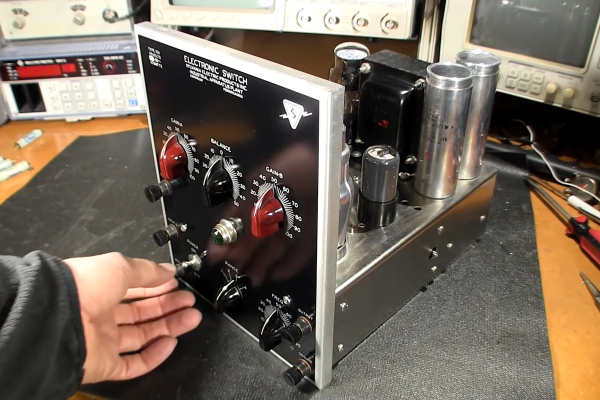
We live in a time when having an oscilloscope is only a minor luxury. But for many decades, a good scope was a major expense, and almost no hobbyist had a brand new one unless it was of very poor quality. Scopes were big and heavy and, at the price most people were willing to pay, only had a single channel. Granted, having one channel is better than having nothing. But if the relative benefit of having a single channel scope is 10 points, the benefit of having two channels is easily at least 100 points. So what was a poor hacker to do when a dual-trace or higher scope cost too much? Why, hack, of course. There were many designs that would convert a single trace scope into a poor-quality multichannel scope. Heathkit made several of these over the years like the ID-22, the ID-101, and the ID-4101. They called them “electronic switches.” The S-2 and S-3 were even earlier models, but the idea wasn’t unique to Heathkit and had been around for some time.

For $25, you could change your scope to dual trace!

There were two common approaches. With alternative or alt mode, you could trigger a sync pulse and draw one trace. Then trigger again and draw the second trace with a fixed voltage offset. If you do this fast enough, it looks like there are two traces on the screen at one time. The other way is to rapidly switch between voltages during the sweep and use the scope’s Z input to blank the trace when it is between signals. This requires a Z input, of course, and a fast switching clock. This is sometimes called “chopper mode” or, simply, chop. This wasn’t just the realm of adapters, though. Even “real” analog scopes that did dual channels used the same methods, although generally with the benefit of being integrated with the scope’s electronics.

Continue reading “Retro Gadgets: Make Your Scope Dual Channel”

Drilling Glass With Femtosecond Lasers Just Got Even Better

Glass! It’s a finicky thing. Strong as hell, yet chip it and glance at it the wrong way, and you’re left with a bunch of sharp rubbish. It’s at once adored for its clarity and smoothness, and decried for how temperamental it can be in the case of shock, whether mechanical, thermal, or otherwise.

If you’ve ever tried to drill glass, you’ll know it’s a tough errand. To do so without cracking it is about as likely as winning the lottery on Mars. Even lasers aren’t great at it. However, a research team from France has developed a new technique that uses femtosecond lasers to drill microscopic holes in glass with a minimum of tapering and no cracking! Brilliant, no?
Continue reading “Drilling Glass With Femtosecond Lasers Just Got Even Better”

How To Build Jenny’s Budget Mixing Desk

Jenny did an Ask Hackaday article earlier this month, all about the quest for a cheap computer-based audio mixer. The first attempt didn’t go so well, with a problem that many of us are familiar with: Linux applications really doesn’t like using multiple audio devices at the same time. Jenny ran into this issue, and didn’t come across a way to merge the soundcards in a single application.

I’ve fought this problem for a while, probably 10 years now. My first collision with this was an attempt to record a piano with three mics, using a couple different USB pre-amps. And of course, just like Jenny, I was quickly frustrated by the problem that my recording software would only see one interface at a time. The easy solution is to buy an interface with more channels. The Tascam US-4x4HR is a great four channel input/output audio interface, and the Behringer U-PHORIA line goes all the way up to eight mic pre-amps, expandable to 16 with a second DAC that can send audio over ADAT. But those are semi-pro interfaces, with price tags to match.

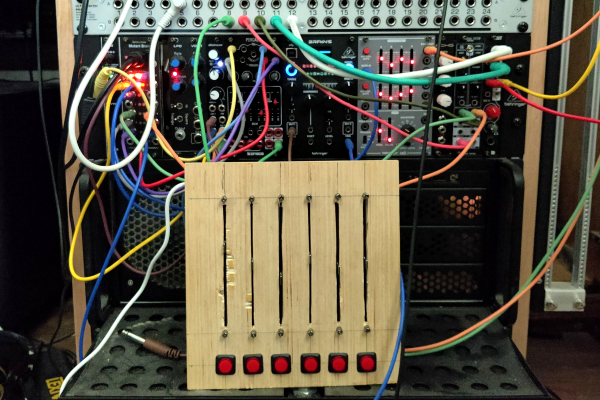
But what about Jenny’s idea, of cobbling multiple super cheap interfaces together? Well yes, that’s possible too. I’ll show you how, but first, let’s talk about how we’re going to control this software mixer monster. Yes, you can just use a mouse or keyboard, but the challenge was to build a mixing desk, and to me, that means physical faders and mute buttons. Now, there are pre-built solutions, with the Behringer X-touch being a popular solution. But again, we’re way above the price-point Jenny set for this problem. So, let’s do what we do best here at Hackaday, and build our own. Continue reading “How To Build Jenny’s Budget Mixing Desk”

All About USB-C: Talking Low-Level PD

In this USB-C series, we’ve covered quite a bit of USB-C – things that are well known, things that should beĀ  better known, and a couple things that just appeared online for the first time. We’ve covered almost everything in some depth except USB Power Delivery. I’ve described the process a bit in the “Power” article, but that was mostly about how to use PD by simply buying the right solution. However, that’s not enough for a hacker. Let’s see if we can make our own PD trigger board. Continue reading “All About USB-C: Talking Low-Level PD”

Methane Pyrolysis: Producing Green Hydrogen Without Carbon Emissions

Generally, when we talk about the production of hydrogen, the discussion is about either electrolysis of water into oxygen and hydrogen, or steam methane reforming (SMR). Although electrolysis is often mentioned – as it can create hydrogen using nothing but water and electricity – SMR is by far the most common source of hydrogen. Much of this is due to the low cost and high efficiency of SMR, but a major disadvantage of SMR is that large amounts of carbon dioxide are released, which offsets some of the benefits of using hydrogen as a fuel in the first place.

Although capturing this CO2 can be considered as a potential solution here, methane pyrolysis is a newer method that promises to offer the same benefits as SMR while also producing hydrogen and carbon, rather than CO2. With the many uses for hydrogen in industrial applications and other fields, such as the manufacturing of fertilizer, a direct replacement for SMR that produces green hydrogen would seem almost too good to be true.

What precisely is this methane pyrolysis, and what can be expect from it the coming years?

Continue reading “Methane Pyrolysis: Producing Green Hydrogen Without Carbon Emissions”

Ask Hackaday: Incidental Earthquake Detection

It never seems to fail: at the very moment that human society seems to reach a new pinnacle of pettiness, selfishness, violence, and self-absorption, Mother Nature comes along and reminds us all who’s really in charge. The obvious case in point here is the massive earthquakes near the border of Turkey and Syria, the appalling loss of life from which is only now becoming evident, and will certainly climb as survivors trapped since the Monday quakes start to succumb to cold and starvation.

Whatever power over nature we think we can wield pales by comparison with the energy released in this quake alone, which was something like 32 petajoules. How much destruction such a release causes depends on many factors, including the type of quake and its depth, plus the soil conditions at the epicenter. But whatever the local effects on the surface, quakes like these have a tendency to set the entire planet ringing like a bell, with seismic waves transmitted across the world that set the needles of professionally maintained seismometers wiggling.

For as valuable as these seismic networks are, though, there’s a looser, ad hoc network of detection instruments that are capable of picking up quakes as large as these from half a planet away. Some are specifically built to detect Earth changes, while some are instruments that only incidentally respond to the shockwaves traveling through the planet. And we want to know if this quake showed up in the data from anyone’s instruments.

Continue reading “Ask Hackaday: Incidental Earthquake Detection”