Arduino Does SDI Video With FPGA Help

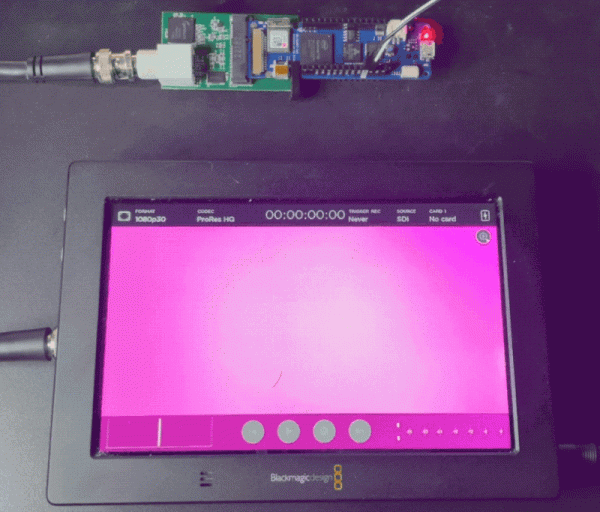
If you are running video around your home theater, you probably use HDMI. If you are running it in a professional studio, however, you are probably using SDI, Serial Digital Interface. [Chris Brown] looks at SDI and shows a cheap SDI signal generator for an Arduino.

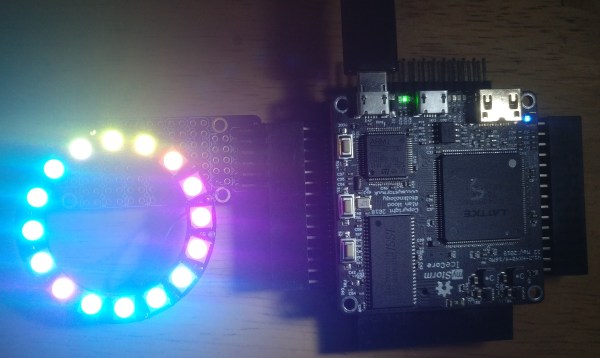
On the face of it, SDI isn’t that hard. In fact, [Chris] calls it “dead simple.” The problem is the bit rate which can be as high as 1.485 Gbps for the HD-SDI standard. Even for a super fast processor, this is a bit much, so [Chris] turned to the Arduino MKR Vidor 4000. Why? Because it has an FPGA onboard. Alas, the FPGA can’t do more than about 200 MHz, but that’s fast enough to drive an external Semtech GS296t2 serializer which is made to drive SDI signals.

The resulting project contains the Arduino, the serializer, a custom PCB, and both FPGA and microcontroller code. While the total cost of the project was a little under $200, that’s still better than the $350 to $2000 for a commercial SDI signal generator.

If you want to play along, the files are out on GitHub. We used the Vidor back in 2018 when it first came out. If you need a quick start on FPGAs, there’s always our boot camp.

Fixing An HP 54542C With An FPGA And VGA Display

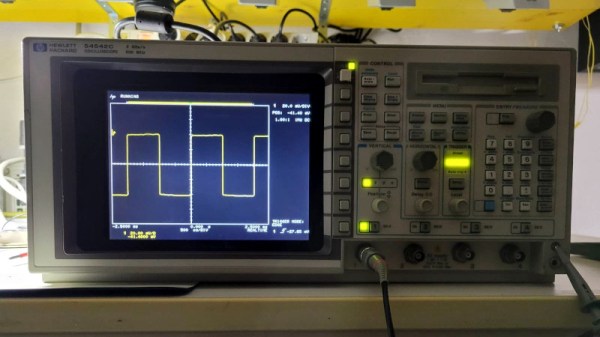
Although the HP 54542C oscilloscope and its siblings are getting on in years, they’re still very useful today. Unfortunately, as some of the first oscilloscopes to switch from a CRT display to an LCD they are starting to suffer from degradation. This has led to otherwise perfectly functional examples being discarded or sold for cheap, when all they need is just an LCD swap. This is what happened to [Alexander Huemer] with an eBay-bought 54542C.

Although this was supposed to be a fully working unit, upon receiving it, the display just showed a bright white instead of the more oscilloscope-like picture. A short while later [Alexander] was left with a refund, an apology from the seller and an HP 54542C scope with a very dead LCD. This was when he stumbled over a similar repair by [Adil Malik], right here on Hackaday. The fix? Replace the LCD with an FPGA and VGA-input capable LCD.

While this may seem counter intuitive, the problem with LCD replacements is the lack of standardization. Finding an 8″, 640×480, 60 Hz color LCD with a compatible interface as the one found in this HP scope usually gets you salvaged LCDs from HP scopes, which as [Alexander] discovered can run up to $350 and beyond for second-hand ones. But it turns out that similar 8″ LCDs are found everywhere for use as portable displays, all they need is a VGA input.

Taking [Adil]’s project as the inspiration, [Alexander] used an UPduino v3.1 with ICE40UP5K FPGA as the core LCD-to-VGA translation component, creating a custom PCB for the voltage level translations and connectors. One cool aspect of the whole system is that it is fully reversible, with all of the original wiring on the scope and new LCD side left intact. One niggle was that the scope’s image was upside-down, but this was fixed by putting the new LCD upside-down as well.

After swapping the original cooling fan with a better one, this old HP 545452C is now [Alexander]’s daily scope.

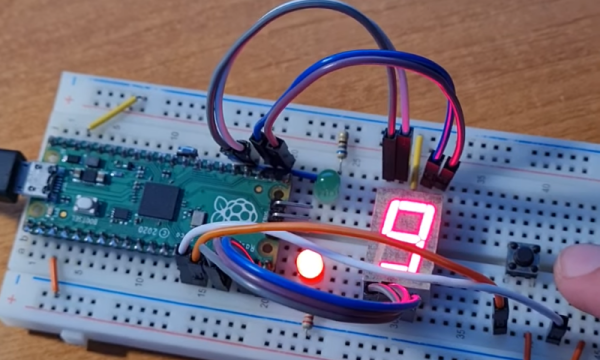
a Pi Pico on a breadboard, running a 7-segment counter gateware, with a 7-segment digit and a pushbutton next to the Pico

Want To Play With FPGAs? Use Your Pico!

Ever want to play with an FPGA, but don’t have the hardware? Now, if you have one of those ever-abundant Pi Picos, you can start playing with Verilog without getting an FPGA board. The FakePGA project by [tvlad1234], based on the Verilator toolkit, provides you with a way to compile Verilog into C++ for the RP2040. FakePGA even integrates RP2040 GPIOs so that they work as digital pins for the simulated GPIOs, making it a significant step up from computer-aided FPGA code simulation

[tvlad1234] provides instructions for setting this up with Linux – Windows, though untested, could theoretically run this through WSL. Maximum clock speed is 5KHz – not much, but way better than not having any hardware to test with. Everything you’d want is in the GitHub repo – setup instructions, Verilog code requirements, and a few configuration caveats to keep in mind.

We cover a lot of projects where FPGAs are used to emulate hardware of various kinds, from ISA cards to an entire Game BoyCPU emulation on FPGAs is basically the norm — it’s just something easy to do with the kind of power that an FPGA provides. Having emulation in the opposite direction is unusual,  though, we’ve seen FPGAs being emulated with FPGAs, so perhaps it was inevitable after all. Of course, if you have neither a Pico nor an FPGA, there’s always browser based emulators.

Continue reading “Want To Play With FPGAs? Use Your Pico!”

Here’s How The Precursor Protects Your Privacy

At some point, you will find yourself asking – is my device actually running the code I expect it to? [bunnie] aka [Andrew Huang] is passionate about making devices you can fundamentally, deeply trust, and his latest passion project is the Precursor communicator.

At the heart of it is an FPGA, and Precursor’s CPU is created out of the gates of that FPGA. This and a myriad of other design decisions make the Precursor fundamentally hard to backdoor, and you don’t have to take [bunnie]’s word for it — he’s made an entire video going through the architecture, boot protections and guarantees of the Precursor, teaching us what goes into a secure device that’s also practical to use.

Screenshot from the video, showing a diagram of how precursor's software and hardware components relate to each other If you can’t understand how your device works, your trust in it might be misplaced. In the hour long video, [bunnie] explains the entire stack, from the lower levels of hardware to root keys used to sign and verify the integrity of your OS, along the way demonstrating how you can verify that things haven’t gone wrong.

He makes sure to point out aspects you’d want to be cautious of, from physical security limitations to toolchain nuances. If you’re not up for a video, you can always check out the Precursor wiki, which has a treasure trove of information on the device’s security model.

As you might’ve already learned, it’s not enough for hardware to be open-source in order to be trustworthy. While open-source silicon designs are undoubtedly the future, their security guarantees only go so far.

Whether it’s esoteric hard drive firmware backdoors, weekend projects turning your WiFi card into a keylogger, or rootkits you can get on store-bought Lenovo laptops, hell, even our latest This Week In Security installment has two fun malware examples – there’s never a shortage of parties interested in collecting as much data as possible.

ICEBlaster: A Drag’n’Drop Bitstream Loader For ICE40

The iCE40 series of FPGAs gets a fair bit of coverage on these pages, largely due to its accessibility (thanks to huge efforts in reverse engineering and open tool chains) and likely also due to Lattice Semiconductors’ attitude to open source in general. Whilst these devices are small and rather limited, you can’t really beat them for a first foray into the subject. They’re plenty beefy enough for many of the simpler FPGA applications. [TinLethax] over on Hackaday.IO has plenty of experience with the devices, and has added another tool to our collective iCE40 arsenal, namely iCEBlaster, a USB mass storage device (MSC) style bootloader for drag-n-drop bitstream loading. The days of needing dedicated special programmers are starting to be numbered, with many chips now presenting a USB mass storage device to the host in order to upload the firmware image.

FPGAs don’t tend to operate this way, needing a device-specific bitstream loading upon start-up, which (unless they have OTP memory) is usually the job of an external configuration memory. iCEBlaster (a play on the Xilinx ByteBlaster programmer, maybe?) runs on the STM32F4xx series devices at least, but should be easily portable to others. The idea is pretty straightforward — dragging a new bitstream file onto the storage device initiates an FPGA target reset, which in turn allows the STM32 to send the bitstream over to the iCE40 via the SPI interface. Nothing more than that.

If you’ve been looking to get into the iCE40, this guide might be a good starting point, and every learning experience needs a good project to drive it, how about running Doom on a softcore RISC-V?

A Sipeed Tang Nano 9k board on a Thinkpad keyboard, with an LCD panel attached to it

An Open Toolchain For Sipeed Tang Nano FPGAs

[Sevan Janiyan] shares their research on putting an open FPGA toolchain together. Specifically, this is an open toolchain for the Sipeed Nano Tang FPGAs, which are relatively cheap offerings by Sipeed from China. The official toolchain is proprietary and requires you to apply for a license that’s to be renewed every year. There’s a limited educational version you can use more freely, but of course, that’s not necessarily sufficient for comfortable work.

This toolchain relies on the apicula project, an effort to reverse-engineer, reimplement and document the Gowin FPGA bitstream format, as well as the gowin integration for nextpnr (an open tool for FPGA place-and-route). With a combination of yosys, apicula, nextpnr and openFPGAloader, [Sevan] put together a set of commands you can use to build gateware for your Nano Tang FPGAs – without any proprietary limitations blocking your way. They show a basic blinkie demo, and also a demo that successfully operates a parallel LCD connected to the board.

The availability of open toolchains for FPGAs has always been somewhat of a sore point. Wondering about open FPGA toolchains? This Supercon 2019 talk by Tim [Mithro] Ansell will get you up to speed!

We thank [feinfinger (sneezing)] for sharing this with us!

Will MiSTer Fool You Into Learning FPGAs?

What’s the killer app for FPGAs? For some people, the allure is the ultra-high data throughput for parallelizable tasks, which can enable some pretty gnarly projects. But what if you’re just starting out? How about 1980s style video games?

The MiSTer FPGA project created a bit of FPGA hardware that makes it easy to build essentially any old school video game or computer platform. That’s a massive clean slate. Of course, you can simply download someone else’s Atari ST or Commodore 64 setup and load it up, but if you want to learn FPGAs while recreating old-school video game machines, you’re going to want to get your hands dirty.

[Mister Retro Wolf] started up a video series last winter (trailer embedded below) where he’s embarked on a project to recreate a classic video game machine from the ground up using the MiSTer FPGA platform. In particular, he’s going to recreate the Namco Tank Battalion arcade game, from the schematics, in Verilog.

This is literally building a 6502-based video game machine from scratch (in gateware), so if you’re interested in retrocomputing or FPGAs, you’ll have something to learn here. He’s gotten through the CPU, screen, tilemap graphics, and memory so far, but it’s not done yet. To follow along, get yourself some hardware and you can probably catch up.

We’ve covered the MiSTer FPGA project before, of course, because we think it’s cool. And if a video game arcade machine is going to be your gateway drug into the seedy world of programmable gates, then so be it.

Continue reading “Will MiSTer Fool You Into Learning FPGAs?”