Tic-Tac-Toe Implemented In Single Call To Printf()

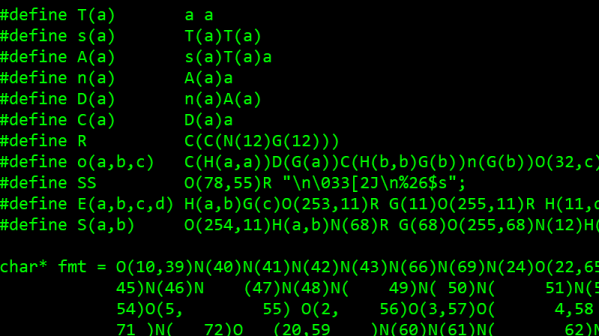
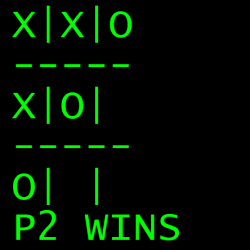
[Nicholas Carlini] programmed a C implementation of two-player Tic Tac Toe, and he did it in a single call to printf(). The arguments for that single function call get mind-bendingly complex, so it may come as no surprise that it was written for The International Obfuscated C Code Contest (IOCCC).
Most of us are aware that printf() is one of those functions that is considerably more complex under the hood, and capable of far more, than it may appear to be. But did you know that it is capable of Turing-complete computation?

[Nicholas] clearly steps through the theory, so give it a read. In short, a maze of arguments handles the logic of the game while an embedded scanf() reads user input, and printing the game board is always preceded by an escape code to clear the screen.

[Nicholas] is certainly no stranger to in-depth understandings; we’ve seen his work before in demonstrating how to fool speech recognition with hidden commands, including a powerful example showing how two virtually identical-sounding audio files transcribe entirely differently.
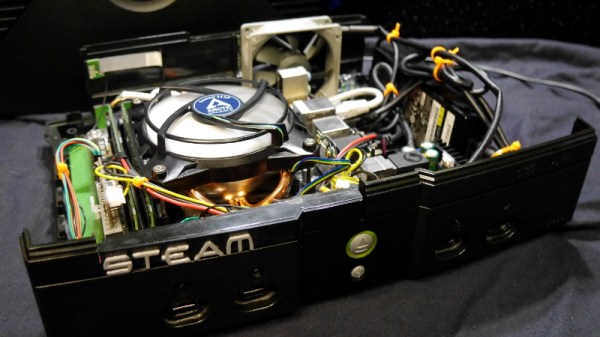
Original Xbox Gets The Steam Overhaul

When Microsoft released the original Xbox, it deviated from the design of traditional game consoles in that it used several off-the-shelf computer components. The fact that Microsoft would want their game console to resemble a PC isn’t particularly surprising in hindsight, but we doubt anyone at Redmond ever imagined folks like [Ryan Walmsley] would be cramming in full-fledged computers nearly 20 years later.

[Ryan] tells us he was looking for a way to play some older games from the early 2000s, and thought it was a good opportunity to put together a quiet set-top computer. The final hardware is more than capable of running older titles, and can even be used with Steam Link to stream newer content from his primary gaming computer.

Even with a diminutive Gigabyte GA-H81N Mini ITX motherboard, things are pretty tight inside the Xbox. Fairly tight wire management was required to prevent any airflow obstructions, especially since [Ryan] decided to put the system’s 80 watt laptop-style power supply inside the case. While this made the build a bit more complicated, it does make the final product a lot cleaner and makes it feel just that much more like a proper game console.

Benchmarks show the machine has decent performance, all things considered. [Ryan] says there are some potential upgrades down the line, but as with most gaming PC builds, cost is the limiting factor. Until he’s ready to spend the cash on revamping the internals, he says that streaming newer games over the the network has been working great.

For those looking for a slightly more modern alternative to this project, we’ve also seen a gaming PC shoehorned into an Xbox 360 with similarly impressive results.

Toilet Paper Chase And Indoor Cycling Race With Unity And Arduino

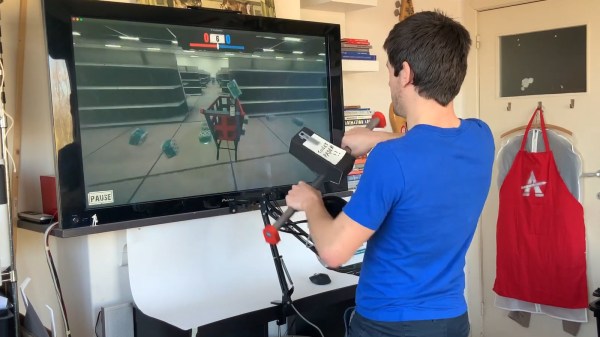
While we’re still far away from returning to a pre-Corona everyday life, people seem to have accepted that toilet paper will neither magically cease to exist, nor become our new global currency. But back at the height of its madness, like most of us, [Jelle Vermandere] found himself in front of empty shelves, and the solution seemed obvious to him: creating a lifelike toilet paper chasing game in hopes to distract the competition.

Using Unity, [Jelle] created a game world of an empty supermarket, with the goal to chase after distribution tubes and collect toilet paper packs into a virtual cart. Inspired by the Wii Wheel, he imitated a shopping cart handle built from — as it appears — a sunshade pole that holds an Arduino and accelerometer in a 3D-printed case as game controller. For an even more realistic feel, he added a sound sensor to the controller, and competing carts to the game, which can be pushed out of the way by simply yelling loud enough. You can witness all of this delightful absurdity in his build video after the break.

From racing shopping carts to racing bicycles

But that’s not all. With the toilet paper situation sorted out, [Jelle] found himself in a different dilemma: a cloud foiled his plans of going for a bicycle ride. In the same manner, he ended up building a cycling racing game, once again with Unity and Arduino. From a 3D-scanned model of himself and his bicycle, to automatically generating tracks on the fly and teaching an AI to ride a bike, [Jelle] clearly doesn’t joke around while he’s joking around.

However, the best part about the game has to be the controller, which is his actual bicycle. Using a magnetic door sensor to detect the speed, and a potentiometer mounted with an obscure Lego construction to the handlebar, it’s at least on par with the shopping cart handle — but judge for yourself in another build video, also attached after the break. The only thing missing now is to level up the difficulty by powering the Arduino with the bicycle itself.

Continue reading “Toilet Paper Chase And Indoor Cycling Race With Unity And Arduino”

Slaying Dragons In Notepad

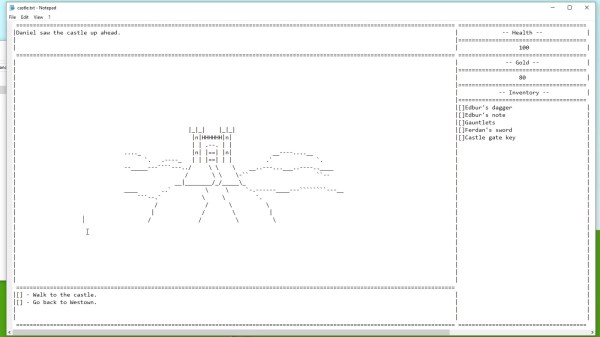
We all have our favorite text editor, and are willing to defend its superiority above all other editors by any means necessary. And then there’s Notepad. But what Notepad may lack in text manipulation features, it compensates with its inconspicuous qualities as a gaming platform. Yes, you read that correctly, and [Sheepolution] delivers the proof with a text-based adventure game running within Notepad.

What started out with [Sheepolution] jokingly wondering what such a game may look like, ended up as an actual implementation as answer to it. Behind the scenes, a script written in Lua using the LÖVE framework — for which he also created an extensive tutorial — monitors the state of several text files that make up the game world. Each location is a separate text file to open in Notepad, showing the current state of the game, telling the story with text and ASCII art, and offering choices to the player. The game is played by modifying and saving those text files, which the script then processes to push the gameplay forward by simply updating the content of those files with the new state. Check out the game’s trailer after the break to get a feel of what that looks like.

Unfortunately, Notepad itself doesn’t automatically reload the file when its content changes, so to provide a smoother gaming experience, [Sheepolution] modified the open source implementation Notepad2 to work around this, and bundled it as part of the game’s executable. Initially, he even added animations to the ASCII graphics, but in the end decided against most of them to avoid constant disk writes and race conditions caused by them.

Sure, this is no Game Boy emulator in a text editor, and it may not be as groundbreaking as Notepad’s latest feature, but it’s always amusing to see alternative uses for well-established tools.

Continue reading “Slaying Dragons In Notepad”

Simple Sprite Routines Ease Handheld Gaming DIY

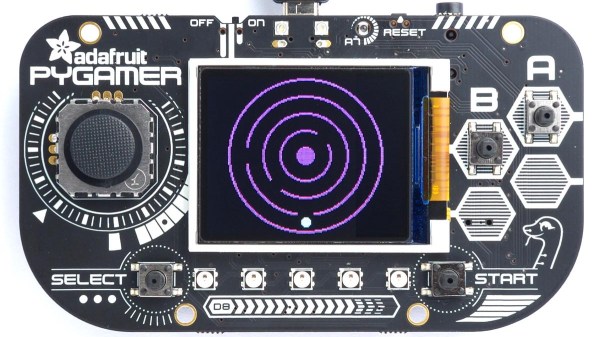
Making your own handheld games is made much easier with [David Johnson-Davies’] simple sprite routines for the Adafruit PyBadge and PyGamer boards. Sprites can be thought of as small, fixed-size graphical objects that are drawn, erased, moved, and checked for collision with other screen elements.

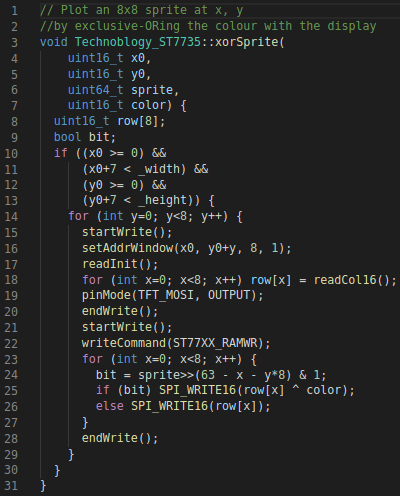
xorSprite() plots an 8×8 sprite, moveSprite() moves a given sprite by one pixel without any flicker, and hitSprite() checks a sprite for collision with any screen elements in a given color. That is all it takes to implement a simple game, and [David] makes them easy to use, even providing a demo program in the form of the rolling ball maze shown here.

These routines work out-of-the-box with the PyBadge and PyGamer, but should be easy to adapt to any TFT display based on the ST7735 controller. The PyGamer is the board shown here, but you can see the PyBadge as it was used to create an MQTT-enabled conference badge.

If you really want to take a trip down the rabbit hole of sprite-based gaming graphics, you simply can’t miss hearing about the system [Sprite_TM] built into the FPGA Game Boy badge.

Pinball Machine Needs No Wizard

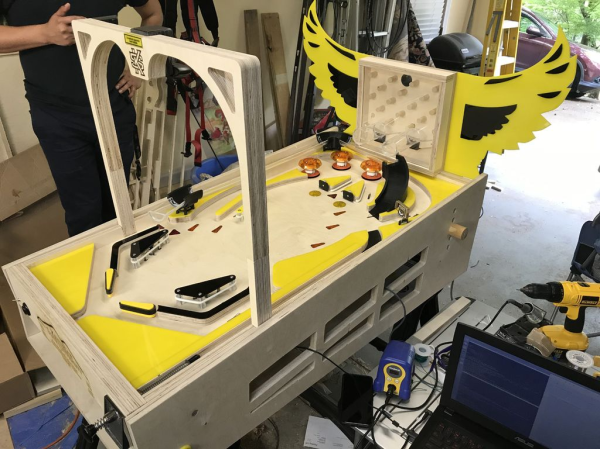
Ever since he was a young boy, [Tyler] has played the silver ball. And like us, he’s had a lifelong fascination with the intricate electromechanical beasts that surround them. In his recently-completed senior year of college, [Tyler] assembled a mechatronics dream team of [Kevin, Cody, and Omar] to help turn those visions into self-playing pinball reality.

You can indeed play the machine manually, and the Arduino Mega will keep track of your score just like a regular cabinet. If you need to scratch an itch, ignore a phone call, or just plain want to watch a pinball machine play itself, it can switch back and forth on the fly. The USB camera mounted over the playfield tracks the ball as it speeds around. Whenever it enters the flipper vectors, the appropriate flipper will engage automatically to bat the ball away.

Our favorite part of this build (aside from the fact that it can play itself) is the pachinko multi-ball feature that manages to squeeze in a second game and a second level. This project is wide open, and even if you’re not interested in replicating it, [Tyler] sprinkled a ton of good info and links to more throughout the build logs. Take a tour after the break while we have it set on free play.

[Tyler]’s machine uses actual pinball machine parts, which could quickly ramp up the cost. If you roll your own targets and get creative with solenoid sourcing, building a pinball machine doesn’t have to be a drain on your wallet.

Continue reading “Pinball Machine Needs No Wizard”

Force Feedback Mouse Really Shakes Things Up

This is a very exciting time for those who like to spend their downtime exploring virtual worlds. The graphics in some big-budget titles are easily approaching photorealism, and immersive multi-channel sound can really make you believe you’ve been transported to another place or time. With another generation or two of GPU development and VR hardware, the line between gaming and reality is bound to get awful blurry.

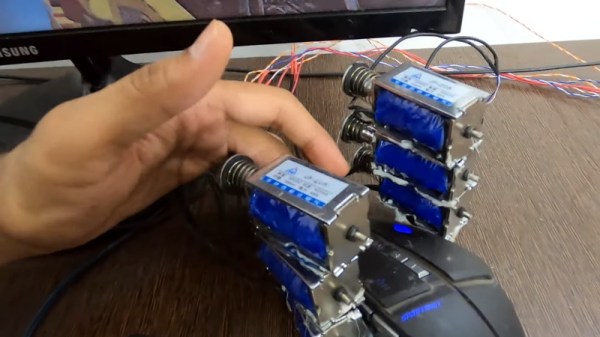
That said, we’re still a far way off from the holodeck aboard the Enterprise. A high-end PC and the latest in VR can fool your eyes and ears, but that still leaves your other senses out of the fun. That’s why [Jatin Patel] has developed this clever force-feedback mouse using an array of solenoids.

The idea is pretty simple: a Python program on the computer listens for mouse click events, and tells an attached Arduino to fire off the solenoids when the player pulls the virtual trigger. It’s naturally not a perfect system, as it would seem that clicking in the game’s menus would also start your “gun” firing. But as you can see in the video after the break, when it works, it works very well. The moving solenoids don’t just vibrate the mouse around, the metallic clacking actually accentuates the gun sound effects from the game.

With this kind of tactile feedback and an omnidirectional treadmill to keep us moving, we’d be pretty close to fooling our senses into thinking we’re actually somewhere else. Which frankly, sounds quite appealing right about now.

Continue reading “Force Feedback Mouse Really Shakes Things Up”