Build Your Own Linux Single Board Computer

We are fortunate enough to have a huge choice of single-board computers before us, not just those with a bare-metal microcontroller, but also those capable of running fully-fledged general purpose operating systems such as GNU/Linux. The Raspberry Pi is probably the best known of this latter crop of boards, and it has spawned a host of competitors with similarly fruity names. With an entire cornucopia to choose from, it takes a bit more than evoking a berry to catch our attention. The form factors are becoming established and the usual SoCs are pretty well covered already, show us something we haven’t seen before!

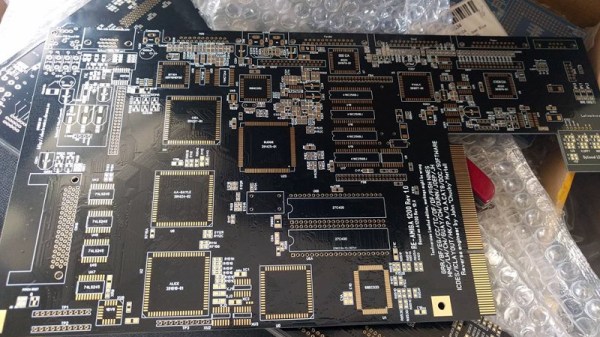
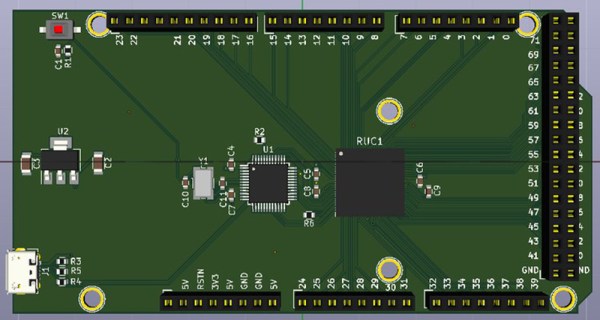
[Marcel Thürmer] may have managed that feat, with his Blueberry Pi. On the face of it this is just Yet Another SBC With A Fruity Pi Name, but what caught our attention is that unlike all the others, this is one you can build yourself if you want. It’s entirely open-source, but it differs from other boards that release their files to the world in that it manages to keep construction within the realm of what is possible on the bench rather than the pick-and-place. He’s done this by choosing an Alwinner V3, an SoC originally produced for the action camera market that is available in a readily-solderable TQFP package. It’s a choice that has allowed him to pull off another constructor-friendly feat: the board is only two layers, so it won’t break the bank to have it made.

It’s fair to say that the Allwinner V3 (PDF) isn’t the most powerful of Linux-capable SoCs, but it has the advantage of built-in RAM to avoid more tricky soldering. With only 64Mb of memory, it’s never going to be a powerhouse, but it does pack onboard Ethernet, serial and parallel camera interfaces, and audio as well as the usual interfaces you’d expect. There is no video support on the Blueberry Pi, but the chip has LVDS for an LCD panel, so it’s not impossible to imagine something could be put together. Meanwhile, all you need to know about the board can be found on its GitHub repository. There is no handy OS image to download, u-boot instructions are provided to build your own. We suspect if you’re the kind of person who is building a Blueberry Pi though this may not present a problem to you.

We hope the Blueberry Pi receives more interest, develops a wider community, and becomes a board with a solid footing. We like its achievement of being both a powerful platform and one that is within reach of the home constructor, and we look forward to it being the subject of more attention.

3D Printers Get A Fuel Gauge: Adding A Filament Scale To OctoPrint

It seems a simple enough concept: as a 3D printer consumes filament, the spool becomes lighter. If you weighed an empty spool, and subtracted that from the weight of the in-use spool, you’d know how much filament you had left. Despite being an easy way to get a “fuel gauge” on a desktop 3D printer, it isn’t something we often see on DIY machines, much less consumer hardware. But with this slick hack from [Victor Noordhoek] as inspiration, it might become a bit more common.

He’s designed a simple filament holder which mounts on top of an HX711 load cell, which is in turn connected to the Raspberry Pi running OctoPrint over SPI. If you’re running OctoPrint on something like an old PC, you’ll need to use an intermediate device such as an Arduino to get it connected; though honestly you should probably just be using a Pi.

On the software side, [Victor] has written an OctoPrint plugin that adds a readout of current filament weight to the main display. He’s put a fair amount of polish into the plugin, going through the effort to add in a calibration routine and a field where you can enter in the weight of your empty spool so it can be automatically deducted from the HX711’s reading.

Hopefully a future version of the plugin will allow the user to enter in the density of their particular filament so it can calculate an estimate of the remaining length. The next logical step would be adding a check that will show the user a warning if they try to start a print that requires more filament than the sensor detects is currently loaded.

This is yet another excellent example of the incredible flexibility and customization offered by OctoPrint. If you’re looking for more reasons to make the switch, check out our guide on using OctoPrint to create impressive time lapse videos of your prints, or how you can control the printer from your mobile device.

Failed Tool Turned Exploded Wall Art

Few things hit a hacker or maker harder than when a beloved tool goes to that Big Toolbox In The Sky. It can be hard to trash something that’s been with you through countless repairs and teardowns, made all the worse by the fact most employers don’t recognize “Tool Bereavement” as a valid reason to request time off. Maybe next time one of your trusty pieces of gear gives up the ghost, you can follow the example set by [usuallyplesent] and turn it into a piece of art to hang up on the shop wall.

The shop had gotten years of daily service out of this air powered angle die grinder (not bad for a $14 Harbor Freight tool), and he thought they should immortalize it in their waiting room by turning it into an interesting piece of art. After all, it’s not everyday that some folks see the insides of the sort of tools the more mechanically inclined of us may take for granted.

After taking the grinder apart and cleaning everything up, [usuallyplesent] decided to simplify things a bit by tossing out the assorted tiny components like seals and washers. By just focusing on the larger core components, the exploded view is cleaner and reminds us of a light saber cutaway.

Using a piece of scrap cardboard, [usuallyplesent] made templates for all of the major pieces of the grinder and used that to sketch out the placement and spacing on the white background. He then cut out each shape so the parts would be partially recessed into the board. This gives the effect that each piece was cut down the middle lengthwise but without all the hassle of actually cutting everything down the middle lengthwise.

We’ve previously seen similar displays made out of dissected consumer electronics, but there’s something rather personal about doing the same thing for a well-used tool. If any of our beloved readers feel inspired to enshrine a dead multimeter into a shadow box over the bench, be sure to let us know.

[via /r/justrolledintotheshop]

A Plasma Speaker Using A TL494

We’re used to loudspeakers as circular components with a paper cone and a big magnet inside which is suspended a coil that is connected to our audio amplifier. But moving-coil speakers are not the only way to create sound from electricity, there are one or two other weapons in the audio designer’s arsenal.

One of the more spectacular and entertaining is the plasma speaker, and it’s one [Marcin Wachowiak] has been experimenting with. A continuous plasma in the form of a discharge between two electrodes is modulated with an audio signal, and the resulting rapid changes in the volume of plasma creates a sound. The value of a plasma speaker lies in the exceptionally low size and mass of the element producing the sound, meaning that while it can only effectively reproduce high frequencies it can do so from a much closer approximation to a point source than can other types of tweeter. For this reason it’s beloved of some audiophiles, and you will find a few commercially produced plasma tweeters at the high-end of the audio market.

[Marcin] isn’t in it for the audiophilia, instead he’s interested in the properties of the plasma. His plasma speaker does do the job well though, and in particular he’s put a lot of thought into the design of its drive circuit. At its heart is the ubiquitous TL494 PWM controller that you may be more familiar with in the context of switching power supplies, this one applies the audio drive as PWM to the gate of a MOSFET that switches the primary of a flyback transformer. He’s added refinements such as a gate discharge circuit and a second primary winding with a freewheel diode.

The result is an effective plasma speaker. It’s difficult to judge from his YouTube video below the break whether he’s achieved audiophile purity, but happily that’s not the point. We’ve shown you a few other plasma speakers in our time, if the subject interests you then take a look at this rotating plasma vortex, or a version using a 555 timer.

Continue reading “A Plasma Speaker Using A TL494”

A Crystal Oscillator For A Stable Bench Reference

[Paul] likes a precise oscillator. His recent video shows a crystal oscillator with a “watch crystal” and a CMOS counter, the CD4060. Using such a circuit can produce very stable frequencies and since the 32.768 kHz crystal is a power of 2, you get nice divisions out of the counter.

We’ve seen the same trick done with decade counters (like the 4518B) to divide by 10 instead of powers of two to make frequency standards. A 1 MHz crystal can easily generate 100 kHz, 10 kHz, etc.

Continue reading “A Crystal Oscillator For A Stable Bench Reference”

Vampire Charger Is A Rugged Anything-to-5VDC Converter

USB sockets providing 5 VDC are so ubiquitous as a power source that just about any piece of modern portable technology can use them to run or charge. USB power is so common, in fact, that it’s easy to take for granted. But in an emergency or in the wake of a disaster, a working cell phone or GPS can be a life saver and it would be wise not to count on the availability of a clean, reliable USB power supply.

That’s where the Vampire Charger by [Matteo Borri] and [Lisa Rein] comes in. It is a piece of hardware focused on turning just about any source or power one might possibly have access to into a reliable source of 5 VDC for anything that can plug in by USB. This is much more than a DC-DC converter with a wide input range; when they say it is made to accept just about anything as an input, they mean it. Found a working power source but don’t know what voltage it is? Don’t know which wire is positive and which is negative? Don’t even know whether it’s AC or DC? Just hook up the alligator clips and let the Vampire Charger figure it out; when the light is green, the power’s clean.

The Vampire Charger was recently selected to move on to the final round of The Hackaday Prize, netting $1000 cash in the process. The next challenge (which will have another twenty finalists receiving $1000 each) is the Human-Computer Interface challenge. All you need to enter is an idea and some documentation, so dust off that project that’s been waiting for an opportunity, because here it is.

Open Source Power Converter For The Masses

GaN or Gallium Nitride Transistors have been in the news for their high-frequency and high-efficiency applications. Anyone interested in the Power Converter domain will love this open-source project by Siemens. The offering is called SDI TAPAS and it is a multipurpose GaN FET based board with a TMS320F28x controller onboard.

A quick look at the schematic reveals a lot of stuff going on like current and voltage sense chips along with a neatly designed GaN power stage with by-the-book drivers. There is a plethora of connectors on-board including one for the Raspberry Pi which is an added bonus. The git repository comes with sample code to get you off the ground, with examples running BLDC motors as well as connect it to Siemens MindSphere Cloud Platform.

This platform can be used in a number of functions in addition to motor control, such as battery charging, solar energy harvesting, and wireless charging. There is a presentation(PDF) that is available for download, and if you are looking for use cases there are a number of user build projects on their community site. The schematic and board designs can be used to make your own, or you could ask them for a sample board and they might give away more on their community site.

For those starting out, you might appreciate this tutorial on Buck Converter Efficiency to get a feel for the hardware that goes into such experiments.