USB To Quad Serial Port Adapter Offers TTL, Isolated Ports

[Felipe Navarro] wanted to add a few serial ports to his computer, but couldn’t find an adapter that suited his needs. So, he built his own.

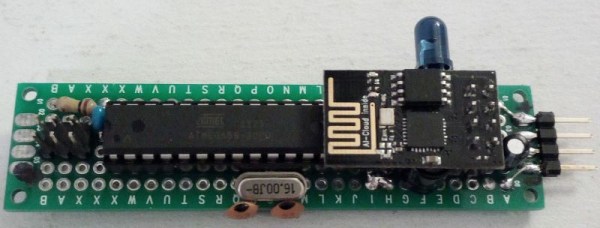
His Quad Serial device is a nicely designed converter that offers four serial ports, two of which are isolated to avoid blowing up too much stuff if things go wrong. The other two are TTL ports, but with an interesting twist: feed them any voltage between 1.8 V and 5 V, and they will happily work with it, which is a lot easier than messing about with TTL to RS-232 converters.

It’s all built around an FTDI FT4232H chip, which has drivers available for most OSes, so it should work with pretty much anything. And, as [Felipe] notes, this chip has not been cloned, so you won’t have to worry about the FTDI drivers disabling your device without warning.  Well, not at the moment, anyway. We did cover a similar quad serial port adapter last year, but this one is a bit more developed, with both DE-9 and screw terminal connectors available.

Count Your Fans With This Stylish ESP8266 Display

Continuous self-affirmation is a vital component to the modern lifestyle. Of course you know the world loves you, but exactly how much do they love you? Checking your phone every few minutes to see if you’ve gained any followers is gauche, and perhaps more to the point, doesn’t let you show off when you’ve got visitors over. In the modern era, the up-and-coming social media star needs a stylish way to display just how popular they are for the world to see.

That’s the idea behind this very slick social media counter created by [Becky Stern]. Built into a standard shadow box frame and using LED displays glowing through a printed piece of paper, the finished product looks more like modern art than the usual hacker fare.

The counter is powered by a NodeMCU, but you could drop in your favorite variant of the ESP8266 and things would work more or less the same. For the displays, [Becky] is using four Adafruit 7-Segment LED modules, which are easily controlled via I2C which keeps the wiring to a minimum.

It’s interesting to note that since her follower count on Twitter has already hit five digits, two of the display modules are used next to each other for that particular service. Her Instructables and Instagram counters only have one display each however, limiting her counts on those services to 9,999 each. There’s probably something to be learned here in terms of the relative follower counts you can expect on the different social networks if you’re targeting your content to the hacker and maker crowd, but we’ll leave the analysis to those with a better handle on such matters.

Hardware aside, [Becky] spends a lot of time in the video talking about the code she’s come up with to pull her stats from the various services and push them out to the LED displays at a regular interval. It’s nice to see so much attention and explanation given to the software side of a project like this, as more often than not you’re left to your own to figure out what the source code is doing.

This project is quite similar to the YouTube Play Button hack we covered a few months back, but the addition of multiple social networks in one device is a nice improvement over the basic concept.

Continue reading “Count Your Fans With This Stylish ESP8266 Display”

Printed Adapter Teaches An Old Ninja New Tricks

Do you like change for the sake of change? Are you incapable of leaving something in a known and working state, and would rather fiddle endlessly with it? Are you unconcerned about introducing arbitrary compatibility issues into your seemingly straight-forward product line? If you answered “Yes” to any of those questions, have we got the job for you! You can become a product engineer, and spend your days confounding customers who labor under the unrealistic expectation that a product they purchased in the past would still work with seemingly identical accessories offered by the same company a few years down the line. If interested please report to the recruitment office, located in the darkest depths of Hell.

A 2D representation of the adapter in Fusion 360

Until the world is rid of arbitrary limitations in consumer hardware, we’ll keep chronicling the exploits of brave warriors like [Alex Whittemore], who take such matters into their own hands. When he realized that the blades for his newer model Ninja food processor didn’t work on the older motor simply because the spline was a different size, he set out to design and print an adapter to re-unify the Ninja product line.

[Alex] tried taking a picture of the spline and importing that into Fusion 360, but in the end found it was more trouble than it was worth. As is the case with many printed part success stories, he ended up spending some intimate time with a pair of calipers to get the design where he wanted it. Once broken down into its core geometric components (a group of cylinders interconnected with arches), it didn’t take as long as he feared. In the end the adapter may come out a bit tighter than necessary depending on the printer, but that’s nothing a few swift whacks with a rubber mallet can’t fix.

This project is a perfect example of a hack that would be much harder (but not impossible) without having access to a 3D printer. While you could create this spline adapter by other means, we certainly wouldn’t want to. Especially if you’re trying to make more than one of them. Small runs of highly-specialized objects is where 3D printing really shines.


This is an entry in Hackaday’s

Repairs You Can Print contest

The twenty best projects will receive $100 in Tindie credit, and for the best projects by a Student or Organization, we’ve got two brand-new Prusa i3 MK3 printers. With a printer like that, you’ll be breaking stuff around the house just to have an excuse to make replacement parts.


CPAP Hacked Into Super Charged 3D Printer Cooler

Of all the parts on your average desktop 3D printer, the nozzle itself is arguably where the real magic happens. Above the nozzle, plastic is being heated to the precise temperature required to get it flowing smoothly. Immediately below the nozzle there’s a fan blowing to get the plastic cooled back down again. This carefully balanced arrangement of heating and cooling is the secret that makes high quality fused deposition modeling (FDM) printing possible.

But as it turns out, getting the plastic hot ends up being easier than cooling it back down again. The harsh reality is that most of the fans small enough to hang on the side of a 3D printer nozzle are pretty weak. They lack the power to push the volume of air necessary to get the plastic cooled down fast enough. But with his latest project, [Mark Rehorst] hopes to change that. Rather than using some anemic little fan that would be better suited blowing on the heatsink of a Raspberry Pi, he’s using a hacked CPAP machine to deliver some serious airflow.

The brilliance of using a CPAP machine for this hack is two-fold. For one, the machine uses a powerful centrifugal fan rather than the wimpy axial “muffin” fans we usually see on 3D printers. Second, the CPAP pushes air down a lightweight and flexible hose, which means the device itself doesn’t have to be physically mounted to the printer head. All you need is manifold around the printer’s nozzle that connects up to the CPAP hose. This “remote” fan setup means the print head is lighter, which translates (potentially) into higher speed and acceleration.

[Mark] was able to connect the fan MOSFET on his printer’s SmoothieBoard controller up to the brushless motor driver from the CPAP motor, which lets the printer control this monster new fan. As far as the software is concerned, nothing has changed.

He hasn’t come up with a manifold design that’s really optimized yet, but initial tests look promising. But even without a highly optimized outlet for the air, this setup is already superior to the traditional part cooler designs since it’s got more power and gets the fan motor off of the print head.

Getting your 3D printed parts to cool down is serious business, and it’s only going to get harder as printers get faster. We wouldn’t be surprised if fan setups like this start becoming more common on higher-end printers.

Circuit Bent Casio SK-1 Gets An Arduino Brain

The Casio SK-1 keyboard is fairly well-known in the “circuit bending” scene, where its simple internals lend themselves to modifications and tweaks to adjust the device’s output in all sorts of interesting ways. But creating music via circuit bending the SK-1 can be tedious, as it boils down to fiddling with the internals blindly until it sounds cool. [Nick Price] wanted to do something a bit more scientific, and decided to try replacing his SK-1’s ROM with an Arduino so he could take complete control it.

Replacing the ROM chip with header pins.

That’s the idea, anyway. Right now he’s gotten as far as dumping the ROM and getting the Arduino hooked up in place of it. Unfortunately the resulting sound conjures up mental images of a 56K modem being cooked in a microwave. Clearly [Nick] still has some work ahead of him.

For now though, the progress is fascinating enough. He was able to pull the original NEC 23C256 chip out of the keyboard and read its contents using an Arduino and some code he cooked up, and he’s even put the dump online for any other SK-1 hackers out there. He then wrote some new code for the Arduino to spit data from the ROM dump back to the keyboard when requested. In theory, it should sound the same as before, but with the added ability to “forge” the data going back to the keyboard to make new sounds.

The result is what you hear in the video linked after the break. Not exactly what [Nick] had in mind. After some snooping with the logic analyzer, he believes the issue is that the Arduino can’t respond as fast as the original NEC chip did. He’s now got an NVRAM chip on order to replace the original NEC chip; the idea is that he can still use the Arduino to reprogram the NVRAM chip when he wants to play around with the sound.

We’ve covered some pretty fancy circuit bent instruments here in the past, but if you’re looking for something a bit easier to get your feet wet we ran a start-to-finish guide back in the Ye Olden Days of 2011 which should be helpful.

Continue reading “Circuit Bent Casio SK-1 Gets An Arduino Brain”

A 3D Printable Raman Probe

Scientific instruments are expensive. In a lot of cases, really expensive, so if you have spent any time in a well-equipped lab, the chances are that it would have been one backed up by the resources of a university, or a large company. Those experimenters who wish to pursue such matters outside those environments have traditionally had to rely on obsolete instruments from the surplus market. A fascinating endeavor in itself, but one that can sometimes limit the opportunity to pursue science.

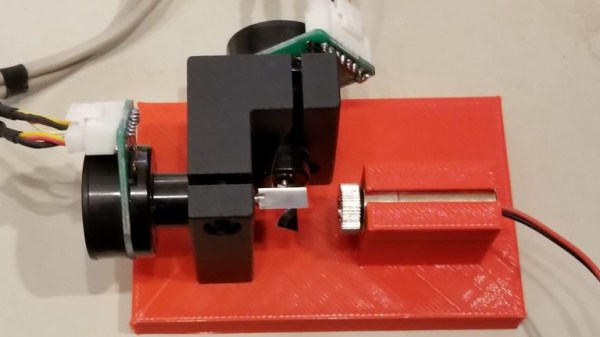
It has been interesting then to see the impact of the arrival of affordable 3D printing on the creation of self-built scientific instruments. A fantastic example has come our way, [David H Haffner Sr]’s 3D printable Raman probe. A Raman spectroscope is an instrument in which the light scattered from the sample exposed to an incident monochromatic source is collected, as opposed to that reflected or transmitted through it. Scattered light can be a huge magnitude weaker than other modes, thus the design of a Raman probe is critical to its success. (If you are curious, read this multi-part explanation on Raman spectroscopy.)

This is a work in progress at the time of writing, but it still makes for an interesting examination of Raman probe design. Interestingly the sensor is a standard DSLR camera, which though not a cheap device is possibly more affordable than a more dedicated sensor.

This isn’t the first Raman spectrometer we’ve seen on these pages, we’ve also brought you a Fourier transform spectrometer, and plenty of more conventional instruments.

Here’s Why Hoverboard Motors Might Belong In Robots

[madcowswe] starts by pointing out that the entire premise of ODrive (an open-source brushless motor driver board) is to make use of inexpensive brushless motors in industrial-type applications. This usually means using hobby electric aircraft motors, but robotic applications sometimes need more torque than those motors can provide. Adding a gearbox is one option, but there is another: so-called “hoverboard” motors are common and offer a frankly outstanding torque-to-price ratio.

A teardown showed that the necessary mechanical and electrical interfacing look to be worth a try, so prototyping has begun. These motors are really designed for spinning a tire on the ground instead of driving other loads, but [madcowswe] believes that by adding an encoder and the right fixtures, these motors could form the basis of an excellent robot arm. The ODrive project was a contender for the 2016 Hackaday Prize and we can’t wait to see where this ends up.