Taking A Robot For A Drive

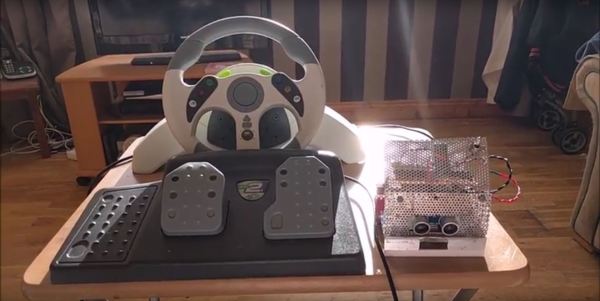
Instructables user [Roboro] had a Mad Catz Xbox steering wheel controller he hasn’t had much use for of late, so he decided to hack and use it as a controller for a robot instead.

Conceivably, you could use any RC car, but [Roboro] is reusing one he used for a robot sumo competition a few years back. Cracking open the controller revealed a warren of wires that were — surprise, surprise — grouped and labelled, making for a far less painful hacking process. Of course, [Roboro] is only using the Xbox button for power, the player-two LED to show the connection status, the wheel, and the pedals, but knowing which wires are which might come in handy later.

An Arduino Uno in the wheel and a Nano in the robot are connected via CC41-A Bluetooth modules which — despite having less functionality than the HM10 module they’re cloned from — perform admirably. A bit of code and integration of a SN754410 H-bridge motor driver — the Arduino doesn’t supply enough current to [Roboro]’s robot’s motors — and the little robot’s ready for its test drive.

Continue reading “Taking A Robot For A Drive”

Toast-Bot Butters For You (Sometimes)

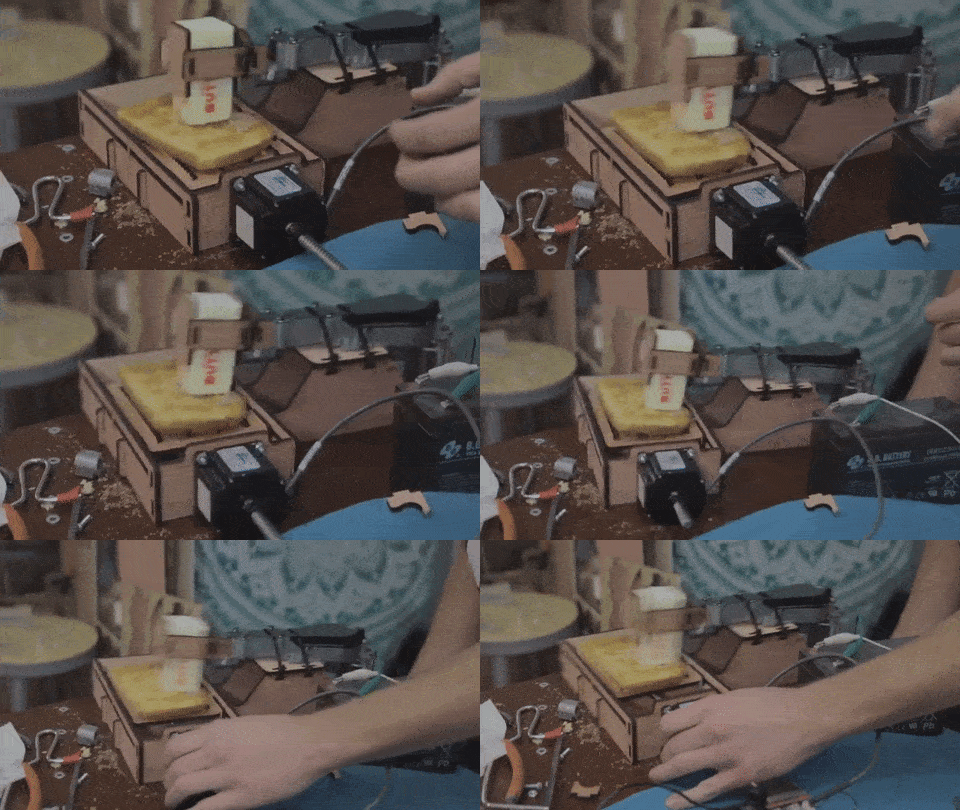
Sometimes — despite impracticality, safety, failure, and general good sense — one has an urge to see a project through for the sake of it. When you’re sick of buttering your toast every morning, you might take a leaf out of Rick Sandc– ahem, [William Osman]’s book and build a toast-bot to take care of the task for you.

[Osman] — opting for nail the overkill quotient — is using a reciprocating saw motor to hold the butter while the toast moves underneath the apparatus on a platform controlled by a linear stepper motor. The frame and mounts for Toast-Bot were cut out of wood on his home-built laser cutter — affectionately named Retina Smelter 9000′ — and assembled after some frustration and application of zip-ties. The final result DOES butter toast, but — well — see for yourself.

Continue reading “Toast-Bot Butters For You (Sometimes)”

The Elements Converge For ±.002 In Tolerance

What can be accomplished with just a torch and compressed air? We can think of many things, but bringing a 17-foot-long marine shaft into ±.002 in tolerance was not on our list.

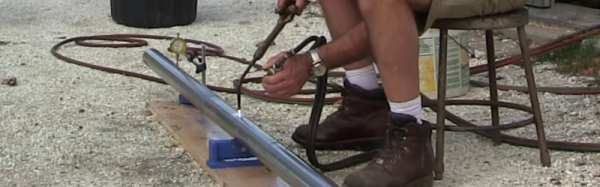
Heat straightening (PDF) utilizes an oxy-acetylene flame that is used to quickly heat a small section of a workpiece. As the metal cools, it contracts more than it expanded when heated, resulting in a changed volume. With skill, any distortions on a shaft can theoretically be straightened out with enough time (and oxy-acetylene). Heat straightening is commonly applied to steel but works on nickel, copper, brass and aluminum additionally.

[Keith Fenner’s] standard process for trueing stock is sensitive enough that even sunlight can introduce irregularities, but at the same time is robust enough to carry out in your driveway. However, even though the only specialty tools you need are a torch, compressed air and work supports, watching [Keith] work makes it clear that heat straightening is as much an art as it is a science. Check out his artistry in the video below the break. Continue reading “The Elements Converge For ±.002 In Tolerance”

A Multicore ZX Spectrum

From the blog of [telmomoya] we found his latest project: a hardware based multicore solution for a ZX Spectrum Emulator. It’s not the first time we feature one of his builds, last year we was working on a ARM Dual-Core Commodore C64. Luckily for Speccy fans, it seems a ZX Spectrum project was just unavoidable.

At its heart is the EduCIAA NXP Board, a Dual Core (M4 & M0) 32-bit microcontroller, based on the NXP LPC4337. It’s an Argentinan-designed microcontroller board, born from an Argentinian academic and industry joint venture. [telmomoya] took advantage of  the multicore architecture by running the ZX Spectrum emulator on M4 core and generating the VGA signals with M0 core. This guarantees that the VGA generation, which is rather time-sensitive, remains isolated from emulation and any task running on other core. The VGA sync is via polling and using DMA GPIO the RGB signals can be up to 256 colors. To store the 48 kb VGA frames one AHB32 and one AHB16 memory IC are used.

On the software side, [telmomoya] adopted Aspectrum, a ZX Spectrum Emulator fully written in C, modified to his needs. Overall, the project faced many challenges and issues, like COLOR VGA generation (with GPIO DMA), TFT SPI low fps, Inter Process Communications and bus sharing.

Can you try to name all the games in the demonstration video?

Continue reading “A Multicore ZX Spectrum”

Taking Apart A Vintage Oscilloscope

After getting a power supply and a multimeter, the next piece of gear a hacker would want to add to their bench is the oscilloscope. Nowadays, even the cheapest ones cost a few hundred dollars yet pack in the features. At the other end of the scale, if you can pony up close to a  million dollars, you can help yourself to an oscilloscope capable of 100 GHz bandwidth and 240 GS/s sampling rate. With that perspective, it becomes interesting to take a look at this video (embedded below), where [Jack Ganssle] shows us the Philco 7019 Junior Scope which was introduced way back in 1946. It seems the Philco 7019 model was an identical re-badged version of the Waterman Model S-10-A PocketScope.

[Jack] is familiar to all of us as an embedded systems engineer, but in this video he does a teardown of this vintage analog model. He starts off by walking us through the various controls, of which there are not a lot, in this “portable” instrument. At around the 3:40 mark in the video, he’ll make you wince as he uses a screwdriver and hammer combo to smash another ’40’s vintage CRT just so he can show us it’s innards — the electron beam source and the horizontal and vertical deflection plates. The circuit is about as bare-bones as it can get. Besides the CRT, there are just three vacuum tubes. One is the rectifier for the power supply, a second one is used for the vertical amplifier while the third one is the free running horizontal sweep oscillator. There is no triggering option — you just adjust the sweep frequency via a potentiometer as best you can. It does have internal, external and line frequency function selection, but it still requires manual adjustment of the sweep oscillator. There’s no blanking signal either, so the return sweep is always clearly visible. This is evident from the horizontal burn mark on the phosphor of the CRT after decades of use. It’s amusing to see that the vertical position could be adjusted by moving a magnet attached to the side cover.

The Oscilloscope Museum website hosts the Instruction Manual for this model, as well as a sales brochure which makes for very interesting reading after viewing [Jack]’s video.

Thanks, [Itay], for the tip.

Continue reading “Taking Apart A Vintage Oscilloscope”

Vintage Laptop Keyboard Types Again Through USB

Have you ever had a laptop you just wish you didn’t have to retire when its specification becomes to aged for your needs? Wouldn’t it be great if you could upgrade it and keep using the physical hardware!

[Alpinedelta] has a vintage Toshiba T1000 laptop, roughly a PC-XT clone from the late 1980s. Its 80C88 processor, CGA display, and 512k of memory make it a museum-piece, but he has plans to modernise it using a LattePanda Intel Atom based single board computer.

To make that happen, he has to ensure all the Toshiba’s peripherals will talk to a modern host. Unfortunately back in the 1980s many PC clones were clones in a rather loose sense, and especially so in the laptop arena. Thus there are no handy standard PC interfaces and since USB was several years away at the time, nothing the LattePanda can talk to directly. His solution for the keyboard is to wire its matrix directly to a Teensy microcontroller that then provides a USB interface, and he’s put up a useful step-by-step Instructables guide.

There is no standard for a laptop keyboard matrix, so the first and most tedious task is to unpick its layout.This he did by identifying each trace and assigning a different rainbow colour to it, before noting down which keys appeared on it and collating the results in a spreadsheet. The different colours of wire could then be assigned to the colours of a piece of rainbow ribbon cable, and wired in sequence to the Teensy’s I/O pins. There then follows a step in the software in which he assigns the pin mappings to the lines in his spreadsheet, then the sketch can be compiled and uploaded to the Teensy. Result: a vintage keyboard now talking USB.

Using a Teensy to present a USB keyboard to the world is a well-worn path, we’ve seen it with both newer keyboards and other relics like this one from a DEC VT100.

Thanks [Brent] for the tip.

Dummies Guide To Reverse Engineering

[Juan Carlos Jiménez] has reverse engineered a router — specifically, a Huawei HG533. While that in itself may not sound substantial, what he has done is write a series of blog posts which can act as a great tutorial for anyone wanting to get started with sniffing hardware. Over the five part series, he walks through the details of identifying the hardware serial ports which open up the doors to the firmware and looking at what’s going on under the hood.

The first part deals with finding the one or several debug ports on the hardware and identifying the three important pins – Rx, Tx and GND. That’s when he shows novices his first trick – shining a flashlight from under the PCB to find the pins that have trace connections (most likely Rx and Tx), those that don’t have any connections (most likely CTS and DTR) and those that have connections to the copper pour planes (most likely VCC and GND). The Tx signal will be pulled up and transmitting data when the device is powered up, while the Rx signal will be floating, making it easy to identify them. Finding the Baud rate, though, will require either a logic analyser, or you’ll have to play a bit of a guessing game.

Once you have access to the serial port and know its baud rate, it’s time to hook it up to your computer and use any one of the several ways of looking at what’s coming out of there — minicom, PuTTY or TeraTerm, for example. With access to the devices CLI, and some luck with finding credentials to log in if required, things start getting interesting.

Over the next part, he discusses how to follow the data paths, in this case, looking at the SPI signals between the main processor and the flash memory, and explaining how to use the logic analyser effectively and decode the information it captures. Moving further, he shows how you can hook up a USB to SPI bridge, connect it to the flash memory, take a memory dump of the firmware and read the extracted data. He wraps it up by digging in to the firmware and trying to glean some useful information.

It’s a great series and the detailed analysis he does of this particular piece of hardware, along with providing a lot of general tips, makes it a perfect starting point for those who need some help when getting started on debugging hardware.

Thanks, [gnif] for posting this tip.

Continue reading “Dummies Guide To Reverse Engineering”