Abacus Drive Is A Speed-to-Torque Game-Changer

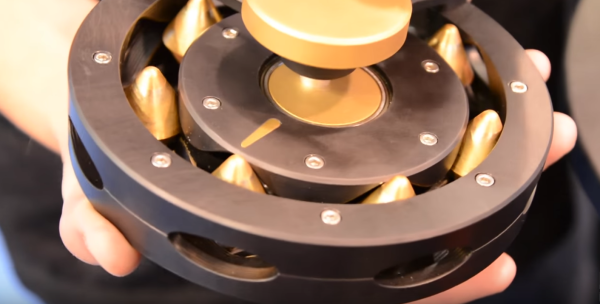
Apart from the harmonic drive, the engineering community hasn’t really come up with any clever mechanisms for speed-to-torque conversion in the last few decades. However, recently a few folks at SRI have given us one more transmission to drool over: the Abacus Drive.

The Abacus Drive takes the standard concepts of a cycloidal drive, but takes the eccentric gear tooth pattern that we’re familiar with and converts it to two grooves in which an array of rolling spacers will ride. The benefit with this design is two-fold: it’s both constructed from entirely rigid components (unlike the harmonic drive), and it has a low-backdriving torque, enabling the application to more easily detect changes in load.

Achieving an affordable low-speed, high-torque transmission has been a holy grail among roboticists, where every motor-driven manipulator joint becomes an engineering design headache where the designers fight their application’s backlash, torque, and price constraints to get a functional robot arm. This problem stems from the fact that motors just don’t perform efficiently at low-speeds, where the near-stall conditions cause them to draw vastly larger amounts of torque compared to their full-speed conditions. While the Abacus Drive isn’t hitting the market anytime soon, we’ll let this idea stew in the community and hope to see some budget variants pop up in the near future.

Continue reading “Abacus Drive Is A Speed-to-Torque Game-Changer”

Flip Dot Displays Appear With Modernized Drivers

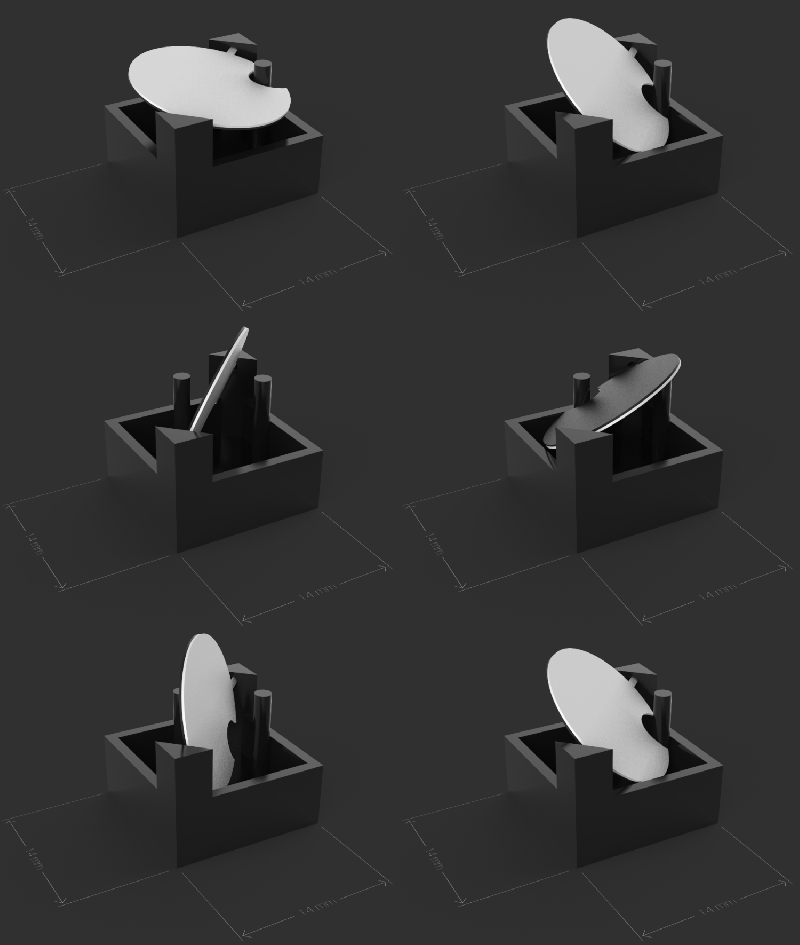
Admit it, you’ve always wanted to have your own flip-dot display to play with. Along with split-flap displays, flip-dots have an addictive look and sound that hearkens back half a century but still feels like modern technology. They use a magnetic coil to actuate each pixel — physical discs painted contrasting colors on either side. It means that you really only need electricity when changing the pixel, and that each pixel makes a satisfyingly unobtrusive click when flipped. The only problem with the displays is that they’re notoriously difficult to get your hands on.

flipdotBreakfast, a Brooklyn-based hardware firm known for creative marketing installations, unveiled their Flip-Disc Display System this morning. Used displays have come up on the usual sites from time to time, but often without a controller. Traditional flip-dot manufacturers haven’t sought out the individual hacker or hackerspace, and a click-to-buy option has been difficult if not impossible to find.
Breakfast’s offering modernizes the driver used to manage all of those electro-mechanical pixels. Whether this will make the displays more accessible is a question that still needs to be answered.
Continue reading “Flip Dot Displays Appear With Modernized Drivers”

Build Your Own YouTube Play Button

The only thing that matters in this world is the likes you get on social media platforms. To that end, YouTube has been sending out silver and gold play buttons to their most valuable creators. [Sean] hasn’t screamed into a microphone while playing Minecraft long enough to earn one of these play buttons, so he decided to build his own.

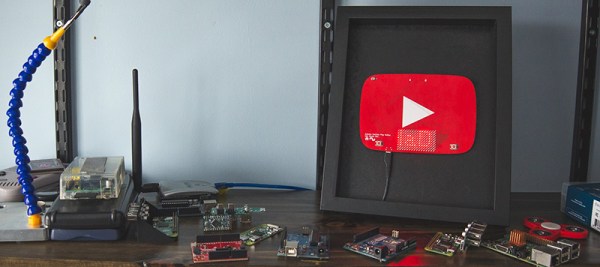
This play button isn’t just a bit of pot metal ensconced in a frame brought to you by Audible dot com; this YouTube play button actually does something useful. It’s a PCB with 144 LEDs working together as a display. There’s an Atmel SAMD21 microcontroller on board to drive the LEDs, and an ESP8266 to pull data down from the Internet. What data is worthy enough to go on an Arduinofied YouTube play button? The subscriber count for [Sean]’s channel, of course. Go subscribe, it might crash his Play button.

Admittedly, there were a few problems with this Play button PCB. Firstly, the ESP8266 can’t directly communicate with the YouTube API to pull down the subscriber count. That problem was fixed with a Raspberry Pi that could connect to the API, and programming the ESP to pull the data from the Pi. Second, this was [Sean]’s first experiment with double-sided SMD boards reflowed in a toaster oven. The first side to be assembled was easy, but to get the second side on, [Sean] turned to low-temp bismuth solder paste. Except for a small error in assembling the board, everything worked as planned.

It’s a great project, and if you want to check out what the better parts of YouTube look like, check out [Sean]’s video below. Don’t forget to rate, comment, like, unlike, or subscribe.

Continue reading “Build Your Own YouTube Play Button”

This Quick Hack Will Keep You Online During Your Next Power Outage

The modern human’s worst nightmare: a power outage. Left without cat memes, Netflix, and — of course — Hackaday, there’s little to do except participate in the temporary anarchy that occurs when left without internet access. Lamenting over expensive and bulky uninterruptible power supplies, Youtube user [Gadget Addict] hacked together a UPS power bank that might just stave off the collapse of order in your household.

This simple and functional hack really amounts to snipping the end off of a USB  power cable. The cable is then attached to a screw terminal to barrel connector adapter and plugged it into a pass-through power USB power bank. No, really — that’s all there is to it. [Gadget Addict] notes that while most modems and routers are designed to run off a 12V power supply, they still operate at 5V. He goes on to connect several router and router/modem combination units to the power bank. In each case the system appears to boot up and perform normally.

Continue reading “This Quick Hack Will Keep You Online During Your Next Power Outage”

A Smart Wand For All Us Muggles

Arthur C. Clarke said that “any sufficiently advanced technology is indistinguishable from magic.” Even though we know that something isn’t “magic”, it’s nice to see how close we can get. [Dofl] and his friends, big fans of the magic in Harry Potter, thought the same thing, and decided to create a magic wand that they could use themselves.

muggle-wand-internalsThe wand itself is 3D printed and has a microcontroller and WiFi board, a voice recognition board, a microphone, and a vibrating motor stuffed inside. The wand converts the voice into commands and since the wand is connected to WiFi, the commands can be used to communicate with your WiFi connected lights (or your WiFi connected anything, really.) Five voice commands are recognized to turn on and off music, the lights, and a “summon” command which is used in the video to request a hamburger from delivery.com. For feedback, the motor is vibrated when a command is recognized.

There’s not much technical information in the original article, but I’m sure our readers could figure out the boards used and could suggest some alternatives to get the wand’s form factor down a bit.  Over the years, other wands have appeared on our pages, using some different technologies.  It’s a fun way to interact with the environment around you, even if you know the “magic” involved is just boring old technology.

Continue reading “A Smart Wand For All Us Muggles”

Faulty Parking Meter Tracking System? RFID To The Rescue!

How often do you see problems that need fixing? How often do you design your own solutions to them — even if they won’t be implemented at scale? Seeing that many of the municipal parking lots in his native Sri Lanka use a paper ticketing system which is prone to failure, [Shazin Sadakath] whipped up his own solution: an efficient RFID tag logging system.

Digging out an HZ-1050 RFID reader — as well an RFID card and two tags — [Sadakath] set to work connecting it to his Raspberry Pi and cooking up a batch of code and a dashboard to work with. A Python script — using a PiGPIO library — reads the Wiegand Format RFID number, storing it in an SQLite3 database. A Bootstrap, Javascript, and JQuery trifecta make up the dashboard that pulls the RFID info from said server and organizes it into a functional format.

Continue reading “Faulty Parking Meter Tracking System? RFID To The Rescue!”

DIY Optical Sensor Breakout Board Makes DIY Optical Mouse

Wanting to experiment with using optical mouse sensors but a bit frustrated with the lack of options, [Tom Wiggins] rolled his own breakout board for the ADNS 3050 optical mouse sensor and in the process of developing it used it to make his own 3D-printed optical mouse. Optical mouse sensors are essentially self-contained cameras that track movement and make it available to a host. To work properly, the sensor needs a lens assembly and appropriate illumination, both of which mate to a specialized bracket along with the sensor. [Tom] found a replacement for the original ADNS LED but still couldn’t find the sensor bracket anywhere, so he designed his own.

Continue reading “DIY Optical Sensor Breakout Board Makes DIY Optical Mouse”