LED Tree Brings Gravity To Christmas

Here’s a fun entry into our coin cell challenge. The power source is the actuating force in [Frank]’s blinky LED Christmas tree, which takes advantage of the physical structure of coin cells and our old pal gravity to roll out some holiday cheer. Talk about forward voltage!

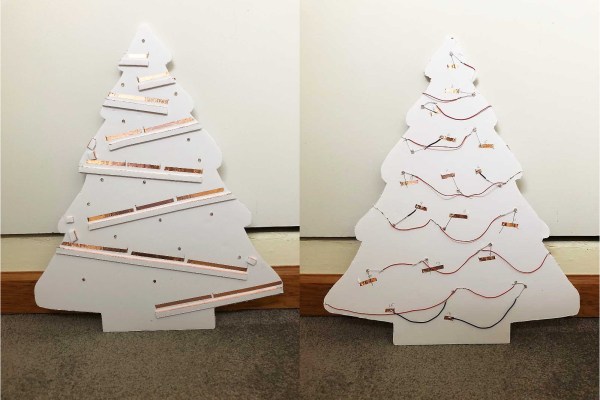
We love the concept, and the circuit couldn’t be more simple. A coin cell is released at the top of the tree and rolls down a series of angled foam board railings covered with 1/4″ copper tape. As the coin cell travels, the negative terminal shimmies along the face of the tree, which has corresponding ground rail tapes. There’s no microcontroller here—all that’s needed for blinks are breaks in the negative rail tape.

The challenging part of a project like this is the execution. Getting a coin cell to ride the rails without falling off required angle experimentation prior to and during the build. Now that it’s done, keeping the tree tilted back against the wall is key. [Frank] explored several options for returning the coin cell to the top using a camera motor and the gear assembly from an old inkjet, but for now, his six-year-old does the job without complaint. Check out his work ethic after the break.
Continue reading “LED Tree Brings Gravity To Christmas”

Bring Up A PCB With Fewer Headaches

What’s the first thing you do when a new set of boards from the fab house hits the doorstep? Apply solder paste, populate the components, and stick it in the reflow oven? That’s one way to do it. But a lot of non-obvious things can go wrong at the fab house, like shorts and undrilled vias. One tiny mistake can mean hours of frustration and sanity questioning as you troubleshoot some problem that’s now buried under solder paste and 0603s.

Over on IO, [Bhavesh] tries to nip these problems in the bud with a comprehensive and explanatory guide to properly bringing up a PCB. Though it’s based on fab house boards, this soup-to-nuts plan is good for any project from kit building to custom stripboard circuits. When new boards arrive, [Bhavesh] does several continuity checks and visually inspects them with a microscope. In the case of a stripboard layout, it’s a good idea to verify there’s no continuity across cut traces. He goes on to cover solder paste, touching on proper handling and storage, application, and problem correction.

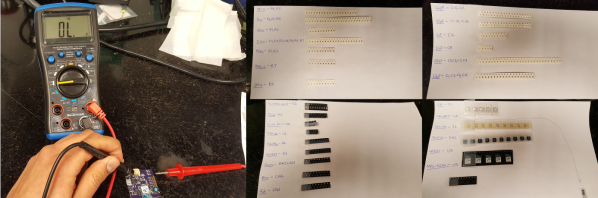
Our favorite part of this guide is the component sheets. Making these is a great preventive measure, like lining up all your ingredients on the counter before you bake a cake. If you know what you need, why not have it all ready?  [Bhavesh] uses a sheet for each component type, lists all the relevant values in ascending order, and lays out component reels next to them.

The guide covers solder paste, too—his stencils were late to arrive, so the guide deals with applying paste by hand. He suggests a plan for populating the board by starting in one corner and working in circle, placing small components first. Then it’s on to reflow and those all-important post-reflow checks for bridges and bad joints before letting the magic smoke out.

A great time to catch mistakes is before you send the order to the fab house. Hackaday’s own [Joshua Vasquez] has you more than covered there.

Afroman Teaches Intro To Servos, Builds Laser Turret

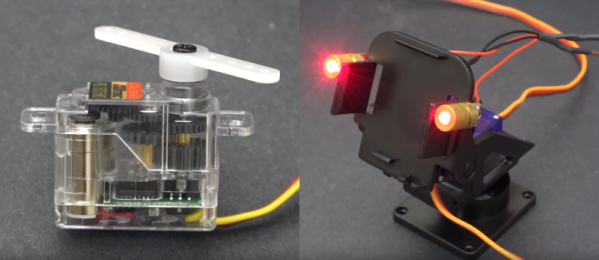
After a longish hiatus, we were pleased to see a new video from [Afroman], one of the most accessible and well-spoken teachers the internet has to offer. If you’re new to electronics, see the previous sentence and resolve to check out his excellent videos. The new one is all about servos, and it culminates in a simple build that provides a foundation for exploring robotics.

[Afroman] leaves no gear unturned in his tour de servo, which is embedded after the break. He explains the differences between open vs. closed loop motor systems, discusses the different sizes and types of servos available, and walks through the horns and pigtails of using them in projects. Finally, he puts this knowledge to use by building a laser turret based on a pan-tilt platform.

The Arduino-driven turret uses two micro servos controlled with pots to move by degrees in X/Y space. Interestingly, [Afroman] doesn’t program the board in the Arduino IDE using wiring. Instead, he uses an open-source microcontroller language/IDE called XOD that lets you code by building a smart sort of schematic from drag-and-drop components and logic nodes. Draw the connections, assign your I/O pin numbers, and XOD will compile the code and upload it directly to the board.

Continue reading “Afroman Teaches Intro To Servos, Builds Laser Turret”

Bark Back IoT Pet Monitor

Does your pet get distressed when you’re not home? Or, perhaps their good behaviour slips when you’re not around and they cause a ruckus for the neighbours. Well, [jenfoxbot] has just such a dog, so she built a ‘bark back’ IoT pet monitor to keep an eye on him while she’s out.

The brains and backbone of the pet monitor is the ever-popular Raspberry Pi 3. A Sparkfun MEMS microphone breakout board listens for any unruly behaviour, with an MCP3002 analog to digital converter chip reading the mic input. Some trial-and-error coding allowed her to set a noise threshold that — once exceeded — will trigger an audio file, shushing her dog. It also logs events and uploads any status updates to a CloudMQTT server to be monitored while away from home. Her Imgur build album can be found here, and the GitHub project page is here if you want to build your own!

Check out the demo video after the break, that was probably confusing for her good dog, Marley.

Continue reading “Bark Back IoT Pet Monitor”

Guide: Why Etch A PCB When You Can Mill?

I recall the point I started taking electronics seriously, although excited, a sense of dread followed upon the thought of facing the two main obstacles faced by hobbyists and even professionals: Fabricating you own PCB’s and fiddling with the ever decreasing surface mount footprints. Any resistance to the latter proves futile, expensive, and frankly a bit silly in retrospect. Cheap SMD tools have made it extremely easy to store, place, and solder all things SMD.

Once you’ve restricted all your hobbyist designs/experiments to SMD, how do you go about producing the PCBs needed for prototyping? Personally, I dread the thought of etching my own boards. The process is laborious and involves messy chemicals and specially sensitized PCB’s — none of which interest me. I’ve only ever done it a few times, and have promised myself never to do it again. Professional but cheap PCB manufacturing is more like it board pooling services such as OSH park have made this both easy and affordable — if you can wait for the turnaround.

So what are the alternatives? If you are really serious about swift prototyping from your own Lab, I put forth the case of milling your own PCB’s. Read on as I take you through the typical workflow from design to prototype and convince you to put up with the relatively high start up cost of purchasing a PCB mill.

Continue reading “Guide: Why Etch A PCB When You Can Mill?”

Upgrading A 3D Printer With OctoPrint

If you’ve been hanging around 3D printing communities, or reading the various 3D printing posts that have popped up here on Hackaday, you’ve almost certainly heard of OctoPrint. Created and maintained by Gina Häußge, OctoPrint allows you to turn an old computer (or more commonly a small ARM board like the Raspberry Pi or BeagleBone) into a network-accessible control panel for your 3D printer. Thanks to a thriving collection of community developed plugins, it can even control other hardware such as lights, enclosure heaters, smart plugs, or anything else you can think to hook onto the GPIO pins of your chosen ARM board. The project has become so popular that the new Prusa i3 MK3 has a header on the control board specifically for connecting a Pi Zero W running OctoPrint.

Even still, I never personally “got” OctoPrint. I was happy enough with my single printer connected to my computer and controlled directly from my slicer over USB. The majority of the things I print are of my own design, so when setting up the printer it only seemed logical that I would have it connected to the machine I’d be doing my designing on. If I’m sitting at my computer, I just need to rotate my chair to the right and I’m at my printer. What do I need to control the thing over WiFi for?

But things got tricky when I wanted to set up a second printer to help with speeding up larger projects. I couldn’t control them both from the same machine, and while I could print from SD on the second printer if I really had to, the idea seemed painfully antiquated. It would be like when Scotty tried talking into the computer’s mouse in “Voyage Home”. Whether I “got it” or not, I was about to dive headfirst into the world of OctoPrint.

Continue reading “Upgrading A 3D Printer With OctoPrint”

Print A Sacrificial Magnet Square

Here’s your quick and dirty hack for the day. Sometimes you just need something that will work for what you’re trying to do, and you don’t want to go through the motions of doing what’s prescribed. When this happens, it’s a cheap, disposable tool that fits the bill. No, we’re not talking about Harbor Freight—we mean those need-driven tools you make yourself that get the job done without fuss. If you’re really lucky, you can use them a couple of times before they break.

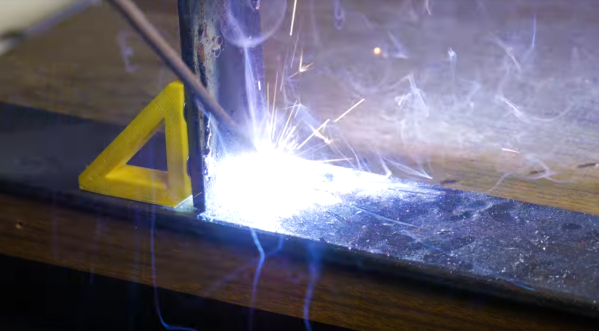
This is one of those tools. [Jake’s Workshop] wanted to be able to quickly tack a corner weld without getting out the clamps, so he thought, why not print some magnet squares? [Jake] hollowed out the triangle to save filament, but this also gives it a nice advantage over store-bought magnet squares: instead of grasping and pulling it off,  you can hook your finger through it and then hang it on the pegboard for next time.

[Jake] got lucky with the pocket sizes and was able to press fit the magnets in place, but it would be worth it to add a drop of CA glue to help with strain. He seems to have forgotten to upload the files for his various styles, but a hollow triangle with chamfers and magnet pockets should be easy enough to replicate in OpenSCAD or  SolidWorks, which he used in the video below.

There’s something special about a cheap tool you make yourself. Even though you know it won’t last forever, it’s just more meaningful than some cheap, rage-inducing tchotchke or assemblage from a place where the air is ~85% offgasses. We love necessity-driven self-built tools around here so much that we gave them their own Hacklet.

Continue reading “Print A Sacrificial Magnet Square”