Injecting Code Into Mouse Firmware Should Be Your Next Hack

Here’s a DEF CON talk that uses tools you likely have and it should be your next hacking adventure. In their Saturday morning talk [Mark Williams] and [Rob Stanely] walked through the process of adding their own custom code to a gaming mouse. The process is a crash course in altering a stock firmware binary while still retaining the original functionality.

The jumping off point for their work is the esports industry. The scope of esporting events has blown up in recent years. The International 2016 tournament drew 17,000 attendees with 5 million watching online. The prize pool of $20 million ($19 million of that crowdfunded through in-game purchases) is a big incentive to gain a competitive edge to win. Contestants are allowed to bring their own peripherals which begs the questions: can you alter a stock gaming mouse to do interesting things?
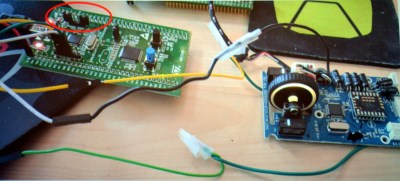
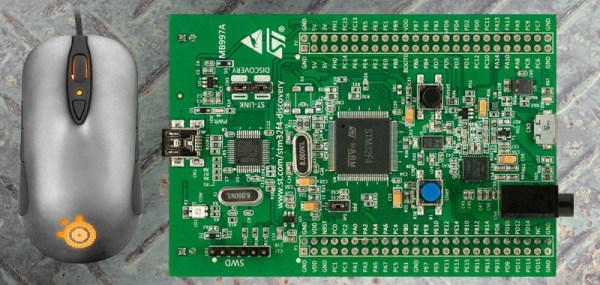
The steelseries Sensei mouse was selected for the hack because it has an overpowered mircocontroller: the STM32F103CB. With 128 KB of flash the researchers guessed there would be enough extra room for them to add code. STM32 chips are programmed over ST-Link, which is available very inexpensively through the ST Discovery boards. They chose the STM32F4DISCOVERY which runs around  $20.

Perhaps the biggest leap in this project is that the firmware wasn’t read-protected. Once the data, clock, and ground pads on the underside of the board were connected to the Discovery board the firmware was easy to dump and the real fun began.
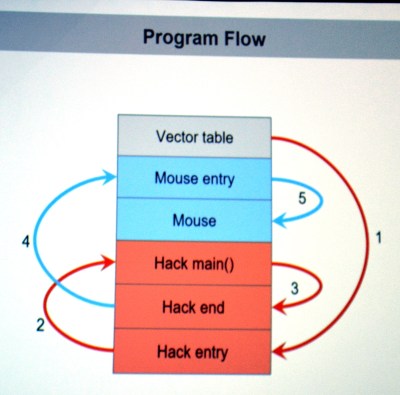
They first looked through the binary for a large block of zero values signifying unused space in flash. The injected firmware is designed to enumerate as a USB keyboard, open Notepad, then type out, save, and execute a PowerShell script before throwing back to the stock firmware (ensuring the mouse would still function as a mouse). Basically, this builds a USB Rubber Ducky into stock mouse firmware.

There are a few useful skills that make taking on this project a worthwhile learning experience. To compile your custom code correctly you need to choose the correct offset address for where it will end up once pasted into the firmware binary. The vector table of the original code must be rewritten to jump to the injected code first, and it will need to jump back to the mouse execution once it has run. The program flow on the left shows this. Both of these jumps require the program counter and registers to be saved and restored. The ARM stack is subtractive and the address will need to be updated to work with the added code.

The talk ended with a live demo that worked like a charm. You can check out the code in the MDHomeBrew repo. In this case the PowerShell script adds keyboard shortcuts for DOOM cheats. But like we said before, the experience of getting under the hood with the firmware binary is where the value will be for most people. With this success under your belt you can take on more difficult challenges like [Sprite_TM’s] gaming keyboard hack where the firmware couldn’t easily be dumped and an update binary was quite obsfucated.

The End Of Arduino 101: Intel Leaves Maker Market

This looks like the end of the road for Intel’s brief foray into the “maker market”. Reader [Chris] sent us in a tip that eventually leads to the discontinuation notice (PCN115582-00, PDF) for the Arduino 101 board. According to Intel forum post, Intel is looking for an alternative manufacturer. We’re not holding our breath.

We previously reported that Intel was discontinuing its Joule, Galileo, and Edison lines, leaving only the Arduino 101 with its Curie chip still standing. At the time, we speculated that the first wave of discontinuations were due to the chips being too fast, too power-hungry, and too expensive for hobbyists. Now that Intel is pulling the plug on the more manageable Arduino 101, the fat lady has sung: they’re giving up on hardware hackers entirely after just a two-year effort.

According to the notice, you’ve got until September 17 to stock up on Arduino 101s. Intel is freezing its Curie community, but will keep it online until 2020, and they’re not cancelling their GitHub account. Arduino software support, being free and open, will continue as long as someone’s willing to port to the platform.

Who will mourn the Arduino 101? Documentation was sub-par, but a tiny bit better than their other hacker efforts, and it wasn’t overpriced. We’re a little misty-eyed, but we’re not crying.  You?

[via Golem.de]

Backchannel UART Without The UART

Anyone who has worked with a microcontroller is familiar with using printf as a makeshift debugger. This method is called tracing and it comes with the limitation that it uses up a UART peripheral. Believe it or not, there are 8051 variants out there that come with only one serial block and you are out of luck if your application needs it to communicate with another device.

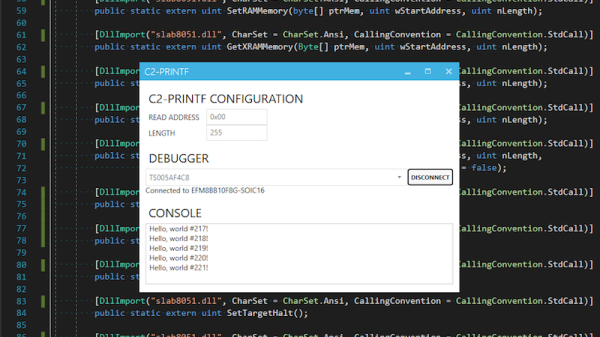
[Jay Carlson] has a method by which he can piggyback these trace messages over an on-chip debugger. Though the newer ARM Cortex-M software debugger already has this facility but [Jay Carlson]’s hack is designed to work with the SiLabs EFM8 controllers. The idea is to write these debug messages to a predefined location in the RAM which the debugger can access anyway. His application polls a certain area of the memory and when it finds valid information, it reads the data and spits it out into a dedicated window. It’s using the debugger as a makeshift printf!

[Jay Carlson] used slab8051.dll interface and put together a C# program and GUI that works alongside the SiLab’s IDE. The code is available on GitHub for you to check out if you are working the EFM8 and need a helping hand. The idea is quite simple and can be ported to other controllers in a multitude of ways like the MSP430 perhaps. For those of you who like the Teensy, you might want to take a look at adding debugger support to the Teensy 3.5/3.6.

Monitor Your City’s Air Quality

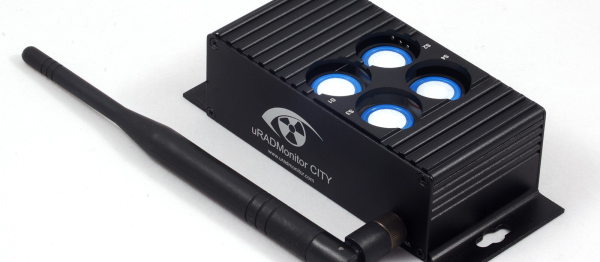
[Radu Motisan]’s entry in the 2017 Hackaday Prize is a series of IoT Air Quality monitors, the City Air Quality project. According to [Radu], air pollution is the single largest environmental cause of premature death in urban Europe and transport is the main source. [Radu] has created a unit that can be deployed throughout a city and has sensors on it to report on the air quality.

The hardware has a laser light scattering sensor for particulate matter and 4 electromechanical sensors for carbon monoxide, nitrogen dioxide, sulfur dioxide and ozone (these sense the six parameters that are recognized as having significant health impact by multiple countries.) These sensors have2-yearear lifespan, so they are installed in sockets for easy replacement, and if needed, you can swap to different sensors to detect different things. The PCBs for the hardware are separated into a WiFi version and a LoRaWAN version and the software runs on an ATMega328 – the PCB has the standard six-pin ISP connection for programming.

The data collected is sent to a server where it is adjusted based on the unit’s calibration parameters and stored in a database per sensor. This makes servicing the sensors at the end of their life easier as all that’s required is replacing the sensors in the unit and changing the calibration parameters stored for that unit, the software changes are required. The server offers the data via a RESTful API so that building dashboards with the stats and charts become easy.

[Radu] used an off the shelf module as the first prototype and attached it to a car while driving around. He used this to test out the plan and work on the server. He then proceeded to designing the PCB hardware and the enclosure for the final unit. This work is an extension of [Radu]’s previous work, spotlit here in the 2015 Hackaday Prize, but also check out this project to put air quality sensors in the classroom.

Continue reading “Monitor Your City’s Air Quality”

STM32CubeMX Makes Makefiles

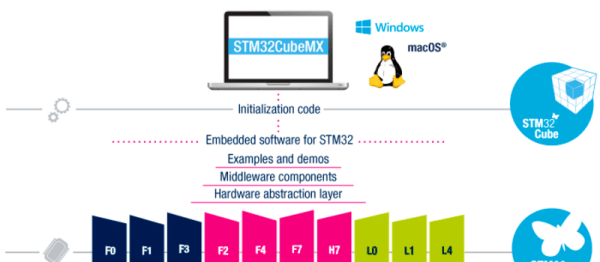
When hardware manufacturers make GUI code-generation tools, the resulting files often look like a canned-spaghetti truck overturned on the highway — there’s metaphorical overcooked noodles and red sauce all over the place. Sometimes we think they’re doing this willfully to tie you into their IDE. Not so the newest version of ST’s graphical STM32CubeMX, which guides you through a pleasant pin-allocation procedure and then dumps out, as of the latest version, a clean Makefile.

Yes, that’s right. This is a manufacturer software suite that outputs something you can actually use with whatever editor, GUI, compiler, or environment that you wish — even the command line. Before this release, you had to go through a hacky but functional script to get a Makefile out of the CubeMX. Now there’s official support for real hackers. Thanks, ST!

If you’re compiling on your own, you’ll need to update the BINPATH variable to point to your compiler. (We use the excellent GNU ARM Embedded Toolchain ourselves, which is super-easy to install on almost any Linux.) If you want to use STM32CubeMX with the Eclipse IDE, [kali prasad yadav] sent us PDF instructions — it’s not hard.

If you doubt that the availability of a free, open, and non-constraining toolchain can matter for a silicon vendor, we’d point to AVR and the Arduino platform that spun off of their support of GCC. Sure, Atmel still pushes their all-in-one wonder, Atmel Studio, which is better than the Arduino IDE by most any metric. But Studio is closed, and Arduino is open. We’d love to see the number of Studio users compared with Arduino users.

Congratulations to ST for taking a big step in the right, open-toolchain, direction.

Digitool Helps Debugging

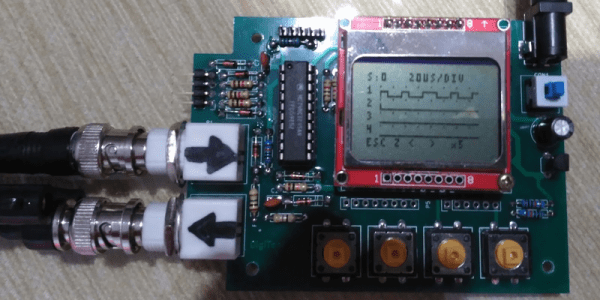
Logic analyzers used to be large boxes full of high-speed logic and a display monitor. Today, they are more likely to be a small box with a USB port that feeds data to a PC application. [Juan Antonio Rubia Mena] wanted something more self-contained, so he built Digitool. Built around a PIC18F2525, the device can measure frequency up to 10 MHz and inject square waves up to 1 MHz into the circuit under test. Oh yeah. It also has a simple four-channel logic analyzer that displays on a tiny LCD.

The 500,000 sample per second rate and the 1024 sample buffer isn’t going to put any logic analyzer vendors out of business, but it is still enough to help you figure out why that SPI or I2C logic is messed up. It looks like a fun project that could have some usefulness.

Continue reading “Digitool Helps Debugging”

COSMAC Elf Calculator Gets New Firmware

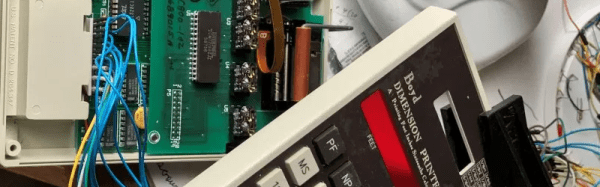
Everyone remembers their first. Their first CPU, that is. For many of us, it was the RCA 1802 thanks to the COSMAC Elf articles that ran in Popular Electronics. The later versions of the chip family were much better but were never as popular, but the 1805 did find its way into a printing calculator for dimensions from a company named Boyd. Some of these recently showed up on the surplus market and–of course–were subsequently hacked.

[Bill Rowe] is active in the groups that still work with the 1802. Because of some specialized uses you can still get the chips readily, some four decades after they were new. Other computers at the time were difficult to build and relatively expensive, while for $100 almost anyone could wire wrap a simple 1802-based computer together in a weekend or less.

Continue reading “COSMAC Elf Calculator Gets New Firmware”