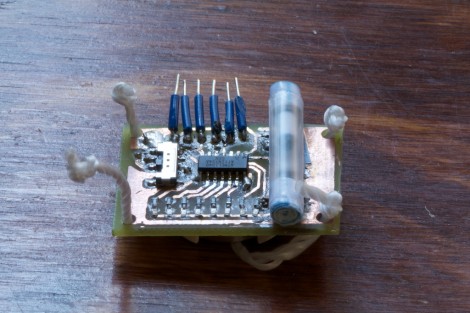
POV Bauble Uses DIY Accelerometer To Sync The Image

So we saw this tip come in and thought–oh, another POV device. We watched the video (embedded after the break), took a sip of coffee, then almost sprayed the beverage all over the computer when we realized that this uses a diy sensor to synchronize the POV image.

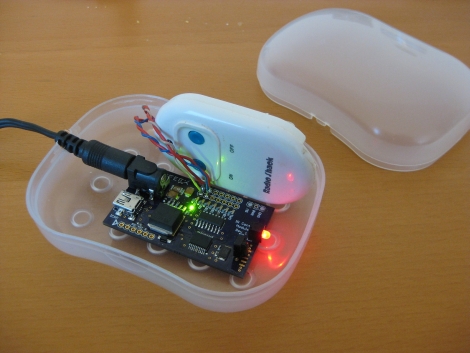
[Ch00f] came up with the idea for the sensor after seeing a similar implementation on a commercial POV toy. Instead of using a proper accelerometer to sense the motion, the toy uses a plastic bead in a channel. When you move the body of the toy the bead rolls to one end or the other, covering or exposing a reflective sensor.

A similar sensor is used here. A drinking straw servers as the channel, with a paper-covered nylon screw as the bead. [Ch00f] cut a window in the bottom of the straw for his reflective sensor, then sealed each end with a wad of paper.

This method works, but not as well as he had hoped. It seems the refresh rate and timing of the particular sensor he’s using is rather poor. If it were replaced with one that is simply and IR LED and phototransistor (like the sensors from [Jack’s] last video) he thinks it would work a lot better.

via Buildlounge.

Continue reading “POV Bauble Uses DIY Accelerometer To Sync The Image”
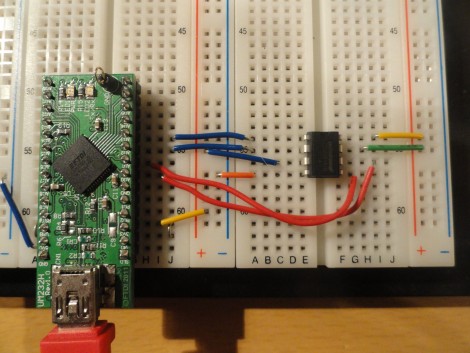
FT-2232 Bridges Python And I2C/SPI

You might already have the hardware on hand to easily interface I2C and SPI devices with Python scripts on your computer. The board seen above is an FT-2232 breakout board. These chips are often used to facilitate JTAG programming via USB, but they have other features that might be useful to you as well. The chip has a Multi-Protocol Synchronous Serial Engine (MPSSE) which can speak the I2C and SPI protocols, you just need to know how to active them in your code.

[Craig] makes this easy with his MPSSE Python wrapper. Simply install his module, and you’ll be able to import all the commands you need. He demonstrates reading the data out of a 1 MB SPI flash memory chip. This could be used for a lot more, including debugging peripherals à la the Bus Pirate, or reprogramming chips to add to your projects (we’re thinking font arrays and sprites for displays, or look-up tables).

If you’re not aware, these FTDI chips were the go-to for USB support for a long time. We’ve got a guide for bit-banging using this hardware. Lately more chips have become available with USB hardware built-in. They’re quite useful and cost-effective, especially with the availability of open-source stacks like the LUFA project.

LUFA Open Source USB Stack Now For NXP ARM Processors

Looks like the Lightweight USB Framework for AVRs (LUFA) has just been ported for ARM microcontrollers. NXP recently released a package for their LPC Cortex M3 family of ARM controllers. You won’t find a reference to LUFA on their nxpUSBlib description page (which we think is kind of sad), but if you grab a copy of the beta code the Version.h header file shows that it is indeed a port of the project. This is further backed up by the LUFA creator, [Dean Camera], who consulted with the NXP team doing the work.

The package provides an open-source USB stack that you can use in your projects as a USB host or USB device. We’re advocates of open source packages like this one as it makes it much easier for hobbyists to get help using the tools, and it allows the community to give back through bug fixes and feature additions.

We’ve highlighted a few LUFA projects, like this keyboard remapper and this AVR programmer. We’re looking to seeing the first set of NXP LUFA projects roll through!

[Thanks Johnny]

Making An RF Controlled Light Switch Work With IR

ir-rf-light-switch

[Gary] had an RF triggered light switch kicking around, and wanted to find a way to control his lights using a home theater remote. The switch, which he bought from RadioShack years ago, came with a simple remote that uses two buttons to toggle the lights on and off. While you might think that switching from RF to IR control would be a step backwards, [Gary] really just wanted to consolidate remotes more than anything else.

He designed a circuit board specifically for interacting with the remote half of his RF controller. It sports a PIC16F628A micro controller, which is tasked with processing IR commands from his home theater remote and triggering the lights when requested.

The code he developed for the project is relatively simple, but very useful all the same. When his board is powered on, it stores the first IR code it receives, then retains it as long as it stays powered on. This lets [Gary] use any button on his remote to turn the lights on and off, without any IR codes permanently defined in software.

As you can see in the video below, the modified switch works just as intended, saving [Gary] from having to walk all the way to the light switch when it’s time to fire up a movie.

Continue reading “Making An RF Controlled Light Switch Work With IR”

HEX Out Reveals The Secrets Your Data Bus Holds

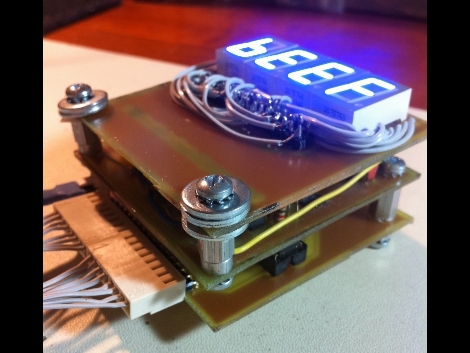
[Quinn Dunki] is looking to augment the tools she has available at her electronics bench and built the HEX Out as a mock-logic sniffer. The device reads 8 or 16-bit inputs, showing the current state of those connections on a 7-segment display. This requires that you’re comfortable reading Hex codes, but if you’re not it’s almost like studying flash cards; before long you’ll be able to read them without thinking about it.

She’s blogging about the design and build process in three parts. The link above is the first installment where she shares the development process for the top layer which hosts the display hardware. The other two parts should be up for your enjoyment in the next couple of weeks.

You’ll notice her design on this portion of the project still requires a lot of point-to-point soldering, even though she etched her own circuit boards. We didn’t look too closely, but it seems this would be worth going to the trouble of etching a double-sided board if you can.

UPDATE: Part Two is now available

Mimicing A Heartbeat In Sound And Electrical Pathways

If you set a cardiac nurse loose on a Propeller microcontroller and some parts you might not know what to expect. But we’re intrigued by the outcome of this project which looks to mimic a heartbeat’s audible and electrical traits. The post about the project is in four parts which are not linked to each other, but you can find them all, as well as a video segment demonstrating the rig after the break.

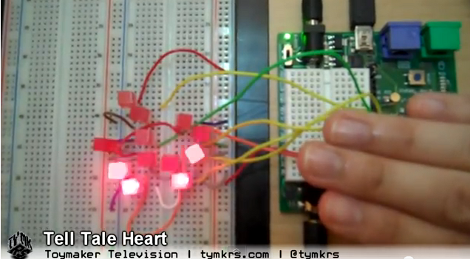
It seems that this was intended as a Halloween project, but we don’t see why it wouldn’t be interesting any time of year. The Propeller demo board is used to mimic a heartbeat with a pulsing LED. But that doesn’t seem all that awesome, so the sounds of a heartbeat were added to the program to coincide with the blinky light. Here’s where the medical training comes in: the next phase of the process was to lay out an array of LEDs on a breadboard in the shape of the human heart’s electrical system. Now you’ve got a pulsing LED, heart sounds, and a lighted animation showing how the electricity travels through the organ.

To add a little [Poe] to the project there’s also a CdS light sensor. As you approach the project you block some light from getting to the sensor and the heart rate increases.

We think the next logical step is to add a heart rate sensor, so that this can illustrate what your own heart is doing. Boom! Another project ready for the Children’s museum.

Continue reading “Mimicing A Heartbeat In Sound And Electrical Pathways”

Shutter Trigger Remote With Some Nice Design Considerations

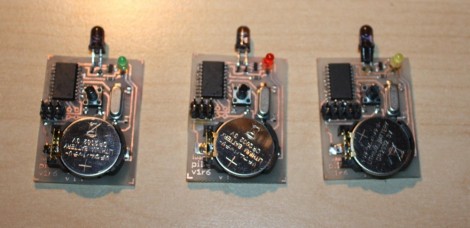
Here are the guts of [Lukasz’s] infrared camera remote control. He based it off of an existing design, but looked for places where improvements could be made. He felt the ATtiny2313 was a bit wasteful in this case. But further investigation led him to see why it was chosen. If you were to drop down to an ATtiny13 the ability to connect a crystal oscillator is lost (that chip only offers a 1-pin clock signal input) and the internal RC oscillator isn’t quite up to his standards for reliable IR communications.

Instead of driving the IR LED directly from an AVR pin he used a transistor in hopes that it will allow the maximum current to flow through the diode when in use. We’re not sure if it’s necessary, but we can see how it makes sense. Power is received from an unregulated 3 volt coin cell, so maybe as that voltage drops over time this will come into play.

Speaking of that coin cell, battery life is a concern here. [Lukasz] is using the sleep functions of the AVR after three seconds of use. This should keep the cell alive for quite a long time. But his 0 volt measurement is an anomaly with the multimeter he’s using. To get a precise measurement for tiny current flow you need extra equipment, like [Dave Jones’] uCurrent adapter.

The schematic for this Canon camera compatible project is only provided in Eagle format so we’ve embedded an image of it after the break for your convenience. You should have no problem making this work with a Nikon if you swap out some of the code from the TV-B-Gone shutter release we saw on Thursday.

Continue reading “Shutter Trigger Remote With Some Nice Design Considerations”