New OS For Commodore 64 Adds Modern Features

The Commodore 64 was a revolutionary computer for its day and age. After four decades, though, it gets harder and harder to use these computers for anything more than educational or hobby electronics projects. [Gregory Nacu] is fiercly determined to challenge this idea, though, and has gone to great extremes to make this hardware still relevant in the modern age by writing a completely new operating system for the Commodore machines.

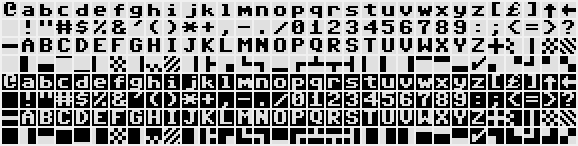
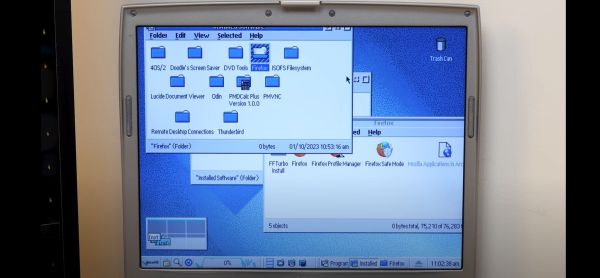
Known as C64OS, it squeezes everything it can out of the 8 bit processor and 64 kB of memory. The new OS includes switchable desktop workspaces, a windowing system, draggable icons, a Mac-style menu bar at the top, and drop-down menus for the icons (known as aliases in the demonstrations). The filesystem is largely revamped as well and enables a more modern directory system to be used. There are still some limitations like a screen resolution of 320×200 pixels and a fixed color palette which only allows for a handful of colors, but this OS might give Windows 3.1 a run for its money.

The project is still being actively developed but it has come a long way into a fairly usable state. It can be run on original hardware as well as long as you have a method of getting the image to the antique machine somehow. If not, the OS can likely run on any number of C64 emulators we’ve featured in the past.

Thanks to [Stephen] for the tip!

Continue reading “New OS For Commodore 64 Adds Modern Features”

Your Own Engineering Workstation, With Mame

There are some things that leave indelible impressions in your memory. One of those things, for me, was a technical presentation in 1980 I attended — by calling in a lot of favors — a presentation by HP at what is now the Stennis Space Center. I was a student and it took a few phone calls to wrangle an invite but I wound up in a state-of-the-art conference room with a bunch of NASA engineers watching HP tell us about all their latest and greatest. Not that I could afford any of it, mind you. What really caught my imagination that day was the HP9845C, a color graphics computer with a roughly $40,000 price tag. That was twice the average US salary for 1980. Now, of course, you have a much better computer — or, rather, you probably have several much better computers including your phone. But if you want to relive those days, you can actually recreate the HP9845C’s 1980-vintage graphics glory using, of all things, a game emulator.

The Machine

The HP9845C with a Colorful Soft Key Display

Keep in mind that the IBM PC was nearly two years away at this point and, even then, wouldn’t hold a candle to the HP9845C. Like many machines of its era, it ran BASIC natively — in fact, it used special microcode to run BASIC programs relatively quickly on its 16-bit 5.7 MHz CPU. The 560 x 455 pixel graphics system had its own CPU and you could max it out with a decadent 1.5 MB of RAM. (But not, alas, for $40,000 which got you — I think –128K or so.)

The widespread use of the computer mouse was still in the future, so the HP had that wonderful light pen. Mass storage was also no problem — there was a 217 kB tape drive and while earlier models had a second drive and a thermal printer optional, these were included in the color “C” model. Like HP calculators, you could slot in different ROMs for different purposes. There were other options such as a digitizer and even floppy discs.

Continue reading “Your Own Engineering Workstation, With Mame”

The LCD being replaced in an old laptop

Hackaday Prize 2022: Repairing A Vintage Laptop With Modern Components

Laptop computers may be ubiquitous today, but there was a time when they were the exclusive preserve of rich businesspeople. Back in the early ’90s, the significant added cost of portability was something that few were willing to pay. As a result, not many laptops from those days survive; for those that do, keeping them running can be quite a challenge due to their compact construction and use of non-standard components.

[Adalbert] ran into these problems when he got his hands on a Toshiba T3200SXC from 1991. As the first laptop ever to feature a color TFT display, it’s very much worth preserving as an historical artifact. Sadly, the original display was no longer working: it only displayed a very faint image and went completely blank soon after. Leaky capacitors then destroyed the power supply board, leaving the laptop completely dead. [Adalbert] then began to ponder his options, which ranged from trying to repair the original components to ripping everything out and turning this into a modern-computer-in-an-old-case project.

In the end he went for an option in between, which we as preservationists can only applaud: he replaced the display with a modern one of the correct size and resolution and built a new custom power supply, keeping the rest of the computer intact as far as possible. [Adalbert] describes the overall process in the video embedded below and goes into lots of detail on his hackaday.io page.

Connecting a modern LCD screen was not as difficult as it might seem: where the old display had an RGB TTL interface with three bits per color, the new one had a very similar system with six bits per color. [Adalbert] made an adapter PCB that simply connected the three bits from the laptop to the highest three bits on the screen. A set of 3D-printed brackets ensured a secure fit of the new screen in the classic case.

The internal power supply module of a laptopFor the power supply [Adalbert] took a similar approach. He designed a PCB with several DC/DC converters that fit easily inside the computer’s case, leaving enough space to add a battery. This made the old Toshiba more portable than it ever was — believe it or not, the original T3200SXC could only be used with a mains connection.

Once the laptop was restored to working order, [Adalbert] added a few finishing touches: a sound card and speakers made it suitable as a gaming platform, and a network card gave it rudimentary online capabilities. The end result is a T3200SXC that looks and feels exactly the way it did when it was new, but with a few added features. That’s a really satisfying result: many classic laptop projects add modern computing hardware, or even completely replace the original contents. You might also want to check out [Adalbert]’s unusual 3D printer based PCB manufacturing technique that he used for the new power supply.

Continue reading “Hackaday Prize 2022: Repairing A Vintage Laptop With Modern Components”

Up Close And Personal With An 8x Floppy Controller

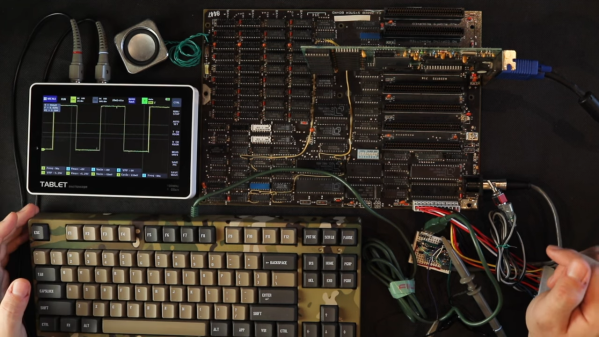
In need of a floppy controller for a 286 he was working on, [Gadget Reboot] took to GitHub to see what was available in the open hardware space. There he found an ISA board capable of controlling up to eight drives from [Sergey Kiselev] called the Monster Floppy Disk Controller (FDC) — arguably overkill for the task, but too impressive to pass up. Luckily for us, he decided to document the build process in a video that covers everything from ordering the boards to configuring the BIOS.

Testing with four drives.

The video starts with a high-level overview of the schematic, which as you might have guessed, essentially puts two identical floppy controllers on the same board. You can tell this design was put together during the current chip shortage, as [Sergey] was careful to include some wiggle room if certain parts became unavailable and had to be swapped out for the alternatives listed in the BOM. It’s a decision that already paid off for [Gadget Reboot], as in some cases he had to go with the second-choice ICs.

[Gadget Reboot] was in for something of a surprise when he submitted the board for fabrication, as selecting the option for gold contacts on the edge connector made the production cost jump from $5 to nearly $300. He details how he was able to bring that cost back down a bit, but it still ended up being more than 10 times as expensive as the base price.

The second half of the video is dedicated to configuring the Monster FDC, which will certainly be a helpful resource for anyone looking to put this board to work in their own system. [Gadget Reboot] demonstrates using the board with “only” four floppy drives, and everything looks to work quite well.

Of course if your needs aren’t quite so grandiose, we’ve seen some more expedient floppy controllers which might be closer to what you’re looking for.

Continue reading “Up Close And Personal With An 8x Floppy Controller”

Modular Z80 Really Racks Up The Retrocomputer Cred

Very few retrocomputing projects are anything other than a labor of love. There’s really no practical reason to build a computer that is woefully inadequate for just about any task compared to even an entry-level PC today. But the lack of a practical reason to do something rarely stops a hacker, as with this nifty modular Z80-based rack computer.

Actually, there’s at least one area where retrocomputers excel compared to their modern multi-core gigahertz counterparts — and that’s nostalgia. That’s what [Ricardo Kaltchuk] was going for with his build, which started by finding a Z80 and an Intel 8251 USART in his parts bin. Those formed the core of what would become the “Proton” computer, a modular beauty built around 7 cm by 10 cm PCBs that plug into a backplane inside a rack made from aluminum angle. Aside from the power supply and the Z80 CPU, other modules include a RAM card with a zero insertion force socket for an EPROM, a mass-storage module sporting a 128 MB Compact Flash card, plus modules for standard serial and I2C comms.

The fit and finish are excellent, and the performance is impressive. The Proton runs CP/M and boasts a ton of old applications that will bring back some memories, like SuperCalc and dBase. We’d venture a bet that WordStar is in there someplace, or easily could be. The video below is a little rough, but shows everything off really well.

In some ways, the Proton reminds us of the RC2014, but its fit and finish are what bring this build home. That’s not to take away from the work [Ricardo] obviously put into documentation, though. The 62-page manual has every detail of every module, plus instructions for building one of your own.

Continue reading “Modular Z80 Really Racks Up The Retrocomputer Cred”

A Commodore 64 running a smartwatch link program

The Commodore 64 Smartwatch Can Now Sync With Your Commodore 64 Desktop

If you’ve got a smartwatch on your wrist, chances are you’ve also got a device nearby that links up with it. Most modern watches will happily sync with Android devices or iPhones, and some will also talk to Windows PCs. But what if you’re running an alternative OS? Something like, say, Commodore BASIC? In that case, you might want to check out [Nick Bild]’s latest project, which lets you to sync your smartwatch to your Commodore 64.

Sadly, you can’t just use any old smartwatch: the project is an extension of [Nick]’s Commodore 64 Smartwatch that we featured earlier. This watch can run Commodore 64 programs thanks to a custom software stack, but like most typical smartwatches also includes an accelerometer that counts your steps. Syncing the step counter to your computer is straightforward: after you come home from your daily run, you simply tap “sync” on the watch, enter LOAD"SYNC.PRG",8,1 on your Commodore 64, and the computer will show your total step count.

The C64 watch communicates with the host computer through a built-in infrared port. The classic Commodore computers don’t have an IR receiver, so [Nick] built one himself using an Arduino Micro hooked up to the C64’s User port. A custom program reads out the data and shows the step count on the screen.

Although the feature set of this app is a bit limited, [Nick]’s project demonstrates how the good old Commodore 64 can still perform useful tasks in today’s world. Not that we needed much reminding: after all, we’ve even seen it run AI applications using TensorFlow Lite.

Continue reading “The Commodore 64 Smartwatch Can Now Sync With Your Commodore 64 Desktop”

A Look Back At The USSR Computer Industry

According to [Asianometry], in 1986 the Soviet Union had about 10,000 computers. At the same time, the United States had 1.3 million! The USSR was hardly a backward country — they’d launched Sputnik and made many advances in science and mathematics. Why didn’t they have more computers? The story is interesting and you can see it in the video below.

Apparently when news of ENIAC reached the USSR, many dismissed it as fanciful propaganda. However, there were some who thought computing would be the future. Sergey Lebedev in Ukraine built a “small” machine around 1951. Small, of course, is relative since the machine had 6,000 tubes in it. It performed 250,000 calculations for artillery tables in about 2 and half hours.

The success of this computer led to two teams being asked to build two different machines. Although one of the machines was less capable, the better machine needed a part they could only get from the other team which they withheld, forcing them to use outdated — even then — mercury delay lines for storage.

The more sophisticated machine, the BESM-1, didn’t perform well thanks to this substitution and so the competitor, STRELA, was selected. However, it broke down frequently and was unable to handle certain computations. Finally, the BESM-1 was completed and was the fastest computer in Europe for several years starting in 1955.

By 1959, the Soviets produced $59 million worth of computer parts compared to the US’s output of around $1 billion.  There are many reasons for the limited supply and limited demand that you’ll hear about in the video. In particular, there was little commercial demand for computers in the Soviet Union. Nearly all the computer usage was in the military and academia.

Eventually, the Russians wound up buying and copying the IBM 360. Not all of the engineers thought this was a good idea, but it did have the advantage of allowing for existing software to run. The US government tried to forbid IBM from exporting key items, so ICL — a UK company — offered up their IBM 360-compatible system.

The Soviets have been known to borrow tech before. Not that the west didn’t do some borrowing, too, at least temporarily.

Continue reading “A Look Back At The USSR Computer Industry”