Your job might be tough, but spare a thought for any of the engineers involved in the Mars InSight lander mission when they learned that one of the flagship instruments aboard the lander, indeed the very instrument for which the entire mission was named, appeared to be a dud. That’s a bad day at work by anyone’s standards, and it happened over the summer when it was reported that the Mars Interior Exploration using Seismic Investigations, Geodesy and Heat Transport lander’s Heat Flow and Physical Properties Package (HP³), commonly known as “The Mole”, was not drilling itself into the Martian regolith as planned.
But now, after months of brainstorming and painstaking testing on Earth and on Mars, it looks as if the mole is working again. NASA has announced that, with a little help from the lander’s backhoe bucket, the HP³ penetrator has dug itself 2 cm into the soil. It’s a far cry from the 5-meter planned depth for its heat-transfer experiments, but it’s progress, and the clever hack that got the probe that far might just go on to salvage a huge chunk of the science planned for the $828 million program.
However, this only tells part of the story. Carbon dioxide is not alone in its role as a greenhouse gas, with many others contributing significantly to global temperature rises. As humanity struggles to keep warming below 2 degrees C over the century, strategies will be needed to tackle the problem on all fronts.
There’s A Bad Smell Around Methane
Ruminant animals are a major source of greenhouse gas emissions, which is probably no surprise to some. Source: Peter van der Sluijs, CC-BA-SA-2.0
Methane is a remarkably potent greenhouse gas, having 28 times the warming potential of CO2 by weight over a 100-year period. Historically, it’s mostly been released from natural sources, like bacteria processing organic material in stagnant watercourses, or from thawing permafrost. However, scientists now consider around 60% of methane in the atmosphere to be a direct result of human activity.
Agriculture is a major contributor in this area. Ruminant animals raised for human consumption are major methane emitters, as the microbes in their digestive systems release the gas when breaking down plant material. With the demand for meat and dairy showing no signs of slowing down, this could prove difficult to tackle. There are a variety of other diffuse sources of the gas, too. Landfills and sewage plants have significant methane emissions of their own, and it’s also often released from oil and gas drilling operations, too.
Oil and gas operations release significant quantities of methane into the atmosphere, often due to leaks or plant malfunctions. Credit: Hugh Chevallier, CC:BA:SA-2.0
Levels of methane in the atmosphere have been low compared to carbon dioxide. Methane also tends to have a short life in the atmosphere, of around 9 years. These factors have meant that methane has historically been of lower concern to environmental organisations. However, after levels plateaued from the 1990s to the mid-2000s, they have once again begun to climb precipitously. Scientists have yet to identify the cause of this rise, and it has the potential to undo hard-fought gains in the fight against global warming on the CO2 front. Theories range from a reduced level of chemicals that break down methane in the atmosphere, to increased livestock production or the rise of the hydraulic fracturing industry.
Whatever the cause of the recent rise, stemming the increase will require significant work. The Environmental Defence Fund is launching MethaneSAT in an attempt to better locate and quantify releases to the atmosphere, aiming to stem easily-fixed leaks in fossil fuel operations. Other ideas include using antibiotics to reduce animal’s methane output, or to capture the emissions from landfills and use them as an energy source. It’s likely a rigorous approach to both monitoring and emissions reduction will be required to keep methane levels in check.
Nitrous Oxide
Nitrous oxide isn’t just the favorite gas of the Fast and the Furious. It’s also a potent greenhouse gas, with 300 times the warming potential of carbon dioxide, pound for pound. With plenty of staying power, it sticks around in the atmosphere for 114 years on average. With 40 percent of NOx emissions coming from human activity, it’s a significant player as far as greenhouse gases go.
Fertilizer use in agriculture is the major contributor to nitrous oxide releases into the atmosphere. As farms push for ever-greater yields, there has been a corresponding increase in the use of nitrogen-containing fertilizers. Other lesser sources include fossil fuel combustion and various chemical production processes.
Reducing nitrous oxide emissions to any major degree is a difficult problem. Reducing farm yields is impractical if we wish to continue feeding as many people as possible. Increasing the efficiency of fertiliizer application is instead a more viable way to go. By applying fertilizers in the right way, in the right quantities at the right time, has the benefit of both reducing nitrous oxide emissions as well as cutting costs for farming operations. Other gains in this space can be made by reducing fossil fuel use by switching to renewable energy production, or cleaner burning technologies. The famous catalytic converter, introduced to gasoline-powered vehicles in the 1970s, plays a major role in reducing these emissions, and urea injection does much the same for diesel engines, which we’ve talked about before.
Sulfur Hexa-what now?
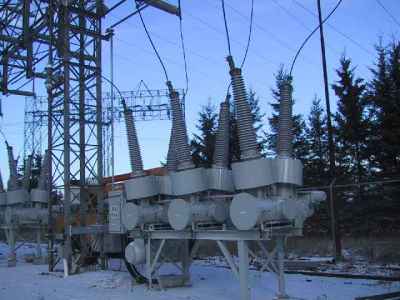
Sulfur hexafluoride is used heavily in high-voltage switchgear, as seen here in this hydroelectric installation. This circuit breaker is rated to run at 115 kV, 1200 A. Credit: Wtshymanski, public domain
Recently, sulfur hexafluoride has come under scrutiny. Also known by its chemical formula, SF6, it’s a highly potent greenhouse gas, with a warming potential of over 23,000 times that of CO2. Prized for its performance as a gaseous dielectric medium, it’s used heavily in high-voltage circuit breakers in modern electricity grids. It enables the construction of much more compact switchgear, while remaining safe and reliable in operation.
Concentrations of SF6 have begun to tick up in recent times, raising alarm bells. Speculation is that this is down to leaks of the gas from electrical equipment. As the world’s energy mix changes, grids have come to rely on more distributed generation, from sources like wind farms and solar. This mode of generation necessitates many more connections to the grid, which means more switchgear, and thus more SF6 out in the wild.
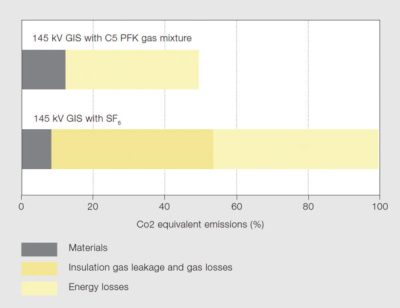
This graph shows the lifetime equivalent emissions of AirPlus versus SF6 technology. There are major gains to be had, thanks to the low global warming potential of AirPlus. Credit: 3M/ABB
Work is afoot to slow this trend before things get out of hand. A replacement has been developed in a collaboration between ABB and 3M, by the name of AirPlus. While the production process releases more CO2, over the lifecycle of an installation, AirPlus-based switchgear should have far lower impact on warming. This is due to the fact that when released into the atmosphere, AirPlus degrades under UV light exposure in just 15 days, versus 3200 years for SF6. Its global warming potential is less than 1, meaning it has less of a warming effect than even CO2, while delivering comparable dielectric performance to SF6. Variants are available for both medium and high voltage applications.
Over time, as goverments work to reduce the prevalance of SF6 in new installations, its likely that we’ll see AirPlus and other alternatives gain steam. The gas has already been banned in the EU for all non-electrical purposes, since 2014. Industry is typically slow to act unless there’s a strong business case, so government intervention is likely to be the game changer that pushes adoption of newer, cleaner technology in this space.
Other Fluorinated Gases
SF6 is just one of a series of fluorinated gases that have significant global warming potential. Many of these were introduced as replacements for chlorofluorocarbons (CFCs), which tend to eat a hole in the ozone layer. Thankfully, that problem was largely solved when production of CFCs was tailed off in 1996, but their replacements can still cause further troubles.
With lifetimes in the hundreds to thousands of years in the upper atmosphere, gases like hydrofluorocarbons and perfluorocarbons have an outsized effect on atmospheric warming, thousands of times that of CO2 on a per-molecule basis. They have applications as aerosol propellants, solvents, and fire retardants, but their primary use is as refrigerants in cooling systems. HFC-134a is the most well-known, used widely in air conditioning systems worldwide, and particularly in motor vehicles. This has led to its position as the most abundant HFC in the atmosphere.
Efforts are in place to limit the impact of these chemicals, through precautionary measures. This involves taking more care during the repair and disposal of HVAC systems, as well as designing systems to be more resilient of leaks in the first place. Recycling methods are also beneficial to ensure that where possible, these gases are captured rather then simply vented to the atmosphere. Enforcement on a broad scale remains a challenge.
Automakers are already planning to switch air conditioning systems to use gases that have less global warming potential. Source: Mercedes Benz
Sometimes, it’s better to avoid the problem entirely. A transition away from using refrigerants like HFC-134a is in progress. The EPA has legislated that all light vehicles manufactured or sold in the USA by model year 2021 must no longer use HFC-134a. Instead, alternatives like HFO-1234yf, HFC-152a, and R-744 will be legal. The first two are mildly flammable, while the latter is simply another name for good old CO2. These refrigerants will require different technology to existing air conditioners. CO2-based systems in particular needing to operate at up to 10 times the pressure of traditional systems. However, progress in technology should allow these gases to take over, reducing the impact these refrigeration gases have on global warming.
The Fight Continues
CO2 is still the primary greenhouse gas, but it’s not the whole story. We’ve looked at a wide variety of chemicals, each with their own important roles and impact on the Earth’s atmosphere. This highlights the fact that there’s no single panacea to heading off global warming; instead, a broad spectrum approach across all aspects of human endeavour is required.
Halting the impacts of these chemicals is difficult, and will require decisive action by both government bodies, as well as cooperation from relevant industries. In some cases, there are additional gains to be had, while in others, the solution comes with high costs and painful changes. We engineered ourselves into this situation, so we can probably engineer ourselves out. Regardless, if humanity is to flourish in the next century, there remains much work to be done.
To grind or not to grind? What a question! It all depends on what you’re really trying to show, and in the case of welded joints, I often want to prove the integrity of the weld.
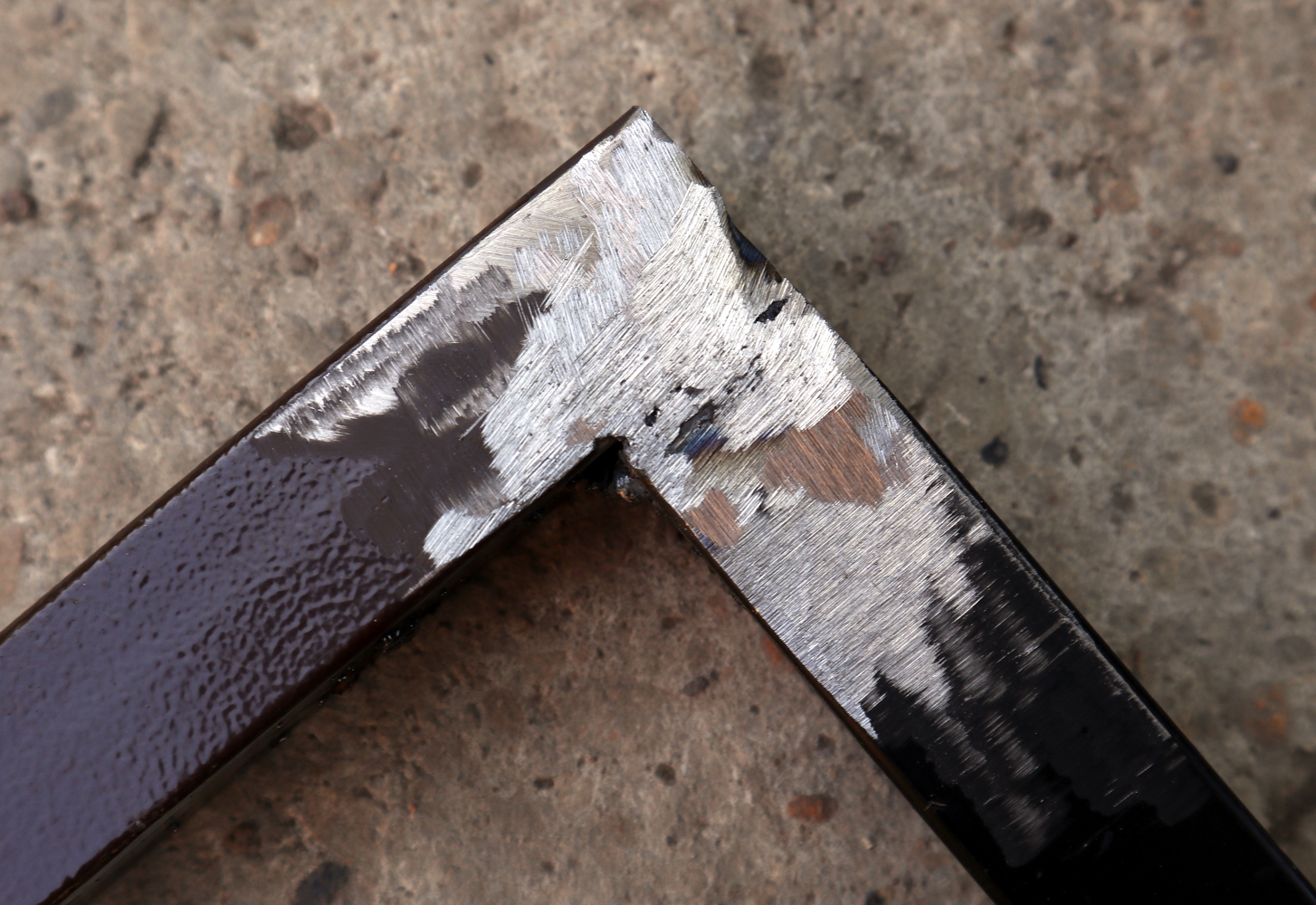
My ground-back piece of welded tube. Eagle-eyed readers will spot that the grinding reveals a weld that isn’t perfect.
Recently, I wrote a piece in which I talked about my cheap inverter welder and others like it. As part of it I did a lower-current weld on a piece of thin tube and before snapping a picture of the weld I ground it back flat. It turns out that some people prefer to see a picture of the weld bead instead — the neatness of the external appearance of the weld — to allow judgment on its quality. Oddly I believe the exact opposite, that the quality of my weld can only be judged by a closer look inside it, and it’s this point I’d like to explore.
In the early days of spaceflight, when only the governments of the United States and the Soviet Union had the ability to put an object into orbit, even the most fanciful of futurists would have had a hard time believing that commercial entities would one day be launching sixty satellites at a time. What once seemed like an infinite expanse above our heads is now starting to look quite a bit smaller, and it’s only going to get more crowded as time goes on. SpaceX is gearing up to launch nearly 12,000 individual satellites for their Starlink network by the mid-2020s, and that’s just one of the “mega constellations” currently in the works.
Just some of the objects in orbit around the Earth
It might seem like overcrowding of Earth orbit is a concern for the distant future, but one needs only look at recent events to see the first hints of trouble. On September 2nd, the European Space Agency announced that one of its research spacecraft had to perform an evasive maneuver due to a higher than acceptable risk of colliding with one of the first-generation Starlink satellites. Just two weeks later, Bigelow Aerospace were informed by the United States Air Force that there was a 1 in 20 chance that a defunct Russian Cosmos 1300 satellite would strike their Genesis II space station prototype.
A collision between two satellites in orbit is almost certain to be catastrophic, ending with both spacecraft either completely destroyed or severely damaged. But in the worst case, the relative velocity between the vehicles can be so great that the impact generates thousands of individual fragments. The resulting cloud of shrapnel can circle the Earth for years or even decades, threatening to tear apart any spacecraft unlucky enough to pass by.
Fortunately avoiding these collisions shouldn’t be difficult, assuming everyone can get on the same page before it’s too late. The recently formed Space Safety Coalition (SSC) is made up of more than twenty aerospace companies that realize the importance of taking proactive steps to ensure humanity retains the unfettered access to outer space by establishing some common “Rules of the Road” for future spacecraft.
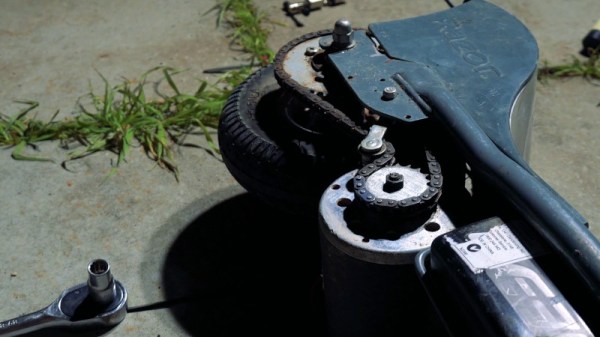
Sometimes, mechanical parts can be supremely expensive, or totally unavailable. In those cases, there’s just one option — make it yourself. It was this very situation in which I found myself. My electric scooter had been ever so slightly bested by a faster competitor, and I needed redemption. A gearing change would do the trick, but alas, the chain sprocket I needed simply did not exist from the usual online classifieds.
Thus, I grabbed the only tools I had, busied myself with my task. This is a build that should be replicable by anyone comfortable using a printer, power drill, and rotary tool. Let’s get to work!
Openness has been one of the defining characteristics of the Internet for as long as it has existed, with much of the traffic today still passed without any form of encryption. Most requests for HTML pages and associated content are in plain text, and the responses are returned in the same way, even though HTTPS has been around since 1994.
But sometimes there’s a need for security and/or privacy. While the encryption of internet traffic has become more widespread for online banking, shopping, the privacy-preserving aspect of many internet protocols hasn’t kept pace. In particular, when you look up a website’s IP address by hostname, the DNS request is almost always transmitted in plain text, allowing all the computers and ISPs along the way to determine what website you were browsing, even if you use HTTPS once the connection is made.
The idea of also encrypting DNS requests isn’t exactly new, with the first attempts starting in the early 2000s, in the form of DNSCrypt, DNS over TLS (DoT), and others. Mozilla, Google, and a few other large internet companies are pushing a new method to encrypt DNS requests: DNS over HTTPS (DoH).
DoH not only encrypts the DNS request, but it also serves it to a “normal” web server rather than a DNS server, making the DNS request traffic essentially indistinguishable from normal HTTPS. This is a double-edged sword. While it protects the DNS request itself, just as DNSCrypt or DoT do, it also makes it impossible for the folks in charge of security at large firms to monitor DNS spoofing and it moves the responsibility for a critical networking function from the operating system into an application. It also doesn’t do anything to hide the IP address of the website that you just looked up — you still go to visit it, after all.
And in comparison to DoT, DoH centralizes information about your browsing in a few companies: at the moment Cloudflare, who says they will throw your data away within 24 hours, and Google, who seems intent on retaining and monetizing every detail about everything you’ve ever thought about doing.
Questionable Casablanca references aside, Amnesty International has reported another attack against human rights workers. In this case, a pair of Moroccan activists were targeted with what appears to be NSO’s Pegasus malware suite. Researchers identified text message phishing that led to malicious web pages, as well as HTTP man in the middle attacks against their mobile devices. Once the target was successfully directed to the malicious site, A collection of zero-day vulnerabilities were used to compromise the phone with the NSO malware.
NSO is an Israeli company that specializes in building malware and other cybersecurity tools for governments. As you can imagine, this specialization has earned NSO the scorn of quite a few organizations. NSO claims to have a policy framework in place that allows them to evaluate and terminate the use of their software when it is deemed illegal or abusive, but due to the nature of their contracts, that process is anything but transparent. Continue reading “This Week In Security: A Digital Café Américain, The Linux Bugs That Weren’t, The Great Nation, And More”→