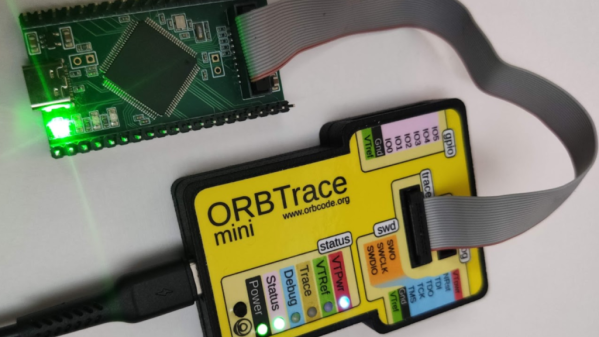
The Orbtrace debugger hardware connected to a development board t hrough a 20-pin ribbon cable. The development board has a green LED shining.

ORBTrace Effort: Open Tool For Professional Debugging

There are some fairly powerful debugging facilities available on today’s microcontrollers — if your code crashes mysteriously, chances are, there’s a debugging interface that could let you track down the exact crash circumstances in no time. Sadly, debugging tools for these powerful interfaces tend to be prohibitively expensive and highly proprietary, thus, not friendly for hobbyists. Now, there’s a community-driven high-capability debugging platform called ORBTrace, brought to us by [mubes] and [zyp].

With parallel trace, you get a constant stream of consciousness, every exact instruction executed by your CPU. [mubes] and [zyp] set out to tap into the power of parallel trace debugging for Cortex-M processors. and the ORBTrace project was born. Relying on the Orbuculum project’s software capabilities, this FPGA-based debugger platform can do parallel trace and the more popular high-speed SWO trace – and way more. ORBTrace has the potential to grow into a powerful debug helper tool, with enough capabilities for anyone to benefit. And of course, it’s fully open-source.
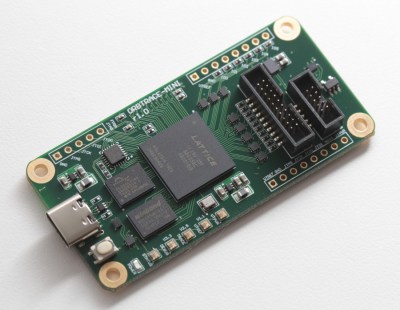
The ORBTrace board, with a FPGA in the center of it, a USB-C connector on the left, and two IDC debug connectors on the right (one ten-pin and one twenty-pin)The ORBTrace platform has plenty of untapped potential. There’s the battle-tested JTAG and SWD that you can already use with all the open tools you could expect. However, there’s also plenty of available resources on the FPGA, including even a currently unutilized RISC-V softcore. If you wanted to add support for any other family of devices to this debugger, sky’s the limit! And, of course, there’s cool software to go with it – for example, orbmortem, which keeps a ring buffer of instructions in memory and shows you the last code executed before your CPU stops, or orbstat, a tool for profiling your embedded code.

If you’re looking to purchase effortless feature parity with Segger or Lauterbach devices, the ORBTrace doesn’t promise that. Instead, it’s an open debugging toolkit project, with hardware available for purchase, and software just waiting for you take control of it. This project’s community hangs out in the 1BitSquared discord’s #orbuculum channel, and gateware’s advancing at a rapid pace – welcoming you to join in on the fun.

ORBTrace is a powerful tool for when your goals become large and your problems become complex. And, being a community-driven experimental effort, we’ll undoubtedly see great things come out of it – like the Mooltipass project, originally developed by Hackaday community members, and still going strong.
Looking At Fortran In 100 Seconds

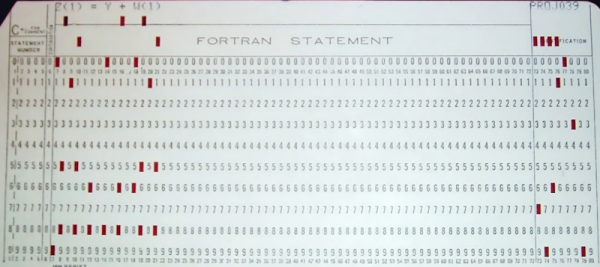
Usually, when we are talking about old computers, we are thinking of BASIC interpreters. But [Fireship] reminds us that it was originally Fortran and promises to give you the essentials in 100 seconds. We didn’t think you could do much in that short amount of time, but we have to admit that they did a pretty good job.

Of course, it doesn’t hurt that we know Fortran — you probably aren’t going to be able to put it on your resume after watching this video. On the other hand, we were impressed with how much they did squeeze in. If you haven’t touched Fortran since the 1960s and 1970s, you should know that it has changed. Pointers, dynamic memory allocation, and even objects are all possible. It is still a very capable language and very adept at crunching large sets of numbers. Besides, there are many sophisticated algorithms you can borrow from decades of Fortran development.

If you decide you want to have a go, there is, of course, GNU Fortran. Honestly, as much time as we spent writing Fortran in years past, we don’t recommend it for new job prospects. But if you have some period hardware and want an authentic experience, it might just be the way to go. Or, just fire up a browser if you want to play.

Not everyone agrees, though, that Fortran is on the wane. There are efforts to bring it even more up to date. You can even use it for web development.

Continue reading “Looking At Fortran In 100 Seconds”

Automate Internet Life With Python

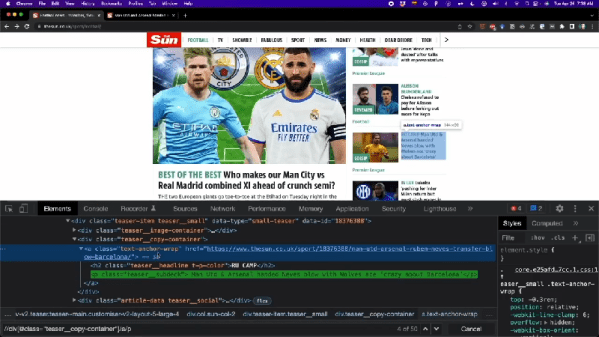
Most of us are adept enough with computers that you know what they can easily do and what they can’t. Invent a new flavor of ice cream? Not easy. Grab the news headlines related to Arduinos from your favorite news feed? Relatively easy. But, of course, the devil is in the details. FreeCodeCamp has a 3-hour course from [Frank Andrade] that dives into the gory details of automating web tasks using Python and a variety of libraries like Path, Xpath, and Selenium. You can watch the course, below.

Topics start off with grabbing tables from websites and PDFs. But it quickly graduates to general-purpose web scraping and even web automation. These techniques can be very useful for testing browser-based applications, too.

By the end, you’ve created an executable that grabs news every day and automatically generates an Excel report. There’s also a little wind down about WhatApp automation. A little something for everyone. We also greatly approved of [Frank]’s workspace which appears in the background. Looks like he would enjoy reading Hackaday.

Honestly, while we’ve seen easier methods of automating the browser, there’s something appealing about having the control something like Python affords. Sure beats building hardware to simulate a human-in-the-loop.

Continue reading “Automate Internet Life With Python”

Why You Should Totally Roll Your Own AES Cryptography

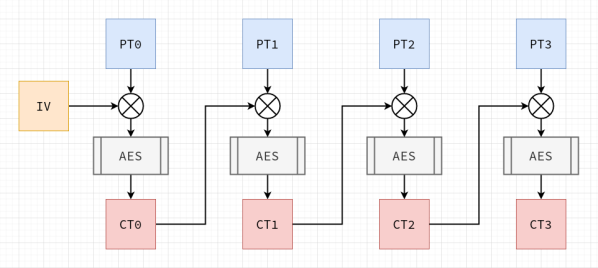
Software developers are usually told to ‘never write your own cryptography’, and there definitely are sufficient examples to be found in the past decades of cases where DIY crypto routines caused real damage. This is also the introduction to [Francis Stokes]’s article on rolling your own crypto system. Even if you understand the mathematics behind a cryptographic system like AES (symmetric encryption), assumptions made by your code, along with side-channel and many other types of attacks, can nullify your efforts.

So then why write an article on doing exactly what you’re told not to do? This is contained in the often forgotten addendum to ‘don’t roll your own crypto’, which is ‘for anything important’. [Francis]’s tutorial on how to implement AES is incredibly informative as an introduction to symmetric key cryptography for software developers, and demonstrates a number of obvious weaknesses users of an AES library may not be aware of.

This then shows the reason why any developer who uses cryptography in some fashion for anything should absolutely roll their own crypto: to take a peek inside what is usually a library’s black box, and to better understand how the mathematical principles behind AES are translated into a real-world system. Additionally it may be very instructive if your goal is to become a security researcher whose day job is to find the flaws in these systems.

Essentially: definitely do try this at home, just keep your DIY crypto away from production servers :)

A New Javascript Runtime Fresh Out Of The Oven

A sizable portion of the Hackaday audience groans and runs their eyes when some new-fangled Javascript thing comes out. So what makes Bun different? Bun is a runtime (like Node or Deno)t that offers a performant all-in-one approach. Much to the Spice Girl’s delight, it is written in Zig. It offers bundling, transpiling, module resolution, and a fantastic foreign-function interface.

Node.js and Deno run on the V8 Javascript engine and provide the Node-API to access different features, such as filesystems, that don’t apply to web browsers. However, vast amounts of tooling have built up around Node.js and NPM (node package manager). Many Javascript projects have a bundling and transpiling step that takes the source and packages it together in a more standard format. Typescript needs to be packaged into javascript, and modules need to be resolved. Continue reading “A New Javascript Runtime Fresh Out Of The Oven”

Need A Linux Kernel Module? Scratch That

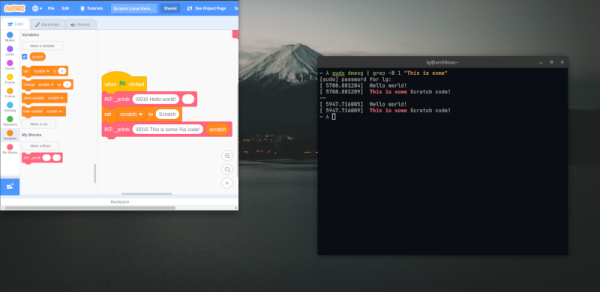
If you have been for (or against) Rust in the Linux kernel, get ready for a Linux kernel module written in… Scratch. That’s right. Scratch, the MIT-developed language with blocks popular for teaching kids to code. We didn’t mean “from scratch.” We meant IN Scratch. The bootstrap code and Makefile is out there on GitHub.

Of course, it is a simple module and the reason it is possible is because of the scratchnative system that lets you compile Scratch into C code. If you want to look at the decidedly simple code, you can open it in your browser.

Continue reading “Need A Linux Kernel Module? Scratch That”

Full Printing Path Control Without Writing GCode

User-friendly slicing software is arguably the key software component that makes 3D printing approachable for most users. Without it going from a CAD design to a printing part would take hours, not seconds. As a trade-off you give up a lot of control over the exact path of the hotend, but most of the time it’s worth it. However, for some niche use-cases, having complete control over the tool path is necessary. Enter FullControl GCode Designer, a tool that gives you all the control without resorting to writing GCode directly.

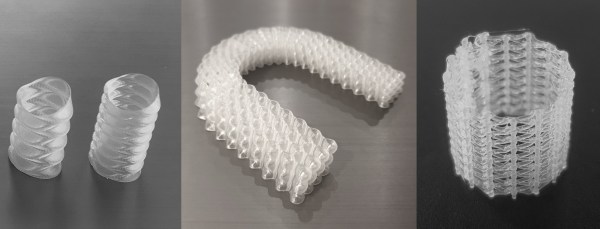
FullControl takes an approach similar to OpenSCAD, where you define path geometries line by line. Need an array of circles? Choose the circle feature, define its origin, radius, starting position, and extrusion height, and define the spacing and axes (including Z) of the copies. Need a mathematically defined lamp shade? Define the functions, and FullControl generates the GCode. Non-planar printing, where your print head moves along all three axes simultaneously instead of staying at a constant Z-height is also possible. In the video after the break, [Thomas Sanladerer] demonstrates how he used FullControl to reduce the print time of a functionally identical part from two hours to 30 minutes.

FullControl is built on Microsoft Excel using Visual Basic scripting, which comes at the cost of long GCode generation times. It also doesn’t show the defined tool paths graphically, so the generated code needs to be pasted into a viewer like Repetier Host to see what it’s doing. Fortunately, a Python version is coming to should hopefully elevate many of these shortcomings.

We also featured some other GCode hacks in the last few months that bend existing GCode along a spline path, and a Blender plugin allows the surface textures of sliced objects to be modified.

Continue reading “Full Printing Path Control Without Writing GCode”