Generating Instead Of Storing Meshes

The 64kB is a category in the demoscene where the total executable size must be less than 65,536 bytes, and at that size, storing vertexes, edges, and normal maps is a waste of space. [Ctrl-Alt-Test] is a French Demoscene group that has been doing incredible animations for the last 13 years. They’ve written an excellent guide on how they’ve been procedurally generating the meshes in their demos.

It all starts with cubes. By stacking them, overlaying them, reusing them, and tiling them you can get better compression than raw vertexes. Revolution was the next trick, as it uses just a few points, plotting it via Catmul-Rom splines, and revolving around an axis. The numbers are pairs of 32-bit floats and before compression, a detailed pawn on a chess board can weigh in at just 40 bytes. Just these few techniques can take you surprisingly far (as seen in the picture above).

They later worked on deforming cubes and placing them into a semi-randomized column, which happened to look a lot like plants. This isn’t the first generated vegetation we’ve seen, and the demoscene technique focused more on getting the shape and setting the mood rather than being accurate.

Signed distance fields are another useful trick that allows you to generate a mesh by implementing a signed distance function and then running a marching cubes algorithm on it. In a nutshell, a signed distance function just returns the distance to the closest point on a surface from a given point. This means you can describe shapes with just a single mathematical equation. As you can imagine, this is a popular technique in the demoscene world because it is so space efficient in terms of code and data. [Ctrl-Alt-Test] even has a deep dive into one of their projects, Immersion, with a breakdown of where the space is allocated.

There are plenty of other tips and tricks here, such as generating textures and developing a C++ hot reload system for faster iteration. It’s just incredible that the executable that plays the whole video is smaller than just a JPEG screenshot of the video. It’s a reminder that the demoscene is still fascinating with new tricks and experiences even as the hardware stays the same. Continue reading “Generating Instead Of Storing Meshes” →

Debugging And Analyzing Real-Mode 16-Bit X86 Code With Fresh Bread

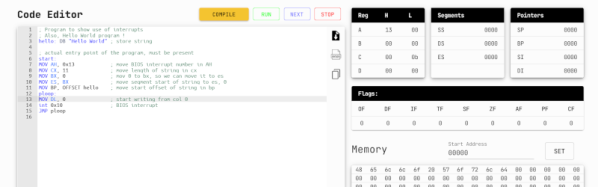
Running a debugger like gdb with real-mode 16-bit code on the x86 platform is not the easiest thing to do, but incredibly useful when it comes to analyzing BIOS firmware and DOS software. Although it’s possible to analyze a BIOS image after running it through a disassembler, there is a lot that can only be done when the software is running on the real hardware. This is where [Davidson Francis] decided that some BREAD would be useful, as in BIOS Reverse Engineering & Advanced Debugging.

What BREAD does is provide some injectable code that with e.g. a BIOS replaces the normal boot logo with the debugger stub. This stub communicates with a bridge via the serial port, with the gdb client connecting to this bridge. Since DOS programs are also often 16-bit real-mode, these can be similarly modified to provide light-weight in-situ debugging and analysis. We imagine that this software can be very useful both for software archaeology and embedded purposes.

Thanks to [Rodrigo Laneth] for the tip.

A ChatGPT client running on an IBM Portable PC

MS-DOS Client Brings ChatGPT To The IBM PC

AI-powered chatbots are clearly the future of computing, and it’s only a matter of time before you’ll see them appear on every internet-connected gadget. If you thought you were safe from this by sticking to an ancient MS-DOS PC though, think again: [Yeo Kheng Meng] has recently written a ChatGPT client that runs on DOS.

[Yeo Kheng Meng] didn’t cheat by simply running MS-DOS on a modern PC, either: he tested the client on a real 1984 vintage IBM 5155 Portable PC. This semi-portable PC/XT model sports a 4.77 MHz 8088 CPU, 640 kB of RAM and a CGA video card with a built-in monochrome monitor. An NE2000 ISA network card, running in 8-bit mode, enables the Portable to connect to the internet.

Running the client couldn’t be simpler: just run doschgpt.exe and type in your question. [Yeo Kheng Meng] developed this program using the Open Watcom C/C++ compiler, which was the compiler of choice for most DOS game developers back in the day. Networking support was provided by an era-appropriate packet driver together with MTCP, a TCP/IP stack developed by [Michael Brutman] for DOS-based internet applications.

Connecting to the ChatGPT API and parsing the results was pretty straightforward, but implementing the required TLS encryption was not. Even if there was a library available for MS-DOS, the 5155 wouldn’t have enough CPU power to run it in real time, so [Yeo Kheng Meng] decided to run that bit of the networking stack on a modern PC and send an unencrypted HTTP stream to the DOS client.

The end result is a delightful retro-futuristic setup that seems to have come straight out of a 1980s science fiction movie. We can already picture it together with a Commodore 64 reporting the news and an IRC server running on an IBM PC. Continue reading “MS-DOS Client Brings ChatGPT To The IBM PC” →

The 4004 Upgrade You’ve Been Waiting For

You know how it is. You have an older computer, and you can’t run the latest software on it. Time to upgrade, right? Well, if you have been in this situation a very long time, [ryomuk] may have an answer for you. The emu8080on4004 project (Google Translate) offers a way to run 8080 code on a 4004 CPU. Finally!

The 4004 development board is a homebrew affair, and the emulator works well enough that an 8080 Tiny BASIC interpreter ran with very few changes to the source code. You can see it working in the video below. It would be cool to run CP/M, but we imagine that would be a little harder, especially resource-wise.

A few things are missing. For example, the DAA instruction doesn’t exist, and there are no provisions for interrupts. There’s only one I/O port, and using the IN instruction will block until you receive a serial port character. There is an option to implement the parity flag in the 8080 flags register, but its operation is untested.

Still, pretty impressive for a 4-bit CPU running at 740 kHz with very little memory. If you want to see more about the development board itself, check out the second video below. Want to know more about the chip that launched a family of processors that is still around? Read its biography. You can also read about the designer who put his signature on the die.

Continue reading “The 4004 Upgrade You’ve Been Waiting For” →

IBIS Models Explained

If you’ve worked with circuit simulation, you may have run into IBIS models. The acronym is input/output buffer information, and while you can do a lot without having to deal with IBIS, knowing about it can help you have a successful simulation.

IBIS is an industry-standard format that uses ASCII text to describe voltage versus current and voltage versus time about some device’s digital input and output pins. This allows precise simulation without revealing the device’s internals, which is important to some vendors. The first post of this two-part series talks about what IBIS is and how it got started. The second part explains creating and using LTSpice to create your own IBIS models. It also covers why you might want to do that.

Of course, if you don’t care about revealing the internals of a device, you could just create a Spice simulation. However, many tools will accept both models, so it is useful to know how to produce either kind of model. In fact, to create an IBIS model, you’ll want to use a Spice model to generate the data for the IBIS model, so it is a good bet you’ll have both, even if you choose to only publish the IBIS models.

If you need a refresher on Spice, we have a series. If you prefer using something different, try Micro-Cap 12, which was commercial, but went free a few years ago.

SheepShaver: A Cross-Platform Tool For Retro Enthusiasts

The world of desktop computing has coalesced into what is essentially a duopoly, with Windows machines making up the bulk of the market share and Apple carving out a dedicated minority. This relatively stable state hasn’t always existed, though, as the computing scene even as late as the 90s was awash with all kinds of competing operating systems and various incompatible hardware. Amiga, Unix, OS/2, MacOS, NeXT, BeOS, as well as competing DOSes, were all on the table at various points.

If you’ve still got a box running one of these retro systems, SheepShaver might be able to help expand your software library. It’s not the sort of virtualization that we’re used to in the modern world, with an entire operating system running on a sanctioned-off part of your system. But SheepShaver does allow you to run software written for MacOS 7.5.2 thru 9.0.4 in a different environment. Unix and Linux are both supported, as well as Mac OS X, Windows NT, 2000, and XP, and the enigmatic BeOS. Certain configurations allow applications to run natively without any emulation at all, and there is plenty of hardware support built-in as well.

For anyone running retro hardware from the late 90s or early 00s, this could be just the ticket to get an application running that wasn’t ever supported on one of these machines. As for the name, it’s a play on another piece of software called ShapeShifter which brought a Mac-II emulator to the Amiga. SheepShaver has been around since the late 90s, too, so we’re surprised that we haven’t featured it before since it is such a powerful tool for cross-platform compatibility for computers of this era. Even if all you are hanging on to is an old BeBox.

The X Macro: A Historic Preprocessor Hack

If we told you that a C preprocessor hack dated back to 1968, you’d be within your rights to remind us that C didn’t exist in 1968. However, assemblers with preprocessors did, and where there is a preprocessor, there is an opportunity to do clever things. One of those things is the so-called X macro, which saw a lot of use in DEC System 10 code but probably dates back even earlier. You can still use it today if you like, even though there are, of course, other arguably better ways to get the same result. However, the X macro can be very efficient, and you may well run into it in some code, too.

Background

Preprocessing used to be a staple of programming. The idea is that code is manipulated purely at the text level before it is compiled. These days, languages with a preprocessor usually handle it as part of the compiler, but you can also use an external preprocessor like m4 for more sophisticated uses.

Modern languages tend to provide other ways to accomplish many of the tasks handled by the preprocessor. For example, if you have a constant you want to set at compile time, you could say:

int X = 32;
y = X;

But then you’ve created a real variable along with the overhead that might entail. A smart compiler might optimize it away for you, but you can be sure by writing:

#define X 32
y = X;

A modern compiler would prefer you to write:

const int X=32;
y = X;

But there are still some common uses for macros, like including header files. You can also make more sophisticated macros with arguments so you don’t incur a function call penalty, although modern usage would be to mark those functions as inline.

The Problem

Which brings us to the X macro. With all great hacks, there is first a problem to solve. Imagine you have a bunch of electronic parts you want to deal with in your code. You don’t want a database, and you don’t want to carry a bunch of strings around, so you define an enumerated type:

Continue reading “The X Macro: A Historic Preprocessor Hack” →