Fitting Snake Into A QR Code

QR codes are usually associated with ASCII text like URLs or serial numbers, but did you know you can also encode binary data into them? To demonstrate this concept, [MattKC] embarked on a journey to create a QR code that holds an executable version of Snake. Video after the break.

As you might expect, the version 40 QR code he ended up using is much larger than the ones you normally see. Consisting of a 171 by 171 grid, it’s the largest version that can still be read by most software. This gave [MattKC] a whopping 2,953 bytes to work with. Not a lot of space, but still bigger than some classic video games of the past.

To start, he first wrote Snake to run in a web browser using HTML, CSS, and JavaScript, which was able to fit in the available space. Modern browsers do a lot of the lifting with built-in features, and [MattKC] wanted more of a challenge, so he decided to instead create a Windows executable file. His first attempts with compiled C code were too large, which led down the rabbit trail of x86 Assembly. Here he found that his knowledge of Assembly was too limited to create a small enough program without investing months into the project. He went back to C and managed to compress his executable using Crinkler, a compressing linker commonly used in the demoscene. This shrunk the file down to 1,478 bytes.

Zbar, a command-line barcode reader for Windows was used to test the final Snake QR code. [MattKC] discovered a bug in Zbarcam that prevented it from reading binary data via a webcam input, so through the power of open source, he submitted a bug fix which is now integrated into the official release.

All the files are available for anyone to play with on [MattKC]’s website. The video below goes into a lot of detail on the entire journey. Since this project proves software can be embedded in QR codes, it means that malware could also be hidden in a QR code, if there is an exploitable bug somewhere in a smartphone QR reader app.

QR codes are an interesting tool with a variety of uses. Take a deep dive into how they work, generate a 3D printable version, or build a QR jukebox, if you want to learn more.

Continue reading “Fitting Snake Into A QR Code”

3D On The ZX Spectrum 48K

There are times when a project becomes such a big part of a maker’s life that they find themselves revisiting it even years later. [Thanassis] combined this phenomena with his love for the ZX Spectrum when he ported one of his old 3D rendering projects to the ZX Spectrum 48K. The video below shows the result, and they speak for themselves.

The roots of this project go back around three years, when [Thanassis] posted a similar project for the ATMega328 which employed fixed point math tricks for achieving the graphics. The code needed to be even tighter to run on the Spectrum, eventually getting boiled down to just a handful of calculations. This got the proof of concept working with the z88dk compiler, but it wasn’t quite fast enough.

In the end, hand assembly optimizations nearly doubled the performance to a blistering 10 frames per second. There’s also a version that kicks it all the way up to 40 FPS, but only if you give it a few minutes to do the calculations ahead of time. With a few teaks and the right display, this project could produce some very cool retro visuals.

Continue reading “3D On The ZX Spectrum 48K”

GridSound – An Audio Workstation In Your Browser

If you’re into creating music, you’ll have a surprisingly large variety of open source options at your disposal, ranging from Audacity as rather simple audio editor to Ardour as a full-blown, studio-worthy DAW — and LMMS, Rosegarden, MusE etc. for anything in between. With [Thomas Tortorini]’s GridSound project, you’ll have one additional choice on your list now, except this one runs in your browser. So if you find yourself in a sudden moment of inspiration, all you’ll need is a browser and off you go.

From the feature set’s point of view, GridSound leans towards LMMS and offers a drum kit, piano roll, and synthesizer. It appears that you won’t be able to record real world instruments at this point, but it’s also a work in progress, so who knows what the future will bring. The code is available on GitHub and you can explore GridSound itself here — no login required, unless you want to save your work. Running in a browser, GridSound is naturally written in JavaScript and uses the Web Audio API to perform the actual audio tasks.

What’s impressive is that [Thomas] opted against any UI framework-of-the-week, but instead implemented everything from scratch in pure vanilla JavaScript. In fact, the entire code base seems to be self-contained without any third party dependencies, and that alone deserves some respect. Sure, JavaScript isn’t everybody’s cup of tea — “real developers use assembly” — so if you prefer something more physical, how about some cardboard music?

Transform Kicad Design To Patchwork For Isolation Routing

Tuning a desktop router and your board designs for isolation routing can be a bit tricky, with thin traces usually being the first victim. For simple prototype boards you usually don’t need tightly packed traces, you just want to isolate the nets. To do this with a minimum amount of routing, [Michael Schembri] created kicad-laser-min, a command-line utility that takes a Kicad PCB design and expands all the tracks and pads to their maximum possible width.

Laser scribed PCB with maximum track widths

The software takes one layer of the PCB layout, converts it to black and white, and then runs a C++ Voronoi algorithm on it to dilate each track and pad until it meets another expanding region. Each region is colourised, and OpenCV edge detection is used to produce the contours that need to be milled or etched. A contour following algorithm is then used to create the G-code. The header image shows the output of each step.

Full source code is available on GitHub. [Michael] has had good results with his own boards, which are scribed using a laser cutter before etching, but welcomes testing and feedback from other users. He has found that OpenCV doesn’t always completely close all the contours, but the gaps are usually smaller than the engraving width of his laser, so no shorts are created.

This is basically “Scribble style” prototyping with CAD and CNC tools. If you prefer scribe and etch, you might consider building a simple PCB shaker for faster etching. If you have a router but want to avoid the dust, you can use a carbide scribe to scratch out the tracks without needing to etch.

Polymorphic String Encryption Gives Code Hackers Bad Conniptions

When it comes to cyber security, there’s nothing worse than storing important secret data in plaintext. With even the greenest malicious actors more than capable of loading up a hex editor or decompiler, code can quickly be compromised when proper precautions aren’t taken in the earliest stages of development. To help avoid this, encryption can be used to hide sensitive data from prying eyes. While a simple xor used to be a quick and dirty way to do this, for something really sophisticated, polymorphic encryption is a much better way to go.

A helpful tool to achieve this is StringEncrypt by [PELock]. An extension for Visual Studio Code, it’s capable of encrypting strings and data files in over 10 languages. Using polymorphic encryption techniques, the algorithm used is unique every time, along with the encryption keys themselves. This makes it far more difficult for those reverse engineering a program to decrypt important strings or data.

While the free demo is limited in scope, the price for the full version is quite reasonable, and we expect many out there could find it a useful addition to their development toolkit. We’ve discussed similar techniques before, often used to make harder-to-detect malware.

[Thanks to Dawid for the tip!]

Custom Weather Camera Feed With Software Tricks

With a gorgeous view of the Italian seaside, we’re not surprised [Danilo Larizza] had a couple IP cameras set up to pull in real-time views. But using a Raspberry Pi, an environmental sensor, and some software trickery to overlay the current (and naturally, perfect) weather conditions over the images? Now he’s just teasing us.

Whatever his motives are, we have to admit that the end result is very nice. Especially when you find out that there’s no complex hardware or software at work here. An original Raspberry Pi is doing all the heavy lifting by pulling a frame from the external IP camera using ffmpeg, polling the I2C-connected BME280 temperature and humidity sensor with a Python script, and then producing a final snapshot with the environmental data laid over top using ImageMagick.

[Danilo] gives the exact commands he’s using for each step of the process, making it easy to follow along and see how everything comes together in the end. That also makes it much easier to adapt for your own purposes should you feel so inclined. Once you see how all the pieces fit together, where the data and images come from is up to you.

We’ve previously shown how some simple Python code can be used to turn your raw data into attractive images, and combining that with real-world photographs is an excellent way of turning a text file full of values into a display worth showing off.

Smooth(er) Text Scrolling On HD44780 LCDs

Most Hackaday readers are likely to be familiar with character LCDs driven by the extremely common Hitachi HD44780 controller chip. If you’re looking for a cheap and easy way for your microcontroller project to display some data, they’re pretty much the go-to solution. But as popular as these displays are, there’s no denying that they’re starting to look a bit dated in 2020. Which is why the tweaks [Joseph Rautenbach] is working on are so interesting.

With one of these displays, the controller puts a single character on each 5×8 block of pixels. There’s also support for creating custom characters, which can be used for rudimentary icons. You’re pretty limited by the per-block resolution, but with a little imagination, you can usually get the point across. With a bit of dead space between each block of the display there’s little point in trying to make icons that “bridge” multiple blocks, as they’ll always be segmented.

Hardware support is not guaranteed.

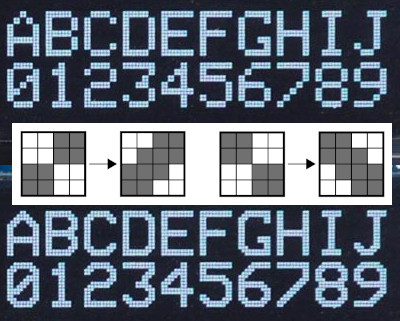
But as [Joseph] realized, that’s less of a problem for scrolling text. So he wrote some code that takes an ASCII string and breaks it down into partial letters and numbers which can be displayed as custom characters. The controller only has space for 8 of these characters though, so the code needs to continually step through the string and generate the appropriate offset characters as the position of the text changes.

While the effect looks pretty good in the video after the break, [Joseph] has found that real-world utilization is a bit finicky. He tried the same code on one of the displays that uses white text on a blue background, and the scrolling text ended up ghosting together so it looked like gibberish. So while he’s released the source code for others to experiment with this trick, your mileage may vary.

This certainly isn’t the first time we’ve seen somebody make clever use of custom characters on the HD44780. We’ve seen it used for an exceptionally tiny game of Tetris, a rendition of Conway’s Game of Life, and even a horizontal space-shooter.

Continue reading “Smooth(er) Text Scrolling On HD44780 LCDs”